1. Inleiding
This manual provides detailed instructions for the operation and maintenance of your Jectse Bluetooth Speaker Alarm Clock. Please read this manual thoroughly before using the product to ensure proper function and longevity.
The Jectse Bluetooth Speaker Alarm Clock is a multi-functional device featuring a digital clock, dual alarm capabilities, an LED mirror display, FM radio, and Bluetooth connectivity for audio playback. It also supports music playback via a memory card.
2. Product voorbijview
2.1. Belangrijkste kenmerken
- Bluetooth 5.0-connectiviteit: Stream draadloos audio vanaf compatibele apparaten.
- Dubbele wekker: Stel twee onafhankelijke alarmen in voor verschillende wektijden.
- LED Mirror Display: Clear digital time display that also functions as a mirror.
- FM-Radio: Digitally tuned FM radio (87.5MHz-108MHz) for news, music, and weather.
- Geheugenkaart afspelen: Supports music playback from a memory card (up to 32GB, not included).
- Ingebouwde oplaadbare batterij: 1600mAh lithium battery for portable use.
- Compact ontwerp: Product dimensions are approximately 116 x 51 x 33mm (4.6 x 2 x 1.3 inches).
2.2. Inhoud van het pakket
- 1 x Jectse Alarm Clock Speaker
- 1 x Micro USB-oplaadkabel
- 1 x Gebruikershandleiding (dit document)
2.3. Productdiagram
Raadpleeg de onderstaande afbeelding voor een overzicht.view of the device's components and controls.
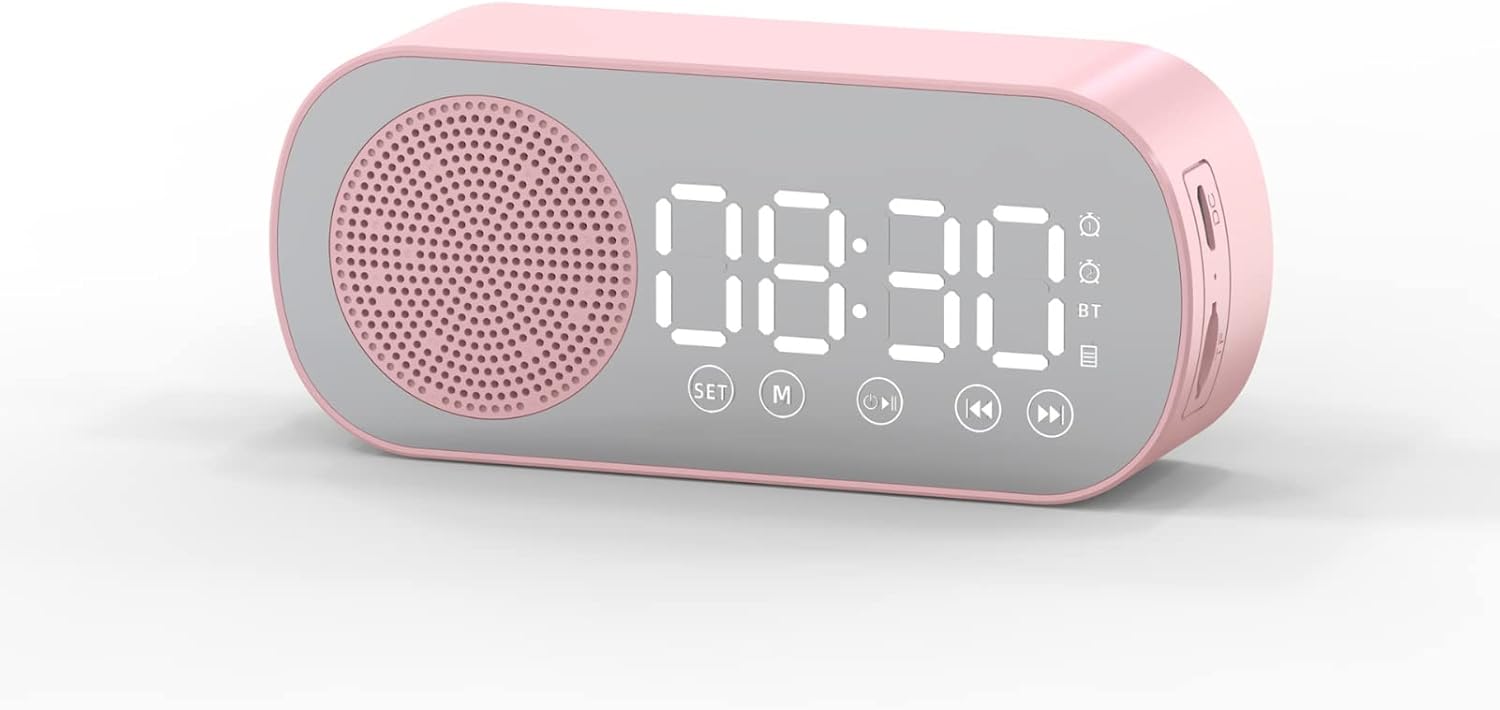
Figuur 1: Voorkant view of the Jectse Bluetooth Speaker Alarm Clock, showing the speaker grille, LED display, and control buttons (SET, M, Play/Pause, Previous, Next).

Figuur 2: Kant view of the alarm clock with dimensions: 116mm (4.6in) length, 51mm (2in) height, and 33mm (1.3in) depth.
3. Instellen
3.1. Eerste keer opladen
Before first use, fully charge the device. Connect the provided Micro USB charging cable to the charging port on the side of the alarm clock and the other end to a standard USB power adapter (not included).

Figuur 3: The alarm clock and its Micro USB charging cable.
The battery indicator on the LED display will show charging status. A full charge typically takes a few hours.
4. Gebruiksaanwijzing
4.1. Aan/uit
Houd de Power/Mode (M) knop om het apparaat in of uit te schakelen.
4.2. De tijd instellen
- Houd in de klokmodus de . ingedrukt SET Druk op de knop totdat de uurcijfers beginnen te knipperen.
- Gebruik de Vorige (◀◀) En Next (▶▶) knoppen om het uur aan te passen.
- Druk op de SET Druk nogmaals op de knop om over te schakelen naar de minuteninstelling. Gebruik de Vorige (◀◀) En Next (▶▶) knoppen om de minuten aan te passen.
- Druk op de SET button a third time to confirm and exit time setting mode.
4.3. Setting Alarms (Dual Alarm Function)
The device supports two independent alarms. Follow these steps for each alarm:

Figuur 4: The alarm clock illustrating the dual alarm feature with two distinct alarm settings.
- In clock mode, short press the SET button once to enter Alarm 1 setting mode. The alarm icon and hour digits will flash.
- Gebruik de Vorige (◀◀) En Next (▶▶) knoppen om het uur aan te passen.
- Pers SET again to adjust minutes. Use Vorige (◀◀) En Next (▶▶) aanpassen.
- Pers SET a third time to select the alarm sound (e.g., buzzer, FM radio). Use Vorige (◀◀) En Next (▶▶) om door de opties te bladeren.
- Pers SET a fourth time to confirm Alarm 1 settings.
- To set Alarm 2, repeat steps 1-5, but short press the SET button twice to enter Alarm 2 setting mode.
- To enable/disable an alarm, short press the SET button until the desired alarm icon flashes, then press the Play/Pause (▶▌▌) knop om deze in of uit te schakelen.
Note: The alarm volume is independent of the main speaker volume and may be fixed or adjustable within the alarm settings. If the alarm sound is too loud, check if there's an option to adjust it during the alarm setup process.
4.4. Bluetooth-modus
- Druk op de Power/Mode (M) button repeatedly until "BT" appears on the display, indicating Bluetooth mode.
- On your mobile device, enable Bluetooth and search for "Jectse Speaker" or a similar device name.
- Selecteer het apparaat dat u wilt koppelen. Een bevestigingsgeluid geeft aan dat het koppelen is gelukt.
- Je kunt nu audio vanaf je apparaat via de luidspreker afspelen. Gebruik de Play/Pause (▶▌▌), Vorige (◀◀), En Next (▶▶) knoppen om het afspelen te regelen.
4.5. FM-radiomodus

Figuur 5: The alarm clock functioning as an FM radio on a bedside table.
- Druk op de Power/Mode (M) Druk herhaaldelijk op de knop totdat "FM" op het display verschijnt.
- Druk op de Play/Pause (▶▌▌) knop om automatisch beschikbare FM-zenders te scannen en op te slaan.
- Gebruik de Vorige (◀◀) En Next (▶▶) Knoppen om te schakelen tussen opgeslagen zenders.
- For better reception, ensure the device is not obstructed and try repositioning it.
4.6. Afspelen vanaf geheugenkaart
Insert a memory card (Micro SD card, up to 32GB, not included) into the designated slot on the device. The device will automatically switch to memory card mode and begin playing audio files. Gebruik de Play/Pause (▶▌▌), Vorige (◀◀), En Next (▶▶) knoppen om het afspelen te regelen.
4.7. Volume-aanpassing
In any audio playback mode (Bluetooth, FM, Memory Card), press and hold the Vorige (◀◀) button to decrease volume or the Next (▶▶) knop om het volume te verhogen.
4.8. LED Mirror Display

Figuur 6: The alarm clock's LED display also functions as a mirror.
The front panel of the device features an LED display that shows the time and other information. When not actively displaying information, the surface can be used as a mirror.

Figuur 7: The LED display showing multiple functions and indicators, including time, battery level, and Bluetooth status.
5. Onderhoud
- Schoonmaak: Gebruik een zachte, droge doek om het apparaat schoon te maken. Gebruik geen schuurmiddelen of oplosmiddelen.
- Opslag: Bewaar het apparaat op een koele, droge plaats, uit de buurt van direct zonlicht en extreme temperaturen.
- batterij zorg: Om de levensduur van de batterij te verlengen, dient u te voorkomen dat u de batterij regelmatig volledig ontlaadt. Laad het apparaat regelmatig op, zelfs als u het langere tijd niet gebruikt.
- Blootstelling aan water: Dit apparaat is niet waterdicht. Vermijd blootstelling aan water of hoge luchtvochtigheid.
6. Probleemoplossing
| Probleem | Mogelijke oorzaak | Oplossing |
|---|---|---|
| Apparaat gaat niet aan. | Batterij bijna leeg. | Laad het apparaat op met de meegeleverde USB-kabel. |
| Koppelen via Bluetooth is niet mogelijk. | Bluetooth not enabled on device or phone; device not in pairing mode. | Ensure the alarm clock is in Bluetooth mode ("BT" displayed) and your phone's Bluetooth is on and searching. Move devices closer. |
| De FM-radio-ontvangst is slecht. | Zwak signaal; interferentie. | Reposition the device. Avoid placing near other electronic devices that may cause interference. |
| Alarm is too loud/quiet. | Alarm volume not adjusted during setup. | Re-enter alarm setting mode and check if there is an option to adjust alarm volume. Some models may have a fixed alarm volume. |
| Het display is moeilijk te lezen. | Lighting conditions; display brightness setting. | Adjust ambient lighting. Check if there is a display brightness setting (refer to specific model instructions if available, not detailed in general description). |
7. Specificaties
| Functie | Detail |
|---|---|
| Model | Jectsesb81t679n01182 |
| Materiaal | ABS (Acrylonitril Butadieen Styreen) |
| Productgrootte | Afmetingen: ca. 116 x 51 x 33 mm (4.6 x 2 x 1.3 inch) |
| Batterijtype | Lithium Battery (Built-in) |
| Batterijcapaciteit | 1600mAh |
| Bluetooth-versie | 5.0 |
| Speelmodi | Bluetooth, Memory Card (Max 32G, not included) |
| Klokmodi | Digital Clock, Dual Alarm Clock, FM Radio |
| FM-radiofrequentie | 87.5MHz-108MHz |
| Connectiviteitstechnologie | Bluetooth, USB |
| Artikelgewicht | 5.3 ons |
8. Garantie en ondersteuning
Voor garantie-informatie en klantenservice kunt u de documentatie raadplegen die u bij aankoop hebt ontvangen of contact opnemen met uw winkelier. Bewaar uw aankoopbewijs.