1. Inleiding en voorbijview
The Wemo Smart Video Doorbell is designed for seamless integration with Apple HomeKit Secure Video, providing a convenient and secure method to monitor your home and communicate with visitors. This device offers a wide field of view and high-definition video quality, ensuring comprehensive coverage of your doorstep. It leverages your existing iCloud subscription for secure storage of motion-based recordings within the Apple Home App.
Key features include face recognition, dual-band Wi-Fi connectivity for reliable performance, and infrared technology for clear night vision. This doorbell is compatible exclusively with wired 16-24V AC doorbell systems.
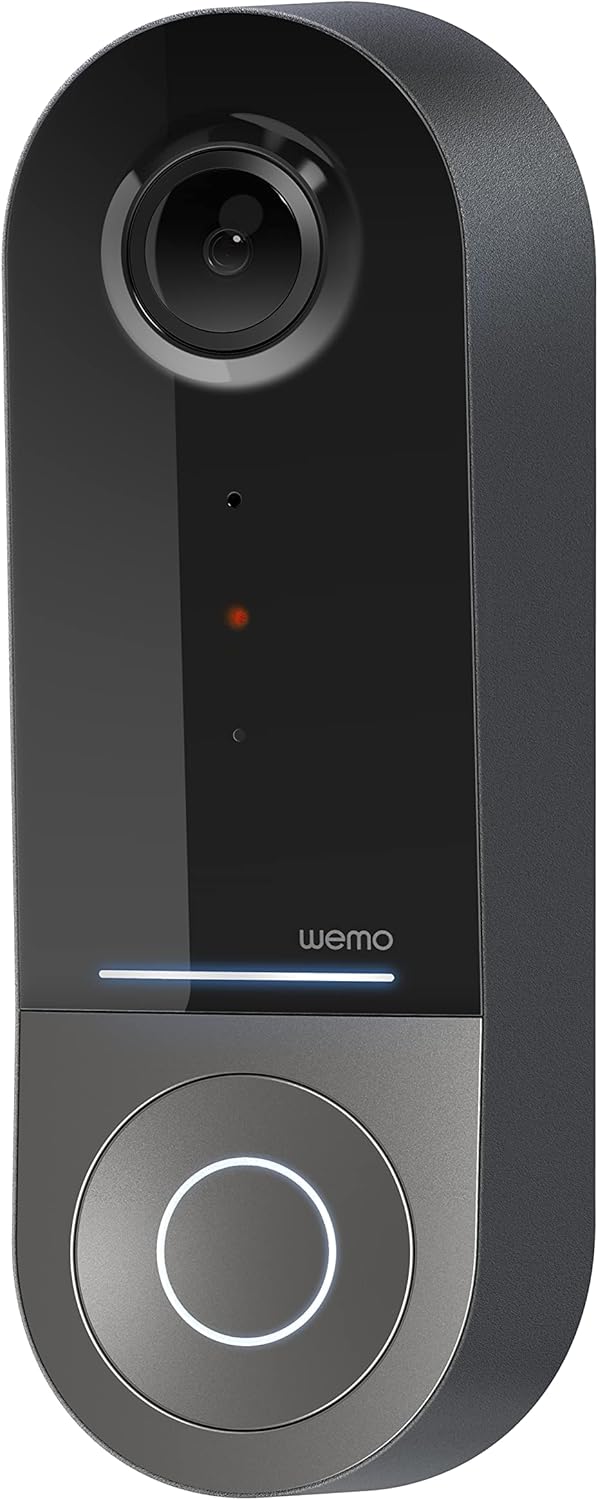
Figure 1: Wemo Smart Video Doorbell
2. Installatie en installatie
2.1 Controlelijst vóór installatie
- Ensure you have a wired doorbell system with 16-24V AC power.
- Download the Apple Home App on your iOS device.
- Confirm strong 2.4GHz and 5GHz Wi-Fi signal at your doorbell location.
2.2 fysieke installatie
- Schakel de stroom uit: Before beginning installation, turn off power to your existing doorbell system at the circuit breaker.
- Verwijder de oude deurbel: Carefully remove your existing doorbell button.
- Install mounting bracket: Use the provided screws and screwdriver to securely attach the mounting bracket to your wall. If needed, use the left/right wedges to adjust the viewhoek.
- Connect power kit: Follow the instructions in the included Setup Guide to properly install the Power Kit with Connectors into your existing chime box. This is crucial for correct operation.
- Wire the Wemo Doorbell: Connect the existing doorbell wires to the terminals on the back of the Wemo Smart Video Doorbell.
- Monteer de deurbel: Secure the Wemo Smart Video Doorbell onto the mounting bracket.
- Stroom herstellen: Schakel de stroom weer in via de stroomonderbreker.
2.3 App-installatie
- Open the Apple Home App on your iOS device.
- Tap the '+' icon to add a new accessory.
- Scan the HomeKit setup code provided with your Wemo Smart Video Doorbell.
- Follow the on-screen prompts to name your doorbell, assign it to a room, and configure HomeKit Secure Video settings, including motion detection and face recognition preferences.
3. Gebruiksaanwijzing
3.1 Levend View en meldingen
- Access live video feed directly from the Apple Home App on your iPhone, iPad, or HomePod.
- Receive instant notifications on your iOS device when motion is detected or the doorbell is pressed.
- Utilize face recognition to receive specific alerts for known individuals.

Figure 2: Face Recognition with HomeKit Secure Video
3.2 Video-opname en -opslag
- HomeKit Secure Video stores 10 days of motion-based recording history in your iCloud account.
- Review recorded events directly within the Apple Home App.

Figure 3: iCloud Recording via Apple Home App
3.3 Tweerichtingsaudio
- Engage in real-time two-way conversations with visitors through the Apple Home App.
3.4 Advanced Video Features
- Breed veld van View: The camera offers a 178° vertical, 140° horizontal, and 223° diagonal field of view for extensive coverage.
- HD Resolution with HDR: Enjoy crystal clear 1200x1600 resolution video with HDR for optimal image quality in varying light conditions.
- Verbeterd nachtzicht: Infrared technology provides clear video even in low-light conditions.

Afbeelding 4: Verbeterd nachtzicht
3.5 Dual-band Wi-Fi-connectiviteit
- The doorbell utilizes both 2.4GHz and 5GHz Wi-Fi bands.
- The 2.4GHz band offers a longer range and better penetration through walls.
- The 5GHz band provides higher speeds for closer proximity connections.

Afbeelding 5: Dual-band Wi-Fi-connectiviteit
4. Onderhoud en probleemoplossing
4.1 Algemeen onderhoud
- Maak de cameralens regelmatig schoon met een zachte, damp cloth to ensure clear video quality.
- Ensure the doorbell is free from obstructions that might block its field of view of microfoon.
4.2 probleemoplossing
- Connectiviteitsproblemen: If the doorbell frequently disconnects, ensure your Wi-Fi signal is strong at the installation location. Consider adjusting your router's band (2.4GHz for range, 5GHz for speed) or adding a Wi-Fi extender.
- Stroomproblemen: Verify that your wired doorbell system provides the required 16-24V AC. Insufficient voltage can lead to intermittent operation or device resets. Consult a qualified electrician if you suspect voltage problemen.
- App-responsiviteit: If the Apple Home App is slow to connect or display the live feed, ensure your iOS device and HomeKit hub (e.g., Apple TV, HomePod) are updated and have a stable internet connection. Restarting the doorbell or your HomeKit hub may resolve temporary glitches.
5. Specificaties
| Binnen-/buitengebruik | Openlucht |
| Compatibele apparaten | HomePod, iPad, iPhone |
| Energiebron | Corded Electric (16-24V AC) |
| Connectiviteitsprotocol | Wi-Fi (2.4 GHz en 5 GHz) |
| Controller-type | Apple HomeKit |
| Montagetype | Muurbevestiging |
| Resolutie video-opname | 1200x1600 (HD, HDR-enabled) |
| Kleur | Zwart |
| Artikelafmetingen L x B x H | 2.1 x 1.8 x 5 inch |
| Artikelgewicht | 13.7 ons |
| Speciale kenmerken | HD Resolution, Image Sensor, Night Vision, HDR |
6. Wat zit er in de doos?
- Slimme videodeurbel
- Installatiehandleiding
- Montagebeugel
- Left/Right Wedge
- Schroeven en schroevendraaier
- Power Kit with Connectors
7. Officiële productvideo
Video 1: Official Wemo Video Doorbell overview, showcasing-functies en -ontwerp.
8. Garantie en ondersteuning
For warranty information and technical support, please refer to the official WeMo webwebsite of neem rechtstreeks contact op met hun klantenservice. Bewaar uw aankoopbewijs voor garantieclaims.


