1. Inleiding
This manual provides detailed instructions for the safe and efficient operation of your InFocus P120 INL412 Multimedia Projector (Model INL4128). Please read this manual thoroughly before using the projector and keep it for future reference. This projector is designed for high-quality image projection, suitable for various applications including presentations, home entertainment, and gaming.
2. Veiligheidsinformatie
Neem de volgende veiligheidsmaatregelen in acht om schade aan de projector te voorkomen en de veiligheid van de gebruiker te waarborgen:
- Ventilatie: Ensure adequate ventilation around the projector. Do not block ventilation openings. Maintain a minimum distance of 30 cm (12 inches) from walls or other objects.
- Energiebron: Gebruik alleen de aangegeven voeding en het aangegeven volumetage. Connect the power cord securely.
- Warmte: The projector generates heat during operation. Do not touch the projector's vents or exhaust areas directly after use.
- Lichtopbrengst: Kijk niet rechtstreeks in de projectorlens als de lamp is ingeschakeld, omdat het felle licht oogschade kan veroorzaken.
- Plaatsing: Plaats de projector op een stabiele, vlakke ondergrond. Vermijd direct zonlicht, warmtebronnen of ruimtes met een hoge luchtvochtigheid of veel stof.
- Schoonmaak: Haal de stekker uit het stopcontact voordat u gaat schoonmaken. Gebruik een zachte, droge doek. Gebruik geen vloeibare reinigingsmiddelen of spuitbussen.
- Onderhoud: Do not attempt to service the projector yourself. Refer all servicing to qualified service personnel.
3. Product voorbijview
3.1 Top Panel and Lens Area
The top panel features the control buttons for basic operation and the lens area with focus and zoom adjustments.

Figuur 3.1: Boven view of the InFocus P120 INL412 projector, highlighting the control panel on the right and the lens adjustment area on the left. The InFocus logo is visible on the top surface.
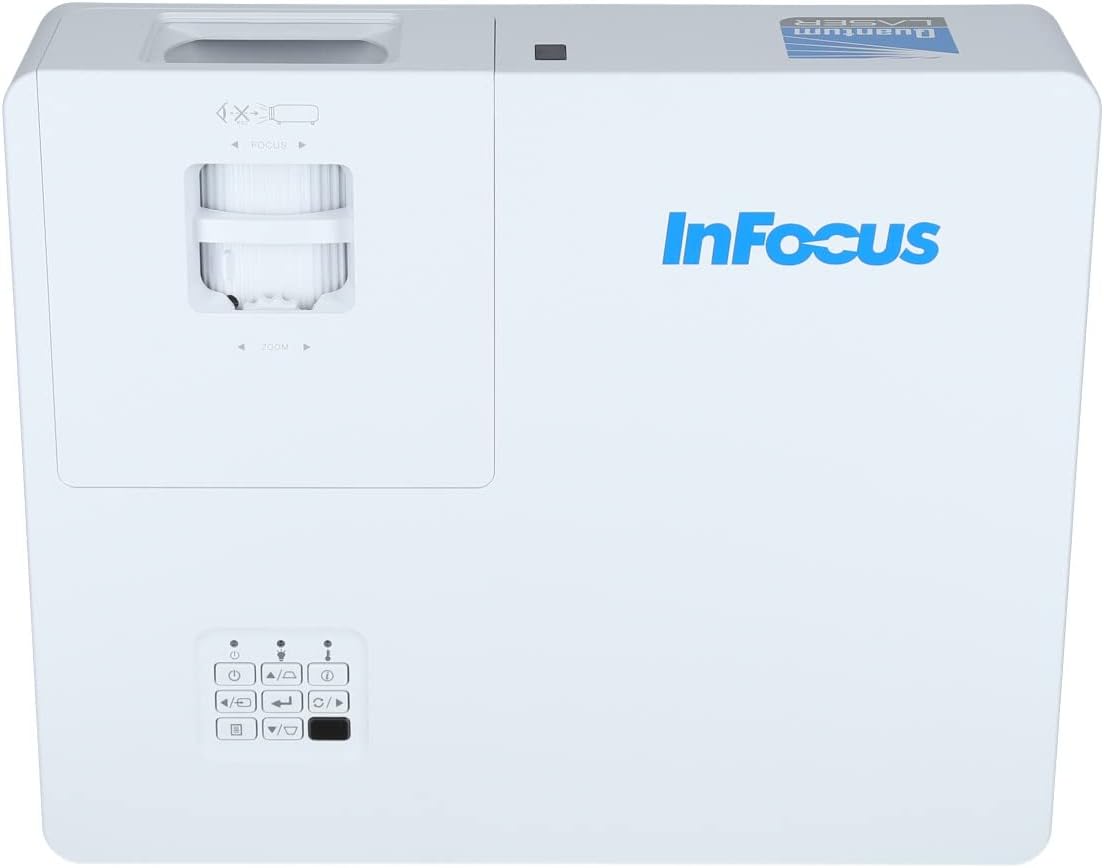
Figuur 3.2: Een nadere beschouwing view of the projector's top panel, showing the focus and zoom rings near the lens opening and the array of control buttons for power, menu, source selection, and navigation.
3.2 Aansluitingen op het achterpaneel
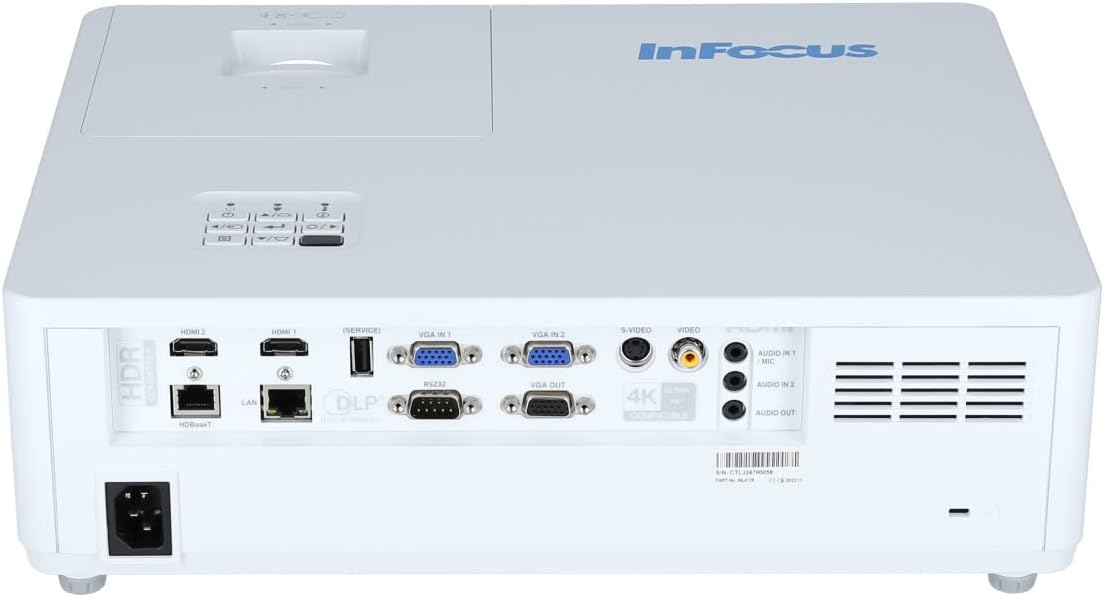
The rear panel provides various input and output ports for connecting external devices.

Figure 3.3: Rear panel of the InFocus P120 INL412 projector, displaying a comprehensive array of connectivity options including HDMI (x2), USB, S-Video, Ethernet (LAN), VGA In (x2), VGA Out, RS232, and Audio In/Out ports. The power input is located on the bottom left.
Belangrijke poorten zijn onder meer:
- HDMI 1 en 2: For connecting high-definition digital video and audio sources.
- USB-poort: For connecting USB devices, potentially for media playback or firmware updates.
- S-video: Voor het aansluiten van oudere videobronnen.
- VGA IN 1 & 2: For connecting computers or other devices with VGA output.
- VGA-UITGANG: For connecting to an external monitor.
- Ethernet (LAN): Voor netwerkconnectiviteit en -besturing.
- Audio IN 1 & 2 / Audio OUT: For analog audio connections.
- RS232: Voor seriële besturing.
- Stroomverbruik: Voor het aansluiten van het netsnoer.
3.3 Front and Side Panels
The front panel houses the projection lens and front ventilation, while the side panels feature additional ventilation grilles.

Figuur 3.4: Voorzijde view of the InFocus P120 INL412 projector, displaying the main projection lens on the right and the extensive front ventilation grille on the left, crucial for heat dissipation.
Figuur 3.5: Zijkant view of the InFocus P120 INL412 projector, illustrating the side ventilation grilles that contribute to maintaining optimal operating temperature.
4. Instellen
4.1 Projectorplaatsing
Position the projector on a stable, flat surface or mount it securely. Ensure the projector is within the optimal projection distance for your screen size. Maintain clear space around the projector for proper ventilation.
4.2 Apparaten aansluiten
Before connecting any cables, ensure the projector and all source devices are powered off.
- HDMI-aansluiting: Connect an HDMI cable from your source device (e.g., laptop, Blu-ray player, gaming console) to either the HDMI 1 or HDMI 2 port on the projector.
- VGA-aansluiting: Connect a VGA cable from your computer to either VGA IN 1 or VGA IN 2. For audio, connect a separate audio cable from your computer's audio output to the corresponding Audio IN port on the projector.
- USB-verbinding: Insert a USB drive into the USB port for media playback (if supported by firmware) or service functions.
- Ethernet (LAN) verbinding: Connect an Ethernet cable to the LAN port for network control or updates.
- Audio-uitvoer: If using external speakers, connect an audio cable from the Audio OUT port on the projector to your audio system.
4.3 Stroomaansluiting
Connect the power cord to the projector's power input and then plug the other end into a grounded electrical outlet.
5. Gebruiksaanwijzing
5.1 In-/uitschakelen
- Inschakelen: Druk op de Stroom Druk op de knop op het bedieningspaneel van de projector of op de afstandsbediening. Het indicatielampje voor de stroom zal veranderen.
- Uitschakelen: Druk op de Stroom button again. A confirmation message may appear. Press the button a second time to confirm shutdown. Allow the projector to cool down before unplugging it.
5.2 Scherpstellen en zoomen aanpassen
Rotate the focus ring around the lens until the image appears sharp and clear. Use the zoom ring to adjust the image size to fit your screen.
5.3 Invoerbron selecteren
Druk op de Bron button on the control panel or remote control to cycle through available input sources (HDMI 1, HDMI 2, VGA 1, VGA 2, S-Video, USB). Select the input corresponding to your connected device.
5.4 Menunavigatie
Gebruik de Menu button to access the on-screen display (OSD) menu. Use the arrow buttons to navigate through menu options and the Binnenkomen knop om te selecteren. Drukken Menu weer om af te sluiten.
6. Onderhoud
6.1 De lens reinigen
Gently wipe the lens with a soft, lint-free cloth specifically designed for optical surfaces. Do not use abrasive cleaners or excessive force, as this can scratch the lens.
6.2 Cleaning the Projector Exterior
Use a soft, dry cloth to clean the projector's casing. For stubborn dirt, dampen the cloth slightly with water, then wipe dry immediately. Avoid getting liquids into the projector's openings.
6.3 Ventilatiezorg
Regularly check the projector's ventilation grilles for dust accumulation. Use a soft brush or a vacuum cleaner with a brush attachment to gently remove dust from the vents to ensure proper airflow and prevent overheating.
7. Probleemoplossing
7.1 Geen afbeelding weergegeven
- Zorg ervoor dat de projector is ingeschakeld en dat het stroomindicatielampje continu brandt.
- Verify that the video cable (HDMI, VGA, etc.) is securely connected to both the projector and the source device.
- Controleer of de juiste ingangsbron op de projector is geselecteerd.
- Confirm that the source device (laptop, player) is powered on and outputting a signal.
7.2 Image is Blurry or Out of Focus
- Stel de scherpstelring op de projectorlens zo in dat het beeld scherp is.
- Ensure the projector is at the correct distance from the screen.
- Maak de projectorlens schoon als deze vuil lijkt.
7.3 Geen geluid
- If using HDMI, ensure the source device's audio output is set to HDMI.
- If using VGA, ensure a separate audio cable is connected from the source to the projector's Audio IN port.
- Controleer de volume-instellingen op zowel de projector als het bronapparaat.
- If using external speakers, ensure they are properly connected to the Audio OUT port and powered on.
8. Specificaties
| Functie | Detail |
|---|---|
| Merk | InFocus |
| Fabrikant | In de schijnwerpers |
| Modelnaam | P120 INL412 |
| Modelnummer | INL4128 |
| Jaar | 2023 |
| hardware Interface | Ethernet, HDMI, S-Video, USB |
| Aantal artikelen | 1 |
| Beeldverhouding | 16:9 |
| Wattage | 341 watt |
| Batterijen inbegrepen | Nee |
| Batterijen vereist | Nee |
| Vormfactor | Bureaublad |
| Montagetype | Tafelmontage |
| Inclusief afstandsbediening | Ja |
| Productafmetingen | 56.13x46.48x25.15cm |
| Artikelgewicht | 5.5 kg |
| Maximale afbeeldingsgrootte | 308.28 inch |
| Minimale afbeeldingsgrootte | 910.63 millimeter |
| Eerste beschikbare datum | 5 januari 2022 |
9. Garantie en ondersteuning
For warranty information and technical support, please refer to the documentation included with your purchase or visit the official InFocus webwebsite. Bewaar uw aankoopbewijs voor garantieclaims.


