1. Veiligheidsinformatie
Read all safety warnings and instructions carefully before using this appliance. Failure to follow the warnings and instructions may result in electric shock, fire, or serious injury.
- Zorg ervoor dat de voltagHet op het typeplaatje aangegeven vermogen komt overeen met het netspanningsvermogentagen bij u thuis.
- Dek de verwarming niet af. Dit kan oververhitting veroorzaken.
- Keep flammable materials (e.g., curtains, furniture) at least 1 meter (3 feet) away from the heater.
- Do not use the heater in bathrooms, laundry areas, or similar indoor locations where it may come into contact with water. The appliance has an IP24 rating, meaning it is protected against splashing water, but it is not fully waterproof.
- Haal altijd de stekker uit het stopcontact wanneer u de kachel niet gebruikt of voordat u hem schoonmaakt.
- Gebruik de verwarming niet met een beschadigd snoer of stekker, of nadat het apparaat defect is geraakt, is gevallen of op een andere manier beschadigd is geraakt.
- Dit apparaat is niet bedoeld voor gebruik door personen (inclusief kinderen) met beperkte fysieke, sensorische of mentale vermogens, of met een gebrek aan ervaring en kennis, tenzij zij onder toezicht staan of instructies hebben gekregen over het gebruik van het apparaat door een persoon die verantwoordelijk is voor hun veiligheid.
- Kinderen moeten onder toezicht staan om ervoor te zorgen dat ze niet met het apparaat spelen.
2. Product voorbijview
The Duux Edge 2000 Smart Convector Heater is designed to provide efficient heating for rooms up to 30 m². It features smart control via a smartphone app, a remote control, and can be operated manually. The heater offers both freestanding and wall-mounted installation options.

Image 2.1: Duux Edge 2000 Smart Convector Heater with its accompanying smartphone application interface.

Image 2.2: The Duux Edge 2000 Smart Convector Heater positioned freestanding in a contemporary living space.
3. Installatie en configuratie
3.1. Inhoud van het pakket
Controleer of alle componenten aanwezig zijn:
- Duux Edge 2000 Convector Heater
- Afstandsbediening
- Feet for freestanding use (if applicable)
- Wall mounting brackets and screws (if applicable)
- Gebruiksaanwijzing
3.2. Vrijstaande installatie
- Pak de kachel en alle accessoires voorzichtig uit.
- Bevestig de meegeleverde voetjes met de schroeven aan de onderkant van de kachel. Zorg ervoor dat ze stevig vastzitten.
- Place the heater on a stable, level surface, ensuring adequate clearance from walls and furniture (minimum 1 meter).

Image 3.1: Mounting brackets and screws, which may be used for either wall mounting or attaching feet for freestanding use.
3.3. Wandmontage
- Select a suitable wall location, ensuring it is clear of obstructions and at least 1 meter from flammable materials.
- Using the provided wall mounting brackets, mark the drilling points on the wall.
- Boor gaten en plaats pluggen (indien nodig).
- Secure the brackets to the wall with screws.
- Carefully hang the heater onto the installed wall brackets, ensuring it is stable and level.
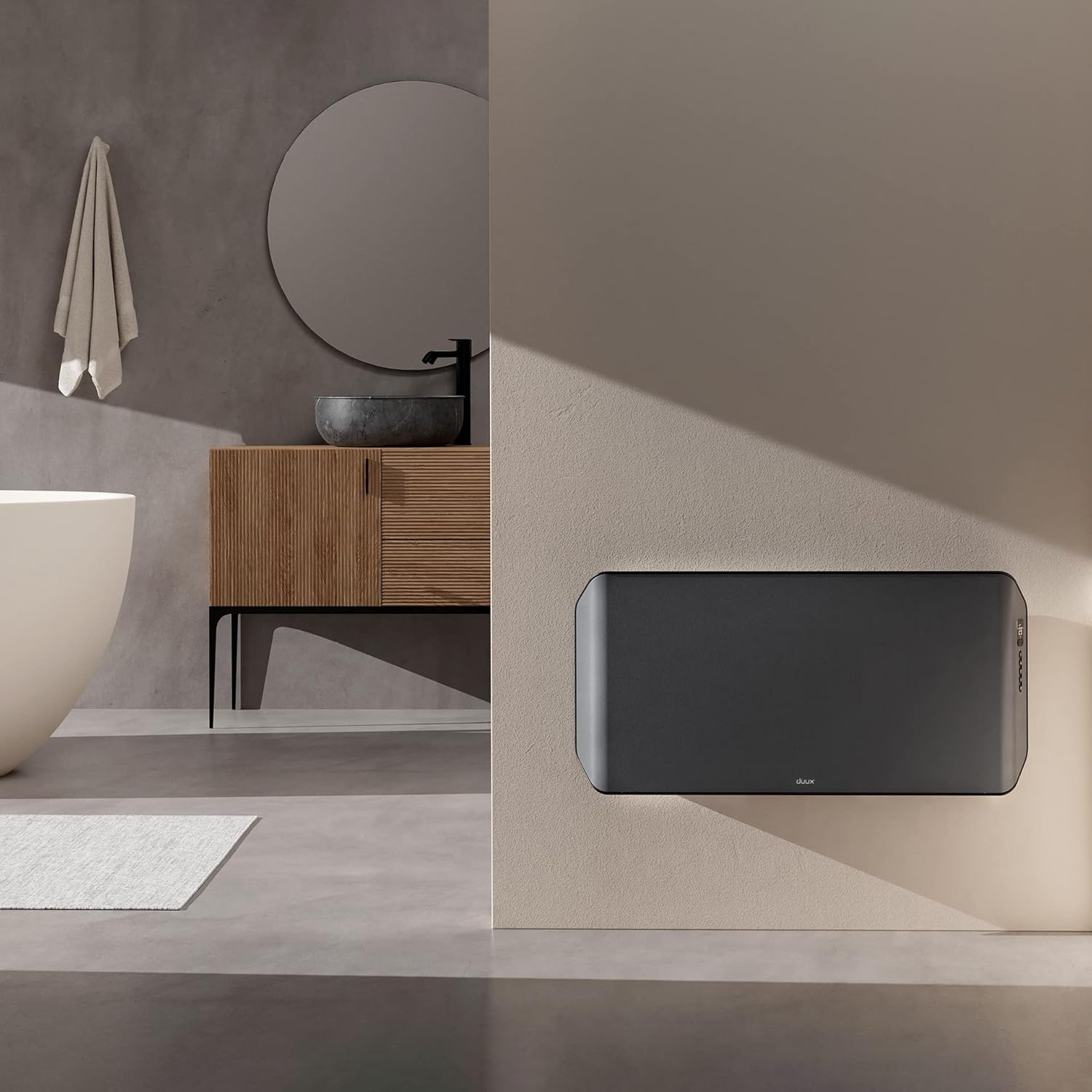
Image 3.2: The Duux Edge 2000 Smart Convector Heater installed on a wall in a bathroom setting.
3.4. Stroomaansluiting
Plug the power cord into a suitable electrical outlet. Ensure the outlet meets the power requirements of the heater (240V, 2000W).
4. De verwarming bedienen
4.1. Configuratiescherm voorbijview
The control panel is located on the side of the heater and features a digital display and several buttons for manual operation.

Afbeelding 4.1: Close-up view of the Duux Edge 2000 heater's integrated control panel.

Image 4.2: A hand demonstrating interaction with the heater's control panel buttons.
4.2. Functies van de afstandsbediening
Met de meegeleverde afstandsbediening kunt u de instellingen gemakkelijk op afstand aanpassen.
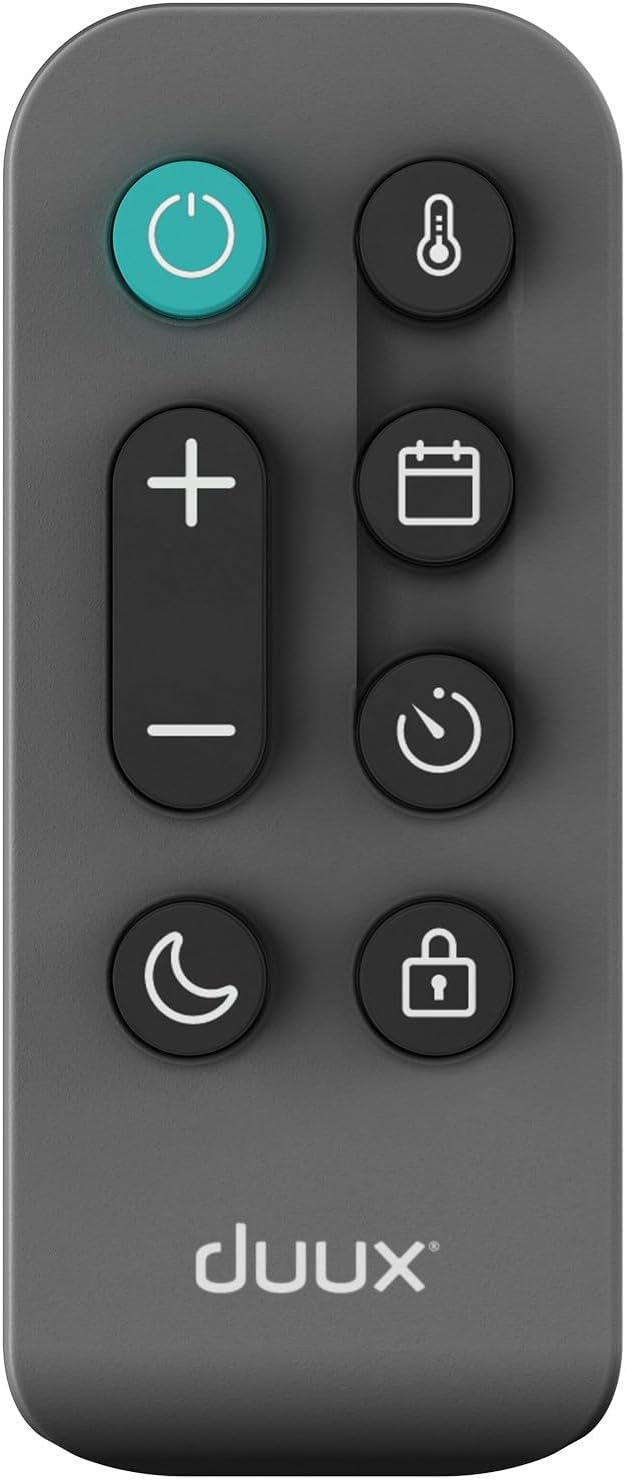
Image 4.3: The remote control for the Duux Edge 2000 Smart Convector Heater, showing various function buttons.
- Aan/uit-knop: Schakelt de verwarming in of uit.
- Temperatuur +/-: Past de gewenste kamertemperatuur aan.
- Modusknop: Cycles through available heating modes (e.g., Eco, Comfort).
- Timerknop: Stelt een timer in voor automatische uitschakeling.
- Kinderslotknop: Hiermee activeert of deactiveert u de kinderbeveiliging.
- Nachtmodusknop: Activates a low-light display mode for nighttime use.
4.3. Slimme app-bediening
The Duux Edge 2000 can be controlled via a smartphone app, offering advanced features and scheduling.

Image 4.4: A user interacting with the Duux smartphone application to manage heater settings.
- Download the Duux app from your smartphone's app store.
- Follow the in-app instructions to pair your heater with your device.
- Once paired, you can control temperature, modes, set schedules, and monitor the heater's status remotely.
- The app is compatible with Amazon Alexa and Google Assistant for voice control.
5. Onderhoud
Regelmatig onderhoud zorgt ervoor dat uw kachel optimaal presteert en lang meegaat.
5.1. Schoonmaken
- Haal altijd de stekker van de kachel uit het stopcontact en laat hem volledig afkoelen voordat u hem schoonmaakt.
- Veeg de buitenoppervlakken af met een zachte, damp doek. Gebruik geen schurende reinigingsmiddelen of oplosmiddelen.
- Use a vacuum cleaner with a brush attachment to gently clean dust from the air intake and outlet grilles.
- Dompel de kachel niet onder in water en laat geen water in het toestel druppelen.

Image 5.1: Top-rear view of the heater, highlighting the air vents that require periodic cleaning.
5.2. Opslag
Als u de verwarming voor langere tijd opbergt, maak deze dan grondig schoon en bewaar hem in de originele verpakking op een droge, koele plaats.
6. Probleemoplossing
If you encounter issues with your Duux Edge 2000 heater, refer to the following common problems and solutions:
| Probleem | Mogelijke oorzaak | Oplossing |
|---|---|---|
| Verwarming gaat niet aan. | Geen stroomvoorziening; Aan/uit-knop niet ingedrukt; Oververhittingsbeveiliging geactiveerd. | Check power cord connection and wall outlet; Press the power button; Unplug, wait 30 minutes, then plug back in. |
| De verwarming staat aan, maar geeft geen warmte af. | Temperature setting too low; Eco mode active; Room temperature already reached. | Increase the target temperature; Switch to a higher heating mode; The heater will resume heating when the room temperature drops. |
| Smart app cannot connect to the heater. | Wi-Fi signal weak; Incorrect pairing procedure; Router issues. | Ensure heater is within Wi-Fi range; Re-attempt pairing process; Restart your Wi-Fi router. |
| Afstandsbediening werkt niet. | Batterijen leeg; Obstructie tussen afstandsbediening en verwarming. | Replace remote control batteries; Ensure a clear line of sight to the heater's receiver. |
Als het probleem blijft bestaan nadat u deze oplossingen hebt geprobeerd, neem dan contact op met de klantenservice.
7. Specificaties
| Functie | Specificatie |
|---|---|
| Merk | Twee keer |
| Modelnummer | DXCH14 |
| Kleur | 2000w Gray |
| Stroom | 2000 Watt |
| Deeltage | 240 Volt |
| Automatische uitschakeling | Ja |
| Aantal snelheden | 2 |
| Speciale kenmerken | Laag energieverbruik |
| Productgewicht | 7.85 kg |
| Afmetingen (L x B x H) | 88 cm x 47 cm x 12 cm |
| Binnen-/buitengebruik | Binnen |
| Montagetype | Wandmontage of vrijstaand |
| Aanbevolen kamertype | Bathroom (IP24 rated) |
| Verwarmingsdekking | Tot 30 m² |
8. Garantie en ondersteuning
For warranty information and customer support, please refer to the documentation included with your product or visit the official Duux webwebsite. Bewaar uw aankoopbewijs voor garantieclaims.


