1. Inleiding
Thank you for choosing the WORX MakerX 20V Mini Grinder WX741.9. This compact and versatile tool is designed for precise cutting, grinding, and sanding tasks. Featuring a brushless motor for extended life and efficiency, and compatible with the WORX PowerShare system, it offers portability and convenience for various projects. Please read this manual thoroughly before operating the tool to ensure safe and effective use.
2. Veiligheidsinstructies
Volg altijd de basisveiligheidsmaatregelen om het risico op brand, elektrische schokken en persoonlijk letsel te beperken bij het gebruik van elektrisch gereedschap.
- Draag oogbescherming: Draag altijd geschikte oogbescherming, zoals een veiligheidsbril, om uzelf te beschermen tegen rondvliegend puin.
- Draag gehoorbescherming: Use ear protection during extended operation to prevent hearing damage.
- Werkstuk beveiligen: Altijd clamp of het werkstuk op een andere manier vastzetten om beweging tijdens de bewerking te voorkomen.
- Houd een stevige grip: Hold the tool firmly with both hands if possible, or with one hand if designed for single-hand operation, ensuring stable control.
- Houd uw werkplek schoon: Cluttered areas invite accidents. Ensure your workspace is well-lit and free of obstructions.
- Voorkom onbedoeld starten: Ensure the switch is in the off position before connecting to a power source or battery pack, picking up or carrying the tool.
- Gebruik de juiste accessoires: Only use accessories specifically designed and rated for this tool. Incorrect accessories can be hazardous.
- Controleer het gereedschap vóór gebruik: Check for damaged parts, misalignment, binding of moving parts, breakage of parts, and any other condition that may affect the tool's operation.
- Stroom loskoppelen: Always disconnect the tool from the PowerShare hub or remove the battery pack before making any adjustments, changing accessories, or storing the tool.
3. Inhoud van het pakket
Controleer of alle hieronder vermelde artikelen in uw pakket zitten. Als er artikelen ontbreken of beschadigd zijn, neem dan contact op met de klantenservice.
- WORX MakerX 20V Mini Grinder WX741.9 (Bare Unit)
- (1) Cutting wheel 50 mm x 10 mm
- (1) Flap wheel sander 50mm x 10mm
- (1) Grinding wheel 50 mm x 10 mm
- (1) Inbussleutel
- (1) M4*10 schroef
- (1) Schroef clamp M4*10
- (2) ST2.0*10 Screws

Image 3.1: The WORX MakerX Mini Grinder WX741.9 shown with its various included accessories, including cutting, grinding, and sanding wheels, a hex key, and mounting hardware.
4. Instellen
4.1 Connecting to PowerShare Hub
The MakerX Mini Grinder WX741.9 is a bare unit and requires a WORX PowerShare 20V battery and MakerX hub (sold separately) for operation. Connect the grinder's cable to the output port on the MakerX hub.

Image 4.1: A user connecting the power cable of the MakerX Mini Grinder to the MakerX PowerShare hub, which provides power from a 20V battery.
4.2 Attaching Accessories (Wheels)
To attach a cutting, grinding, or sanding wheel:
- Ensure the tool is disconnected from the PowerShare hub.
- Press and hold the spindle lock button (if present) or use the hex key to loosen the retaining screw/nut.
- Place the desired wheel onto the spindle, ensuring it is seated correctly.
- Secure the wheel with the retaining screw/nut, tightening it firmly with the hex key. Do not overtighten.
- Verify the wheel is securely attached and spins freely without wobble before use.
5. Gebruiksaanwijzing
Before operating, ensure you have read and understood all safety instructions. Always wear appropriate personal protective equipment (PPE).
5.1 In-/uitschakelen en snelheidsregeling
Once connected to the PowerShare hub, turn on the hub. The grinder itself may have an on/off switch. The PowerShare hub typically features a variable speed dial to adjust the rotational speed of the grinder. Start at a lower speed and increase as needed for the material and task.
5.2 Snijbewerkingen
For cutting, use the appropriate cutting wheel. Position the wheel perpendicular to the material. Apply light, consistent pressure, allowing the tool to do the work. Avoid forcing the tool, which can lead to kickback or damage to the wheel.

Image 5.1: The MakerX Mini Grinder being used to precisely cut ceramic tiles, showcasing its suitability for detailed tasks.

Image 5.2: The MakerX Mini Grinder in action, cutting a metal pipe, illustrating its capability for metalwork.
5.3 Grinding Operations
When grinding, use the appropriate grinding wheel. Hold the tool at a slight angle to the workpiece. Move the tool smoothly across the surface to achieve an even finish. Be mindful of sparks and debris, especially when working with metal.

Image 5.3: A user performing a grinding operation with the MakerX Mini Grinder, demonstrating proper handling and safety gear.

Image 5.4: The MakerX Mini Grinder being used to remove rust from a metal garden tool, highlighting its utility for restoration and surface preparation.
5.4 Sanding Operations
For sanding, attach the flap wheel sander. Use gentle, even pressure and move the tool in a consistent pattern to avoid uneven sanding marks. This tool is ideal for fine detail sanding or preparing surfaces.
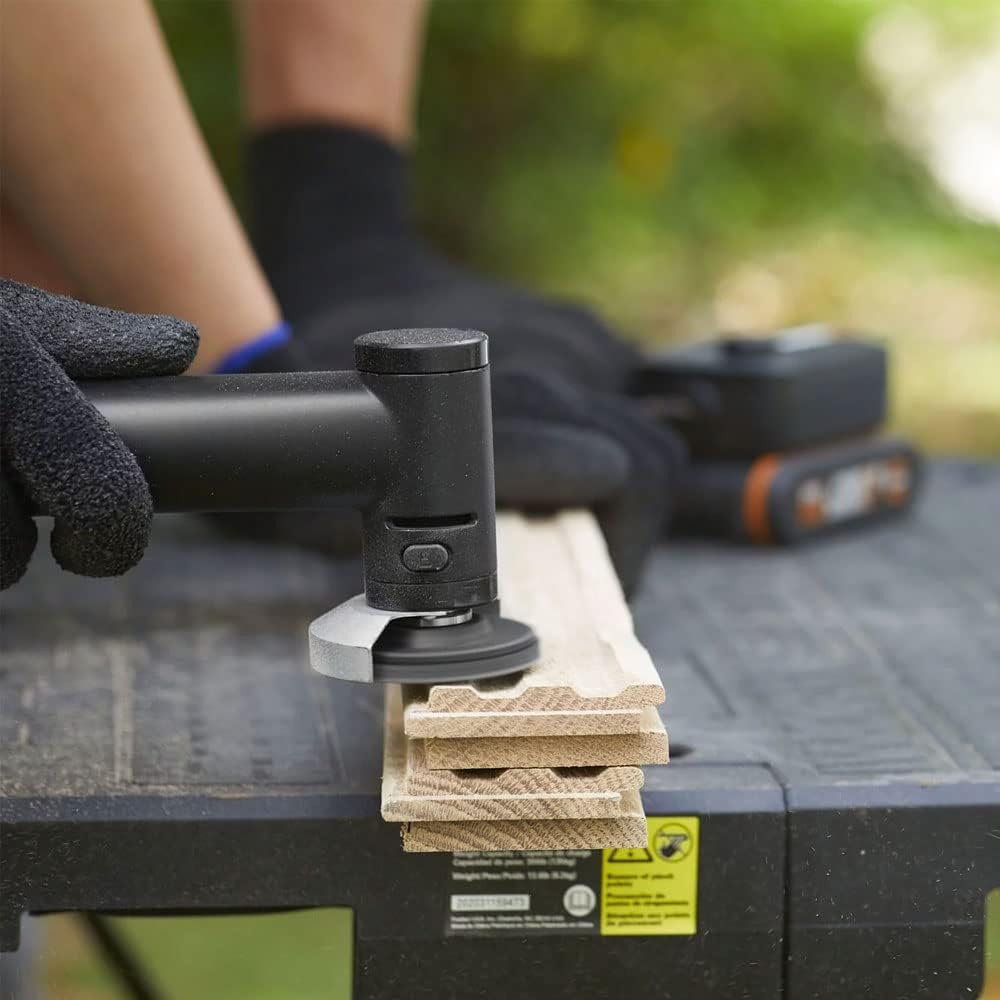
Image 5.5: The MakerX Mini Grinder equipped with a sanding attachment, being used to smooth a wooden surface.
6. Onderhoud
Regelmatig onderhoud zorgt voor optimale prestaties en verlengt de levensduur van uw gereedschap.
- Schoonmaak: After each use, disconnect the tool from the power source and clean the exterior with a soft, damp doek. Gebruik perslucht om stof uit de ventilatieopeningen te verwijderen. Gebruik geen agressieve chemicaliën of schuurmiddelen.
- Accessoire-inspectie: Regularly inspect cutting, grinding, and sanding wheels for wear, cracks, or damage. Replace worn or damaged accessories immediately.
- Opslag: Bewaar het gereedschap en de accessoires op een droge, veilige plaats, buiten het bereik van kinderen.
7. Probleemoplossing
If you encounter issues with your MakerX Mini Grinder, refer to the following common problems and solutions:
| Probleem | Mogelijke oorzaak | Oplossing |
|---|---|---|
| Tool start niet | Not connected to PowerShare hub; PowerShare hub not turned on; Battery discharged; Faulty connection. | Ensure grinder is securely connected to the hub. Turn on the PowerShare hub. Check battery charge level and recharge if necessary. Inspect cable and connections for damage. |
| Poor cutting/grinding/sanding performance | Worn or incorrect accessory; Insufficient speed setting; Excessive pressure. | Replace worn accessory. Ensure the correct accessory is used for the task. Adjust speed setting on the PowerShare hub. Apply lighter, consistent pressure. |
| Overmatige trillingen of lawaai | Accessory not properly seated or damaged; Loose components. | Disconnect power and re-seat the accessory. Inspect accessory for damage and replace if necessary. Check for any loose screws or parts. |
8. Specificaties
Technical specifications for the WORX MakerX 20V Mini Grinder WX741.9:
- Merk: WORX
- Modelnummer: WX741.9
- Deeltage: 20 Volts (via PowerShare hub)
- Energiebron: Battery Powered (via WORX PowerShare 20V battery and MakerX hub)
- Aanbevolen toepassingen: Cutting, grinding, sanding
- Kleur: Zwart/Wit
- Speciale eigenschap: Compact design, Brushless Motor
- Artikelgewicht: Ongeveer 0.4 kilogram (14.1 ounces)
- Maximale rotatiesnelheid: 24,000 toeren per minuut
- Minimale rotatiesnelheid: 14,000 toeren per minuut
- Productafmetingen (L x B x H): 2.83 x 1.26 x 7.4 inch
- Materiaal: Plastic
9. Garantie en ondersteuning
For warranty information, technical support, or to purchase replacement parts and accessories, please visit the official WORX webwebsite of neem contact op met hun klantenservice. Bewaar uw aankoopbewijs als aankoopbewijs voor garantieclaims.
WORX Customer Support: Please refer to the contact information provided with your PowerShare hub or on the official WORX webplaats.


