1. Inleiding
This manual provides comprehensive instructions for the COMTEC ZDR035 dual camera Full HD drive recorder. It covers product features, installation, operation, maintenance, and troubleshooting. Please read this manual thoroughly before using the device to ensure proper and safe operation.

Image 1.1: COMTEC ZDR035 Front and Rear Dash Cam units.
2. Belangrijkste kenmerken
The COMTEC ZDR035 is equipped with advanced features designed to enhance driving safety and provide reliable recording:
- Opname met dubbele camera: Opnames zowel voor als achter views simultaneously in Full HD.
- STARVIS-technologie: Enhances image clarity in low-light conditions, such as at night or in tunnels.
- Ultra-Wide-Angle Lenses: Vangt een breed veld van view (168° diagonal) for comprehensive coverage.
- Safety Driving Support Functions: Includes alerts for rear vehicle approach, forward vehicle start, front traffic signal, rapid acceleration/deceleration/steering, and vehicle speed.
- Parkeerbewakingsmodus: Monitors your vehicle for impacts or continuous recording while parked (requires optional accessory).
- HDR/WDR: Provides clear images by compensating for brightness differences, reducing whiteout and black crush.
- SD Card Data Protection: Features a proprietary file system and super capacitor to minimize data corruption and ensure high recovery rates.
- Noise Countermeasures: Designed to prevent interference with terrestrial digital TV and car navigation GPS signals.

Afbeelding 2.1: voorbijview of ZDR035 key features including dual cameras, STARVIS, and GPS.
3. Installatie en installatie
Proper installation is crucial for optimal performance. It is recommended to have the device professionally installed. If self-installing, ensure the following:
- Montage locatie: Mount the front camera on the windshield where it does not obstruct the driver's view. The rear camera should be mounted on the rear window.
- Stroomaansluiting: Connect the power cable to the vehicle's power source according to the instructions provided in the separate installation guide.
- Camera-aansluiting: Connect the front and rear cameras using the supplied camera cable.
- SD-kaart plaatsen: Insert the microSDHC card into the main unit.
The device uses an adhesive mounting type for secure attachment.

Image 3.1: Illustration of the 168-degree wide-angle coverage for both front and rear cameras.
4. Gebruiksaanwijzing
4.1. Opnamefuncties
- Continu opnemen: Automatically records from engine ON to OFF. Recording time varies based on settings. Older files are overwritten when the card is full.
- Impact Recording: When the built-in G-sensor detects an impact, the relevant footage is saved as protected data.
- Handmatige opname: Press the designated switch to manually record and protect footage op elk moment.
4.2. Safety Driving Support Functions
These functions provide alerts to assist safe driving. They are not accident prevention systems.
- Rear Vehicle Approach Alert: Detects vehicles approaching from the rear and provides an audible or alarm alert. Can automatically save footage van het evenement.
- Forward Vehicle Start Alert: Notifies you when the vehicle ahead begins to move.
- Front Signal Alert: Alerts you when a traffic light ahead turns green.
- Drive Support Function: Detects and alerts for sudden acceleration, deceleration, or steering.
- Vehicle Speed Alarm: Alerts you if your vehicle exceeds a preset speed.

Image 4.1: Illustration of the Rear Vehicle Approach Alert function.
4.3. Geavanceerde beeldverwerkingsfuncties
- STARVIS Nachtzicht: Both front and rear cameras utilize Sony's STARVIS CMOS sensor for clear recording in dark environments.
- HDR/WDR: High Dynamic Range (HDR) and Wide Dynamic Range (WDR) functions ensure clear images in varying light conditions, such as strong backlight or sudden changes in brightness. (Rear camera supports HDR only).
- LED Traffic Light Compatibility: Records reliably across different power frequencies in Japan (East/West).

Image 4.2: Comparison of night recording with and without STARVIS technology.
4.4. Parking Surveillance Functions
Requires the optional HDROP-14 direct wiring cord.
- Impact Quick Recording: Records when an impact is detected while parked, minimizing power consumption.
- One-Time Parking Surveillance Mode: Temporarily activates parking surveillance even if the main function is off.
- Parking Surveillance Mode Pass: Temporarily disables parking surveillance in environments prone to false triggers (e.g., mechanical parking lots, windy conditions).
- Time-Lapse-opname: Records still images at 1-second intervals, compressing them into a short video for extended parking surveillance.
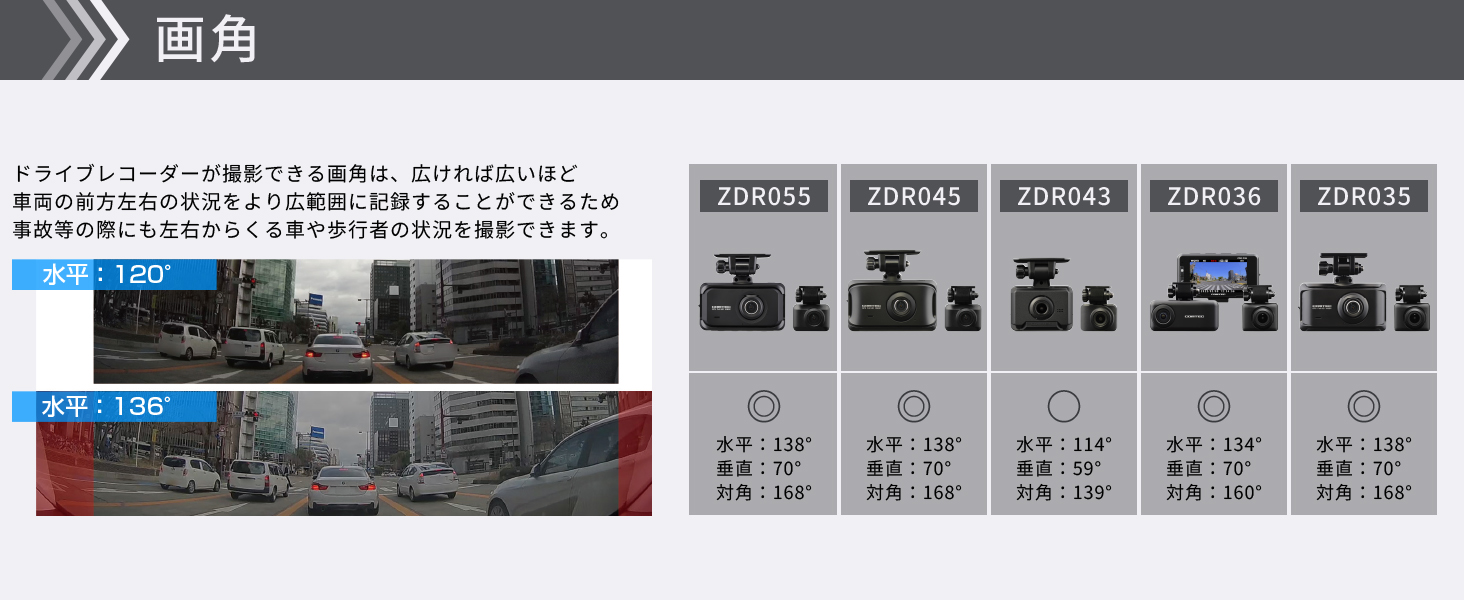
Image 4.3: Diagram illustrating parking surveillance features, including impact detection and recording.
4.5. Data Protection Features
- Back-upfunctie: A proprietary file system and super capacitor protect recorded data from corruption in case of sudden power loss.
- SD Card Check Function: The device checks the microSDHC card at startup and alerts you via an LED indicator if damage is detected, preventing missed recordings.
- Emergency Recording Stop Function: Automatically stops recording after a significant impact to prevent important accident footage worden overschreven.
4.6. Handige functies
- High-Speed Start Recording: Recording begins immediately after the engine is turned ON.
- Recorded Image Rotation: The built-in G-sensor automatically adjusts image orientation, allowing flexible mounting.
- Audio-opname: Neemt audio op samen met video.
- Date and Time Information: Records date and time data with footage.
5. Onderhoud
The COMTEC ZDR035 utilizes a proprietary file system that significantly reduces SD card fragmentation, thereby minimizing the need for frequent manual formatting. However, it is good practice to periodically check the SD card's health using the device's built-in SD Card Check Function.
6. Probleemoplossing
- Geen opname: Check if the SD card is inserted correctly and is not damaged. The SD Card Check Function will alert you if there's an issue.
- Function Malfunction: Some functions, particularly safety support features, may not operate correctly if GPS reception is poor or unavailable, or due to environmental factors (weather, vehicle ahead's shape/color, mounting position).
- Ruisinterferentie: The device includes noise countermeasures to prevent interference with other vehicle electronics. If interference occurs, ensure proper installation and grounding.
- Impact Detection Sensitivity: The impact detection sensitivity for features like Impact Recording and Emergency Recording Stop can be adjusted in 11 levels (including OFF) via the device settings.
7. Specificaties
| Functie | Detail |
|---|---|
| Merk | COMTEC |
| Modelnaam | ZDR035 |
| Productafmetingen (L x B x H) | 9.2x3.2x5.2cm |
| Productgewicht | 600 gram |
| Batterij | 1 lithium-metaalbatterij (meegeleverd) |
| Speciale kenmerken | Built-in GPS, Night Vision |
| Kleur | Zwart |
| Compatibel voertuigtype | Auto |
| Resolutie video-opname | 1080p (Full HD) |
| Montagetype | Kleefstof |
| Veld van View | 168 graden (diagonaal) |
| Controlemethode | Aanraken |

Image 7.1: Diagram showing the dimensions of the COMTEC ZDR035 main unit.
8. Garantie en ondersteuning
8.1. Garantie-informatie
The COMTEC ZDR035 comes with a 3 jaar garantie from the date of purchase. Please retain your proof of purchase (e.g., delivery note) as it is required for warranty claims. The warranty is not applicable for use outside Japan or without valid proof of purchase.

Image 8.1: Illustration indicating the 3-year product warranty.
8.2. Viewer-software
Een toegewijde viewer software is available for download from the official COMTEC website. This software allows you to review opgenomen footage, audio, and G-sensor data on your computer. You can also convert recorded data into video or still images for saving.
For further support or inquiries, please visit the official COMTEC webwebsite of neem contact op met de klantenservice.


