1. Inleiding
Welcome to your new SoFlow SO4 Pro Gen 2 Electric Scooter. This manual provides essential information for safe operation, maintenance, and troubleshooting. Please read it thoroughly before using your scooter to ensure a safe and enjoyable experience.
2. Veiligheidsinstructies
Uw veiligheid staat voorop. Houd u altijd aan de volgende richtlijnen:
- Draag tijdens het rijden altijd een helm en geschikte beschermende kleding (kniebeschermers, elleboogbeschermers).
- Check the brakes, tire pressure, and overall condition of the scooter before each ride.
- Houd u aan alle lokale verkeerswetten en -voorschriften.
- Rijd niet bij natte omstandigheden, hevige regenval of door plassen.
- Het maximale draagvermogen is 150 kg. Overschrijd deze limiet niet.
- Utilize the integrated turn signals for enhanced visibility when changing direction.
- The contactless anti-theft feature with the integrated NFC chip provides additional security.
- Avoid riding on uneven surfaces, steep slopes (over 18%), or in crowded areas.
3. Inhoud van het pakket
Upon opening your package, ensure all the following items are present:
- SoFlow SO4 Pro Gen 2 Electric Scooter (1 piece)
- Lithium Battery (pre-installed or separate)
- Batterijlader
- Gebruiksaanwijzing
4. Product voorbijview
Familiarize yourself with the main components of your SoFlow SO4 Pro Gen 2 Electric Scooter.

Figuur 4.1: Voorkant view of the SoFlow SO4 Pro Gen 2 Electric Scooter, highlighting the handlebars, front wheel, and deck.
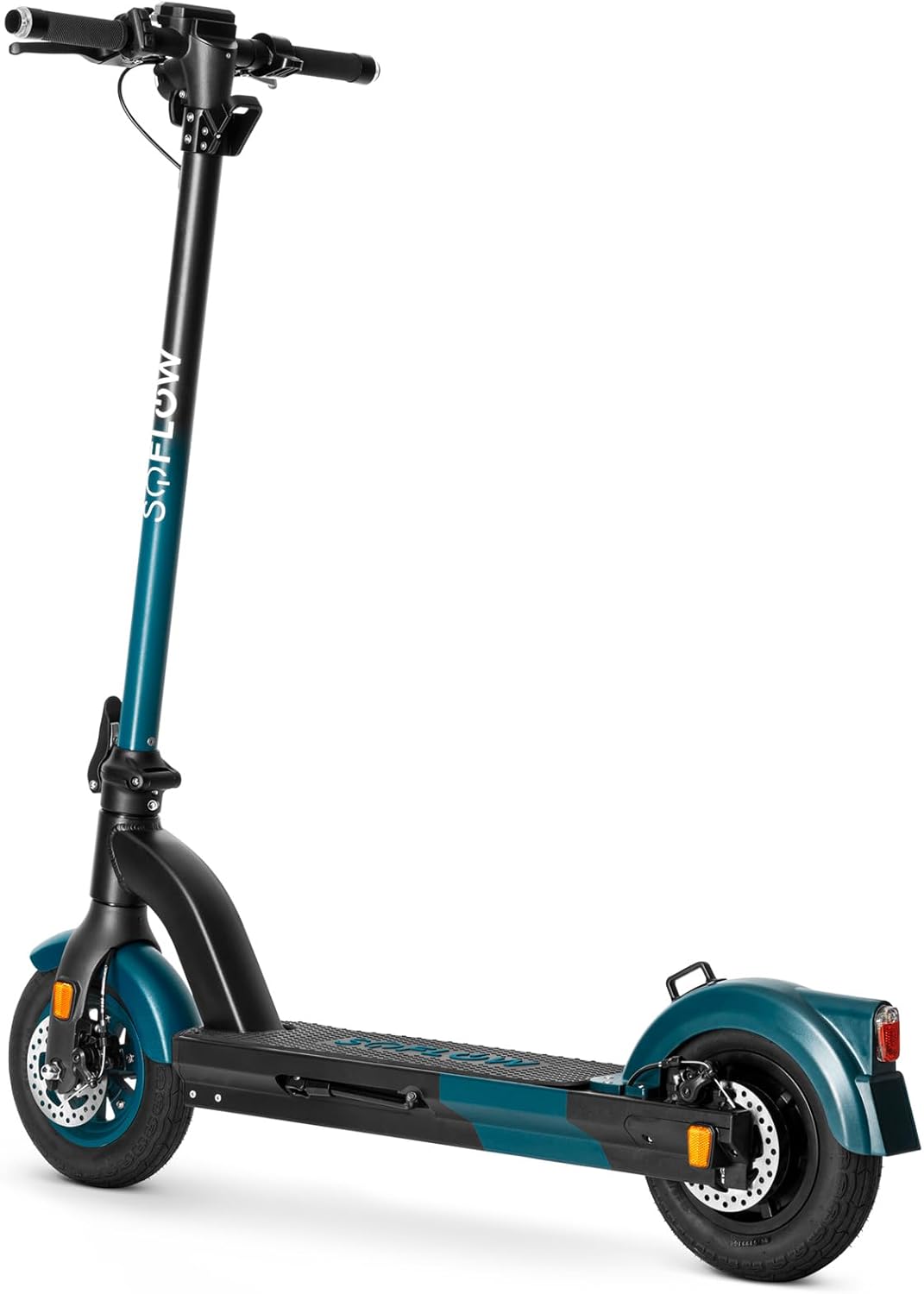
Figuur 4.2: Voorzijde view of the SoFlow SO4 Pro Gen 2 Electric Scooter, showing the front disc brake and tire.
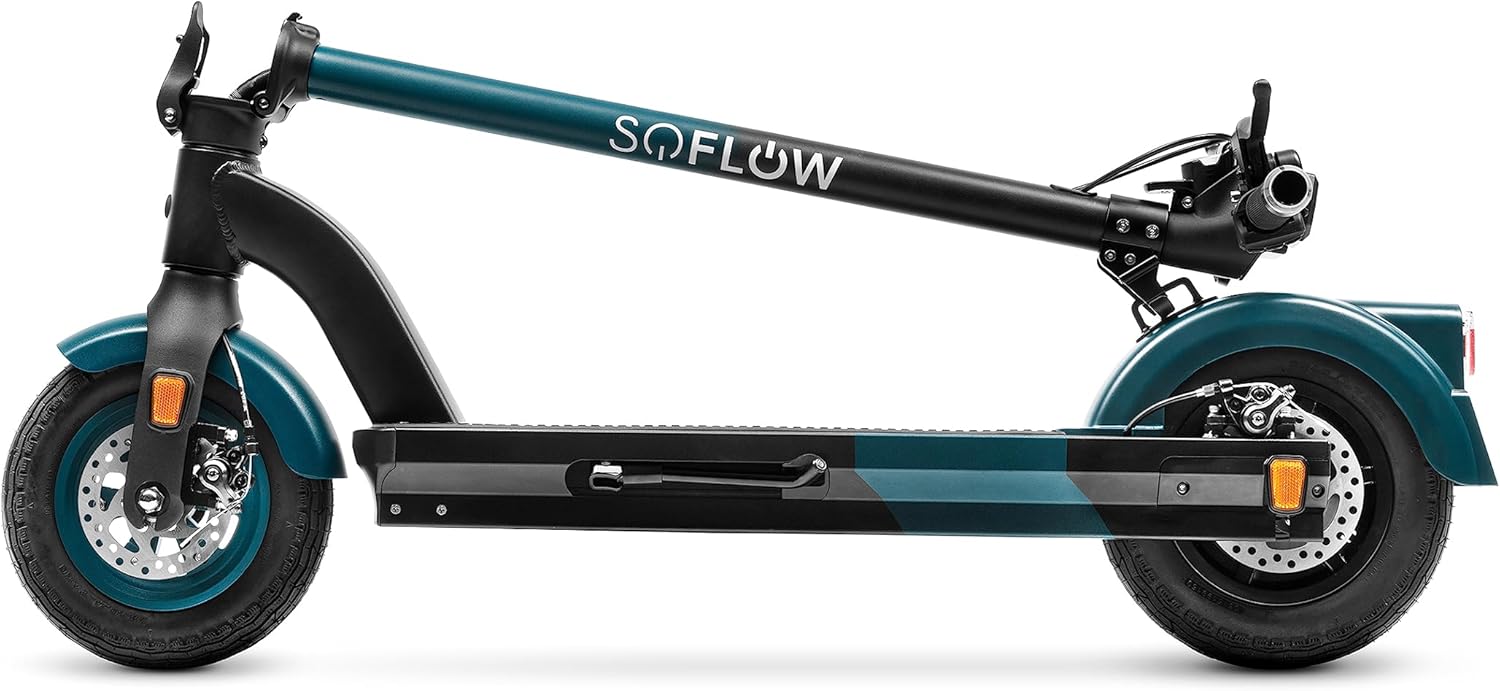
Figuur 4.3: Kant view of the SoFlow SO4 Pro Gen 2 Electric Scooter, illustrating the overall profile and rear wheel.

Figuur 4.4: Achterkant view of the SoFlow SO4 Pro Gen 2 Electric Scooter, showing the rear fender, brake light, and disc brake.

Figuur 4.5: The SoFlow SO4 Pro Gen 2 Electric Scooter in its folded position, demonstrating its compact design for transport.

Figuur 4.6: A hand removing the lithium battery from the scooter's deck compartment, illustrating the removable battery feature.
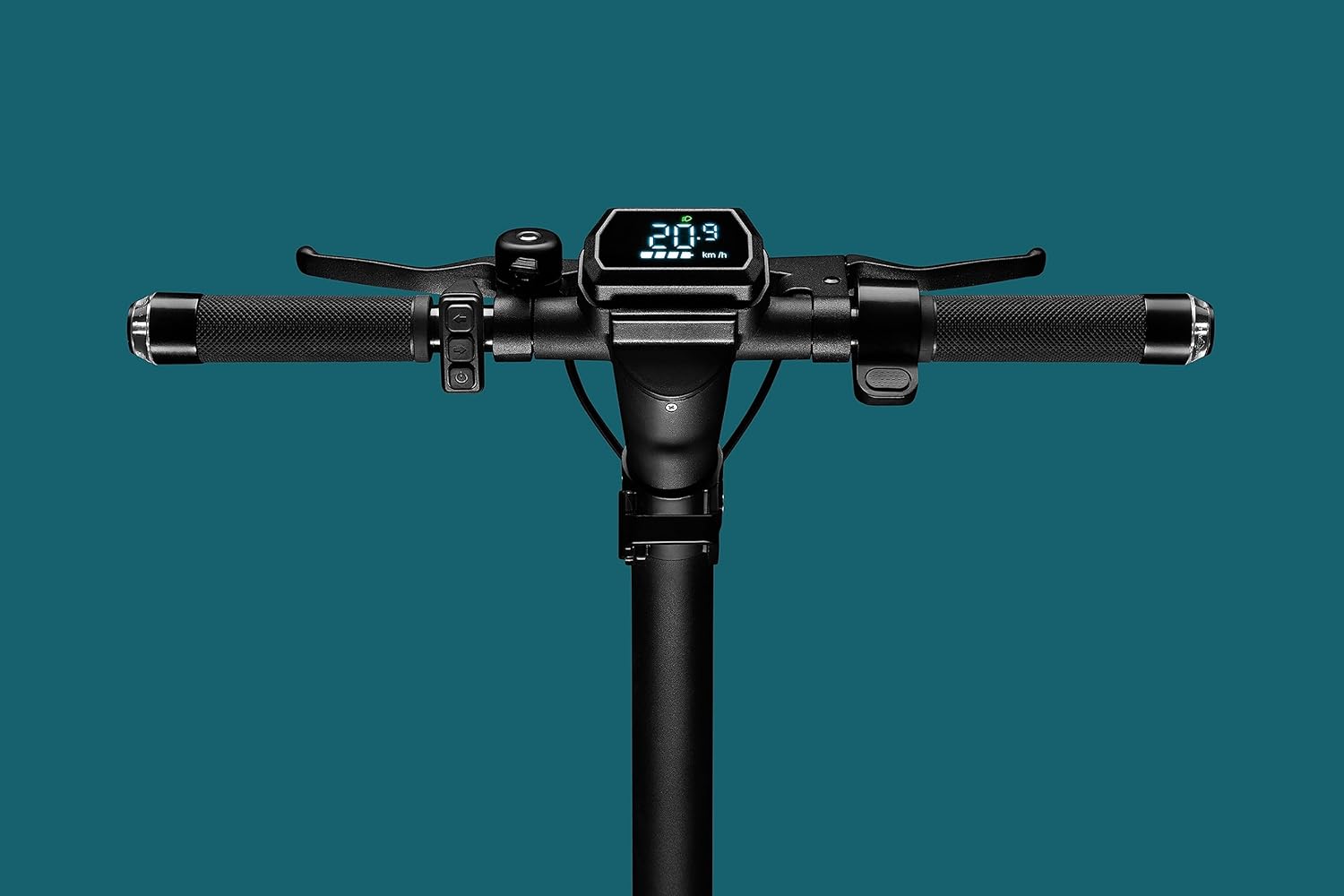
Figuur 4.7: Close-up of the handlebar display, showing the digital screen with speed and battery indicators, along with controls.

Figuur 4.8: The scooter's headlight illuminated, with integrated turn signals on the handlebars also lit, emphasizing visibility features.

Figuur 4.9: Gedetailleerd view of the front wheel and disc brake assembly.

Figuur 4.10: Gedetailleerd view of the rear wheel and disc brake assembly.
5. Instellen
5.1 De scooter uitvouwen
- Zet de scootmobiel op een vlakke ondergrond.
- Maak de vergrendeling van het inklapmechanisme los, deze bevindt zich meestal aan de onderkant van de stuurpen.
- Til de stuurpen voorzichtig omhoog totdat deze stevig in de rechtopstaande positie vastklikt. Zorg ervoor dat het vergrendelingsmechanisme volledig is ingeschakeld.
- Adjust the handlebars to your desired height if adjustable, and tighten any quick-release clamps.
5.2 De batterij opladen
The SoFlow SO4 Pro Gen 2 is equipped with a Lithium battery. For optimal performance and battery longevity, follow these charging instructions:
- Zoek de oplaadpoort op de scooter.
- Sluit de oplader aan op de oplaadpoort en steek de stekker van de oplader vervolgens in een standaard stopcontact.
- De laadindicator op de oplader geeft de laadstatus weer (bijvoorbeeld rood voor opladen, groen voor volledig opgeladen).
- A full charge takes approximately 3 hours and 50 minutes with the special "fast charge" charger.
- Always ensure the battery is fully charged before your first ride and after each use for maximum range.
6. Gebruiksaanwijzing
6.1 In-/uitschakelen
- Inschakelen: Press and hold the power button on the handlebar display until the screen illuminates.
- Uitschakelen: Houd de aan/uit-knop opnieuw ingedrukt totdat het scherm uitgaat.
6.2 Rijden op de scooter
- Zet één voet stevig op de grond en zet je af met de andere voet om vaart te krijgen.
- Zodra je in beweging bent, zet je je tweede voet op het dek.
- Gently press the accelerator lever (throttle) to engage the motor.
- The 500-watt motor provides ample power for speeds up to 25 km/h and inclines up to 18%.
- Use the integrated turn signals on the handlebars to indicate your direction changes.
6.3 Remmen
The scooter is equipped with front and rear disc brakes for precise and controlled stopping.
- To slow down or stop, gently squeeze the brake levers on the handlebars.
- Apply both brakes simultaneously for more effective stopping power.
- Vermijd plotseling of hard remmen, vooral bij hoge snelheden, om verlies van controle te voorkomen.
6.4 Using the SoFlow App
Enhance your riding experience by connecting your scooter to the intuitive SoFlow application:
- Download the SoFlow app from your smartphone's app store.
- Enable Bluetooth on your smartphone and open the SoFlow app.
- Volg de instructies in de app om uw scooter te koppelen.
- The app provides important details such as battery capacity, current speed, Bluetooth status, and light indicators.
- You can also track your completed journeys and electronically lock the scooter for added security.
7. Onderhoud
Regular maintenance ensures the longevity and optimal performance of your SoFlow SO4 Pro Gen 2 Electric Scooter.
- Schoonmaak: Veeg de scooter af met adamp Maak de doek na elk gebruik schoon. Vermijd het gebruik van hogedrukwater of agressieve chemicaliën.
- Bandenspanning: Controleer regelmatig de bandenspanning van de 10-inch luchtbanden. Houd de aanbevolen spanning aan voor optimale rijkwaliteit en actieradius.
- Remmeninspectie: Periodically inspect the front and rear disc brakes for wear and proper function. Adjust or replace brake pads as needed.
- batterij zorg: Charge the battery regularly, even if the scooter is not in use for extended periods, to maintain battery health. Store the scooter in a cool, dry place.
- Algemene controle: Routinely check all screws, bolts, and connections to ensure they are tight and secure.
8. Probleemoplossing
In dit gedeelte worden veelvoorkomende problemen besproken die u met uw scooter kunt tegenkomen.
| Probleem | Mogelijke oorzaak | Oplossing |
|---|---|---|
| Scooter start niet | Low or depleted battery; Loose battery connection; Power button malfunction | Charge the battery fully; Ensure battery is securely seated; Contact support if issue persists |
| Reduced range/autonomy | Under-inflated tires; Heavy load; Riding uphill frequently; Cold weather | Check and inflate tires to recommended pressure; Reduce load; Adjust riding style; Battery performance may be reduced in cold temperatures |
| Remmen voelen zwak aan | Worn brake pads; Loose brake cable; Disc brake misalignment | Inspect brake pads and replace if worn; Adjust brake cable tension; Consult a technician for disc brake alignment |
| Ongebruikelijke geluiden tijdens de werking | Losse onderdelen; Vuil in wielen/remmen; Motorprobleem | Check all fasteners; Clean wheels and brakes; If noise persists, contact customer support |
9. Technische specificaties
Detailed specifications for the SoFlow SO4 Pro Gen 2 Electric Scooter:
| Functie | Specificatie |
|---|---|
| Merk | ZoFlow |
| Modelnaam | SO4 PRO Gen2 |
| Artikelmodelnummer | 300.450.01 |
| Productafmetingen (L x B x H) | 109.1x46.6x114.5cm |
| Gewicht | 17.50 kg |
| Maximale draagkracht | 150 kilogram |
| Motorvermogen | 500W |
| Batterijtype | Lithium-ion |
| Oplaadtijd | Ongeveer 3 uur en 50 minuten |
| Maximale snelheid | 25 KM/U |
| Range (Autonomy) | Ongeveer 40 km |
| Maximale helling | 18% |
| Wielmaat | 10 inch |
| Remmen | Front and Rear Disc Brakes, Regenerative Braking |
| Framemateriaal | Aluminium |
| Speciale kenmerken | NFC Anti-theft, Integrated Turn Signals, SoFlow App Connectivity, Foldable |
10. Garantie en ondersteuning
Your SoFlow SO4 Pro Gen 2 Electric Scooter comes with a standard manufacturer's warranty covering defects in materials and workmanship under normal use. Please refer to the warranty card included in your package for specific terms and conditions, including the warranty period and coverage details.
For technical support, warranty claims, or any questions regarding your scooter, please contact SoFlow customer service through their official webwebsite of de contactgegevens die u in uw aankoopdocumentatie vindt.


