1. Inleiding
This manual provides essential information for the operation and maintenance of your Apple iPad Air (4th Generation) 10.9-inch Wi-Fi + Cellular 64GB. This device is a renewed product, meaning it has been professionally inspected, tested, and cleaned by Amazon-qualified suppliers to ensure full functionality. It may not be Apple certified, but it is guaranteed to have no visible cosmetic imperfections when held at arm's length, and the battery capacity will exceed 80% relative to new. Accessories may not be original but are compatible and fully functional. The product may arrive in a generic box.

Figure 1: Apple iPad Air (4th Generation) - Front and Rear View
2. Product voorbijview
The iPad Air (4th Generation) features a 10.9-inch Liquid Retina display, powered by the A14 Bionic chip for efficient performance. It includes Wi-Fi + Cellular connectivity and 64GB of storage. Key features include:
- Weergave: 10.9-inch Liquid Retina display (2360 x 1640 Pixels)
- Verwerker: A14 Bionic-chip
- Opslag: 64GB
- Besturingssysteem: iPadOS 14
- Beveiliging: Touch ID integrated into the top button
- Connectiviteit: Wi-Fi, Cellular, Bluetooth, USB-C port
- Camera's: Front and rear cameras (1080p scanner resolution)
- Verenigbaarheid: Supports Apple Pencil (2nd Generation) and Magic Keyboard
- Afmetingen: 7.02 x 9.74 x 0.24 inch
- Gewicht: 1 pond

Figure 2: iPad Air (4th Generation) - Side View with USB-C Port
3. Instellen
To begin using your iPad Air, follow these initial setup steps:
- Uitpakken: Carefully remove the iPad Air and included accessories (USB Data Cable and power adapter) from the packaging.
- Eerste keer inschakelen: Press and hold the top button (integrated with Touch ID) until the Apple logo appears.
- Opladen: If the device does not power on, connect the USB-C cable to the iPad's USB-C port and the power adapter, then plug it into a power outlet. The iPad Air supports fast charging.
- Snel starten: Follow the on-screen instructions to select your language and region. You can use Quick Start to automatically transfer data from an existing iPhone or iPad by placing them near each other, or set up manually.
- Touch ID instellen: During setup, you will be prompted to configure Touch ID for secure unlocking and purchases.
Video 1: Unboxing and Initial Setup of iPad Air (4th Generation), demonstrating the USB-C port and power-on sequence.
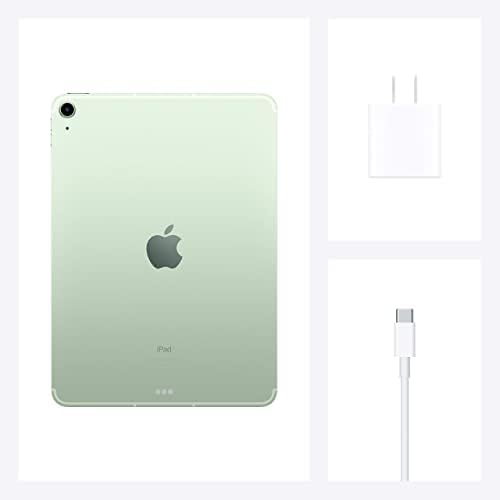
Figure 3: Included USB-C Data Cable and Power Adapter
4. Gebruiksaanwijzing
The iPad Air runs on iPadOS, offering an intuitive touch interface. Here are basic operating guidelines:
- Navigatie: Swipe up from the bottom to go to the Home screen. Swipe down from the top-right corner for Control Center, and from the top-left for Notifications.
- App-beheer: Tap an app icon to open it. Swipe left or right on the Home screen to access different pages of apps. Swipe down on any Home screen to access Search.
- Multitasking: Gebruik Split View Of schuif de app over om met meerdere apps tegelijk te werken.
- Apple Pencil (2nd Gen): Attach the Apple Pencil magnetically to the side of the iPad for charging and pairing. Use it for drawing, note-taking, and marking up documents.
- Magisch toetsenbord: Connect the Magic Keyboard for a laptop-like experience, enabling typing and trackpad navigation.
Video 2: Demonstration of iPad Air (4th Generation) usage, including note-taking with Apple Pencil and integration with Magic Keyboard.
5. Onderhoud
Proper care ensures the longevity of your iPad Air:
- Schoonmaak: Gebruik een zachte, pluisvrije doek om het scherm en de buitenkant schoon te maken. Vermijd schurende materialen of agressieve chemicaliën.
- batterij zorg: To optimize battery life, avoid exposing the device to extreme temperatures. The renewed product is guaranteed to have a battery capacity exceeding 80% of a new device.
- Software-updates: Keep your iPadOS updated to the latest version for optimal performance and security.
- Opslagbeheer: Regularly manage your storage to ensure smooth operation. Delete unnecessary apps and files.
6. Probleemoplossing
If you encounter issues with your iPad Air, consider the following:
- Apparaat reageert niet: If the screen is unresponsive, try a force restart: Press and quickly release the Volume Up button, press and quickly release the Volume Down button, then press and hold the Top button until the Apple logo appears.
- Touch ID Issues: Ensure your finger is clean and dry when using Touch ID. If issues persist, try re-registering your fingerprints in Settings.
- Problemen met opladen: Verify that the USB-C cable and power adapter are securely connected and that the power outlet is functional.
- App crasht: Close and reopen the app. If the problem continues, check for app updates in the App Store or reinstall the app.
- Connectiviteitsproblemen: For Wi-Fi or Cellular problems, try toggling Wi-Fi/Cellular off and on, or restart your iPad.
For further assistance, refer to Apple's official support resources or contact customer service.
7. Specificaties
| Functie | Specificatie |
|---|---|
| Productafmetingen | 7.02 x 9.74 x 0.24 inch |
| Artikelgewicht | 1 pond |
| ASIN | B08PF8HCDJ |
| Artikelmodelnummer | A2324 |
| Batterijen | 1 lithium-ionbatterijen vereist (inbegrepen) |
| OS | iPadOS 14 |
| GPU | Appel |
| RAM | 6GB |
| Draadloze communicatietechnologieën | Cellulair |
| Connectiviteitstechnologieën | Bluetooth |
| Weergaveresolutie | 2048x1536 (2360 x 1640 Max) |
| Menselijke interface-invoer | Touchscreen met ondersteuning voor stylus |
| Scannerresolutie | 1080p |
| Andere camerafuncties | Voorkant |
| Kleur | Groente |
| Wat zit er in de doos? | USB-gegevenskabel |
| Fabrikant | Apple-computer |
| Datum eerste beschikbaarheid | 2 december 2020 |
| Staande schermgrootte | 10.9 inch |
| Geheugenopslagcapaciteit | 64GB |
| Merk | Appel |
8. Garantie en ondersteuning
As a renewed product, your iPad Air is backed by the Amazon Renewed Guarantee:
- 90-Day Replacement or Refund: This product is eligible for a replacement or refund within 90 days of receipt if you are not satisfied.
- Amazon Renewed Conditions: Alle Amazon Renewed-producten zijn volledig functioneel en worden geleverd met generieke of originele accessoires en verpakking.

Figure 4: Amazon Renewed Product Condition Guidelines
For any support needs, please refer to the Amazon Renewed program details or contact Amazon customer service directly.


