1. Product voorbijview
The Rowenta Nomad TN2307 is a rechargeable beard trimmer designed for precise and convenient grooming. It features high-quality stainless steel blades and an adjustable comb for various cutting lengths.

Image 1.1: Rowenta Nomad TN2307 Beard Trimmer, showing the main unit, adjustable comb, cleaning brush, oil bottle, and power adapter.
2. Inhoud van het pakket
Controleer of alle artikelen in het pakket aanwezig zijn:
- Rowenta Nomad TN2307 Beard Trimmer
- Verstelbare baardkam (3-7 mm)
- Stroomadapter
- Reinigingsborstel
- Smeerolie fles
- Gebruiksaanwijzing (dit document)
3. Instellen en opladen
3.1 Initiële kosten
- Before first use, fully charge the trimmer for approximately 8 hours.
- Sluit de voedingsadapter aan op de oplaadpoort van de trimmer.
- Steek de adapter in een standaard stopcontact (240V).
- The charging indicator light (red LED) on the trimmer will illuminate during charging. It may not change color or turn off when fully charged, so rely on the recommended charging time.
A full charge provides approximately 60 minutes of cordless operation.
3.2 Attaching the Adjustable Comb
- Zorg ervoor dat de trimmer is uitgeschakeld.
- Align the adjustable comb with the trimmer head.
- Gently slide the comb onto the trimmer head until it clicks into place.
- To remove, push the comb upwards and slide it off.

Image 3.1: Rowenta Nomad TN2307 with the adjustable comb guide attached, showing the length settings.
4. Gebruiksaanwijzing
4.1 In-/uitschakelen
- To turn on, slide the ON/OFF switch upwards.
- To turn off, slide the ON/OFF switch downwards.
4.2 De snijlengte aanpassen
The adjustable comb allows for cutting lengths from 3mm to 7mm, in 1mm increments. To adjust the length:
- Zorg ervoor dat de trimmer uit staat.
- With the comb attached, slide the comb adjustment button up or down to select the desired length. The selected length (3, 4, 5, 6, or 7mm) will be indicated on the comb.
For a very short trim (0.5mm), remove the adjustable comb and use the trimmer directly against the skin.
4.3 Je baard trimmen
- Zorg ervoor dat uw baard schoon en droog is voordat u hem trimt.
- Start with a longer length setting if you are unsure, and gradually reduce it until you achieve the desired length.
- Houd de trimmer vast met de mesjes naar uw baard gericht.
- Beweeg de trimmer tegen de haargroeirichting in voor een gelijkmatige snit.
- Use smooth, controlled strokes.
- For detailing and shaping, remove the comb and use the trimmer blades carefully.
5. Onderhoud en reiniging
Regular cleaning and maintenance ensure optimal performance and extend the life of your trimmer.
5.1 De messen reinigen
- Turn off the trimmer and disconnect it from the power adapter.
- Verwijder de verstelbare kam.
- Use the provided cleaning brush to remove any hair clippings from the blades and the trimmer head.
- For thorough cleaning, the blade set can be detached. Refer to the diagram below for blade removal.
- After cleaning, reattach the blade set securely.
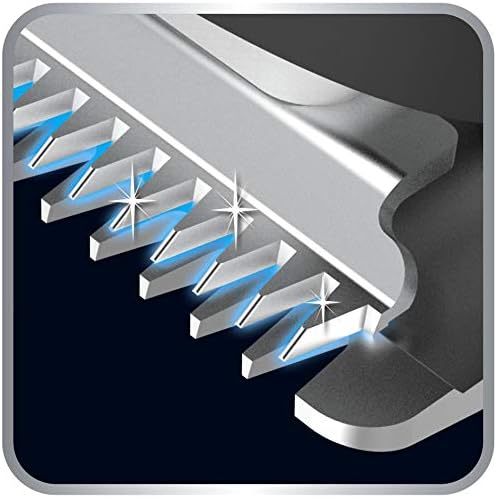
Afbeelding 5.1: Close-up view of the stainless steel blades, highlighting their design for effective trimming.
5.2 Het smeren van de messen
After every few uses, or if the trimmer's performance decreases, lubricate the blades:
- Ensure the blades are clean and dry.
- Apply one or two drops of the provided lubricating oil (or a suitable light machine oil) onto the blades.
- Turn on the trimmer for a few seconds to distribute the oil evenly.
- Veeg overtollige olie af met een zachte doek.
5.3 Opslag
Store the trimmer in a dry place, away from direct sunlight and extreme temperatures. Ensure it is turned off and disconnected from the power source before storing.
6. Probleemoplossing
| Probleem | Mogelijke oorzaak | Oplossing |
|---|---|---|
| Trimmer gaat niet aan. | Batterij is leeg. | Charge the trimmer for the recommended time (Section 3.1). |
| Slechte snijprestaties. | Blades are dirty or not lubricated. | Clean and lubricate the blades (Section 5.1, 5.2). |
| De trimmer trekt aan het haar. | De messen zijn bot of zitten vol met haar. | Clean and lubricate blades. If problem persists, blades may need replacement. |
| Charging indicator light not on. | Power adapter not properly connected or faulty outlet. | Ensure adapter is securely connected to trimmer and outlet. Test outlet with another device. |
7. Technische specificaties
- Model: TN2307
- Merk: Rijenta
- Energiebron: Oplaadbare NiMH-batterij
- Batterijautonomie: Tot 60 minuten
- Oplaadtijd: Approximately 8 hours (initial charge)
- Bladmateriaal: Roestvrij staal
- Snijlengtes: 0.5mm (without comb), 3mm to 7mm (with adjustable comb, 1mm increments)
- Ingangsvolumetage: 240V
- Afmetingen (L x B x H): 150x25x35mm
- Gewicht: 120 gram
8. Garantie en ondersteuning
This product is covered by a manufacturer's warranty. Please refer to the warranty card included in your package for specific terms and conditions. For technical support, spare parts, or service, please contact Rowenta customer service or visit the official Rowenta webplaats.
Officiële Rowenta Webwebsite: www.rowenta.com


