1. Inleiding
The TC Electronic Flashback 2 Mini Delay is a compact and powerful delay pedal designed for guitarists. It features next-generation delay algorithms, the innovative MASH footswitch for expressive control, and TonePrint technology for custom sound creation. This manual provides essential information for setting up, operating, and maintaining your Flashback 2 Mini Delay pedal.
2. Belangrijke veiligheidsinstructies
- Lees deze instructies aandachtig door voordat u het apparaat in gebruik neemt.
- Bewaar deze instructies voor toekomstig gebruik.
- Neem alle waarschuwingen in acht en volg alle instructies op.
- Gebruik dit apparaat niet in de buurt van water.
- Alleen schoonmaken met een droge doek.
- Blokkeer geen ventilatieopeningen. Installeer volgens de instructies van de fabrikant.
- Installeer het apparaat niet in de buurt van warmtebronnen zoals radiatoren, warmteroosters, kachels of andere apparaten (inclusief ampwarmtebronnen) die warmte produceren.
- Gebruik uitsluitend de door de fabrikant gespecificeerde hulpstukken/accessoires.
- Laat al het onderhoud over aan gekwalificeerd onderhoudspersoneel. Onderhoud is vereist wanneer het apparaat op enigerlei wijze is beschadigd.
3. Inhoud van het pakket
Controleer het pakket op de volgende items:
- TC Electronic Flashback 2 Mini Delay Pedal
- Gebruikershandleiding (dit document)
- TC Electronic sticker
Note: A 9V DC power supply (not included) is required for operation.
4. Bediening en aansluitingen

Figuur 1: Voorzijde view of the Flashback 2 Mini Delay pedal, showing the three control knobs and the MASH footswitch.
4.1 Bedieningselementen op het bovenpaneel
- VERTRAGINGSKNOP: Controls the delay time, from short slap-back echoes to long, ambient repeats.
- F.BACK-knop: Adjusts the number of repeats (feedback) for the delay effect. Turn clockwise for more repeats, counter-clockwise for fewer.
- LEVEL-knop: Sets the mix level of the delayed signal relative to the dry signal.
- MASH Footswitch: This multi-functional footswitch acts as an on/off switch with a single tap. Pressing and holding the footswitch engages the MASH expression control, allowing you to dynamically control various delay parameters depending on the selected TonePrint.
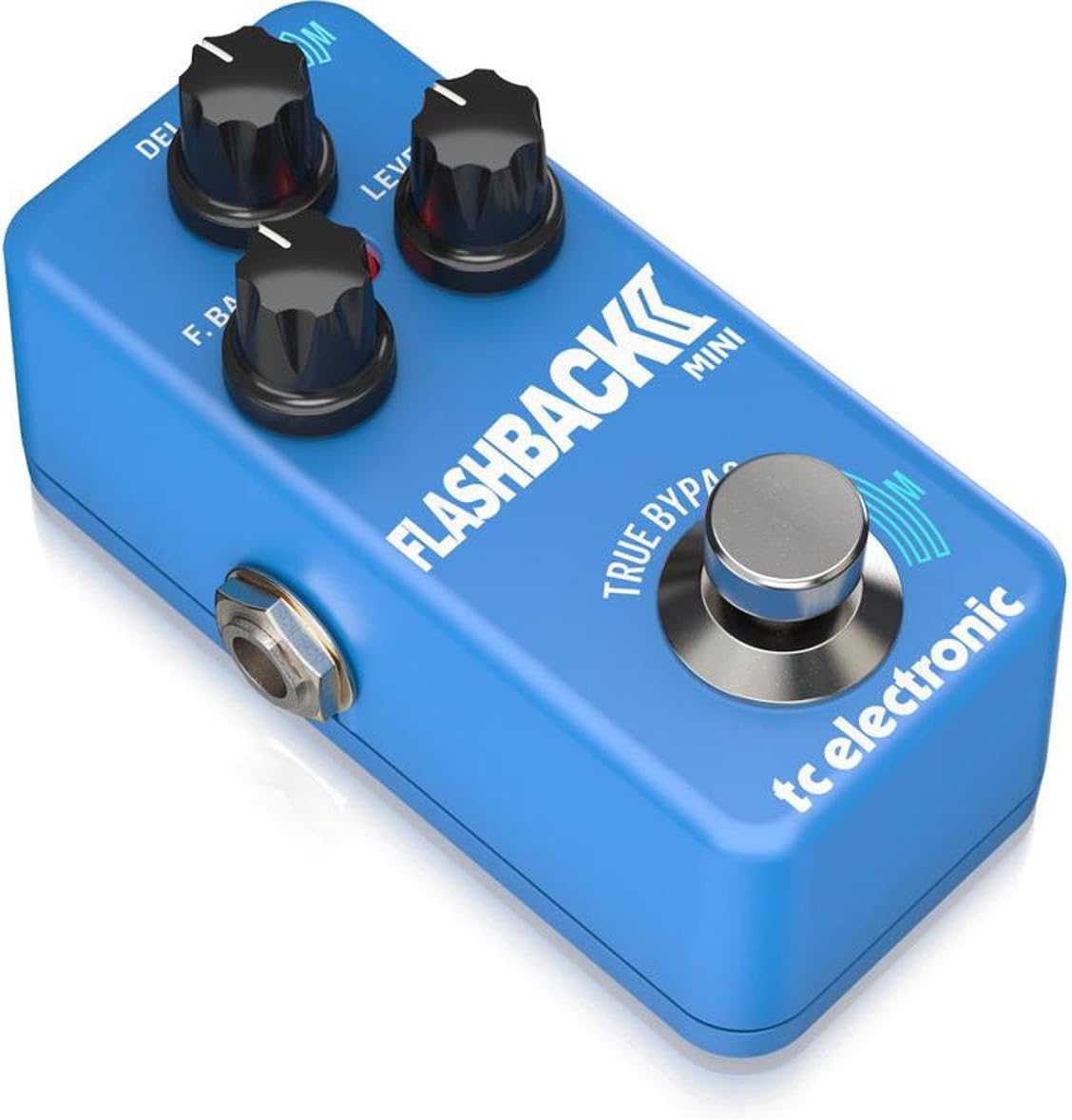
Figuur 2: Schuin view of the Flashback 2 Mini Delay pedal, highlighting the input, output, and power connections.
4.2 Side Panel Connectors
- INPUT-aansluiting: Connect your guitar or the output of another pedal here using a standard 1/4-inch instrument cable.
- OUTPUT-aansluiting: Verbind dit met uw ampSluit de versterker of de ingang van het volgende pedaal in je signaalketen aan met een standaard 1/4-inch instrumentkabel.
- 9V DC-voedingsingang: Connect a standard 9V DC, center-negative power supply (not included) here.
- USB-poort: Used for connecting the pedal to a computer for TonePrint editing and firmware updates.
5. Instellen
Follow these steps to connect your Flashback 2 Mini Delay pedal:
- Zorg ervoor dat uw amplifier is turned off or its volume is set to zero.
- Connect your guitar (or the output of a preceding pedal) to the INVOER jack of the Flashback 2 Mini using a 1/4-inch instrument cable.
- Sluit de UITVOER jack of the Flashback 2 Mini to your amplifier (or the input of a subsequent pedal) using another 1/4-inch instrument cable.
- Connect a 9V DC, center-negative power supply (not included) to the 9V DC-voedingsingang.
- Once all connections are secure, you can power on your amplifier and begin using the pedal.
6. Operating the Flashback 2 Mini
6.1 Basisbediening
To activate the delay effect, simply tap the MASH footswitch. The LED indicator will illuminate. Tap it again to bypass the effect. Adjust the DELAY, F.BACK, and LEVEL knobs to shape your desired delay sound.
6.2 MASH Footswitch Functionality
The MASH footswitch offers pressure-sensitive expression control. While the effect is active, press and hold the footswitch with varying pressure to dynamically control a specific parameter of the delay. The parameter controlled by MASH is determined by the selected TonePrint. For example, MASH can control delay time, feedback, modulation, or other effects.
6.3 TonePrint Feature
TonePrint allows you to load custom delay sounds created by TC Electronic and famous artists, or design your own using the free TonePrint Editor software. To load a TonePrint:
- Download the free TC Electronic TonePrint App for your smartphone or the TonePrint Editor for your computer.
- Using the app, select a TonePrint and 'beam' it to your pedal by holding your phone's speaker near your guitar pickup.
- Alternatively, connect the pedal to your computer via the USB port and use the TonePrint Editor software to load or create custom sounds.
6.4 Delay Algorithms
The Flashback 2 Mini features a range of high-quality delay algorithms, including new Tape and Analog algorithms for classic delay tones, and Crystal Delay algorithms based on the Sub'n'Up Octaver for unique, shimmering effects.
6.5 Bypass Modes (True Bypass / Buffered Bypass)
The pedal offers switchable bypass modes: True Bypass and Buffered Bypass. True Bypass ensures that your signal remains completely unaltered when the pedal is off, while Buffered Bypass provides a strong, clean signal over long cable runs. The bypass mode can typically be switched via an internal dip switch or through the TonePrint Editor software. Refer to the TonePrint Editor documentation for specific instructions on changing the bypass mode.
7. Onderhoud
- Houd het pedaal schoon door het af te vegen met een zachte, droge doek. Vermijd het gebruik van schurende reinigingsmiddelen of oplosmiddelen.
- Bewaar het pedaal op een droge plaats, uit de buurt van extreme temperaturen en vochtigheid.
- Ensure all cables are securely connected during use and disconnected when not in use to prevent accidental damage.
8. Probleemoplossing
- Geen geluid: Check all cable connections. Ensure the power supply is correctly connected and functioning. Verify that your ampDe versterker staat aan en het volume staat hoog.
- Zwak of vervormd geluid: Check cable integrity. Ensure the power supply provides the correct voltage (9V DC) and polarity (center-negative). Adjust the LEVEL knob on the pedal.
- Het pedaal gaat niet aan: Confirm the power supply is connected and working. Try a different power outlet or power supply.
- MASH Footswitch Not Responding: Ensure the pedal is powered on and the effect is active. If using a custom TonePrint, verify that MASH control is assigned to a parameter within the TonePrint Editor.
- TonePrint Transfer Issues: Ensure your smartphone speaker is placed directly over your guitar pickup for beaming. For USB connection, ensure the correct drivers are installed and the TonePrint Editor software is up to date.
9. Specificaties
| Artikelgewicht | 7.1 ounces (200 gram) |
| Productafmetingen | 9.3 x 5.1 x 5 cm (3.66"L x 2.01"B x 1.97"H) |
| Energiebron | Corded Electric (9V DC, center-negative, not included) |
| Deeltage | 9 Volt |
| hardware Interface | USB |
| Signaalformaat | Analog (Analog-Dry-Through) |
| Bypass-modus | Switchable True Bypass / Buffered Bypass |
10. Garantie en ondersteuning
TC Electronic products are designed for reliability and performance. For detailed warranty information, please refer to the warranty card included with your product or visit the official TC Electronic website. For technical support, firmware updates, or to access the TonePrint Editor, please visit the TC Electronic support page online.
Aanvullende informatie en contactgegevens vindt u op: www.tcelectronic.com


