1. Overview
The Belkin BoostCharge USB-C to USB-C Fast Charging Cable is designed for efficient power delivery and data transfer between compatible USB-C devices. This 6.6ft (2M) cable supports fast charging up to 60W and data transfer speeds up to 480 Mbps, ensuring reliable performance for a wide range of electronics.
2. Producteigenschappen
- Universele compatibiliteit: Connects with a broad range of USB-C devices, including iPhone 17/16 Series, Samsung Galaxy S25/S24, Google Pixel 9, Nintendo Switch 2, iPad Pro, MacBook Pro, and more. Supports Apple Carplay and Android Auto.
- Snel opladen: Delivers up to 60W Power Delivery, enabling fast charging of compatible USB-C smartphones from 0-50% in approximately 35 minutes when paired with an 18W or higher USB-C PD charger (not included).
- Superieure duurzaamheid: Engineered with a durable braided material, tested to withstand over 8,000 bends and 10,000 plugs, offering enhanced longevity compared to standard cables.
- Gegevensoverdracht: Supports data transfer speeds up to 480 Mbps (USB 2.0 standard) for syncing music, photos, and other data.
- USB-IF-gecertificeerd: Ensures adherence to strict electrical, mechanical, and environmental standards for a safe and reliable user experience.
Afbeelding: Illustratie van de snellaadfunctie van 60 W.
Image: USB-IF certification for 60W power delivery.
Image: Durability testing results for bends and plugs.
3. Inhoud van het pakket
Het pakket bevat:
- 1 x Belkin USB-C to USB-C Cable (2M/6.6ft)
4. Instellen
To set up your Belkin BoostCharge USB-C to USB-C cable:
- Ensure your charging adapter and device are compatible with USB-C and support the desired power delivery (e.g., 60W for fast charging).
- Connect one end of the Belkin USB-C cable to the USB-C port on your power adapter.
- Connect the other end of the Belkin USB-C cable to the USB-C port on your device (e.g., smartphone, tablet, laptop).
- Sluit de stroomadapter aan op een stopcontact.

Image: A Belkin USB-C to USB-C cable connected to a device.
5. Gebruiksaanwijzing
5.1 Uw apparaat opladen
Once connected as described in the Setup section, your device should begin charging automatically. The cable supports fast charging for devices that are compatible with USB Power Delivery (PD) and are paired with an appropriate power adapter.
5.2 Gegevensoverdracht
To transfer data between two USB-C compatible devices (e.g., a smartphone and a laptop):
- Connect one end of the Belkin USB-C cable to the USB-C port on the source device.
- Connect the other end of the Belkin USB-C cable to the USB-C port on the destination device.
- Follow the on-screen prompts on your devices to initiate data transfer. The cable supports USB 2.0 data transfer speeds up to 480 Mbps.
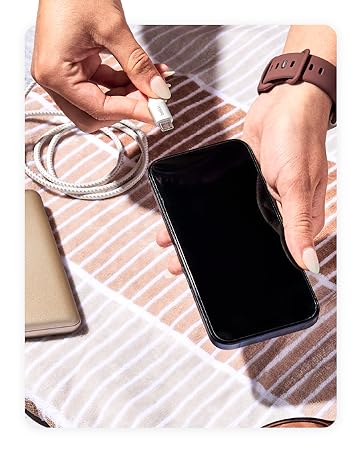
Image: Wide compatibility with various USB-C devices.
6. Onderhoud
To ensure the longevity and optimal performance of your Belkin BoostCharge USB-C to USB-C cable:
- Opslag: Bewaar de kabel op een koele, droge plaats, uit de buurt van direct zonlicht en extreme temperaturen. Vermijd het strak oprollen of buigen van de kabel in scherpe hoeken om interne schade te voorkomen.
- Schoonmaak: Use a soft, dry cloth to gently wipe the cable and connectors. Do not use liquid cleaners or abrasive materials.
- Behandeling: Pak de connector altijd vast bij het aansluiten of loskoppelen van de kabel, en trek niet aan de kabel zelf.
- Inspectie: Controleer de kabel regelmatig op slijtage, rafelen of beschadiging van de connectoren. Stop het gebruik als er schade wordt geconstateerd.
7. Probleemoplossing
7.1 Apparaat laadt niet op
- Controleer verbindingen: Zorg ervoor dat beide uiteinden van de kabel stevig in het apparaat en de voedingsadapter zijn aangesloten.
- Energiebron: Verify that the power adapter is plugged into a working wall outlet. Try a different outlet if necessary.
- Adaptercompatibiliteit: Confirm that your power adapter provides sufficient wattage for your device and supports USB Power Delivery (PD) for fast charging.
- Kabelconditie: Inspect the cable for any visible damage. A damaged cable may not function correctly.
- Apparaatprobleem: Test the cable with another compatible device or try a different cable with your device to isolate the problem.
7.2 Trage laadsnelheid
- Stroomadapter: Ensure you are using an 18W or higher USB-C PD charger for optimal fast charging speeds.
- Apparaatondersteuning: Confirm that your device supports fast charging via USB-C PD.
- Achtergrond-apps: Sluit alle energie-intensieve applicaties die op de achtergrond op uw apparaat draaien.
- Kabellengte: While this cable is 2M, longer cables can sometimes result in slightly slower charging. Ensure the cable is not excessively long for your needs.
7.3 Problemen met gegevensoverdracht
- Verbinding: Re-seat both ends of the cable to ensure a stable connection.
- Apparaat instellingen: Check your device's settings to ensure data transfer is enabled (e.g., USB preferences on Android devices).
- Problemen met stuurprogramma's: Ensure necessary drivers are installed on your computer for the connected device.
8. Specificaties
| Functie | Beschrijving |
|---|---|
| Modelnaam | BoostCharge USB-C to USB-C Cable |
| Modelnummer | CAB003bt2M |
| Kabellengte | 2M (6.6ft) |
| Aansluitingstype | USB Type C (mannelijk naar mannelijk) |
| Vermogensafgifte | Tot 60W |
| Gegevensoverdrachtsnelheid | Tot 480 Mbps (USB 2.0) |
| Duurzaamheid | Tested to 8,000+ bends, 10,000+ plugs |
| Certificering | USB-IF-gecertificeerd |
| Kleur | Zwart |
| Materiaal | Durable braided material |
| Productafmetingen | 1 x 4 x 5.21 inch |
| Artikelgewicht | 0.07 kilogram (2.39 ounces) |
Image: Internal engineering for safety and performance.
9. Garantie en ondersteuning
Belkin biedt een 2 jaar dekking for this BoostCharge USB-C to USB-C cable. For technical support, warranty claims, or further assistance, please visit the official Belkin support website of neem contact op met hun klantenservice.

Image: Belkin 2-Year Coverage and quality assurance.
10. Officiële productvideo
Video: Belkin Brand OverviewDeze video geeft een algemeen overzichtview of the Belkin brand and its commitment to quality and innovation.


