1. Inleiding
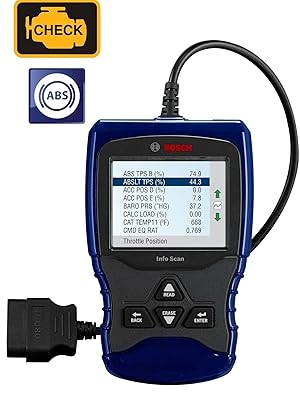
The Bosch OBD 1150 Trilingual Scan Tool is a diagnostic device designed for use on all 1996 and newer import and domestic vehicles (OBD II & CAN compliant), as well as 1994 and 1995 OBD II compliant vehicles. This tool provides comprehensive vehicle data to assist in diagnosing and resolving automotive issues.
Belangrijkste kenmerken zijn:
- Over 15,000 generic and manufacturer-specific Diagnostic Trouble Code (DTC) definitions.
- Live real-time data with over 300 possible data PIDs (depending on vehicle).
- Ability to record and playback live data.
- Graphing of live data.
- ABS codes and definitions for most 1996-2013 GM, Ford, Chrysler, Toyota, Honda, Nissan, and Hyundai vehicles.
- AutoID feature for automatic vehicle identification (VIN#, make, model, year) for most 2000 and newer vehicles.
- Enhanced Engine and Transmission Codes.
- Read and erase DTCs, reset MIL, and turn off the Check Engine light.
- Battery, Alternator, and Charging System Monitor.
- Trilingual menu and code definitions (English, Spanish, French).
- Component Locator for text-based descriptions of component locations.
- Color display and ergonomic design for ease of use.
- Updateable via USB port.
2. Instellen
Follow these steps to prepare your Bosch OBD 1150 Scan Tool for use:
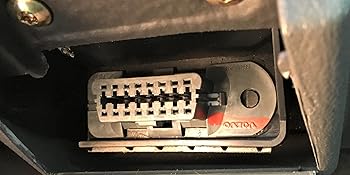
- Zoek de OBD-II-poort: The OBD-II port is typically located under the dashboard on the driver's side of the vehicle. Refer to your vehicle's service manual if you cannot locate it.
- Connect the Scan Tool: Plug the scan tool's OBD-II connector firmly into the vehicle's OBD-II port. Ensure a secure connection.
- Power On the Vehicle: Turn the vehicle's ignition to the 'ON' position without starting the engine. The scan tool will power on automatically.
- Select Language (if prompted): If this is the first use or after a reset, the tool may prompt you to select your preferred language (English, Spanish, or French). Use the navigation buttons to select and press 'ENTER'.
3. Gebruiksaanwijzing
The Bosch OBD 1150 offers various diagnostic functions. Navigate through the menus using the UP/DOWN arrow buttons and confirm selections with the 'ENTER' button.
3.1. Diagnostische foutcodes (DTC's) uitlezen
- Selecteer in het hoofdmenu 'Read Codes' and press 'ENTER'.
- The tool will communicate with the vehicle's ECU and display any stored DTCs.
- Use the UP/DOWN arrows to scroll through multiple codes if present. The display will show the code number and a brief description.
- For more detailed definitions, refer to the comprehensive trilingual user manual included with the tool.
3.2. Erasing DTCs and Resetting MIL
Voorzichtigheid: Erasing DTCs will clear all diagnostic data. Ensure you have recorded any necessary information before proceeding.
- Selecteer in het hoofdmenu 'Erase Codes' and press 'ENTER'.
- Confirm your selection when prompted. This action will clear the DTCs and turn off the Malfunction Indicator Lamp (MIL), also known as the Check Engine light.
3.3. ViewLive gegevens
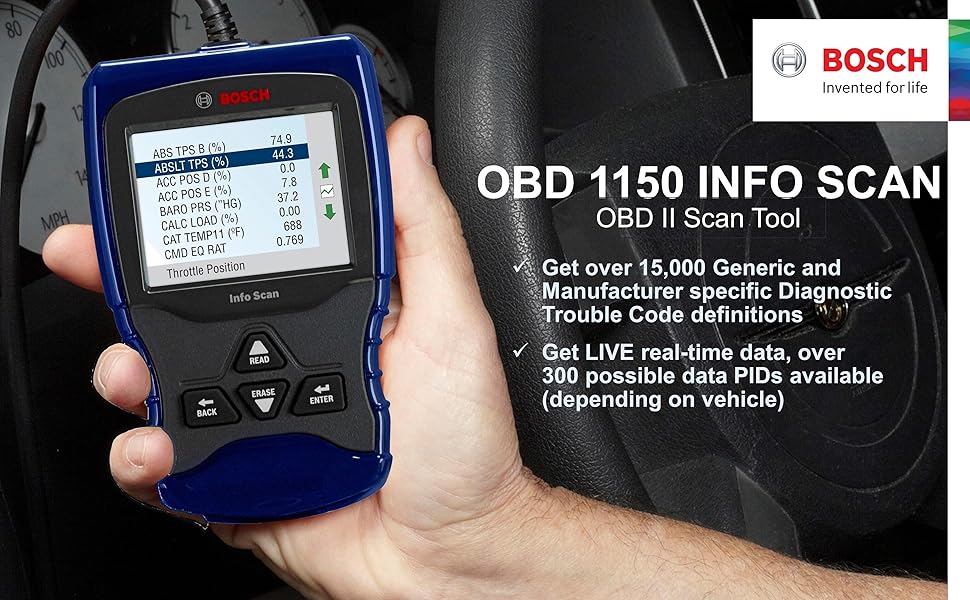
Live Data allows you to view real-time sensor, switch, and relay inputs while the engine is running.
- Selecteer in het hoofdmenu 'View Data' and press 'ENTER'.
- The tool will validate PIDs (Parameter IDs) and then display a list of available data streams.
- Use the UP/DOWN arrows to scroll through various parameters such as engine speed, coolant temperature, fuel trim, and more.
3.4. Freeze Frame-gegevens
Freeze Frame Data is a snapshot of vehicle operating conditions at the moment a DTC was set.
- Selecteer in het hoofdmenu 'View Freeze Data' and press 'ENTER'.
- The tool will display parameters such as engine speed, vehicle speed, fuel system status, and more, captured when the fault occurred.
3.5. I/M-gereedheidsstatus
This function checks the status of the emission-related diagnostic monitors on the vehicle.
- Selecteer in het hoofdmenu 'I/M Status' (or similar, depending on firmware) and press 'ENTER'.
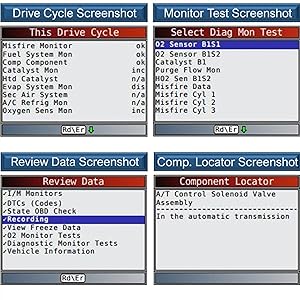
- The tool will display whether various monitors (e.g., Misfire Monitor, Fuel System Monitor, O2 Sensor Monitor) are 'OK' (completed), 'INC' (incomplete), or 'N/A' (not applicable).
3.6. Component Locator
The Component Locator provides text-based descriptions of where to find specific components on the vehicle.
- Selecteer in het hoofdmenu 'Component Locator' and press 'ENTER'.
- Follow the on-screen prompts to select the component you wish to locate.
4. Onderhoud
4.1. Software-updates
To ensure optimal performance and access to the latest vehicle data and DTC definitions, it is recommended to regularly update your scan tool's software.
- Connect the scan tool to a computer using a USB cable.
- Visit the official Bosch Automotive Tools website to download the latest update software.
- Follow the on-screen instructions provided by the update software to install the new firmware.
4.2. Reiniging en opslag
- Clean the tool's exterior with a soft, damp doek. Gebruik geen schurende reinigingsmiddelen of oplosmiddelen.
- Store the tool in a dry, clean environment, away from extreme temperatures and direct sunlight.
- Ensure the cable is not kinked or damaged during storage.
5. Probleemoplossing
If you encounter issues with your Bosch OBD 1150 Scan Tool, consider the following:
- Het apparaat gaat niet aan: Ensure the OBD-II connector is securely plugged into the vehicle's port and the vehicle's ignition is in the 'ON' position. Check the vehicle's battery voltage.
- Communicatiefout: Verify the vehicle is OBD-II compliant (1996 or newer for most models). Check the connection of the OBD-II cable. Try the tool on a different compliant vehicle if possible to rule out vehicle-specific issues.
- Incorrect Code Definitions: Ensure your tool's software is up to date. Outdated software may not have the latest DTC definitions.
- Schermproblemen: If the screen is blank or unreadable, try adjusting the contrast settings (if available in the setup menu) or performing a software update.
- Tool Freezes: Disconnect the tool from the vehicle, wait a few seconds, and reconnect. If the issue persists, perform a software update.
6. Specificaties
| Functie | Beschrijving |
|---|---|
| Model | OBD-1150 |
| Verenigbaarheid | All 1996 and newer import, domestic, diesel, and hybrid vehicles (OBD II & CAN), as well as 1994 and 1995 OBD II compliant vehicles. |
| DTC Definitions | Over 15,000 generic and manufacturer-specific. |
| Live Data PIDs | Over 300 possible (vehicle dependent). |
| ABS Code Coverage | Most 1996-2013 GM, Ford, Chrysler, Toyota, Honda, Nissan, and Hyundai vehicles. |
| Weergave | Color LCD screen. |
| Talen | English, Spanish, French. |
| Connectiviteit | USB port for updates. |
| Afmetingen | Afmetingen: 10.25 x 1.8 x 6.55 cm. |
| Artikelgewicht | 12.2 ons. |
| Energiebron | Battery Powered. |
| Besturingssysteem (voor updates) | Windows XP (and newer compatible systems). |
7. Garantie en ondersteuning
For warranty information, technical support, or service inquiries regarding your Bosch OBD 1150 Trilingual Scan Tool, please refer to the documentation included with your product or visit the official Bosch Automotive Tools website. Bosch provides comprehensive support to ensure customer satisfaction.


