1. Inleiding
This user manual provides comprehensive instructions for the installation, operation, and maintenance of your ComfortStar Mini Split Single Zone Heat Pump. This system is designed to provide efficient heating and cooling for your space. Please read this manual thoroughly before operating the unit to ensure proper function and safety.
The ComfortStar Mini Split system is known for its energy efficiency, quiet operation, and ability to provide comfort even in extreme temperatures, down to -13°F (-25°C) for heating. It utilizes R410A refrigerant, which is environmentally friendly.
2. Veiligheidsinformatie
Always observe the following basic precautions to reduce the risk of fire, electric shock, or injury to persons or property:
- Professionele installatie: Installatie en onderhoud mogen uitsluitend door gekwalificeerd personeel worden uitgevoerd.
- Voeding: Ensure the power supply matches the unit's specifications. Do not operate with damaged power cords or plugs.
- Ventilatie: Blokkeer de luchtinlaten of -uitlaten van het apparaat niet.
- Blootstelling aan water: Do not expose the indoor unit to water. Do not operate with wet hands.
- Kinderen en huisdieren: Houd kinderen en huisdieren uit de buurt van het apparaat als het in werking is.
- Schoonmaak: Schakel de stroom uit voordat u het apparaat reinigt of onderhoudt.
- koelmiddel: The system contains R410A refrigerant. Do not attempt to service the refrigerant circuit yourself.
3. Product voorbijview en componenten
Your ComfortStar Mini Split system consists of an indoor unit, an outdoor unit, and a remote control. Understanding each component is key to proper operation.

Figure 3.1: Complete ComfortStar Mini Split System. This image displays the indoor wall-mounted unit, the outdoor condenser unit, and the wireless remote control, providing a comprehensive view van de belangrijkste componenten.
3.1. Binnenhuis unit
The indoor unit is typically mounted on a wall and is responsible for circulating conditioned air within your space. It contains the evaporator coil, fan, and air filter.

Figure 3.2: ComfortStar Indoor Unit. This image shows the sleek, white indoor unit designed for wall mounting, which houses the fan and evaporator coil.
3.2. Buitenunit
The outdoor unit, or condenser, is placed outside your building. It contains the compressor, condenser coil, and expansion valve. It is responsible for releasing or absorbing heat from the outdoor air.
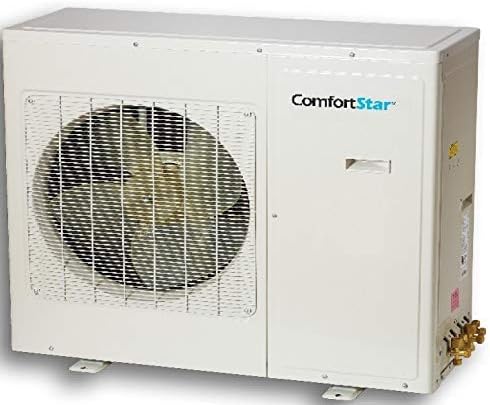
Figure 3.3: ComfortStar Outdoor Unit. This image displays the robust outdoor condenser unit, which contains the compressor and is responsible for heat exchange with the outside environment.
3.3. Afstandsbediening
The wireless remote control allows you to conveniently adjust settings such as mode, temperature, fan speed, and timer functions from anywhere within range.

Figure 3.4: ComfortStar Remote Control. This image shows the ergonomic remote control with an LCD display and various buttons for controlling the mini split system's functions.
4. Installatie en installatie
The ComfortStar Mini Split system requires professional installation. This section provides an overview of the installation process. Do not attempt to install the unit yourself unless you are a certified HVAC technician.
4.1. Controlelijst vóór installatie
- Verify that the electrical supply meets the unit's requirements (voltage, amptijdperk).
- Zorg voor voldoende ruimte voor zowel de binnen- als de buitenunit, zodat er voldoende luchtcirculatie is en onderhoudstoegang mogelijk is.
- Confirm that the wall for the indoor unit is strong enough to support its weight.
- Gather necessary tools and materials (e.g., mounting brackets, refrigerant lines, electrical wiring).
4.2. General Installation Steps (Professional Only)
- Bevestig de binnenunit stevig aan de muur en zorg ervoor dat deze waterpas staat.
- Install the outdoor unit on a stable, level surface, ensuring proper drainage.
- Connect the refrigerant lines between the indoor and outdoor units. Ensure proper flaring and tightening to prevent leaks.
- Connect the electrical wiring between the units and to the main power supply, following local electrical codes.
- Ontlucht de koelleidingen om lucht en vocht te verwijderen.
- Perform a leak test on all connections.
- Release the refrigerant into the system.
- Test the unit's operation in all modes.
For detailed installation instructions, refer to the separate installation manual provided with the unit or consult a certified HVAC professional.
5. Gebruiksaanwijzing
This section explains how to use your remote control to operate the ComfortStar Mini Split system.
5.1. Functies van de afstandsbediening
The remote control features an LCD display and various buttons for easy operation:
- AAN/UIT-knop: Hiermee schakelt u het apparaat in of uit.
- TEMP +/- knoppen: Past de gewenste temperatuur aan.
- MODE-knop: Cycles through operating modes (Auto, Cool, Dry, Heat, Fan).
- FAN SPEED-knop: Past de ventilatorsnelheid aan (Auto, Laag, Gemiddeld, Hoog).
- SWING-knop: Regelt de verticale lamellenbeweging voor de luchtrichting.
- TIMER AAN/UIT-knoppen: Stelt de timer in voor automatisch in- en uitschakelen.
- Slaapknop: Activeert de slaapstand voor een stille werking en energiebesparing tijdens de slaapstand.
- TURBO-knop: Activeert snelle koeling of verwarming voor snelle temperatuurveranderingen.
- ZELFREINIGINGSKnop: Initiates the self-cleaning function for the indoor unit.
- LED-knop: Hiermee kunt u de display-LED van de binnenunit in- of uitschakelen.
- VOLG MIJ-knop: Activates the "Follow Me" function, where the remote control's sensor measures the temperature and adjusts the unit accordingly.
- Vergrendelknop: Vergrendelt de knoppen van de afstandsbediening om onbedoelde wijzigingen te voorkomen.
- Reset knop: Hiermee worden de instellingen van de afstandsbediening gereset.
5.2. Bedrijfsmodi:
- Automatische modus:
- The unit automatically selects the appropriate operating mode (Cool, Heat, or Fan) based on the room temperature and your set temperature.
- Koele modus:
- Cools the room to the desired temperature. Adjust temperature using TEMP +/- buttons.
- Droogmodus (ontvochtiging):
- Reduces humidity in the room. The fan speed is automatically controlled.
- Warmtemodus:
- Heats the room to the desired temperature. This unit is a heat pump, providing efficient heating even in low ambient temperatures.
- Ventilator modus:
- Circulates air without heating or cooling. You can adjust the fan speed.
6. Onderhoud
Regular maintenance ensures optimal performance and longevity of your ComfortStar Mini Split system. Always disconnect power before performing any maintenance.
6.1. Luchtfilter reinigen
The electrostatic carbon active fiber filter should be cleaned regularly, typically every 2-4 weeks, depending on usage and air quality.
- Open het voorpaneel van de binnenunit.
- Verwijder de luchtfilters voorzichtig.
- Maak de filters schoon met een stofzuiger of was ze met lauw water en een mild schoonmaakmiddel.
- Laat de filters volledig drogen op een schaduwrijke plek voordat u ze terugplaatst. Stel ze niet bloot aan direct zonlicht.
- Plaats de filters terug en sluit het voorpaneel.
6.2. Reiniging van de buitenunit
Periodically check the outdoor unit for debris (leaves, dirt) that may obstruct airflow. Clean the coils gently with a soft brush or water hose. Ensure the area around the outdoor unit is clear of obstructions.
6.3. Professionele service
It is recommended to have your system professionally inspected and serviced annually by a qualified HVAC technician. This includes checking refrigerant levels, electrical connections, and overall system performance.
7. Probleemoplossing
Voordat u contact opneemt met de klantenservice, raadpleegt u de volgende tabel met veelvoorkomende problemen en de bijbehorende oplossingen.
| Probleem | Mogelijke oorzaak | Oplossing |
|---|---|---|
| Het apparaat gaat niet aan. | Geen stroomvoorziening; batterijen van de afstandsbediening leeg; stroomonderbreker is uitgeschakeld. | Controleer de stroomaansluiting; Vervang de batterijen van de afstandsbediening; Reset de stroomonderbreker. |
| Onvoldoende koeling/verwarming. | Dirty air filter; Blocked outdoor unit; Incorrect mode setting; Low refrigerant. | Clean air filter; Clear obstructions from outdoor unit; Select correct mode; Contact professional for refrigerant check. |
| Ongebruikelijk geluid. | Losse onderdelen; verstopping van de ventilator; probleem met de compressor. | Check for loose parts; Remove obstruction; Contact professional if compressor noise. |
| Waterlekkage uit binnenunit. | Verstopte afvoerleiding; Onjuiste installatie. | Clear drain pipe; Contact professional for installation check. |
| Afstandsbediening werkt niet. | Dead batteries; Obstruction between remote and unit; Remote out of range. | Replace batteries; Remove obstruction; Move closer to unit. |
Als het probleem blijft bestaan nadat u deze oplossingen hebt geprobeerd, neem dan contact op met een gekwalificeerde servicetechnicus.
8. Specificaties
Key technical specifications for the ComfortStar Mini Split Single Zone Heat Pump, Model CFS-CXH24CDI/24CDO:
- Model: CFS-CXH24CDI/24CDO
- Capaciteit: 24,000 BTU (2 Toneladas)
- SEER (seizoensgebonden energie-efficiëntieverhouding): Tot 25
- koelmiddel: R-410A
- Speciale eigenschap: Verwarming (Warmtepomp)
- Low Ambient Operation: Capable of heating down to -13°F (-25°C)
- Filtertype: Electrostatic Carbon Active Fiber Filter
- Energiebron: Bedraad elektrisch
- Vormfactor: Minisplit
- Geluidsniveau: Super quiet technology
- Tijdklok: 24-uurs timerfunctie
- Automatisch opnieuw opstarten: Ja
9. Garantie en ondersteuning
ComfortStar provides a limited warranty for this product:
- Garantie op compressor: 7 jaar
- Garantie op onderdelen: 5 jaar
For warranty claims, technical support, or service inquiries, please contact your authorized ComfortStar dealer or the customer service number provided with your purchase documentation. Ensure you have your model number (CFS-CXH24CDI/24CDO) and proof of purchase readily available.
You can also visit the official ComfortStar website for additional resources and support information. (Note: Specific webplaats URL not provided in source data, user should refer to product packaging or purchase documentation).


