1. Inleiding
Bedankt voor uw aankoopasing the American Audio WM-419 4-Channel UHF Handheld Wireless Microphone System. This system is designed to provide high-quality, reliable wireless audio for various applications, including PA systems, karaoke, mobile entertainment, schools, and houses of worship. This manual provides essential information for the proper setup, operation, and maintenance of your WM-419 system.
Please read this manual thoroughly before operating the unit to ensure optimal performance and to prevent damage.
2. Inhoud van het pakket
Controleer of alle hieronder vermelde componenten in uw pakket zitten:
- 1 x WM-419 Wireless Receiver Unit
- 4 x Draadloze handmicrofoons
- 4 x microfoonclips
- 8 x AA Batteries (for microphones)
- 1 x voedingsadapter voor de ontvanger
- 1 x 1/4" Audio Cable
- Gebruikershandleiding (dit document)
Figuur 2.1: Included components of the WM-419 system. This image displays the receiver, four handheld microphones, four detachable antennas, eight AA batteries, a power adapter, and a 1/4" audio cable, along with four microphone clips.
3. Belangrijkste kenmerken
- 4-Channel UHF Wireless Handheld Microphone System
- Intelligent Frequency Autoscan with IR Synchronization
- Individual Volume Control for each microphone channel on the receiver
- XLR Audio Output for each microphone channel
- 50 Channels Available per Receiver (200 total channels)
- 16-Bit Pilot Technology to assist with eliminating frequency interference
- Wireless Range: Up to 300 feet / 90 meters (line of sight)
- Microphone Battery Life: 6-10 hours (with included AA batteries)
- OLED Screen on Handheld MIC Transmitters
4. Installatiehandleiding
4.1 Plaatsing van de ontvanger
Place the WM-419 receiver on a stable, flat surface, away from strong electromagnetic interference sources. Ensure there is adequate ventilation around the unit. For optimal signal reception, position the receiver's antennas vertically and ensure they are not obstructed.

Figuur 4.1: Voorkant view of the WM-419 receiver with microphones. This image shows the receiver unit with its four antennas extended, and the four handheld microphones resting on top, illustrating the compact design.
4.2 De ontvanger aansluiten
- Stroomaansluiting: Connect the included power adapter to the DC 12-15V input on the rear panel of the receiver. Plug the adapter into a suitable power outlet.
- Audio-uitvoer: Connect the receiver to your PA system, mixer, or amplifier using the XLR audio outputs for individual microphone channels (Balanced A, B, C, D) or the AF MIX OUT (1/4" unbalanced) for a combined output.

Figuur 4.2: Rear panel connections of the WM-419 receiver. This image highlights the DC power input, four balanced XLR outputs (A, B, C, D), and a mixed 1/4" audio output, along with the antenna connections.
4.3 Installing Batteries in Microphones
Each handheld microphone requires two AA batteries. Ensure correct polarity when inserting the batteries.
- Unscrew the bottom cap of the microphone to reveal the battery compartment.
- Insert two AA batteries, observing the polarity markings (+/-).
- Draai de onderste dop er weer stevig op.

Figuur 4.3: Four handheld microphones. This image displays the four individual handheld microphones, each featuring an OLED display and power button, ready for battery installation and use.
5. Gebruiksaanwijzing
5.1 In-/uitschakelen
- Ontvanger: Press the POWER button on the front panel of the receiver to turn it on or off.
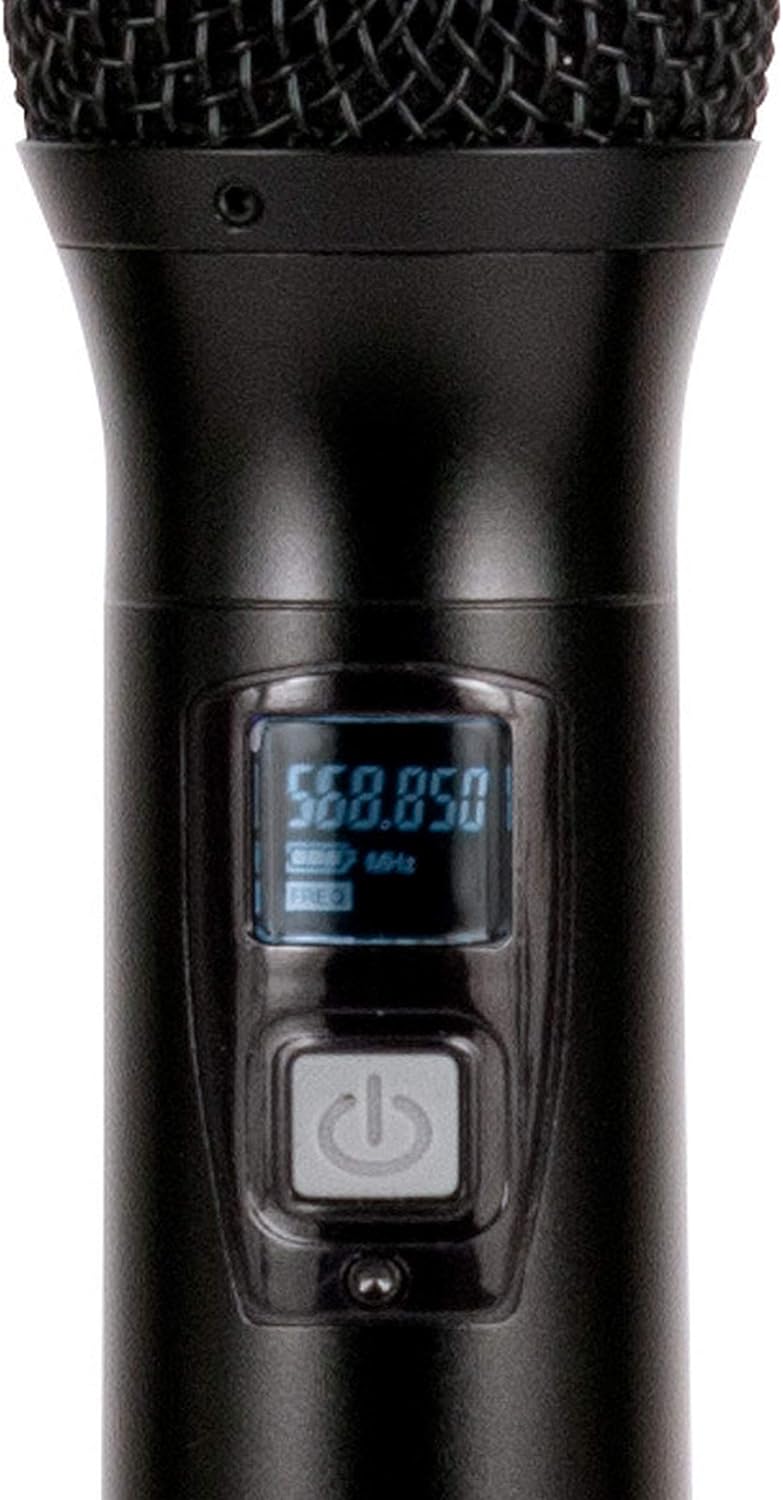
- Microfoons: Press and hold the power button on each handheld microphone for a few seconds to turn it on or off. The OLED screen will illuminate when powered on.
5.2 Frequency Synchronization (IR Sync)
The WM-419 features Intelligent Frequency Autoscan and IR Synchronization for easy setup.
- Turn on the receiver and the desired microphone.
- Druk op de ontvanger op de SCANNEN button for the channel you wish to set. The receiver will automatically scan for an available clear frequency.
- Once a frequency is found, the display will show "SYNC". Position the IR window of the microphone (usually near the bottom of the display) close to the IR sensor on the receiver (located near the channel display).
- Druk op de SET button on the receiver for that channel. The frequency information will be transmitted to the microphone via infrared. The microphone's display should show the same frequency as the receiver, indicating successful synchronization.
- Repeat this process for each microphone.

Figuur 5.1: Receiver front panel detail. This image provides a close-up view of the receiver's illuminated OLED displays for each channel, showing frequency information, signal strength, and individual volume controls.

Figuur 5.2: Microphone OLED display. A detailed view of one handheld microphone's OLED screen, showing the current frequency and battery indicator, along with the power/mute button.
5.3 Volume aanpassen
Each channel on the receiver has an independent volume control knob. Adjust these knobs to achieve the desired audio level for each microphone.
5.4 Muting Microphones
A short press of the power button on the handheld microphone will mute/unmute the microphone. The OLED display will indicate the mute status.
6. Onderhoud
- Schoonmaak: Use a soft, dry cloth to clean the surfaces of the receiver and microphones. Do not use abrasive cleaners or solvents.
- Batterij vervangen: Replace microphone batteries when the low battery indicator appears on the microphone's OLED screen or when audio quality degrades. Always use fresh AA batteries.
- Opslag: Verwijder de batterijen uit de microfoons wanneer ze gedurende langere tijd niet worden gebruikt om lekkage te voorkomen. Bewaar het systeem op een koele, droge plaats.
7. Probleemoplossing
| Probleem | Mogelijke oorzaak | Oplossing |
|---|---|---|
| Geen geluid uit microfoon | Microphone not powered on; Batteries dead; Microphone not synchronized; Receiver volume too low; Output cable disconnected. | Ensure microphone is on; Replace batteries; Perform IR sync; Increase receiver channel volume; Check audio cable connections to mixer/PA. |
| Storing/statische ruis | Nearby electronic devices; Other wireless systems on same frequency; Obstructions between mic and receiver; Receiver too far from microphone. | Move receiver away from interference sources; Perform Autoscan and re-sync to a clear frequency; Ensure line of sight; Reduce distance between mic and receiver. |
| Kort draadloos bereik | Antennas not properly positioned; Obstructions; Low microphone battery. | Ensure antennas are vertical and unobstructed; Minimize physical barriers; Replace microphone batteries. |
| Microfoondisplay werkt niet | Dead batteries; Microphone not powered on. | Replace batteries; Press and hold power button to turn on. |
8. Specificaties
| Functie | Detail |
|---|---|
| Modelnaam | American Audio WM-419 |
| Microfoonvormfactor | Microfoonsysteem (handheld) |
| Aantal kanalen | 4 (50 channels available per receiver, 200 total) |
| Connectiviteitstechnologie | UHF Wireless, XLR |
| Energiebron | Receiver: AC Adapter; Microphones: 2 x AA Batteries (per mic) |
| Battery Life (Microphones) | 6-10 uur |
| Wireless Range | Up to 300 feet / 90 meters (line of sight) |
| Signaal-ruisverhouding | 70dB |
| Geluidsniveau | 85dB |
| Productafmetingen (ontvanger) | 22 x 14 x 6 inch |
| Artikelgewicht | 9 pond |
| Kleur | Zwart |
| Compatibele apparaten | PA System, Karaoke Machine |
| Speciale functie | Volume Control (individual channel) |
| Polair patroon | Unidirectioneel |
9. Garantie en ondersteuning
For warranty information and technical support, please contact ADJ Products directly or visit their official webwebsite. Bewaar uw aankoopbewijs als bewijs van aankoop voor eventuele garantieclaims.
Fabrikant: ADJ-producten
Merk: ADJ
Webwebsite: www.adj.com
10. Veiligheidsinformatie
WAARSCHUWING: Dit product kan u blootstellen aan chemicaliën, waaronder lood, waarvan in de staat Californië bekend is dat het kanker en geboorteafwijkingen of andere reproductieve schade veroorzaakt. Ga voor meer informatie naar www.P65Warnings.ca.gov.
- Stel het apparaat niet bloot aan regen of vocht.
- Verwijder de kap niet. Er bevinden zich geen onderdelen in het binnenwerk die door de gebruiker kunnen worden onderhouden. Laat onderhoudswerkzaamheden uitvoeren door gekwalificeerd personeel.
- Zorg voor goede ventilatie. Blokkeer de ventilatieopeningen niet.
- Gebruik alleen de voedingsadapter die bij het apparaat is geleverd.
- Gooi batterijen op verantwoorde wijze weg, volgens de plaatselijke voorschriften.


