1. Inleiding
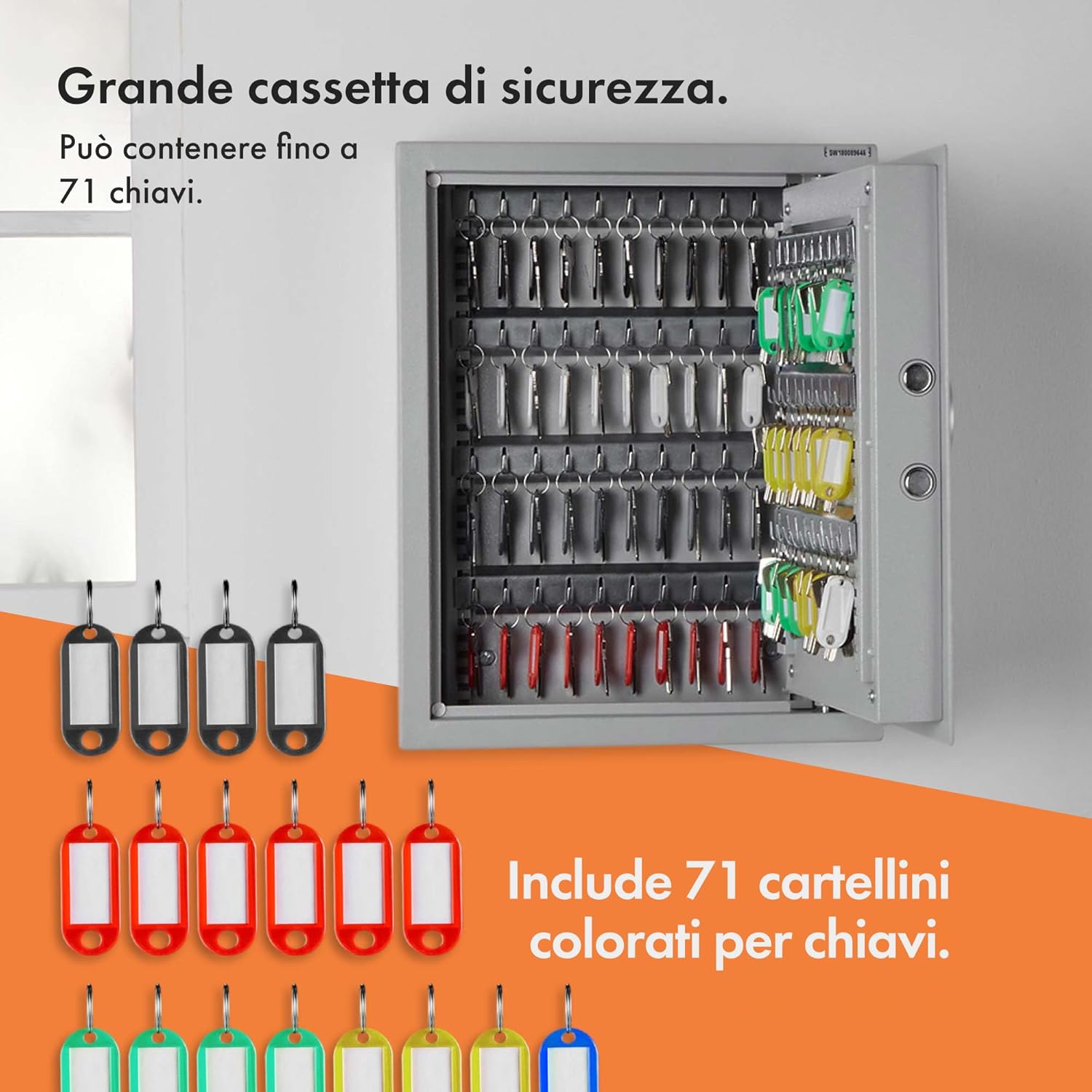
This manual provides essential information for the safe and effective use of your VonHaus 71 Key Digital Safe Cabinet. Please read these instructions thoroughly before installation and operation, and retain them for future reference. The VonHaus Key Safe is designed to securely store up to 71 keys, featuring a robust steel body, an electronic keypad for access, and an emergency override system.
2. Veiligheidsinformatie
- Ensure the safe is mounted on a solid, stable surface capable of supporting its weight and potential contents.
- Keep emergency override keys in a secure location away from the safe. Do not store them inside the safe.
- Do not expose the safe to extreme temperatures or moisture.
- Regularly check battery levels to ensure continuous operation.
- Keep the keypad clean and free from debris.
3. Inhoud van het pakket
Controleer of alle componenten aanwezig zijn voordat u met de installatie begint:
- VonHaus 71 Key Digital Safe Cabinet
- 2 x noodsleutels
- Bevestigingsbouten (4)
- Wall Plugs/Anchors (4)
- Keyrings and Labels (71 sets)
- Gebruiksaanwijzing
4. Product voorbijview
The VonHaus Key Safe features a robust design for secure key storage. Key components include:
- Rust-Resistant Solid Steel Body: Provides durability and security.
- Digital Electronic Keypad: For setting and entering a 3-8 digit access code.
- Emergency Key Lock: A manual override for access if the code is forgotten or batteries are depleted.
- Robust Rotary Dial: The handle used to open the safe door after successful code entry or manual unlock.
- LED-indicatoren: Lights to indicate successful entry, failed entry, and low battery level.
- Adjustable Key Shelves: Seven shelves with integrated hooks for organizing up to 71 keys.

5. Instellen
5.1. Wandmontage
The key safe is designed for wall mounting to ensure maximum security. It comes with pre-drilled mounting holes and all necessary hardware.
- Choose a suitable, solid wall location for installation. Ensure there are no hidden electrical wires or pipes.
- Hold the safe against the wall at the desired height and mark the positions of the four pre-drilled mounting holes.
- Drill pilot holes at the marked positions using an appropriate drill bit for your wall type.
- Insert the provided wall plugs (anchors) into the drilled holes.
- Align the safe with the wall plugs and secure it using the provided mounting bolts. Tighten securely.

5.2. Batterij installatie
The electronic keypad requires batteries (not included) for operation.
- Open the safe door using the emergency override key (refer to Section 6.2 if needed).
- Zoek het batterijvak aan de binnenkant van de kluisdeur.
- Insert the required batteries (typically AA, check compartment for exact type and quantity) according to the polarity markings.
- Sluit het batterijklepje.
5.3. Uw persoonlijke code instellen
The safe allows you to set a 3-8 digit personal access code.
- Terwijl de kluisdeur open is, zoekt u de rode resetknop aan de binnenkant van de deur, vlak bij het scharnier.
- Press the red reset button. You will hear a beep, and the yellow LED on the keypad will illuminate.
- Voer binnen 5 seconden de gewenste 3-8-cijferige code in op het toetsenbord.
- Press the '#' button to confirm your code. You will hear a confirmation beep, and the yellow LED will turn off.
- Test your new code: With the door still open, enter your new code followed by '#'. The green LED should light up, and you should be able to turn the rotary dial to simulate opening the safe. If it doesn't work, repeat steps 1-4.
6. Gebruiksaanwijzing
6.1. De kluis openen met uw code
- Voer uw persoonlijke code van 3 tot 8 cijfers in op het toetsenbord.
- Press the '#' button. The green LED will illuminate, indicating successful entry.
- Within 5 seconds, turn the rotary dial clockwise to open the safe door.
6.2. Using Emergency Override Keys
In case you forget your code or the batteries are depleted, you can use the emergency override keys.
- Zoek het noodsleutelgat, dat meestal verborgen zit achter een klein afdekplaatje op het toetsenpaneel.
- Insert one of the emergency override keys into the keyhole and turn it.
- While the key is turned, rotate the main rotary dial clockwise to open the safe door.
- Verwijder de noodsleutel na het openen.

6.3. Sleutels ordenen
The safe is equipped with 7 adjustable key shelves and 71 keyrings with labels for efficient organization.
- Attach your keys to the provided keyrings and labels.
- The 7 key shelves (4 with 11 hangers and 3 with 9 hangers) can be removed and adjusted to accommodate different key sizes and quantities. Simply slide them out of their slots and re-insert them into desired positions.
- Hang the labeled keyrings onto the hooks on the shelves.


7. Onderhoud
7.1. Batterij vervangen
When the low battery indicator (red LED) illuminates, it is time to replace the batteries.
- Open the safe door (using your code or emergency key).
- Open het batterijklepje.
- Verwijder de oude batterijen en gooi ze op een verantwoorde manier weg.
- Plaats nieuwe batterijen en zorg voor de juiste polariteit.
- Sluit het batterijklepje.
7.2. Schoonmaken
Veeg de buitenkant van de kluis schoon met een zachte, damp doek. Gebruik geen schurende reinigingsmiddelen of oplosmiddelen.
8. Probleemoplossing
- De kluis gaat niet open met de code:
- Zorg ervoor dat de batterijen niet leeg zijn. Vervang ze indien nodig.
- Verify you are entering the correct 3-8 digit code followed by '#'.
- If the code is forgotten, use the emergency override keys.
- Het toetsenbord reageert niet:
- Controleer en vervang de batterijen.
- Zorg ervoor dat er geen vuil tussen de knoppen zit.
- De deur sluit niet goed:
- Controleer of er obstakels zijn die voorkomen dat de deur volledig sluit.
- Ensure the locking bolts are retracting correctly when the door is open.

Figuur 8.1: Van dichtbij view of the robust locking bolts, ensuring secure closure of the safe.
9. Specificaties
| Merk | VanHuis |
| Modelnaam | VonHaus 71 Digital Key Safe |
| Artikelmodelnummer | 3500139 |
| Kleur | Zilver |
| Materiaal | Gelegeerd staal |
| Slottype | Elektronisch combinatieslot |
| Kerncapaciteit | 71 toetsen |
| Aantal planken | 7 |
| Montagetype | Wall Mounted (Surface Mount) |
| Artikelgewicht | 9 kg 600 gram |
| Artikelafmetingen (LxBxH) | 14.2 x 17.7 x 4.7 Centimeters (Note: These dimensions seem to be package or internal, refer to Figure 4.1 for external safe dimensions: 36cm W x 45cm H x 12cm D) |
| Montage vereist | Ja (Montage) |
10. Garantie en ondersteuning
All VonHaus products are backed by a minimum 2-year warranty. For support, warranty claims, or further assistance, please refer to the contact information provided with your purchase or visit the official VonHaus webwebsite. Houd uw modelnummer (3500139) en aankoopgegevens bij de hand wanneer u contact opneemt met de ondersteuning.


