Invoering
Thank you for choosing the Baseus 10W Automatic Clamping Wireless Car Charger Mount. This device is designed to provide convenient and fast wireless charging for your Qi-enabled smartphone while securely holding it in your vehicle. Please read this manual carefully before use to ensure proper operation and to maximize the product's lifespan.
Veiligheidsinformatie
- Het product niet demonteren of wijzigen.
- Verwijderd houden van water, vuur en hoge temperaturen.
- Vermijd harde stoten en laat het apparaat niet vallen.
- Zorg tijdens gebruik voor voldoende ventilatie rond de oplader.
- Use only with compatible power sources (QC 3.0 car charger recommended for fast charging).
Inhoud van het pakket
- Baseus Wireless Car Charger Mount
- Air Vent Clip (1x)
- Micro USB Cable (4.9ft)
- Gebruiksaanwijzing
Product voorbijview
The Baseus Wireless Car Charger Mount features an automatic clamping mechanism, Qi wireless charging, and an air vent mounting system. It is designed for easy one-hand operation.
Belangrijkste componenten:
- Oplaadpad: The surface where the phone rests for wireless charging.
- Automatische Clamping Arms: Securely hold the phone in place.
- Infrared Induction Sensor: Detects the phone for automatic clampind.
- One-Tap Release Button: Located on the side, releases the clamparmen.
- Air Vent Clip: Attaches the mount to your car's air vent.
- Micro-USB-poort: Voor stroomtoevoer.
Installatie-instructies
1. Attaching the Air Vent Clip
- Unscrew the nut on the back of the charger mount.
- Insert the ball joint of the air vent clip into the nut, then into the socket on the back of the charger.
- Tighten the nut to secure the clip to the charger.
2. Mounting to the Car Air Vent
- Choose a suitable air vent in your vehicle. The clip is designed for various vent types, as shown in the image below.
- Gently push the air vent clip onto one of the vent blades until it is securely attached.
- Adjust the angle of the charger mount for optimal viewind.

This image illustrates the different types of car air vents that are compatible with the charger mount's clip. Ensure your car's vent matches one of the compatible designs for secure installation.
3. Stroom aansluiten
- Connect the Micro USB cable to the charging port on the bottom of the charger mount.
- Plug the other end of the USB cable into a car charger (not included). For 10W fast charging, a QC 3.0 car charger is required. Standard 5V/2A car chargers will provide 5W charging.
- Het indicatielampje op de oplader gaat branden, wat aangeeft dat deze is ingeschakeld en klaar voor gebruik.
Gebruiksaanwijzing
1. Je telefoon plaatsen
- Hold your Qi-enabled smartphone near the charging pad. The infrared induction sensor will detect your phone.
- The automatic clamping arms will open. Place your phone onto the charging pad.
- de clamping arms will automatically close, securing your phone and initiating wireless charging.
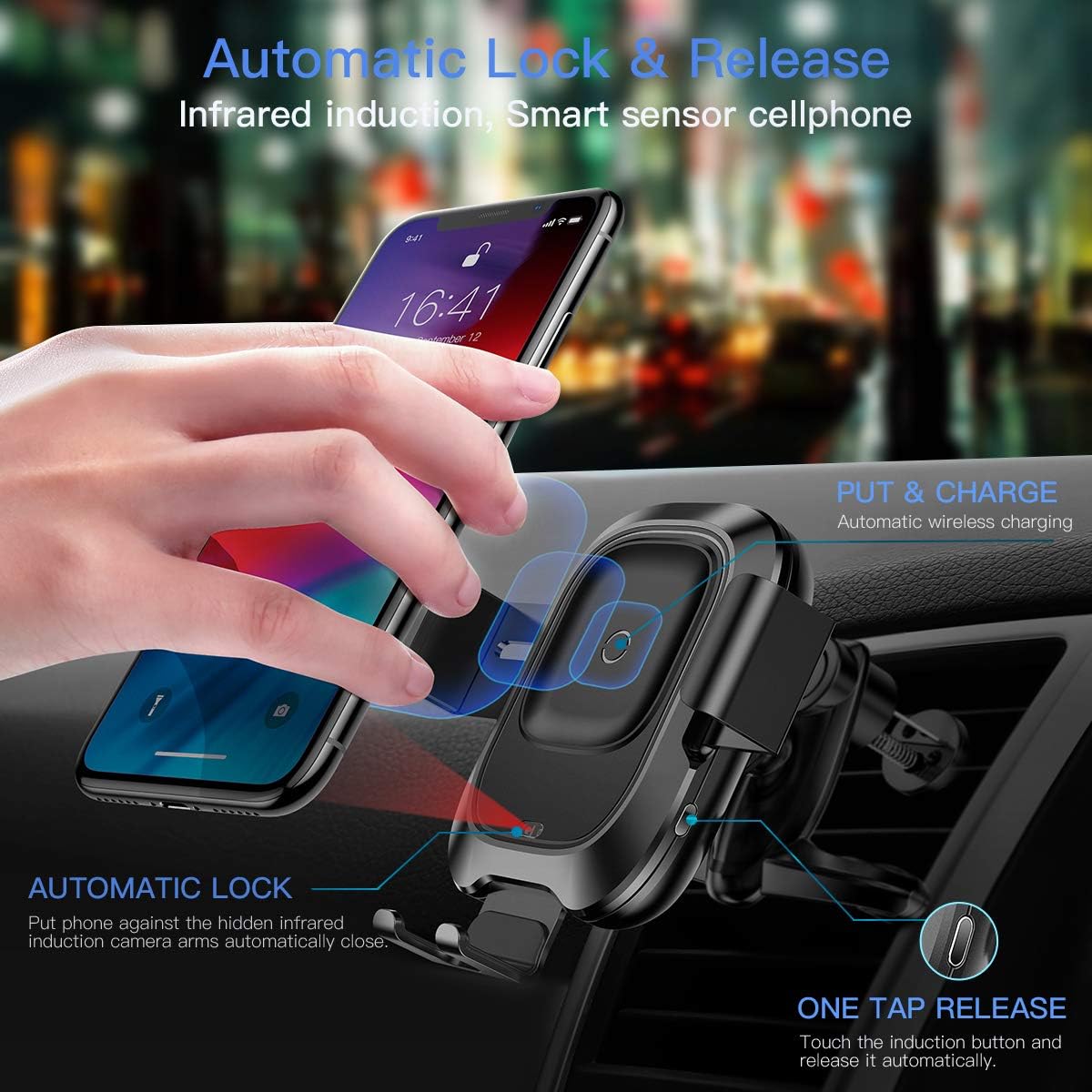
This image illustrates how the infrared sensor detects a phone, causing the arms to automatically open and then clamp shut once the phone is placed, initiating charging.
2. Je telefoon verwijderen
- To release your phone, gently touch the sensor button located on the right side of the charger mount.
- de clamping arms will automatically open, allowing you to remove your phone.
3. Wireless Charging Functionality
The charger supports Qi-enabled phones between 4.0 and 6.5 inches. Charging speeds vary:
- 10 W snel opladen: For compatible Samsung phones (e.g., Galaxy S10/S9/Note 9). Requires a QC 3.0 car charger.
- 7.5 W snel opladen: For compatible iPhones (e.g., iPhone Xs/XR/X/8). Requires a QC 3.0 car charger.
- 5W standaard opladen: For other Qi-enabled devices. Requires a 5V/2A car charger.
Belangrijke opmerking:
- The thickness of your phone case should not exceed 4mm for optimal charging.
- Metal cases or foreign objects between the phone and charger will interfere with wireless charging.
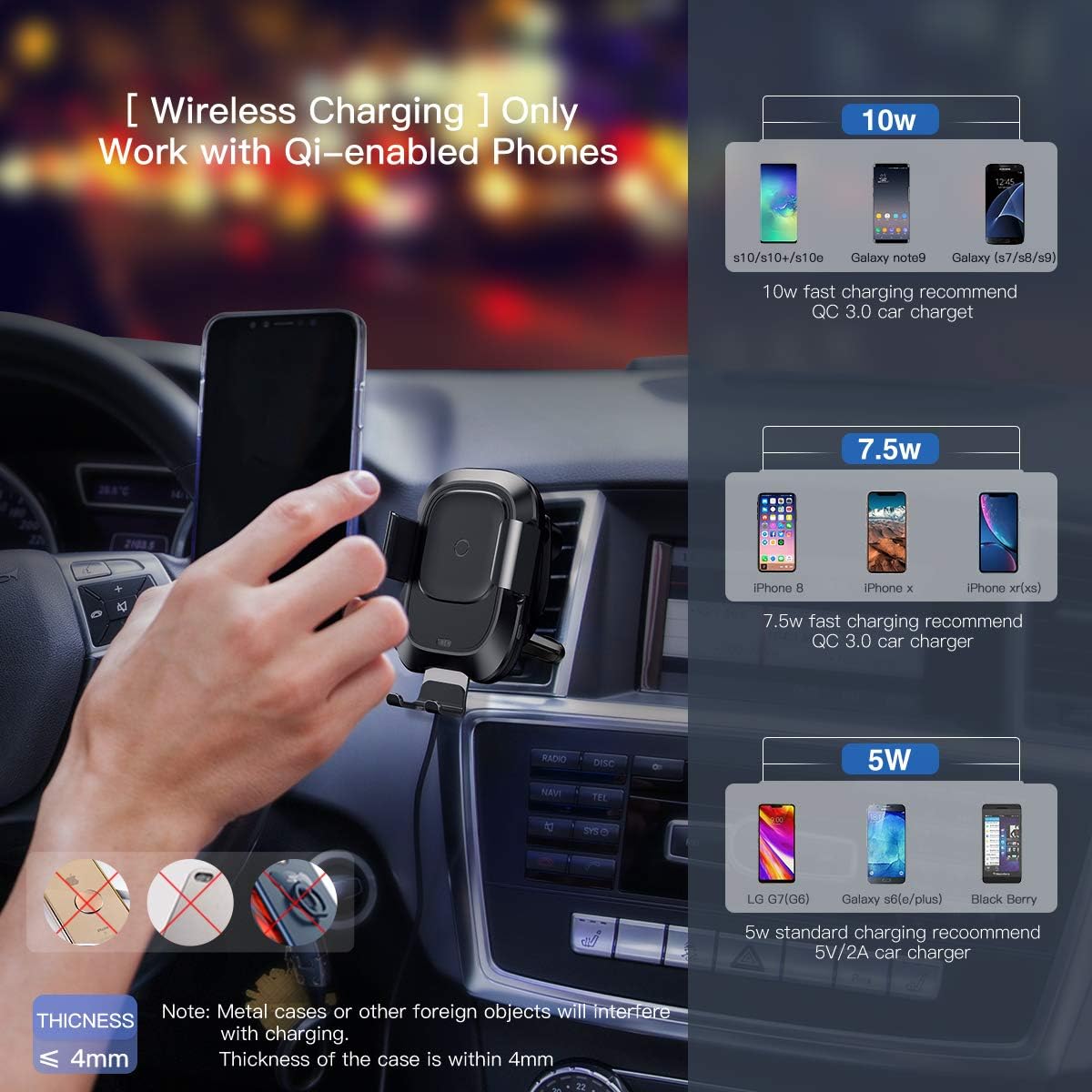
This image provides a visual guide to the wireless charging capabilities, showing 10W, 7.5W, and 5W charging for various phone models and the requirement for a QC 3.0 car charger for fast charging.
4. Productdemonstratievideo
Watch this video for a visual demonstration of the Baseus Wireless Car Charger Mount's features and operation.
Deze video geeft een gedetailleerd overzichtview and demonstration of the Baseus Wireless Car Charger Mount, showcasing its automatic clamping, wireless charging, and ease of use.
Onderhoud
- Reinig het oppervlak van de oplader met een zachte, droge doek. Gebruik geen schurende reinigingsmiddelen of oplosmiddelen.
- Ensure the air vent clip is free from dust and debris to maintain a secure grip.
- Regularly check the Micro USB cable for any signs of wear or damage.
Probleemoplossing
| Probleem | Mogelijke oorzaak | Oplossing |
|---|---|---|
| De telefoon laadt niet draadloos op. | 1. Phone not Qi-enabled. 2. Phone not properly aligned. 3. Phone case too thick or contains metal. 4. Insufficient power input. | 1. Verify phone supports Qi wireless charging. 2. Re-position phone on the charging pad. 3. Remove phone case or use a thinner, non-metallic case. 4. Ensure a QC 3.0 car charger is used for fast charging, or a 5V/2A for standard charging. |
| Clamping arms not opening/closing automatically. | 1. Er gaat geen stroom naar de oplader. 2. Sensor geblokkeerd. 3. Storing. | 1. Check power connection and car charger. 2. Ensure the infrared sensor is clean and unobstructed. 3. Neem contact op met de klantenondersteuning als het probleem aanhoudt. |
| Charger mount is loose on the air vent. | Improper installation or incompatible vent type. | Ensure the air vent clip is fully engaged with a vent blade and the nut is tightened. Verify vent compatibility. |
Specificaties
- Merk: Basis
- Aansluittype: USB, Draadloos
- Compatibele apparaten: Qi-enabled Smartphones (4.0"-6.5")
- Compatibele telefoonmodellen: iPhone Xs, Xs Max, XR, X, 8, 8 Plus; Samsung Galaxy S10, S10 Plus, S10e, S9, S9 Plus, S8, S8 Plus, S7, S7 edge, S6 edge plus, Note 9, Note 5 series devices.
- Speciale eigenschap: Snel opladen
- Kleur: Zwart
- Ingangsvolumetage: 9 Volt
- Amptijdperk: 1.67 Amps
- Totaal aantal USB-poorten: 1
- Artikelgewicht: 10.2 ons
- Pakket afmetingen: 8.15 x 4.45 x 2.91 inch
Garantie en ondersteuning
This Baseus Wireless Car Charger Mount comes with an 18 maanden garantie from the date of purchase. Baseus also provides levenslange klantenservice voor dit product.
For warranty claims, technical support, or any inquiries, please refer to the contact information provided with your purchase or visit the official Baseus webplaats.