1. Inleiding
This manual provides essential information for the safe and efficient operation of your Vonyx CDJ450 DJ Workstation. Please read it thoroughly before using the device and retain it for future reference. The Vonyx CDJ450 is a versatile DJ workstation featuring dual CD/MP3 players, Bluetooth connectivity, two USB ports, and a 2-channel mixer, designed for comprehensive audio control.
2. Veiligheidsinstructies
- Zorg ervoor dat de voeding overeenkomt met de voltagzoals aangegeven op het apparaat.
- Stel het apparaat niet bloot aan regen of vocht om elektrische schokken te voorkomen.
- Plaats het apparaat niet in de buurt van warmtebronnen of in direct zonlicht.
- Open de c nietasing; laat alle onderhoudswerkzaamheden over aan gekwalificeerd personeel.
- Houd ventilatieopeningen vrij om oververhitting te voorkomen.
- Haal de stekker uit het stopcontact tijdens onweer of wanneer het apparaat gedurende langere tijd niet wordt gebruikt.
3. Product voorbijview
The Vonyx CDJ450 integrates two media players and a central mixer into a single unit, offering a compact and powerful solution for DJs.

Figuur 3.1: Top-down view of the Vonyx CDJ450 DJ Workstation, showing the dual players and central mixer controls.

Figuur 3.2: Gehoekt view of the workstation, highlighting its compact design and accessible controls.

Figuur 3.3: Close-up of the central mixer and player controls, including jog wheels, pitch faders, and display screens.

Figuur 3.4: USB ports located on the top panel, demonstrating USB drive connectivity for MP3 playback.

Figuur 3.5: Voorkant view with both CD trays open, ready for disc insertion.

Figuur 3.6: Gedetailleerd view of a player's display, showing track information, and associated playback controls.
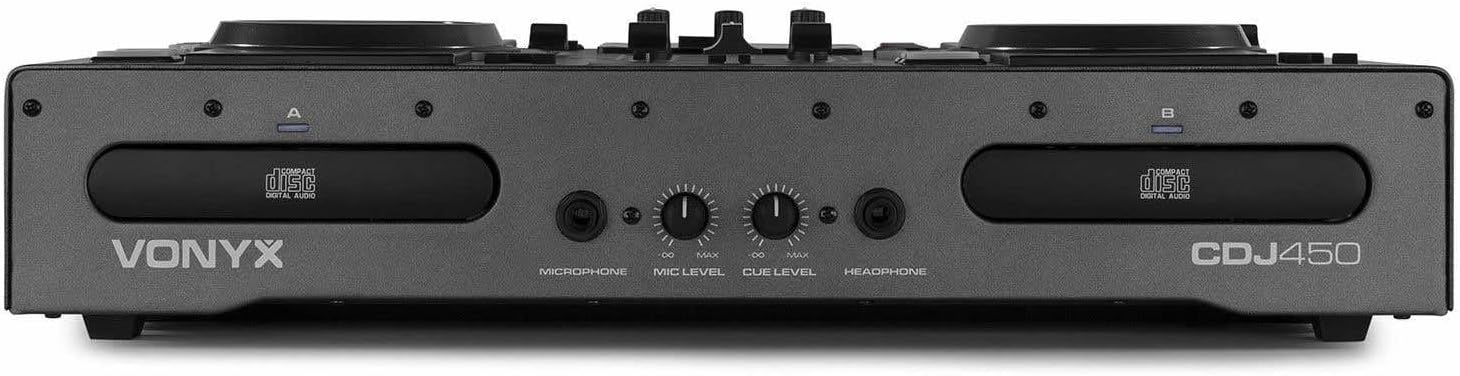
Figuur 3.7: Front panel featuring microphone input, microphone level control, cue level, and headphone output.

Figuur 3.8: Rear panel showing power input, main outputs (XLR, RCA), record output, USB Type-B port, and switchable Phono/Line inputs.
4. Instellen
- Plaatsing: Place the CDJ450 on a stable, flat surface with adequate ventilation.
- Stroomaansluiting: Connect the included power cable to the unit's power input and then to a suitable wall outlet. Ensure the power switch is in the OFF position before connecting.
- Audio-uitvoer: Connect the main outputs (XLR or RCA) to your ampversterker, actieve luidsprekers of PA-systeem.
- Externe apparaten (optioneel): Connect external audio sources (e.g., turntables, additional CD players) to the Phono/Line inputs on the rear panel. Use the switches to select the correct input type.
- Microphone/Headphones: Connect your microphone to the XLR-DJ input or the 6.3mm jack on the front. Plug your headphones into the 3.5mm jack on the front.
- USB-verbinding (optioneel): For computer control or recording, connect a USB Type-B cable from the unit to your computer.
5. Gebruiksaanwijzing
5.1. Aan/uit
Flip the power switch on the rear panel to the 'ON' position. The displays will illuminate. To power off, flip the switch back to 'OFF'.
5.2. Media Playback (CD/USB)
- CD-weergave: Insert an audio CD or MP3 CD into one of the CD trays. The unit will automatically read the disc.
- USB-weergave: Plaats een USB-flashstation met MP3 files into one of the USB ports on the top panel.
- Bronselectie: Use the 'SOURCE' button above each player to switch between CD and USB input.
- Track selectie: Use the navigation buttons or the numeric keypad to select tracks. The integrated folder search function allows quick access to fileop USB-drives.
- Afspeelbediening: Use the 'PLAY/PAUSE' and 'CUE' buttons for standard playback control.
5.3. Bluetooth-connectiviteit
- Activate Bluetooth on your smartphone, tablet, or laptop.
- Select 'Bluetooth' as the source on the desired player.
- Zoeken naar available devices on your external device and select 'Vonyx CDJ450'.
- Once paired, you can stream audio wirelessly to the workstation.
5.4. Mixer Functions
- Kanaalfaders: Adjust the volume level for each player (Channel A and B).
- EQ-bedieningselementen: Use the HIGH, MID, and LOW knobs for each channel to adjust the frequency response.
- Gain/Level: Adjust the input gain for each channel to match levels.
- Crossfader: Blend between Channel A and Channel B.
- Hoofduitvoer: Control the overall volume of the mix.
- Microfoon: Adjust microphone volume using the 'MIC LEVEL' knob on the front panel.
- Koptelefoon: Use the 'CUE LEVEL' knob to adjust headphone volume and the 'CUE' buttons on each channel to monitor specific sources.
5.5. Speciale kenmerken
- Kras: Use the jog wheels for scratching effects.
- Achteruit: Play audio in reverse.
- Pauze: Create a brake effect on playback.
- Toonhoogte: Adjust the playback speed and pitch using the pitch faders.
- Lus: Use 'LOOP IN', 'LOOP OUT', and 'RELOOP' buttons to create and manage seamless loops.
6. Verbindingen
The CDJ450 offers a variety of input and output options:
- Uitgangen:
- 2 x XLR Speaker Outputs
- 1 x RCA Master Output
- 1 x RCA Recorder Output
- Ingangen:
- 2 x Switchable Phono/Line RCA Inputs (for external devices)
- 1 x XLR-DJ Microphone Input
- 1 x 6.3mm Jack Microphone Input (front)
- Digital/Control:
- 2 x USB Ports (Type-A, top panel, for media playback)
- 1 x USB Type-B Port (rear, for computer connection)
- Bluetooth-connectiviteit
- Toezicht:
- 1 x 3.5mm Jack Headphone Output (front)
7. Onderhoud
- Schoonmaak: Reinig de buitenkant van het apparaat met een zachte, droge doek. Gebruik geen schuurmiddelen of oplosmiddelen.
- CD Trays: Keep CD trays free of dust and debris. Avoid touching the lens inside the CD player.
- Opslag: Bewaar het apparaat, wanneer het niet in gebruik is, op een koele, droge plaats, uit de buurt van direct zonlicht en extreme temperaturen.
8. Probleemoplossing
| Probleem | Mogelijke oorzaak | Oplossing |
|---|---|---|
| Geen stroom | Stroomkabel losgekoppeld; stroomschakelaar uit; defect stopcontact. | Controleer de aansluiting van de stroomkabel; zorg ervoor dat de aan/uit-schakelaar AAN staat; probeer een ander stopcontact. |
| Geen geluidsuitvoer | Volume levels too low; incorrect input/output connections; external ampverliezer uit. | Increase master/channel volumes; verify all audio connections; ensure external amplifier staat aan. |
| CD not playing/reading | Disc dirty or scratched; incorrect disc format; source not selected. | Clean or replace disc; ensure disc is audio CD or MP3 CD; select 'CD' source. |
| USB speelt niet | USB-station niet correct geformatteerd; niet ondersteund file type; source not selected. | Zorg ervoor dat de USB FAT32-geformatteerd is; alleen MP3 files supported; select 'USB' source. |
| Bluetooth maakt geen verbinding | Bluetooth not enabled on external device; unit not in pairing mode; interference. | Enable Bluetooth on your device; select 'Bluetooth' source on CDJ450; try re-pairing. |
9. Specificaties
- Modelnaam: CDJ450
- Connectiviteitstechnologie: Bluetooth, USB
- Aantal schijven: 2
- Ondersteunde audioformaten: CD, MP3, USB, AAC (Bluetooth)
- Aansluittype: Bluetooth, Jack 6.35 mm, RCA, USB, XLR 3-pin
- Aantal kanalen: 2
- Artikelgewicht: 7.8 kilogram
- Compatibele apparaten: Koptelefoons, Luidsprekers
- Fabrikant: Vonyx
10. Garantie en ondersteuning
For warranty information, please refer to the documentation provided at the time of purchase or contact your retailer. For technical support, please visit the official Vonyx website of neem contact op met de klantenservice.