Invoering
This instruction manual provides essential information for the safe and proper installation, operation, and maintenance of your Eaton CH 1P 20A Ground Fault Circuit Interrupter (GFCI) with Pigtail. Please read this manual thoroughly before installation and keep it for future reference. This device is designed to protect against electrical shock hazards in residential and commercial applications.
Veiligheidsinformatie
WAARSCHUWING: Risico op elektrische schok of brand.
- De installatie moet worden uitgevoerd door een gekwalificeerde elektricien in overeenstemming met alle nationale en lokale elektrische voorschriften.
- Turn off power at the main service panel before installing or servicing this device. Failure to do so can result in serious injury or death.
- Gebruik dit apparaat niet als het beschadigd lijkt.
- Zorg voor een goede aarding.
- Test the GFCI regularly as described in the Operating Instructions section.
Product voorbijview
The Eaton CH 1P 20A GFCI with Pigtail is a single-pole, 20-amp circuit breaker designed to provide ground fault protection. It features a pigtail neutral wire for easy connection to the neutral bus bar in your load center. This device is compatible with Eaton CH series load centers.
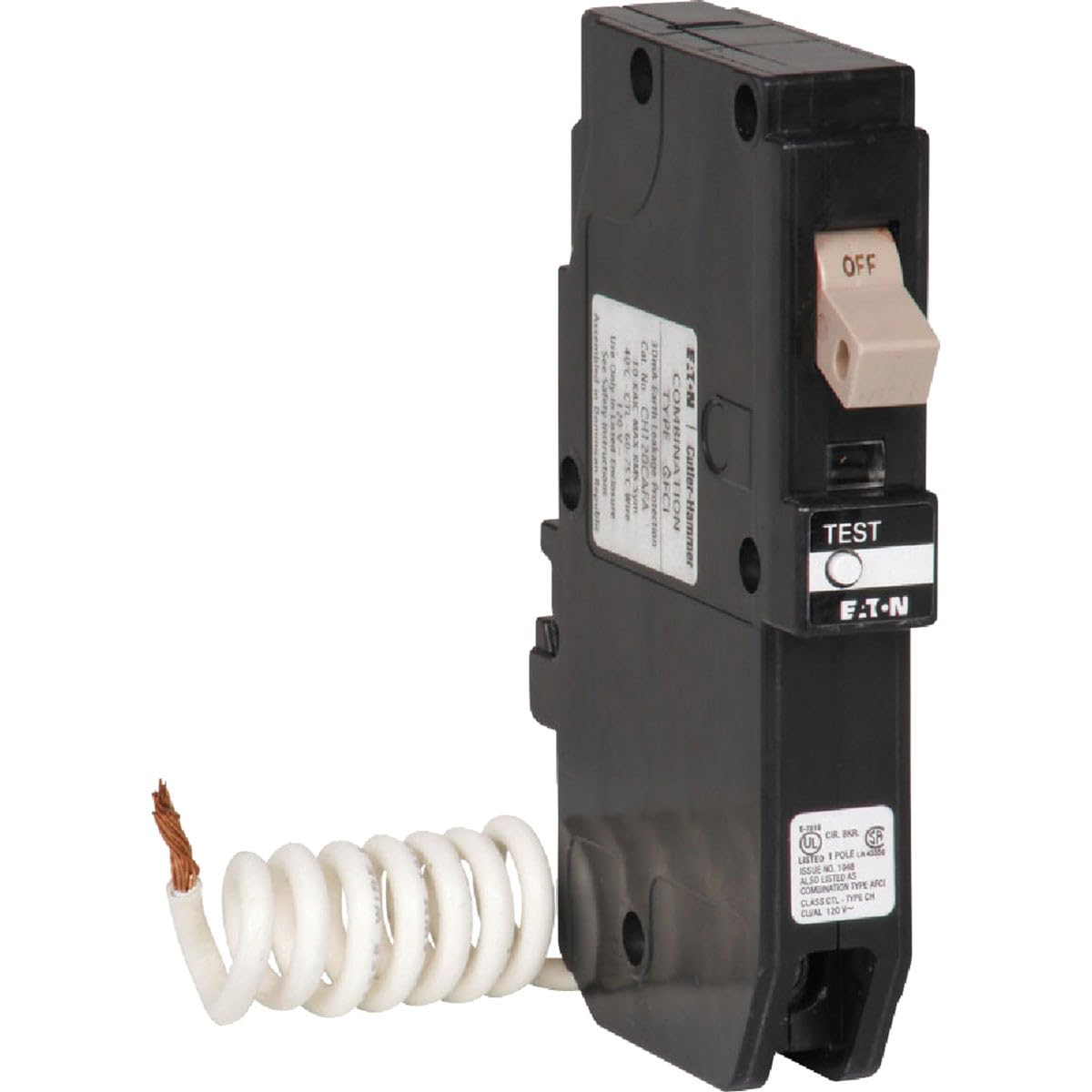
Figuur 1: Eaton CH 1P 20A GFCI Circuit Breaker. This image shows the compact design of the single-pole, 20-amp GFCI breaker, including its distinctive test and reset buttons and the attached pigtail neutral wire for installation.
Instellen en installeren
Voordat u begint: Ensure the main power to the electrical panel is OFF. Use a voltage-tester om te bevestigen dat de stroom is uitgeschakeld.
- Bereid het panel voor: Open the electrical panel cover. Locate an available space for a single-pole breaker.
- Connect the Pigtail: Connect the white (neutral) pigtail wire from the GFCI breaker to the neutral bus bar in the panel. Ensure a secure connection.
- Connect the Load Wire: Connect the black (hot) load wire from the circuit you are protecting to the terminal on the GFCI breaker. Tighten the screw securely.
- Install the Breaker: Snap the GFCI breaker firmly onto the hot bus bar in the panel. Ensure it is fully seated.
- Connect the Neutral Load Wire: Connect the white (neutral) load wire from the circuit you are protecting to the designated neutral terminal on the GFCI breaker. Do not connect this neutral wire to the panel's neutral bus bar.
- Herstel de stroom: Close the electrical panel cover. Turn the main power back ON.
- Test de aardlekschakelaar: Perform the operational test as described in the "Operating Instructions" section.
Gebruiksaanwijzing
Regular testing of the GFCI circuit breaker is crucial to ensure it is functioning correctly and providing continuous protection against ground faults. Test monthly or after any electrical storm.
- Test: With power ON, press the "TEST" button on the face of the GFCI breaker. The breaker should immediately trip to the OFF position.
- Reset: To restore power, push the breaker handle firmly to the "OFF" position, then push it to the "ON" position.
- Verificatie: If the GFCI does not trip when the "TEST" button is pressed, or if it does not reset, it may be faulty or improperly wired. Discontinue use and consult a qualified electrician.
Onderhoud
The Eaton GFCI circuit breaker requires minimal maintenance. Perform the monthly test as described in the Operating Instructions. Keep the area around the electrical panel clean and free of obstructions. Do not attempt to repair a faulty GFCI; replace it with a new one.
Probleemoplossing
| Probleem | Mogelijke oorzaak | Oplossing |
|---|---|---|
| De aardlekschakelaar schakelt regelmatig uit. | Ground fault in the circuit; faulty appliance; moisture. | Unplug all appliances on the circuit and reset. If it holds, plug in appliances one by one to identify the faulty one. Check for moisture in outlets or wiring. If problem persists, consult an electrician. |
| De aardlekschakelaar schakelt niet uit wanneer de TEST-knop wordt ingedrukt. | Faulty GFCI; incorrect wiring. | Ensure power is on. If it still doesn't trip, the GFCI is faulty and needs replacement. Verify wiring connections. |
| GFCI does not reset. | Persistent ground fault; faulty GFCI. | Ensure the breaker handle is pushed fully to OFF before attempting to reset to ON. If a ground fault is present, it will not reset. Address the ground fault or replace the GFCI if it's faulty. |
Specificaties
| Functie | Detail |
|---|---|
| Merk | Eten |
| Modelnaam | CH 1P 20A GFCI W/PIGTAIL |
| Onderdeelnummer | CHFN120GF |
| Huidige beoordeling | 20 Amps |
| Deeltage | 120 Volt |
| Aantal polen | 1 |
| Type stroomonderbreker | GFCI |
| Montagetype | Plug-in houder |
| Artikelafmetingen (LxBxH) | 7 x 4 x 2 inch |
| Materiaal | Plastic |
| UPC | 786689058876 |
Garantie-informatie
This Eaton product comes with a manufacturer's warranty. For specific details regarding warranty coverage, duration, and claims process, please refer to the warranty documentation included with your purchase or visit the official Eaton webwebsite. Bewaar uw aankoopbewijs voor garantiedoeleinden.
Klantenservice
If you have any questions, require technical assistance, or need to report an issue with your Eaton CH 1P 20A GFCI, please contact Eaton customer support. You can find contact information on the official Eaton webde website of via de documentatie die bij uw product is geleverd.
Eaton-functionaris Webwebsite: www.eaton.com


