1. Inleiding
Thank you for choosing the MIATONE BOOMBOX Bluetooth Speaker. This portable and waterproof wireless speaker is designed to deliver high-quality audio for various environments, from indoor relaxation to outdoor adventures. Please read this manual carefully before using the product to ensure proper operation and to maximize its lifespan.

Audio met hoge resolutie: Experience crisp highs, rich mids, and deep bass with advanced DSP-enhanced sound technology.
2. Veiligheidsinformatie
- Do not expose the speaker to extreme temperatures (heat or cold) or high humidity.
- Laat de luidspreker niet vallen en stel hem niet bloot aan harde stoten.
- Demonteer, repareer of wijzig de luidspreker niet zelf. Schakel hiervoor gekwalificeerd servicepersoneel in.
- Houd de luidspreker uit de buurt van medische apparatuur, aangezien het magnetische veld de werking ervan kan verstoren.
- Ensure the charging port cover is securely closed when using the speaker near water to maintain its waterproof rating.
- Gebruik uitsluitend de meegeleverde oplaadkabel of een gecertificeerd equivalent.
- Do not listen at excessively high volumes for prolonged periods to prevent hearing damage.
3. Inhoud van het pakket
Controleer het pakket op de volgende items:
- MIATONE BOOMBOX Bluetooth Speaker
- Micro USB-oplaadkabel
- Hulpingangskabel
- Gebruikershandleiding
4. Product voorbijview
Familiarize yourself with the various parts and controls of your MIATONE BOOMBOX speaker.
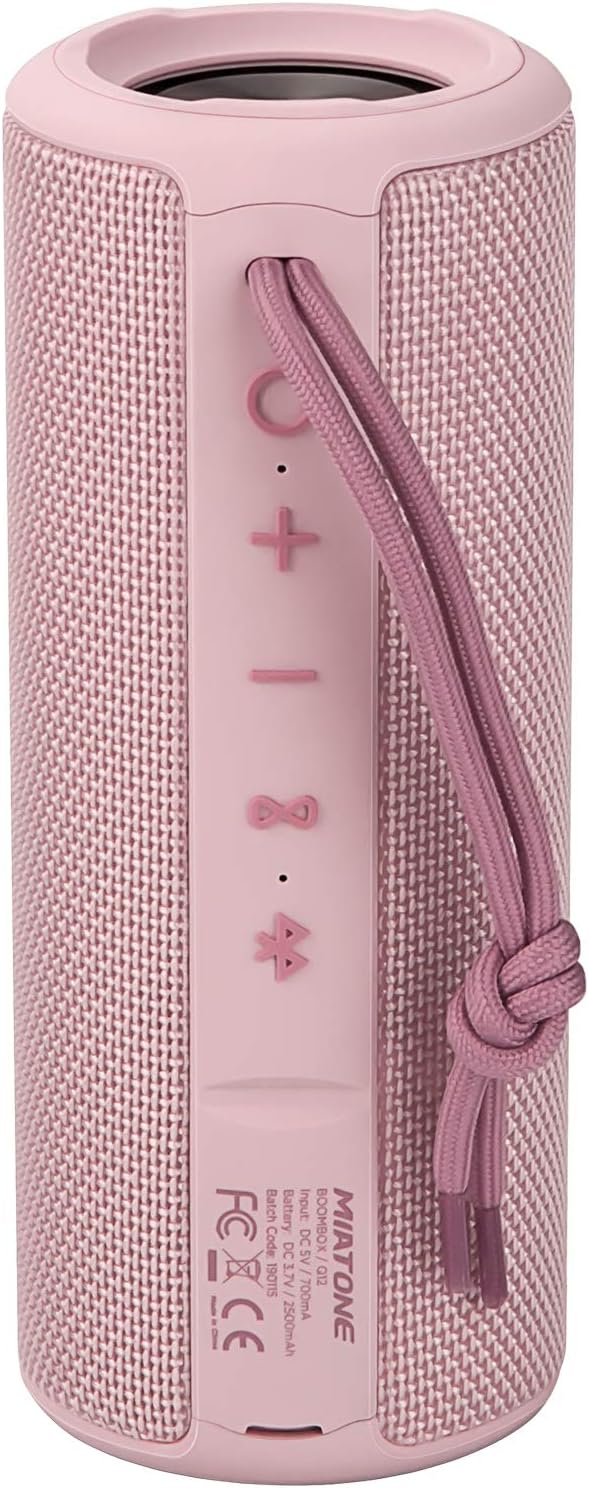
Voorkant View: Shows the speaker grille and the MIATONE logo.

Achterkant View: Displays the control buttons (+, -, Play/Pause, Bluetooth, TWS) and the charging/AUX ports under a protective flap.

Reinforced Silicone End Caps: The speaker features durable silicone bumpers on both ends to absorb impact and prevent slipping.
Knopfuncties:
| Knop | Functie |
|---|---|
| + | Short press: Volume Up; Long press: Next Track |
| - | Short press: Volume Down; Long press: Previous Track |
| Afspelen/Pauzeren | Short press: Play/Pause; Short press (incoming call): Answer/End Call; Long press (incoming call): Reject Call |
| Bluetooth-pictogram | Long press: Disconnect current Bluetooth device and enter pairing mode |
| TWS Icon | Short press: Initiate TWS pairing (True Wireless Stereo) |
| Aan/uit-knop | Lang indrukken: Aan/Uit |
5. Instellen
5.1 De luidspreker opladen
- Open the protective flap on the back of the speaker to reveal the charging port.
- Connect the Micro USB charging cable to the speaker's charging port and the other end to a USB power adapter (not included) or a computer's USB port.
- De led-indicator geeft de laadstatus weer (bijvoorbeeld rood tijdens het opladen, uit wanneer volledig opgeladen).
- A full charge takes approximately 12 hours. Ensure the protective flap is sealed after charging.
5.2 In-/uitschakelen
- Inschakelen: Long press the Power button until you hear a power-on prompt.
- Uitschakelen: Long press the Power button until you hear a power-off prompt.
5.3 Bluetooth-koppeling
- Ensure the speaker is powered on and in Bluetooth pairing mode (indicated by a flashing blue LED). If not, long press the Bluetooth icon button.
- Schakel Bluetooth in op uw apparaat (smartphone, tablet, computer).
- Zoeken naar "BOOMBOX" in your device's Bluetooth list.
- Select "BOOMBOX" to connect. You will hear a confirmation sound once paired.
- De luidspreker maakt automatisch opnieuw verbinding met het laatst gekoppelde apparaat wanneer deze wordt ingeschakeld, mits binnen bereik.

Verbeterde Bluetooth 5.3: Provides faster and more stable wireless connections.
5.4 TWS (True Wireless Stereo) Koppelen
TWS allows you to pair two MIATONE BOOMBOX speakers together for a true stereo sound experience.
- Ensure both BOOMBOX speakers are powered on and not connected to any Bluetooth device.
- On one speaker (this will be the primary speaker), short press the TWS icon button. It will enter TWS pairing mode.
- De twee luidsprekers maken automatisch verbinding met elkaar. U hoort een bevestigingsgeluid zodra de TWS-koppeling is gelukt.
- Nadat de TWS-apparaten zijn gekoppeld, verbindt u uw apparaat via Bluetooth met de primaire luidspreker zoals beschreven in paragraaf 5.3.
- To disconnect TWS, short press the TWS icon button on either speaker.
6. Gebruiksaanwijzing
6.1 Muziek afspelen
- Afspelen/Pauzeren: Druk kort op de knop Afspelen/Pauze.
- Volume omhoog: Druk kort op de + knop.
- Volume verminderen: Druk kort op de - knop.
- Volgende nummer: Houd de + knop.
- Vorig nummer: Houd de - knop.
6.2 Handsfree bellen
- Beantwoord oproep: Druk kort op de afspeel-/pauzeknop wanneer er een inkomend gesprek overgaat.
- Einde gesprek: Druk tijdens een gesprek kort op de afspeel-/pauzeknop.
- Oproep afwijzen: Houd de afspeel-/pauzeknop ingedrukt wanneer er een inkomend gesprek overgaat.
6.3 Auxiliary Input (AUX Mode)
You can connect non-Bluetooth devices to the speaker using the provided 3.5mm auxiliary cable.
- Open the protective flap on the back of the speaker.
- Connect one end of the 3.5mm AUX cable to the speaker's AUX port and the other end to your audio device's headphone jack.
- De luidspreker schakelt automatisch over naar de AUX-modus.
- Regel het afspelen en het volume vanaf uw aangesloten apparaat.
- Ensure the protective flap is sealed after use to maintain water resistance.
7. Onderhoud
7.1 Reinigen
- Veeg de luidspreker schoon met een zachte, damp lap.
- Gebruik geen schuurmiddelen, alcohol of chemische oplosmiddelen.
- Zorg ervoor dat de luidspreker volledig droog is voordat u hem oplaadt of opbergt.
7.2 Opslag
- Bewaar de luidspreker op een koele, droge plaats, uit de buurt van direct zonlicht en extreme temperaturen.
- If storing for a long period, charge the battery to about 50% every few months to preserve battery life.
7.3 Waterdicht onderhoud (IPX6)
The MIATONE BOOMBOX is IPX6 waterproof, meaning it can withstand powerful water jets. It is not designed for submersion.
- Always ensure the charging port and AUX port protective flap is securely closed before exposing the speaker to water.
- If the speaker gets wet, wipe it dry with a clean cloth before opening the port flap or charging.
- Do not charge the speaker if the ports are wet.

IPX6 Waterproof Speaker: Designed to float and withstand water splashes, making it ideal for poolside or beach use.
8. Probleemoplossing
| Probleem | Mogelijke oorzaak | Oplossing |
|---|---|---|
| De luidspreker gaat niet aan. | Batterij is bijna leeg. | Laad de luidspreker volledig op. |
| Kan niet koppelen met Bluetooth-apparaat. | Speaker is not in pairing mode; device's Bluetooth is off; speaker is already connected to another device; device list needs refresh. | Ensure speaker is in pairing mode (flashing blue LED). Turn device's Bluetooth off and on. Disconnect from other devices. Forget "BOOMBOX" on your device and re-scan. |
| Geen geluid of zacht volume. | Het volume van de luidspreker of het apparaat is te laag; de invoermodus is onjuist; de luidspreker is niet aangesloten. | Increase volume on both speaker and device. Ensure correct input mode (Bluetooth/AUX). Re-establish Bluetooth connection. |
| Geluidsvervorming. | Volume te hoog; batterij bijna leeg; storing. | Reduce volume. Charge the speaker. Move speaker closer to the device or away from other electronic devices. |
| Het koppelen met TWS is mislukt. | De luidsprekers staan te ver uit elkaar; één luidspreker is al aangesloten op een apparaat. | Zorg ervoor dat beide luidsprekers dicht bij elkaar staan en niet met een Bluetooth-apparaat zijn verbonden voordat u de TWS-koppeling start. |
9. Specificaties
| Functie | Detail |
|---|---|
| Modelnaam | BOOMBOX (Q12) |
| Connectiviteitstechnologie | Bluetooth 5.3, USB, AUX |
| Luidsprekertype | Portable Speaker, Bluetooth Speaker |
| Maximaal uitgangsvermogen | 20 Watt |
| Frequentierespons | 20 kHz |
| Levensduur van de batterij | Tot 17 uur (bij 50% volume) |
| Oplaadtijd | 12 uur |
| Waterdichtheidsclassificatie | IPX6 |
| Bluetooth-bereik | Tot 100 voet (30.5 meter) |
| Afmetingen (L x B x H) | 7.11 x 7.11 x 18.54 cm (2.8 x 2.8 x 7.3 inch) |
| Gewicht | 421.84 gram (0.93 lbs) |
| Materiaal | Aluminium |
| Compatibele apparaten | Persoonlijke computer, laptop, tablet, smartphone |

Langdurige speeltijd: Enjoy up to 17 hours of playback at 50% volume.
10. Garantie en ondersteuning
MIATONE products are designed and manufactured to the highest quality standards. For information regarding warranty coverage, technical support, or service inquiries, please refer to the contact information provided on the product packaging or visit the official MIATONE webplaats.
Bewaar uw aankoopbewijs voor garantieclaims.


