Invoering
This manual provides detailed instructions for the installation, operation, and maintenance of your FOSCAM R4S 4MP WiFi IP Camera. Designed for home security and monitoring, this camera offers advanced features such as 4MP resolution, dual-band WiFi connectivity, AI human detection, two-way audio, and night vision. Please read this manual thoroughly before using the product to ensure proper setup and functionality.

Figure 1: FOSCAM R4S 4MP WiFi IP Camera
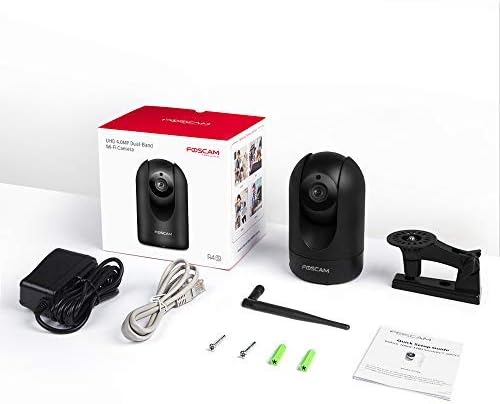
Inhoud van het pakket
Verify that all items listed below are included in your package. If any items are missing or damaged, please contact FOSCAM support.
- FOSCAM R4S 4MP WiFi IP Camera
- Stroomadapter
- Ethernet-kabel
- Montagebeugel
- Montageschroeven en pluggen
- Installatiehandleiding
- WiFi-antenne

Figure 2: FOSCAM R4S Package Contents
Product voorbijview en functies
The FOSCAM R4S camera is equipped with advanced technology to provide reliable surveillance and monitoring. Key features include:
- 4MP/2K Resolution: Levert heldere en gedetailleerde videobeelden.tage.
- Dual-band wifi (2.4/5 GHz): Garandeert stabiele en flexibele draadloze connectiviteit.
- AI menselijke detectie: Reduces false alarms by distinguishing human shapes from other movements.
- Geluidsdetectie: Waarschuwt u voor ongebruikelijke geluiden.
- 33ft nachtzicht: Biedt helder zicht bij weinig licht.
- Tweerichtingsaudio: Maakt realtimecommunicatie via de camera mogelijk.
- Pan/Tilt-functionaliteit: Biedt een horizontale draaihoek van 360° en een verticale draaihoek van 100°. viewbereik.
- 20x digitale zoom: Maakt een nauwkeurige inspectie van details mogelijk.
- Privacymodus: Temporarily disables recording and transmission for privacy.
- Verenigbaarheid: Werkt met Amazon Alexa en Google Assistent.
- Opslag opties: Supports Micro SD card (up to 256GB, not included) and cloud storage services.
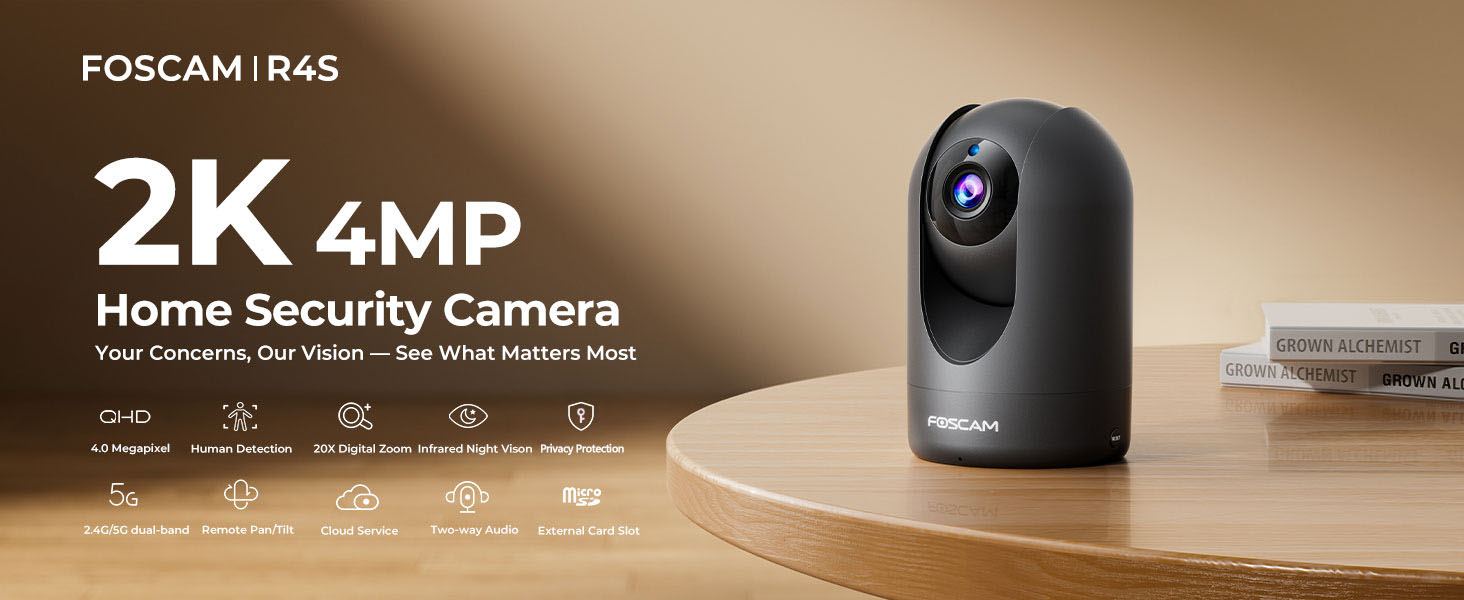
Figure 3: FOSCAM R4S Key Features
Installatiehandleiding
1. Fysieke plaatsing
The FOSCAM R4S camera can be placed on a flat surface or mounted to a wall or ceiling. Ensure the camera is positioned to cover the desired monitoring area.

Figure 4: Camera Placement Options
2. Stroomaansluiting
Connect the power adapter to the camera's power input and plug it into a standard electrical outlet. The camera will power on automatically.
3. App-installatie en eerste configuratie
- Download the Foscam App from your mobile device's app store (iOS or Android).
- Open the Foscam App and create an account or log in.
- Tap the "+" icon to add a new camera.
- Follow the on-screen instructions to connect your camera to your Wi-Fi network using either the sound wave or QR code setup method. Ensure your mobile device is connected to the same Wi-Fi network (2.4GHz or 5GHz) you intend to use for the camera.
- Once connected, you can name your camera and set a password.

Afbeelding 5: Dual-band wifi-verbinding
Gebruiksaanwijzing
1. Leven View en Pan/Tilt-bediening
From the Foscam App, select your camera to view the live feed. Use the on-screen controls to pan (horizontal movement) and tilt (vertical movement) the camera lens to adjust your viewhoek.

Figure 6: Pan/Tilt Camera Control
2. Tweerichtingsaudio
Tap the microphone icon in the app to enable two-way audio. You can speak through your phone, and your voice will be broadcast through the camera's speaker. Similarly, you can hear audio from the camera's environment.
Figuur 7: Tweerichtingsaudiocommunicatie
3. Bewegings- en geluidsdetectie
Configure detection settings in the app to receive alerts for human movement or unusual sounds. You can customize sensitivity and detection zones to minimize false alarms.

Figure 8: Intelligent Human and Pet Detection
4. Nachtzicht
The camera automatically switches to night vision mode in low-light conditions, providing clear black and white images up to 33 feet.

Figuur 9: Nachtzichtmogelijkheid
5. Privacymodus
Activate Privacy Mode via the app to temporarily disable video recording and transmission, ensuring your privacy when needed. The camera lens will physically retract or turn away.

Figure 10: Activating Privacy Mode
6. Opslag en afspelen
Recordings can be stored on a Micro SD card (up to 256GB, not included) or via FOSCAM's cloud service. Access and playback recorded footage through the Foscam App.

Afbeelding 11: Opslagopties
Onderhoud
To ensure optimal performance and longevity of your FOSCAM R4S camera, follow these maintenance guidelines:
- Schoonmaak: Veeg de cameralens en -behuizing voorzichtig af met een zachte, droge doek. Gebruik geen agressieve chemicaliën of schurende materialen.
- Firmware-updates: Regularly check for and install firmware updates through the Foscam App to ensure your camera has the latest features and security enhancements.
- Plaatsing: Ensure the camera is placed in a stable environment, away from direct sunlight, extreme temperatures, and excessive moisture.
- Voeding: Gebruik uitsluitend de originele stroomadapter die bij de camera is geleverd.
Probleemoplossing
If you encounter issues with your FOSCAM R4S camera, refer to the following common troubleshooting steps:
| Probleem | Mogelijke oorzaak | Oplossing |
|---|---|---|
| Camera offline | Geen stroom, wifi-verbinding verbroken, probleem met de router. | Check power connection. Restart camera and router. Verify Wi-Fi signal strength. |
| Slechte videokwaliteit | Low bandwidth, dirty lens, insufficient lighting. | Ensure stable Wi-Fi. Clean the lens. Adjust camera position or add lighting. |
| Bewegingsdetectie werkt niet | Incorrect settings, detection zone not configured. | Check motion detection settings in the app. Ensure detection zones are active. |
| Problemen met tweerichtingsaudio | Microphone/speaker muted, app permissions. | Check volume settings in the app. Ensure app has microphone permissions. |
For further assistance, please refer to the FOSCAM support webwebsite of neem contact op met de klantenservice.
Specificaties
| Functie | Detail |
|---|---|
| Oplossing | 4MP (2K) |
| Connectiviteit | 2.4GHz & 5GHz Dual-Band Wi-Fi |
| Nachtzichtbereik | Tot 33 voet (10 meter) |
| Viewhoek: | 105° (diagonaal) |
| Pan/Tilt-bereik | Horizontaal: 360°, Verticaal: 100° |
| Digitale zoom | 20X |
| Geluid | Two-Way Audio with built-in mic and speaker |
| Detectie | AI Human Detection, Sound Detection |
| Opslag | Micro SD-kaart (tot 256 GB), cloudopslag |
| Verenigbaarheid | Amazon Alexa, Google Assistent |
| Stroomverbruik | DC 5V/2A (via voedingsadapter) |
| Afmetingen (L x B x H) | 2.91 x 3.03 x 4.69 inch |
| Gewicht | 1.15 pond |
Garantie en ondersteuning
FOSCAM is committed to providing high-quality products and excellent customer service.
- Kwaliteitsgarantie: 180-Day Quality Guarantee.
- Retourneren: 30-Day Free Returns.
- Technische ondersteuning: 24/7 Fast Reply & Lifetime Tech Support.
- Contact: For support, please visit the official FOSCAM website of neem contact op met hun klantenservice.


