Invoering
Welcome to the user manual for the TC Electronic Ditto JAM X2 Looper Pedal. This intuitive looper pedal is designed for musicians seeking intelligent loop synchronization that responds to their band's rhythm. It features innovative BeatSense technology, allowing for automatic adjustment of loop tracks to your beat, and offers both Record-then-Play and Record-then-Overdub functionalities with unlimited overdubs and undo/redo capabilities. This manual provides essential information for setting up, operating, maintaining, and troubleshooting your Ditto JAM X2 Looper.
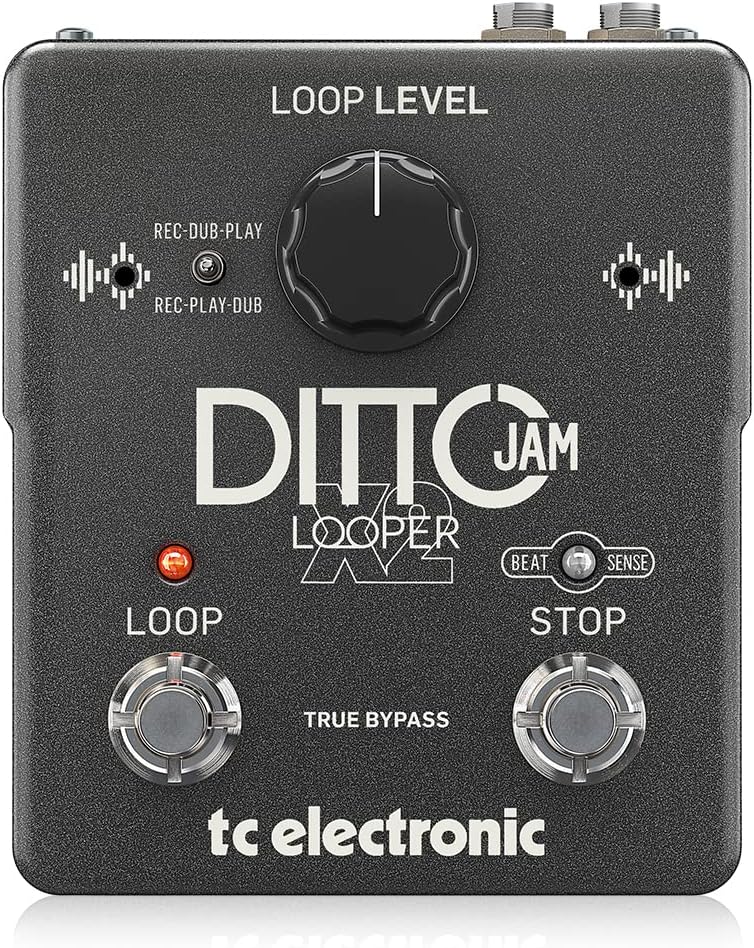
Afbeelding: Voorzijde view of the TC Electronic Ditto JAM X2 Looper Pedal, showcasing the 'LOOP LEVEL' knob, 'REC-DUB-PLAY' and 'REC-PLAY-DUB' switches, 'LOOP' and 'STOP' footswitches, and 'BEAT SENSE' indicator.
Belangrijkste kenmerken
- Intuitive looper pedal with intelligent loop synchronization that responds to your band.
- Innovative responsive BeatSense technology automatically adjusts loop tracks to your beat.
- Choose between Record-then-Play or Record-then-Overdub functionalities.
- Unlimited overdubs and undo/redo for total creative freedom.
- Dual built-in mics accurately track band tempo by focusing only on rhythmic elements.

Afbeelding: Een close-up view of the "BEAT SENSE" indicator on the pedal, highlighting its function.

Image: An external microphone, likely used for the BeatSense technology, clipped onto a drum kit component.
Instellen
Stroomvoorziening
The Ditto JAM X2 Looper requires a 9V power supply. Ensure you use a compatible power adapter (not included) to power the unit.
Verbindingen
- Sluit uw instrument (bijvoorbeeld een gitaar) aan op de INVOER aansluiting met behulp van een standaard 1/4-inch instrumentkabel.
- Sluit de UITVOER jack naar je amplifier or next pedal in the signal chain using a standard 1/4-inch instrument cable.
- An EXT MICROFOON input is available for connecting an external microphone to enhance BeatSense accuracy, particularly in complex rhythmic environments.

Afbeelding: Achterkant view of the Ditto JAM X2 pedal, clearly showing the INPUT, OUTPUT, EXT MIC jacks, and the power input.
Gebruiksaanwijzing
Basis looping
- Opname: Druk op de LUS footswitch once to start recording your loop. The LED will illuminate red.
- Playback/Overdub: Druk op de LUS footswitch again to stop recording and begin playback. If you press it again during playback, you will start overdubbing.
- Stop: Druk op de STOP footswitch once to stop playback.
- Ongedaan maken/Opnieuw: Houd de STOP footswitch to undo the last overdub. Press and hold again to redo it.
- Clear Loop: Houd de LUS Voetschakelaar om de huidige lus te wissen.
Loop Level Control
De LUS-NIVEAU knob adjusts the overall volume of your recorded loop. Turn clockwise to increase volume, counter-clockwise to decrease.
Record Modes (REC-DUB-PLAY / REC-PLAY-DUB)
The Ditto JAM X2 offers two recording modes, selectable via the small toggle switch:
- REC-DUB-PLAY: In this mode, the first press of the LOOP footswitch records, the second press starts overdubbing, and a third press initiates playback without further overdubbing.
- REC-PLAY-DUB: In this mode, the first press records, the second press starts playback, and a third press initiates overdubbing.

Afbeelding: Een gedetailleerde view of the toggle switch for selecting between REC-DUB-PLAY and REC-PLAY-DUB modes.
BeatSense Technology
The innovative BeatSense technology uses dual built-in microphones to listen to your band's rhythmic elements (like drums) and automatically synchronize your loops to the detected tempo. This ensures your loops stay perfectly in time with the rest of the band.

Image: A musician's feet operating the Ditto JAM X2 pedal on a stage floor, demonstrating its use in a live setting.
Onderhoud
- Houd het pedaal schoon en vrij van stof en vuil. Gebruik een zachte, droge doek om het schoon te maken.
- Vermijd blootstelling van het pedaal aan extreme temperaturen, hoge luchtvochtigheid of direct zonlicht.
- Do not attempt to open the unit or perform repairs yourself, as this will void the warranty. Refer to qualified service personnel for any issues.
- Ensure proper ventilation around the pedal during use.

Image: The bottom label of the Ditto JAM X2 pedal, displaying compliance information, manufacturer details, and power requirements.
Probleemoplossing
Geen geluidsuitvoer
- Controleer alle kabelaansluitingen (ingang, uitgang, voeding).
- Ensure the pedal is receiving power.
- Verify the LOOP LEVEL knob is not set to minimum.
- Test met verschillende kabels en ampversterker/instrument om het probleem te isoleren.
Loop Not Synchronizing
- Ensure the BeatSense microphones are not obstructed.
- Verify the external microphone (if used) is properly connected and functioning.
- The BeatSense technology works best with clear, consistent rhythmic input (e.g., drums). Complex or irregular rhythms may affect synchronization accuracy.
- Ensure the pedal is placed in an optimal position to pick up rhythmic sounds from the band.
Voetschakelaars reageren niet
- Controleer de stroomvoorziening.
- Neem contact op met de klantenondersteuning als het probleem zich blijft voordoen.
Specificaties
| Functie | Specificatie |
|---|---|
| Model | DITTO JAM X2 LOOPER |
| Merk | TC Electronic |
| Artikelgewicht | 1.26 pond (570 gram) |
| Productafmetingen | 4.45 x 5.31 x 2.13 inch (5.31"L x 4.45"B x 2.13"H) |
| Kleur | Zwart |
| Energiebron | Werkt op batterijen (9 volt) |
| hardware Interface | 1/4-inch audio |
| Signaalformaat | Analoog |
Garantie en ondersteuning
For warranty information and technical support, please refer to the official TC Electronic webwebsite of neem rechtstreeks contact op met hun klantenservice. Bewaar uw aankoopbewijs voor garantieclaims.
Online bronnen: Bezoek de TC Electronic Store on Amazon voor aanvullende productinformatie en bronnen.


