Invoering
This manual provides detailed instructions for the setup, operation, maintenance, and troubleshooting of your Jaycar Composite AV to HDMI Converter (Model AC-1722). Please read this manual thoroughly before using the device to ensure proper functionality and to prevent damage.
Belangrijkste kenmerken
- Converts Composite Video and Stereo Audio (RCA) to HDMI output.
- Supports HDMI 1080p or 720p output resolutions.
- Compatible with NTSC and PAL video systems.
- Plug and play operation.
Inhoud van het pakket
Controleer of alle artikelen in uw pakket aanwezig zijn:
- Jaycar Composite AV to HDMI Converter (AC-1722)
- Stroomadapter (5V DC)
- Gebruikershandleiding (dit document)
Product voorbijview
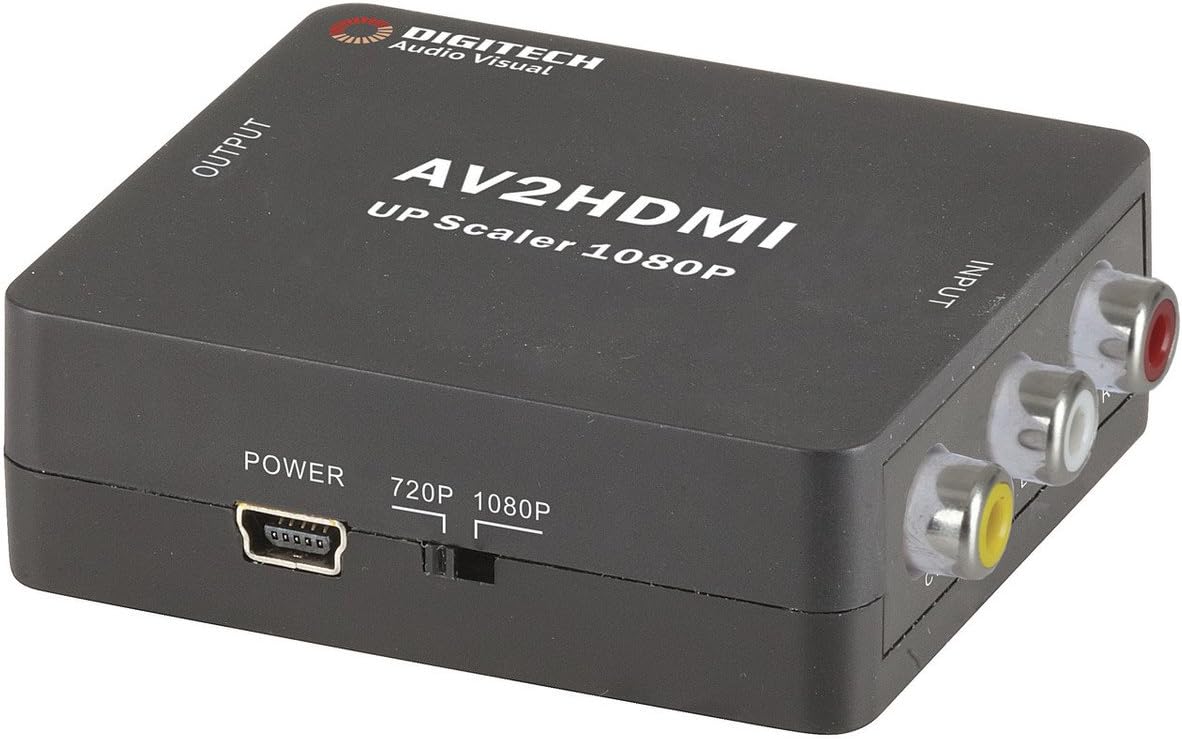
Afbeelding 1: Voorkant view of the Jaycar Composite AV to HDMI Converter. This image displays the top and front of the converter, showing the "AV2HDMI UP Scaler 1080P" label, "OUTPUT" and "INPUT" indicators, the power input, and the 720p/1080p resolution switch. The Composite AV input ports (yellow, white, red) are visible on the right side.

Afbeelding 2: Kant view of the converter showing the HDMI output port. This port is labeled "HDMI" and is where the HDMI cable connects to your display device.

Afbeelding 3: Kant view of the converter showing the Composite AV input ports. These ports are labeled "CVBS" (yellow for video), "L" (white for left audio), and "R" (red for right audio).

Afbeelding 4: Kant view of the converter showing the power input port and the 720p/1080p resolution switch. The power port is a mini-USB type, and the switch allows selection between 720p and 1080p output resolutions.
Installatie-instructies
- Bronapparaat aansluiten: Connect your Composite AV source device (e.g., DVD player, VCR, game console) to the converter's input ports. Match the yellow RCA cable to the "CVBS" port, the white RCA cable to the "L" (Left Audio) port, and the red RCA cable to the "R" (Right Audio) port.
- Connect Display Device: Connect an HDMI cable from the converter's "HDMI" output port to an available HDMI input on your display device (e.g., TV, monitor, projector).
- Select Output Resolution: Use the 720p/1080p switch on the converter to select your desired output resolution. For most modern displays, 1080p is recommended. If you experience issues, try 720p.
- Sluit stroom aan: Connect the provided 5V DC power adapter to the converter's "POWER" input port, then plug the adapter into a wall outlet. The converter will power on automatically.
- Selecteer invoer op het scherm: Turn on your display device and select the corresponding HDMI input channel to view the converted signal.
Gebruiksaanwijzing
The Jaycar Composite AV to HDMI Converter is designed for plug-and-play operation. Once all connections are made and power is supplied, the converter will automatically scale the analog AV signal to the selected HDMI output resolution (720p or 1080p).
- Ensure your source device is powered on and outputting a Composite AV signal.
- Verify your display device is set to the correct HDMI input.
- If no image appears, check all cable connections and the power supply.
- Experiment with the 720p/1080p switch if the image is distorted or not displayed correctly.
Onderhoud
The converter requires minimal maintenance. Follow these guidelines to ensure longevity:
- Bewaar het apparaat op een droge, goed geventileerde plaats, uit de buurt van direct zonlicht, hoge temperaturen en vochtigheid.
- Zorg ervoor dat u het apparaat niet laat vallen en blootstelt aan sterke schokken.
- Reinig de buitenkant met een zachte, droge doek. Gebruik geen vloeibare reinigingsmiddelen of oplosmiddelen.
- Zorg ervoor dat alle kabels goed zijn aangesloten, maar forceer ze niet.
Probleemoplossing
| Probleem | Mogelijke oorzaak | Oplossing |
|---|---|---|
| Geen video- of audio-uitvoer. |
|
|
| Distorted or flickering image. |
|
|
| No audio, but video is present. |
|
|
Specificaties
| Invoertype | Composite Video and Audio (3 RCA) |
| Uitvoertype | HDMI Type-A |
| Ondersteunde resoluties | 1080p (1920 x 1080), 720p |
| Videosystemen | NTSC, PAL |
| Vermogensvereiste | 5V DC (voedingsadapter meegeleverd) |
| Productafmetingen (L x B x H) | 54 mm x 60 mm x 20 mm (ongeveer 2.13" x 2.36" x 0.79") |
| Productgewicht | 80 gram |
Garantie-informatie
This Jaycar product comes with a 1 jaar garantie Deze garantie geldt vanaf de aankoopdatum. De garantie dekt materiaal- en fabricagefouten bij normaal gebruik. Schade veroorzaakt door verkeerd gebruik, een ongeval, ongeoorloofde aanpassingen of onjuiste installatie valt niet onder de garantie.
For warranty claims, please retain your proof of purchase and contact Jaycar customer support.
Klantenservice
If you require further assistance or have questions not covered in this manual, please contact Jaycar customer support through their official webwebsite of de winkel waar u het product hebt gekocht.
For the latest support information, please visit the official Jaycar webwebsite: www.jaycar.com.au


