1. Inleiding
This manual provides comprehensive instructions for the safe and effective operation, setup, and maintenance of the OWON B41T+ Digital Multimeter. The B41T+ is a versatile 3-in-1 device, functioning as a datalogger, a multimeter, and a temperature meter. It incorporates True RMS measurement capabilities and a clear backlight for enhanced readability in various environments.
2. Veiligheidsinformatie
To ensure safe operation and prevent personal injury or damage to the device, please observe the following safety precautions:
- Always disconnect test leads from the circuit before changing functions or ranges.
- Do not exceed the maximum input limits specified for each function. Refer to the specifications section for details.
- Wees uiterst voorzichtig bij het werken met stroomvoerende circuits. Hoge spanningtagHet kan gevaarlijk zijn.
- Ensure the correct fuse rating is used when replacing fuses. Incorrect fuses can lead to damage or fire.
- Inspect test leads for damage before each use. Do not use damaged leads.
- Gebruik de multimeter niet als deze beschadigd lijkt of niet goed functioneert.
- Houd het apparaat droog. Vermijd blootstelling aan vocht of extreme temperaturen.
3. Inhoud van het pakket
Controleer bij het openen van de verpakking of de volgende onderdelen aanwezig zijn:
- 1x OWON B41T+ Multimeter
- 1x Multimeter Lead Set (Red and Black)
- 1x K-Type Thermocouple
- 1x Alligator Clip Set
- 1x Multi-function Test Bench
- 1x Gebruikershandleiding (Engels)
- 1x draagtas

4. Product voorbijview
The OWON B41T+ Digital Multimeter features a robust design with a clear digital display, a central rotary function dial, and various input terminals for different measurement types.
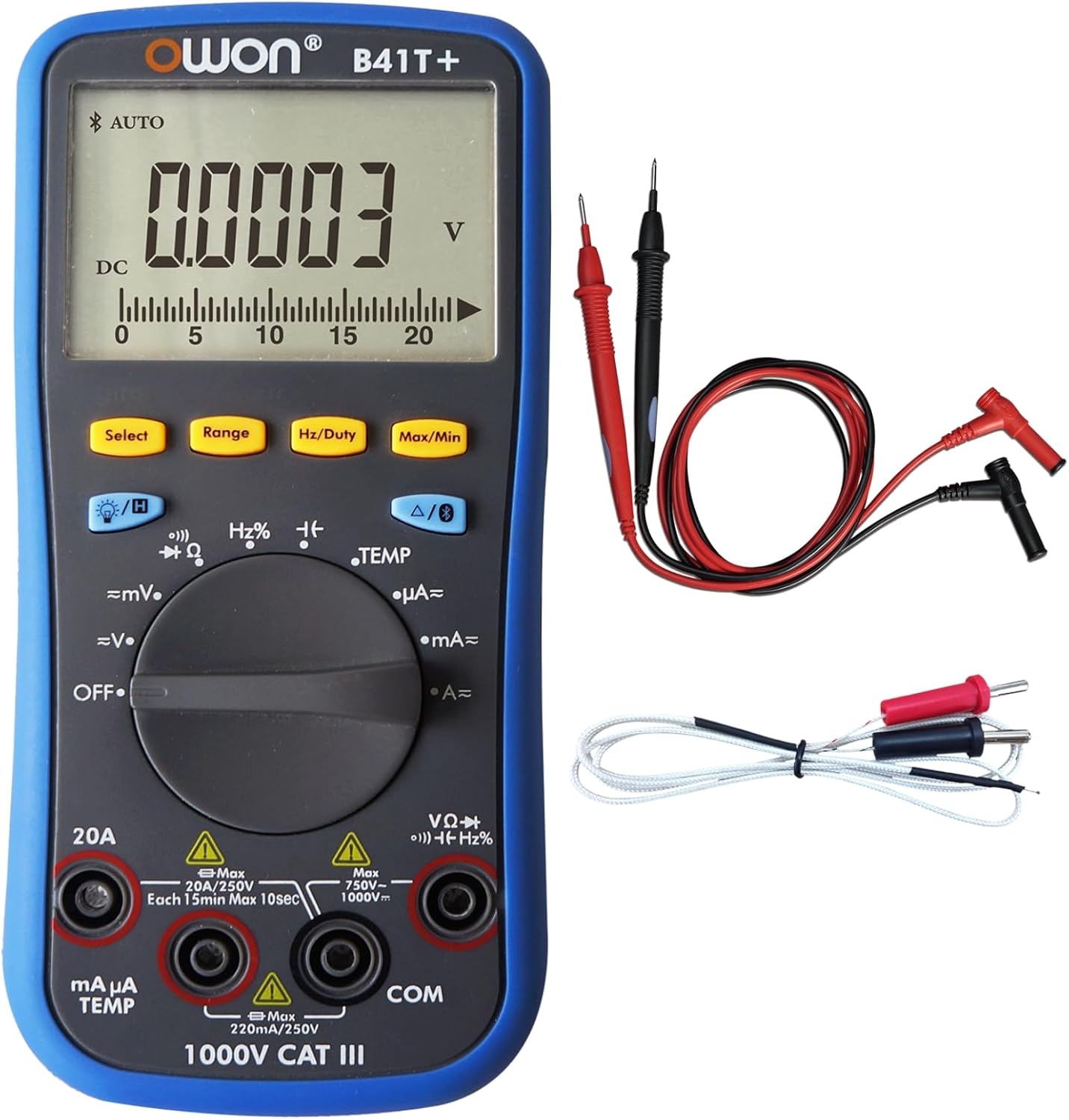
4.1. Sleutelcomponenten
- Weergave: 4(1/2)-digit LCD with backlight, capable of showing 21999 counts.
- Functieknop: Draaischakelaar om meetmodi te selecteren (bijv. Vol).tage, Current, Resistance, Temperature).
- Knoppen: Include Select, Range, Hz/Duty, Max/Min, Backlight, and Data Hold functions.
- Ingangsaansluitingen: Dedicated terminals for test leads, including COM (common), VΩHz, mAµA, and 20A inputs.


5. Instellen
5.1. Batterij installatie
The OWON B41T+ requires two 1.5V AA batteries for operation. Batteries are typically included with the device.
- Ensure the multimeter is powered OFF.
- Zoek het batterijvak aan de achterkant van het apparaat.
- Gebruik een schroevendraaier om het batterijklepje te openen.
- Plaats twee AA-batterijen en let daarbij op de juiste polariteit (+ en -), zoals aangegeven in het batterijcompartiment.
- Plaats het deksel van het batterijcompartiment terug en zet het vast met de schroef.
5.2. Testkabels aansluiten
Een correcte aansluiting van de meetsnoeren is cruciaal voor nauwkeurige en veilige metingen.
- Sluit de zwart test leidde tot de COM (standaard) ingangsaansluiting.
- Voor de meeste voltage, resistance, frequency, diode, and continuity measurements, connect the rood test leidde tot de VΩHz ingangsaansluiting.
- For current measurements (mA/µA), connect the rood test leidde tot de mAµA TEMP ingangsaansluiting.
- Voor metingen met hoge stroomsterkte (tot 20A) sluit u de volgende verbinding aan: rood test leidde tot de 20A ingangsaansluiting.
6. Gebruiksaanwijzing
6.1. Basic Measurement Procedure
- Sluit de testkabels aan zoals beschreven in paragraaf 5.2.
- Turn the function dial to the desired measurement mode.
- Sluit de testpennen aan op het te testen circuit of onderdeel.
- Lees de meetwaarde af op het display.
6.2. Functieselectie
Use the rotary dial to select the primary measurement function:
- OFF: Hiermee schakelt u het apparaat uit.
- =mV / =V: DC voltage measurement (millivolts/volts).
- ~mV / ~V: AC voltage measurement (millivolts/volts).
- Oorzaak: Weerstandsmeting.
- Continuity / Diode: For continuity checks and diode testing.
- Hz%: Frequency and Duty Cycle measurement.
- TEMP: Temperature measurement using the K-type thermocouple.
- µA / mA / A: Current measurement (microamperes/milliamperes/amper).
6.3. Knopfuncties
- Selecteer: Toggles between sub-functions within a dial position (e.g., AC/DC, Continuity/Diode).
- Bereik: Manually selects the measurement range. The device also supports auto-ranging.
- Hz/Bedrijfstak: Activates frequency or duty cycle measurement.
- Maximum minimum: Records and displays the maximum and minimum values measured.
- Achtergrondverlichting: Toggles the display backlight for improved visibility.
- Gegevens vasthouden (H): Bevriest de huidige meting op het display.
6.4. Data Logging and Bluetooth Connectivity
The OWON B41T+ features Bluetooth connectivity, allowing it to interface with a mobile application for advanced data logging and analysis.
- Multi-connection: The mobile app supports monitoring of more than one device simultaneously, enhancing measurement safety and flexibility.
- Offline opname: The device can record up to 10,000 data points over a period of 168 hours (7 days) without being continuously connected to the app. This data can be downloaded later.
- Trendanalyse: The mobile app provides a special chart mode for analyzing measurement trends over time.
- Voice Warning & Reading: The app offers voice warnings for measurement safety and smart voice-reading of measurements.
Refer to the specific mobile application's instructions for detailed guidance on pairing and using these advanced features.
7. Onderhoud
7.1. Schoonmaken
Om de prestaties en het uiterlijk van het apparaat te behouden:
- Veeg de c afasing met een zachte, damp lap.
- Do not use abrasive cleaners, solvents, or harsh chemicals, as these can damage the plastic components.
- Ensure the device is powered off and disconnected from any circuits before cleaning.
7.2. Batterij vervangen
When the low-battery indicator appears on the display, replace the batteries promptly to ensure accurate readings.
- Schakel de multimeter uit en koppel alle meetsnoeren los.
- Open the battery compartment cover on the rear of the device (refer to Section 5.1).
- Verwijder de oude AA-batterijen.
- Insert new 1.5V AA batteries, ensuring correct polarity.
- Sluit het deksel van het batterijcompartiment goed.
7.3. Zekering vervangen
If the current measurement functions cease to work, the internal fuse may need replacement. Refer to the device's internal markings or the full technical manual for specific fuse ratings and replacement procedures. Always use a fuse with the correct voltage en huidige beoordeling.
7.4. Opslag
For long-term storage, remove the batteries to prevent leakage and store the multimeter in its carry bag in a cool, dry place, away from direct sunlight and extreme temperatures.

8. Probleemoplossing
This section addresses common issues you might encounter with your OWON B41T+ Multimeter.
- Geen weergave of zwakke weergave:
Controleer de plaatsing van de accu's en zorg ervoor dat ze niet leeg zijn. Vervang de accu's indien nodig. - Onjuiste metingen:
Verify that the function dial is set to the correct measurement mode. Ensure test leads are properly connected to the correct input jacks. Check for damaged test leads. - Huidige meting werkt niet:
The internal fuse for current measurement may be blown. Refer to Section 7.3 for fuse replacement guidance. - Problemen met Bluetooth-connectiviteit:
Ensure Bluetooth is enabled on your mobile device. Confirm the OWON B41T+ is powered on and within range. Restart both the multimeter and the mobile application. - Device Powers Off Unexpectedly:
The multimeter has a smart power-off feature to conserve battery life. If it powers off too frequently, check battery level. This feature can often be configured or disabled via the mobile app or specific button combinations (refer to the full manual).
9. Specificaties
| Functie | Specificatie |
|---|---|
| Merk | EIGEN |
| Model | B41T+ |
| Weergave | 21999 Counts, 4(1/2)-digit |
| Echte RMS | Ja |
| Auto-scale | Ja |
| Max / Min Value | Ja |
| Offline Recording Function | Ja |
| Record Period | 168 uur (7 dagen) |
| Recordlengte | 10,000 punten |
| LCD-achtergrondverlichting | Ja |
| Diode Test | Ja |
| Continuity Test (Audion Test) | Ja |
| Gegevens vasthouden | Ja |
| Invoerbeveiliging | Ja |
| Automatische test | Ja |
| Indicatie batterij bijna leeg | Ja |
| Ingangsimpedantie | 10MΩ |
| Relatieve meting: | Ja |
| Frequentierespons | (40 - 10000) Hz |
| Shift Rate | 3 keer / s |
| Simulate Chart Shift Rate | 30 keer / s |
| Batterij | 3V (1.5V x 2) AA |
| Afmetingen (BxHxD) | 85 mm x 185 mm x 30 mm (ongeveer 3.35 x 7.28 x 1.18 inch) |
| Gewicht van het apparaat | 0.32 kg (approx. 11.3 ounces) |
| Kleur | Zwart, Blauw |
| Energiebron | Op batterijen |
| Meettype | Multimeter |
| min. Bediening Voltage | 3 Volt |
| UPC | 884473045276, 695087763636 |
10. Garantie en ondersteuning
For detailed warranty information, technical support, or service inquiries regarding your OWON B41T+ Digital Multimeter, please refer to the official OWON webwebsite of neem contact op met hun klantenservice. Bewaar uw aankoopbewijs als aankoopbewijs voor garantieclaims.


