1. Product voorbijview
The HP ProDesk 600 G1 SFF (Small Form Factor) is a compact business desktop computer designed for productivity and manageability. This manual provides essential information for setting up, operating, maintaining, and troubleshooting your device.
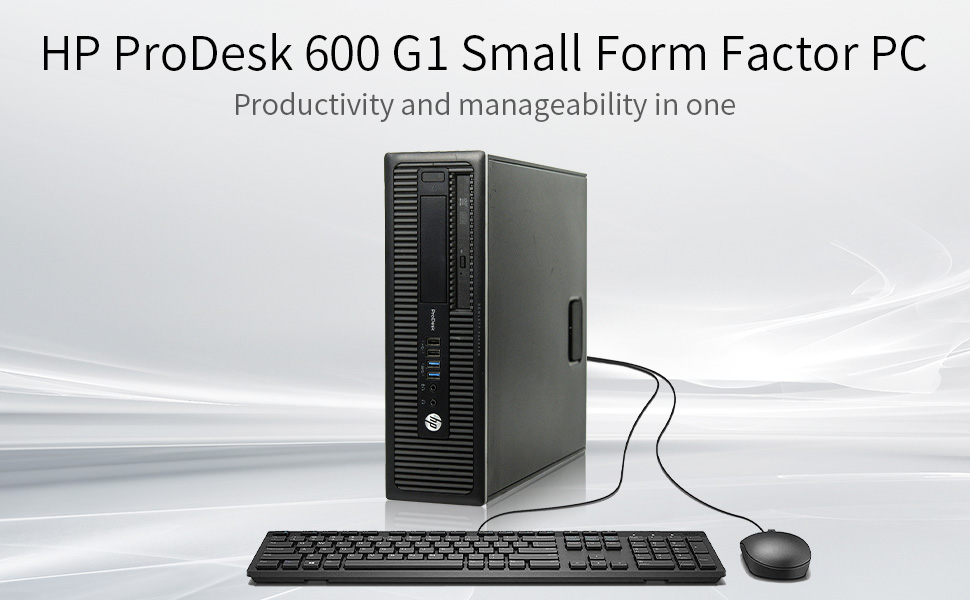
Image: HP ProDesk 600 G1 SFF desktop computer with connected keyboard and mouse.
Belangrijkste kenmerken
- Intel i5-4570 Quad-Core Processor (up to 3.60 GHz)
- 8 GB DDR3 RAM voor efficiënt multitasken
- 500GB Hard Drive (HDD) for storage
- Integrated DVD Optical Drive
- Multiple USB 3.0 ports for high-speed connectivity
- Pre-installed with Windows 11 Pro 64 Bit (Multi-Language Support: English/Spanish/French)
- Compact Small Form Factor (SFF) design
2. Installatiehandleiding
2.1 Uitpakken
Carefully remove the computer and all accessories from the packaging. Ensure all components listed in the packing slip are present. Retain packaging for future transport or service.
2.2 Randapparatuur aansluiten
Connect your monitor, keyboard, mouse, and other peripherals to the appropriate ports on the rear of the computer. The HP ProDesk 600 G1 SFF features various ports for connectivity.
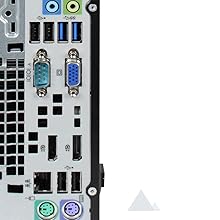
Image: Rear ports of the HP ProDesk 600 G1 SFF, including USB, VGA, DisplayPort, and audio jacks.
- Monitor: Connect your monitor using a DisplayPort or VGA cable. Note that this model may not include an HDMI port directly. An adapter may be required for HDMI monitors.
- Toetsenbord en muis: Connect the USB keyboard and mouse to any available USB ports.
- Netwerk: Connect an Ethernet cable to the RJ-45 network port for wired internet access.
- Stroom: Connect the power cord to the computer and then to a grounded electrical outlet.
2.3 Inschakelen
Press the power button located on the front of the computer. The system will boot up, and Windows 11 Pro will load. Follow any on-screen prompts for initial setup if this is the first time powering on the device.
3. Gebruiksaanwijzing
3.1 Besturingssysteem
Your HP ProDesk 600 G1 SFF comes with Windows 11 Pro 64 Bit pre-installed. This operating system provides a user-friendly interface for managing files, running applications, and accessing the internet. Familiarize yourself with the Windows 11 interface for optimal use.
3.2 Gebruik van de optische schijf
The integrated DVD optical drive supports reading and writing CDs and DVDs. To use the drive, press the eject button on the drive bay, insert your disc, and close the tray. The operating system will typically prompt you with options for the disc content.
Afbeelding: Voorzijde view of the HP ProDesk 600 G1 SFF showing the DVD optical drive.
4. Onderhoud en verzorging
- Schoonmaak: Use a soft, dry cloth to clean the exterior of the computer. For the screen, use a specialized screen cleaner and a microfiber cloth.
- Ventilatie: Ensure the computer's ventilation openings are clear of obstructions to prevent overheating.
- Software-updates: Werk uw besturingssysteem en drivers regelmatig bij om optimale prestaties en beveiliging te garanderen.
- Gegevensback-up: Maak regelmatig een back-up van belangrijke gegevens naar een externe schijf of cloudopslag om gegevensverlies te voorkomen.
- Stroombeheer: Use surge protectors to protect against power fluctuations. Shut down the computer properly when not in use.
5. Probleemoplossing
This section provides solutions to common issues you might encounter with your HP ProDesk 600 G1 SFF.
| Probleem | Mogelijke oplossing |
|---|---|
| De computer start niet op. | Check power cable connections to the computer and wall outlet. Ensure the power button is pressed firmly. Test the outlet with another device. |
| Geen weergave op monitor | Verify monitor power and video cable connections. Ensure the correct input source is selected on the monitor. Try a different video port or cable if available. |
| Trage prestaties | Close unnecessary applications. Check for malware or viruses. Ensure sufficient free space on the hard drive. Consider upgrading to a Solid State Drive (SSD) for improved speed. |
| Randapparatuur niet herkend | Ensure devices are properly connected. Try a different USB port. Install or update device drivers. Restart the computer. |
| Optical drive not reading discs | Ensure the disc is clean and free of scratches. Try a different disc. Check if the drive appears in 'This PC' or 'Device Manager'. |
6. Technische specificaties
Detailed specifications for the HP ProDesk 600 G1 SFF desktop computer.
Image: Intel Core i5 processor graphic.
| Onderdeel | Specificatie |
|---|---|
| Verwerker | Intel Core i5-4570 (3.2 GHz, up to 3.6 GHz with Intel Turbo Boost Technology, 6 MB cache, 4 cores) |
| RAM | 8 GB DDR3 SDRAM |
| Harde schijf | 500 GB SSHD (Solid State Hybrid Drive) |
| Grafisch | Intel HD Graphics (geïntegreerd) |
| Optische schijf | DVD-ROM / DVD-RW |
| Besturingssysteem | Windows 11 Pro 64-bit |
| USB-poorten | 6 x USB 2.0, 4 x USB 3.0 |
| Videopoorten | 2 x DisplayPort, 1 x VGA |
| Audiopoorten | Line-in, Line-out, Headphone, Microphone |
| Netwerk | Gigabit Ethernet, 802.11ac, 802.11n Wireless |
| Afmetingen (HxBxD) | 10 x 3 x 14 cm (25.4 x 7.6 x 35.6 inch) |
| Gewicht | 12 pond (5.44 kg) |
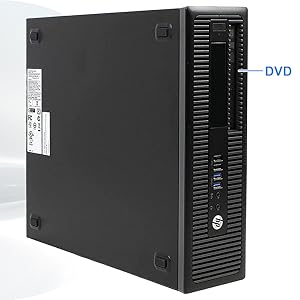
Image: DDR3 SDRAM module, indicating the type of memory used.