1. Inleiding
This manual provides detailed instructions for the safe and effective operation of your BENNING CM 12 True RMS Digital Power Clamp Multimeter. Please read this manual thoroughly before using the device and keep it for future reference. The BENNING CM 12 is designed for demanding measurement tasks in industrial and commercial environments, offering precise measurements of AC, AC+DC True RMS, inrush current, and more, with data logging and Bluetooth connectivity.
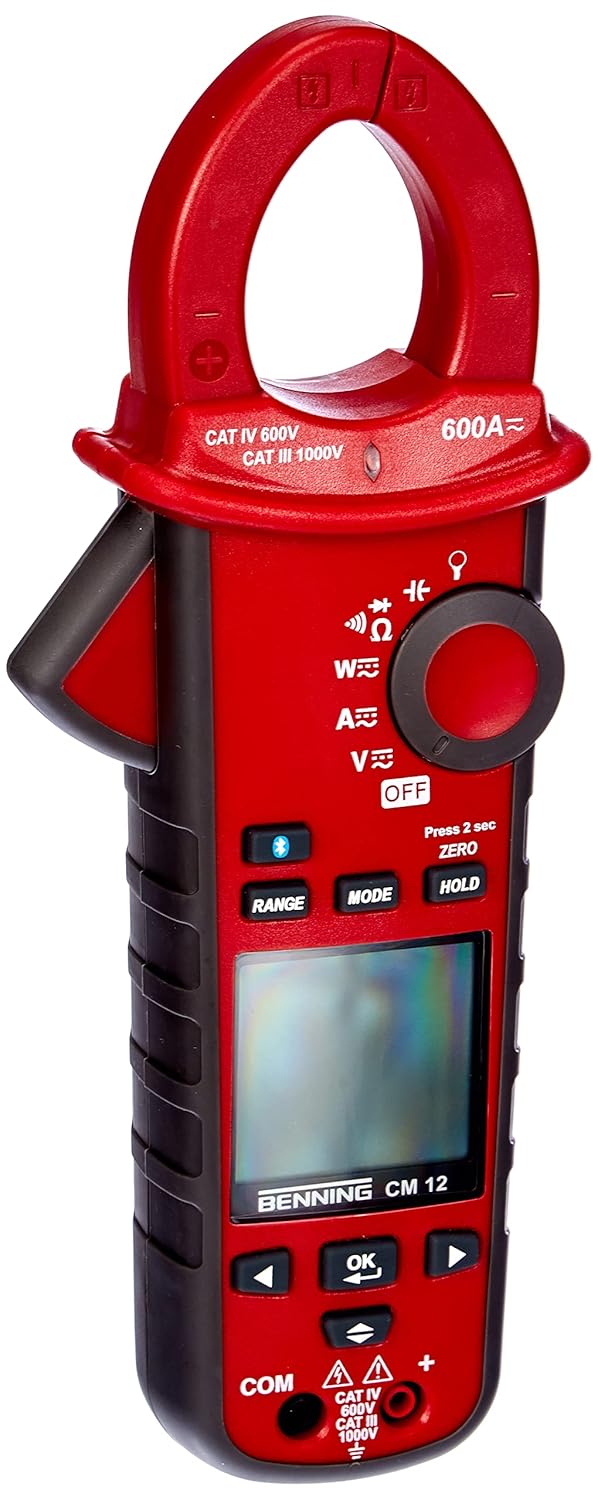
Figuur 1: The Benning CM 12 True RMS Digital Power Clamp Multimeter. This image displays the main unit with its red casing, clamp jaw, display screen, and control buttons.
2. Veiligheidsinformatie
Always observe the following safety precautions to prevent personal injury and damage to the instrument:
- Gebruik de meter niet als deze beschadigd lijkt of als de isolatie van de testkabels is aangetast.
- Zorg ervoor dat de juiste functie en het juiste bereik zijn geselecteerd voordat u metingen uitvoert.
- Overschrijd de maximale invoerlimieten voor geen enkele functie.
- Wees voorzichtig bij het werken met voltagboven 30V AC RMS, 42V piek of 60V DC, aangezien deze een schokgevaar opleveren.
- Koppel altijd de stroom naar het circuit los en ontlaad alle hoog-voltage condensatoren voordat u weerstands-, continuïteits-, diode- of capaciteitstests uitvoert.
- Houd u aan de lokale en nationale veiligheidscodes.
3. Productcomponenten
The BENNING CM 12 package includes the following items:
- BENNING CM 12 Digitale Power Clamp Multimeter
- Testkabels (rood en zwart)
- AAA-batterijen (6 meegeleverd)
- Draagtas
- Gebruikershandleiding (dit document)
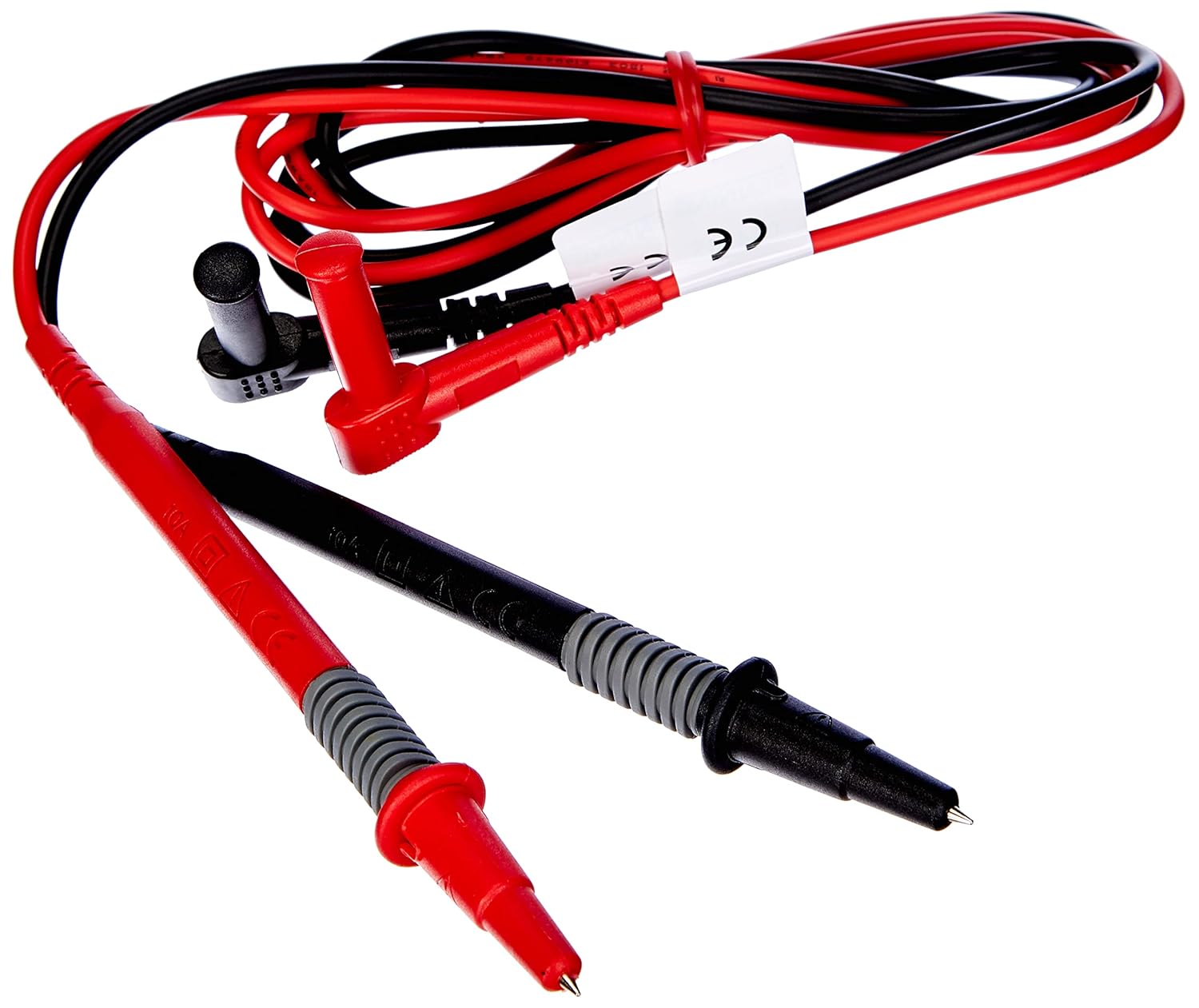
Figuur 2: Red and black test leads. These leads are used for voltage, resistance, continuity, and other measurements.

Figuur 3: Six AAA batteries. These batteries power the Benning CM 12 multimeter.

Figuur 4: Black carrying case. This case provides protection and portability for the multimeter and its accessories.
4. Instellen
4.1. Batterij installatie
- Zoek het klepje van het batterijcompartiment aan de achterkant van het apparaat.
- Gebruik een schroevendraaier om het batterijvak te openen.
- Insert six (6) AAA batteries, ensuring correct polarity as indicated inside the compartment.
- Plaats het deksel van het batterijcompartiment terug en zet het vast met de schroef.
4.2. Eerste keer inschakelen
Turn the rotary switch to any measurement function (e.g., V~ for AC Voltage) to power on the device. The display will illuminate, indicating the device is ready for use.
5. Gebruiksaanwijzing
The BENNING CM 12 offers a variety of measurement functions. Select the desired function using the rotary switch.
5.1. AC/DC-stroommeting (Clamp Functie)
- Turn the rotary switch to the 'A~' (AC Current) or 'A=' (DC Current) position.
- Druk op de clamp trekker om de kaak te openen.
- Enclose a single conductor with the clamp kaak. Zorg ervoor dat de kaak volledig gesloten is.
- Lees de huidige waarde af op het display.
- For AC+DC True RMS measurements, ensure the appropriate mode is selected if available via the MODE button.
5.2. voltage Meting (AC/DC)
- Insert the red test lead into the 'VΩ' input jack and the black test lead into the 'COM' input jack.
- Turn the rotary switch to 'V~' (AC Voltage) of 'V=' (DC Voltagen).
- Sluit de testkabels parallel aan op het te testen circuit of onderdeel.
- Lees het deeltage-waarde op het display.
5.3. Resistance and Continuity Measurement
- Zorg ervoor dat het circuit spanningsloos is voordat u de meting uitvoert.
- Insert test leads as for voltagde meting.
- Turn the rotary switch to 'Ω' (Resistance/Continuity).
- Sluit de testkabels aan op het component.
- For continuity, the meter will beep if resistance is below approximately 30Ω - 100Ω.
5.4. Diodetest
- Zorg ervoor dat het circuit spanningsloos is.
- Insert test leads as for voltagde meting.
- Draai de draaischakelaar naar het 'Diode'-symbool.
- Sluit de rode draad aan op de anode en de zwarte draad op de kathode van de diode. Een voorwaartse volstroomtage drop (approx. 0.8V) will be displayed. Reverse the leads for an open circuit reading.
5.5. Inschakelstroommeting
This function measures the initial surge of current when a device (e.g., motor, lamp) is first turned on.
- Turn the rotary switch to the 'A~' position.
- Press the 'INRUSH' button (if dedicated) or activate via 'MODE' button.
- Clamp the meter around the power conductor of the device.
- Turn on the device to measure the inrush current.
5.6. Power Measurement (W) and Power Factor
The BENNING CM 12 can simultaneously detect current (A) and voltage (V) to calculate active power (W) and power factor in AC/DC networks.
- Turn the rotary switch to the 'W' (Power) position.
- Connect the test leads for voltage measurement and clamp the jaw around the current conductor.
- The display will show active power (W) and power factor.
5.7. Data Logger Function (LOG) and Bluetooth Interface
The device features a data logger capable of storing 10,000 readings with a sampling rate from 1 second to 10 minutes. It also includes a Bluetooth interface for data connection to smartphones or tablets via the "BENNING MM-CM Link" app.
- Download and install the "BENNING MM-CM Link" app from your device's app store (iOS and Android compatible).
- Activate Bluetooth on your smartphone/tablet and on the BENNING CM 12 (refer to the device's specific button for Bluetooth activation, usually a dedicated button or a long press of 'MODE').
- Pair the device with the app.
- Use the app to configure logging parameters (sampling rate, start/stop logging) and to view/export recorded data.
5.8. Low-Pass Filter (HFR)
The HFR (High-Frequency Rejection) low-pass filter is used for accurate measurements on clocked motor drives or other noisy environments by filtering out high-frequency interference.
- Activate the HFR filter via a dedicated button or by pressing the 'MODE' button in relevant measurement functions (e.g., AC Voltage or Current).
- The display will typically show an indicator when the filter is active.
5.9. Total Harmonic Distortion (THD) Measurement
The THD function assesses network quality by measuring the total harmonic distortion of voltage or current waveforms.
- Select the THD function using the rotary switch or 'MODE' button in AC Voltage/Current modes.
- Connect the meter as appropriate for voltage of stroommeting.
- The display will show the THD value.
5.10. Two-Pole Rotary Field Testing
This function is used to determine the phase sequence in three-phase systems.
- Turn the rotary switch to the 'Rotary Field' symbol (if dedicated) or select via 'MODE' button in a relevant AC voltage functie.
- Connect the test leads to two phases of the three-phase system.
- The display will indicate the phase sequence (e.g., L1-L2, L2-L3).
6. Onderhoud
6.1. Schoonmaken
Veeg de behuizing af met advertentieamp Gebruik een doek en een mild reinigingsmiddel. Gebruik geen schuurmiddelen of oplosmiddelen. Zorg ervoor dat het apparaat is uitgeschakeld en losgekoppeld van alle stroomcircuits voordat u het schoonmaakt.
6.2. Batterij vervangen
When the low battery indicator appears on the display, replace the batteries as described in Section 4.1. Remove batteries if the device will not be used for an extended period to prevent leakage.
6.3. Opslag
Store the multimeter in its carrying case in a cool, dry environment, away from direct sunlight and extreme temperatures. Remove batteries for long-term storage.
7. Probleemoplossing
| Probleem | Mogelijke oorzaak | Oplossing |
|---|---|---|
| Meter gaat niet aan. | Batterijen zijn leeg of verkeerd geplaatst. | Controleer de polariteit van de batterijen; vervang de batterijen. |
| Geen meetwaarde of "OL" (Overload) weergegeven. | Incorrect range selected, open circuit, or measurement exceeds range. | Select appropriate range, check circuit connections, ensure measurement is within device limits. |
| Onnauwkeurige metingen. | Poor test lead connection, external interference, or low battery. | Ensure secure connections, move away from strong electromagnetic fields, replace batteries. |
| Problemen met Bluetooth-verbinding. | Bluetooth not activated on device/phone, app issues, or out of range. | Ensure Bluetooth is on for both devices, restart app, move closer to the meter. |
8. Specificaties
| Functie | Detail |
|---|---|
| Modelnummer | CM12 |
| Meettype | True RMS (AC, AC+DC) |
| Inschakelstroom | Ja |
| Laad Profile Opname | Yes (single-phase and three-phase) |
| Meting van het stroomverbruik | Active Power (W), Power Factor |
| Continuïteitstest | 30 Ω - 100 Ω |
| Diode Test | 0.8V |
| Rotary Field Testing | Tweepolig |
| Laagdoorlaatfilter | HFR (High-Frequency Rejection) |
| Harmonic Measurement | THD (totale harmonische vervorming) |
| Gegevenslogger | 10,000 readings, 1s - 10min samplengtarief |
| Interface | Bluetooth (iOS and Android app "BENNING MM-CM Link") |
| Energiebron | 6 AAA-batterijen (meegeleverd) |
| Productafmetingen | 11.42 x 5.12 x 2.76 inch |
| Artikelgewicht | 1.3 pond (590 gram) |
| Fabrikant | Benning |

Figuur 5: Dimensionaal view of the Benning CM 12 Multimeter, indicating its approximate height of 11 inches (27 cm).
9. Garantie-informatie
BENNING products are manufactured to high-quality standards. For specific warranty terms and conditions, please refer to the warranty card included with your product or visit the official BENNING webwebsite. Bewaar uw aankoopbewijs voor garantieclaims.
10. Klantenservice
If you encounter any issues or have questions regarding your BENNING CM 12, please contact BENNING customer support. You can find contact information on the official BENNING webwebsite of via uw lokale distributeur.
- Webwebsite: www.benning.de (Controleer uw regionale webplaats)
- E-mailadres: Raadpleeg de website for specific contact emails.
- Telefoon: Raadpleeg de webVoor specifieke contactnummers kunt u de website raadplegen.


