Invoering
Bedankt voor uw aankoopasing the VONYX SPX-PA9210 Portable PA System. This manual provides essential information for the safe and efficient operation of your device. Please read it thoroughly before use and retain it for future reference.
Veiligheidsinstructies
- Lees alle instructies zorgvuldig door voordat u het apparaat gebruikt.
- Houd het apparaat uit de buurt van water, vocht en extreme temperaturen.
- Open de c nietasing; laat alle onderhoudswerkzaamheden over aan gekwalificeerd personeel.
- Gebruik uitsluitend de aangegeven voedingsadapter om op te laden.
- Zorg voor goede ventilatie om oververhitting te voorkomen.
- Vermijd langdurige blootstelling aan hoge volumeniveaus om gehoorschade te voorkomen.
Inhoud van het pakket
Controleer of alle artikelen in het pakket aanwezig zijn:
- VONYX SPX-PA9210 Portable PA System Unit
- 2 x UHF draadloze microfoons
- Stroomadapter/oplaadkabel
- Gebruikershandleiding (dit document)
Product voorbijview
The VONYX SPX-PA9210 is a portable PA system designed for various audio applications. It features integrated speakers, media playback options, and wireless microphones for versatile use.
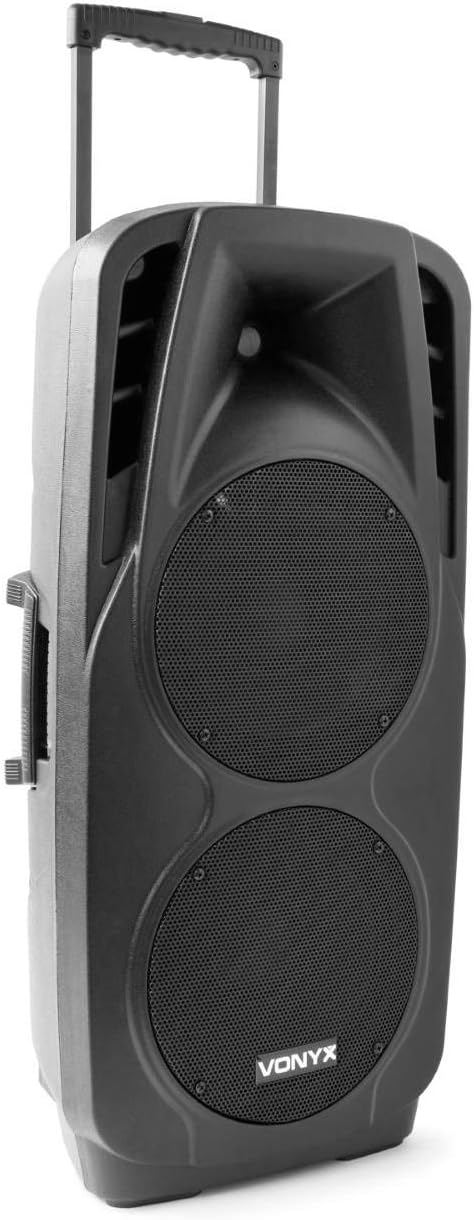
An image showing the VONYX SPX-PA9210 portable PA system. It features a black casing, two large speaker grilles on the front, and a retractable handle at the top for easy transport. A side handle is also visible.
Belangrijkste kenmerken:
- Integrated 2x 10-inch speakers with titanium tweeter controller.
- Built-in media player with USB and SD/MMC card slots.
- Bluetooth-connectiviteit voor draadloze audiostreaming.
- High-performance 12V/7A rechargeable battery for 4-6 hours of autonomy.
- Two UHF wireless microphones with up to 50m range.
- Integrated trolley with telescopic handle and wheels for portability.
- LCD screen for media information display.
Instellen
1. Eerste keer opladen
Before first use, fully charge the internal 12V/7A battery. Connect the provided power adapter to the charging port on the PA system and then to a suitable power outlet. The charging indicator will show the charging status. A full charge typically provides 4-6 hours of operation.
2. In-/uitschakelen
- To power on the unit, locate the power switch (usually on the rear or control panel) and set it to the "ON" position.
- To power off, set the switch to the "OFF" position.
3. Microfoonopstelling
- Insert fresh batteries into the two UHF wireless microphones.
- Turn on the microphones. They should automatically connect to the PA system.
- Adjust the microphone volume on the PA system's control panel. The wireless range is up to 50 meters.
Gebruiksaanwijzing
1. Media Playback (USB/SD/MMC)
- Insert a USB flash drive or an SD/MMC card into the corresponding slot on the control panel.
- The system will automatically detect the media and begin playback, or you may need to select the input source using the "Mode" button.
- Use the playback controls (Play/Pause, Next, Previous) on the control panel to manage your music.
- The LCD screen will display track information.
2. Bluetooth-koppeling
- Press the "Mode" button on the PA system until "Mode" button on the PA system until "Bluetooth" is selected.
- Schakel Bluetooth in op uw smartphone, tablet of ander Bluetooth-apparaat en zoek naar beschikbare apparaten.
- Select "VONYX SPX-PA9210" (or similar name) from the list to pair.
- Na de koppeling kunt u draadloos audio vanaf uw apparaat naar het PA-systeem streamen.
3. Volume and Tone Controls
- Adjust the master volume knob to control the overall sound output.
- Separate volume controls are available for microphones and media playback.
- Use the bass and treble controls (if available) to adjust the tone of the audio.
Onderhoud
1. Schoonmaken
Wipe the exterior of the unit with a soft, dry cloth. Do not use abrasive cleaners or solvents. Ensure no liquids enter the device.
2. Batterijverzorging
- Om de levensduur van de batterij te verlengen, moet u voorkomen dat u de batterij te vaak volledig ontlaadt.
- Charge the unit regularly, even if not in use, to maintain battery health.
- Bewaar het apparaat op een koele, droge plaats wanneer u het gedurende langere tijd niet gebruikt.
Probleemoplossing
- Geen stroom: Ensure the unit is charged or connected to a power source, and the power switch is in the "ON" position.
- Geen geluid: Check all volume controls (master, microphone, media player). Ensure the correct input source is selected. Verify microphone batteries.
- Bluetooth maakt geen verbinding: Ensure the PA system is in Bluetooth mode and discoverable. Turn off and on Bluetooth on your device and try pairing again. Move closer to the PA system.
- Vervormd geluid: Reduce the volume. Check audio cables if using wired inputs. Ensure microphones are not too close to the speakers (feedback).
Specificaties
| Merk | VONYX |
| Modelnummer | Sky-170.082 (SPX-PA9210) |
| Afmetingen (L x B x H) | 27x38.5x81cm |
| Gewicht | 16.25 kg |
| Connectiviteitstechnologie | Bluetooth, USB |
| Aanbevolen productgebruik | Smartphones of tablets |
| Speciale kenmerken | Bluetooth, USB Port, Portable, LCD Screen |
| Energiebron | Wireless (Internal Battery) |
| Batterij | 12V/7A, 4-6 hours autonomy |
| Materiaal | Acrylonitril-butadieen-styreen (ABS) |
| Aantal kanalen | 5 |
| Sprekers | 2x 10-inch woofers, Titanium tweeter controller |
| Microfoons | 2x UHF Wireless Microphones (up to 50m range) |
Garantie en ondersteuning
For warranty information and technical support, please refer to the documentation provided with your purchase or contact VONYX customer service directly.
Beschikbaarheid van reserveonderdelen: Informatie over de beschikbaarheid van reserveonderdelen voor dit product is momenteel niet beschikbaar.
Software-updates: Informatie over gegarandeerde software-updates voor dit product is momenteel niet beschikbaar.