Invoering
Bedankt voor uw aankoopasing the Havit HV-MS991GT Wireless Mouse. This manual provides essential information for setting up, operating, maintaining, and troubleshooting your device. Please read it carefully before use to ensure optimal performance and longevity of your mouse.
Installatie-instructies
- Pak de muis uit: Carefully remove the mouse and the USB receiver from the packaging.
- Batterijen installeren:
Locate the battery compartment on the underside of the mouse. Open the cover and insert one AA battery (not included), ensuring correct polarity (+/-). Close the battery compartment cover.
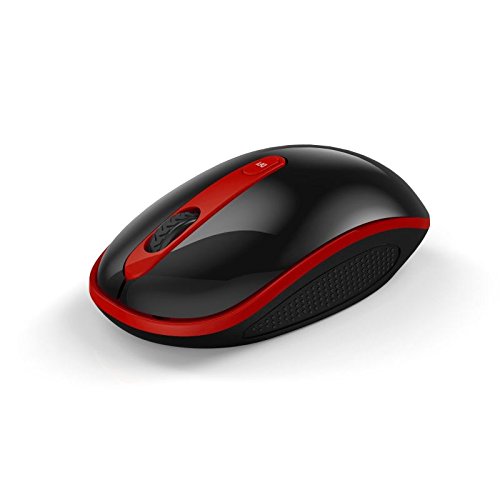
Image: The Havit HV-MS991GT Wireless Mouse, featuring a black body with red accents and a scroll wheel. This image illustrates the overall design of the mouse.
- Sluit de USB-ontvanger aan: Plug the mini USB receiver into an available USB port on your computer. The system will automatically detect and install the necessary drivers.
- Zet de muis aan: Locate the power switch on the underside of the mouse and slide it to the "ON" position. The mouse is now ready for use.
Gebruiksaanwijzing
The Havit HV-MS991GT Wireless Mouse is designed for intuitive use with standard mouse functions.
- Basisfuncties:
- Links klikken: Primaire selectie en activering.
- Klik met de rechtermuisknop: Geeft toegang tot contextmenu's.
- Muis wieltje: Rollen documenten en web pagina's verticaal. Het scrollwieltje functioneert ook als middelste muisknop.
- DPI-aanpassing: This mouse features adjustable DPI settings (1000-1600 DPI) for varying cursor speeds and precision. A dedicated DPI button, usually located near the scroll wheel, allows you to cycle through these settings. Press the button to switch between DPI levels.
- Draadloos bereik: The advanced 2.4GHz wireless technology provides an effective working distance of up to 15 meters (approximately 49 feet) from the USB receiver.
- Systeemcompatibiliteit: This mouse is compatible with Windows 2000, Windows XP, Windows Vista, Windows 7, and Windows 8 operating systems.
Onderhoud
- Schoonmaak: Om de muis schoon te maken, veegt u het oppervlak voorzichtig af met een zachte, droge doek. Voor hardnekkig vuil kunt u de muis iets voorzichtiger reinigen.ampen the cloth with water. Avoid using harsh chemicals or abrasive cleaners, as these can damage the mouse's finish.
- Batterij vervangen: When the mouse performance degrades or it stops responding, it is likely time to replace the battery. Follow the battery installation steps in the "Setup Instructions" section.
- Automatische slaapfunctie: The mouse features a built-in auto sleep function to conserve battery life. If the mouse is inactive for a period, it will enter a low-power sleep mode. To wake it up, simply move the mouse or click any button.
- Ontvangeropslag: The mini USB receiver can be stored inside the mouse's battery compartment when not in use, making it convenient for travel and preventing loss.
Probleemoplossing
| Probleem | Oplossing |
|---|---|
| Muis reageert niet. |
|
| De cursor beweegt onregelmatig of traag. |
|
| Wireless connection is unstable. |
|
Specificaties
| Functie | Detail |
|---|---|
| Merk | Hadit |
| Modelnummer | HV-MS991GT |
| Connectiviteitstechnologie | 2.4GHz Wireless |
| DPI-instellingen | 1000-1600 DPI |
| Aantal knoppen | 4 |
| Sleutelleven | 1,000,000 keer |
| Wireless Range | Tot 15 meter |
| Ondersteuning voor besturingssysteem | Windows 2000/XP/Vista/7/8 |
| Gemiddelde batterijduur | 12 maanden |
| Batterijen inbegrepen | No (Requires 1x AA battery) |
| Artikelgewicht | 120 gram |
| Pakket afmetingen | 16.2x10.8x6cm |
Garantie en ondersteuning
Specific warranty information for the Havit HV-MS991GT Wireless Mouse is not provided in this manual. Please refer to the product packaging or the manufacturer's official website for details regarding warranty coverage and customer support contact information.


