1. Inleiding
Thank you for choosing the Retevis RT33 Kids Walkie Talkies. This manual provides essential information for the safe and effective use of your new two-way radios. Please read it thoroughly before operation and retain it for future reference.
2. Veiligheidsinformatie
- Probeer het apparaat niet uit elkaar te halen of aan te passen.
- Houd het apparaat uit de buurt van water en vocht.
- Use only specified batteries (3 AAA batteries per unit, not included).
- Gooi batterijen op de juiste manier weg, volgens de plaatselijke voorschriften.
- Supervise children during use to ensure safe operation.
- Stel het apparaat niet bloot aan extreme temperaturen of direct zonlicht.
3. Inhoud van het pakket
Controleer of alle artikelen in uw pakket aanwezig zijn:
- 2 x Retevis RT33 Walkie Talkies
- 2 x Belt Clips
- 1 x Gebruikershandleiding

Figure 1: Product Dimensions and Battery Requirements. Each unit requires 3 AAA batteries (not included).
4. Product voorbijview
The Retevis RT33 walkie talkies feature a compact, ergonomic design made from durable PC and ABS materials, suitable for children aged 6-12. Key components include:
- Antenne: Voor het verzenden en ontvangen van signalen.
- LCD-scherm: Displays channel, sub-code, battery level, and other indicators.
- Menu/PWR Button: Long press to power on/off, short press to access menu.
- Omhoog/omlaag-knoppen: Navigeer door de menuopties en pas de instellingen aan.
- PTT-knop (Push-to-Talk): Houd ingedrukt om spraak te verzenden.
- MONI-knop: Monitor current channel activity.
- SCAN-knop: Scan naar actieve kanalen.
- LAMP Knop: Activeert de ingebouwde LED-zaklamp.
- Luidspreker/Microfoon: Voor audio-uitvoer en -invoer.

Afbeelding 2: Gedetailleerd view of the walkie talkie controls, LCD screen, and battery compartment.

Figure 3: The walkie talkie is constructed from durable PC and ABS materials, designed for child-friendly use.
5. Instellen
5.1 Batterij installatie
- Zoek het batterijklepje aan de achterkant van de portofoon.
- Schuif het deksel naar beneden om het vak te openen.
- Insert 3 AAA alkaline batteries into the compartment, ensuring correct polarity (+/-).
- Close the battery compartment cover by sliding it upwards until it clicks securely into place.
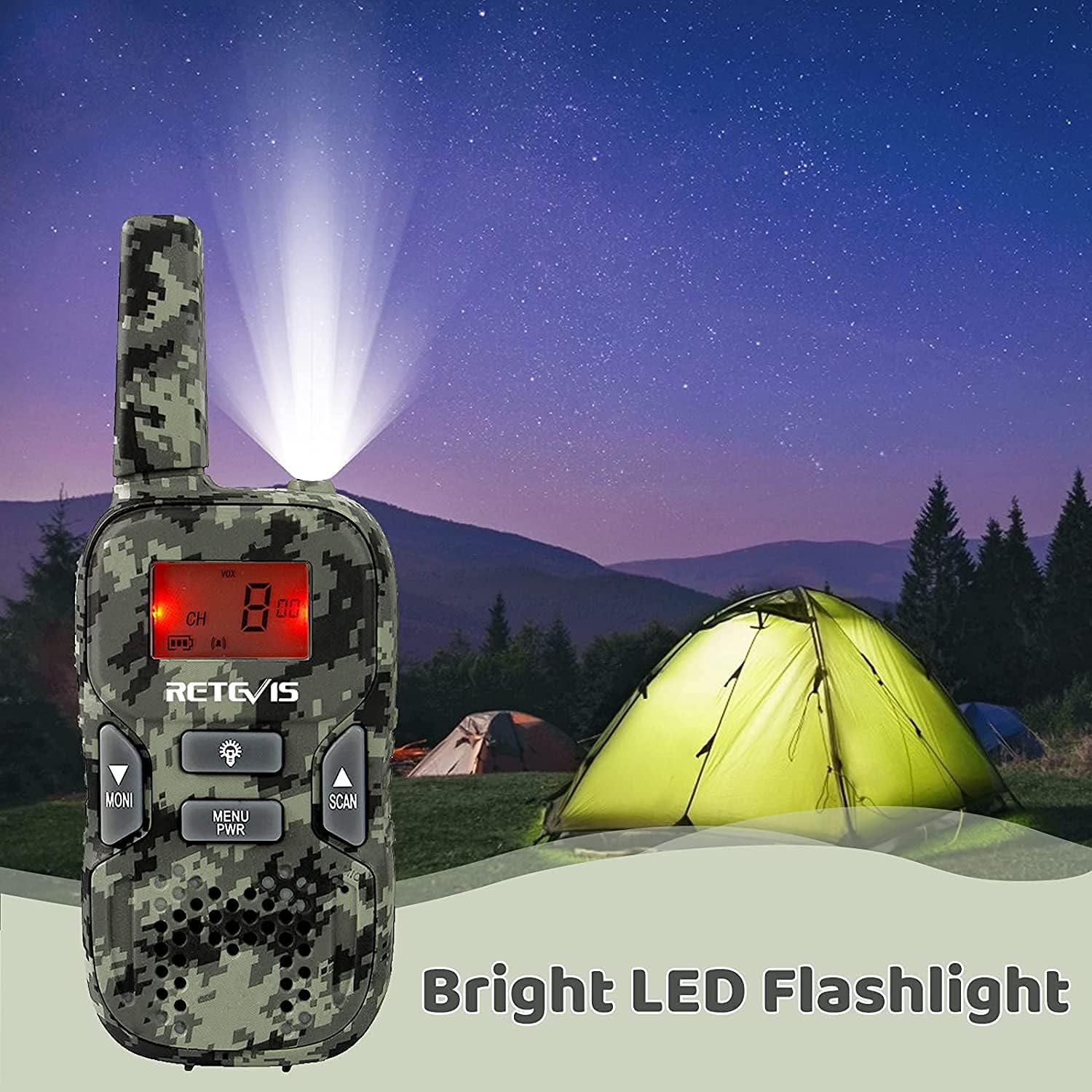
Figure 4: Open the battery compartment to insert 3 AAA batteries.
5.2 In-/uitschakelen
- To power on: Long press the Menu/PWR totdat het LCD-scherm oplicht.
- To power off: Long press the Menu/PWR ingedrukt totdat het LCD-scherm uitgaat.
5.3 Channel and Sub-channel Setting
For communication, both walkie talkies must be set to the same main channel and sub-channel.
- Druk kort op de Menu/PWR Druk op de knop om het menu te openen. Het kanaalnummer zal knipperen.
- Gebruik de Up or Omlaag buttons to select the desired main channel (1-22).
- Druk kort op de Menu/PWR button again to confirm the main channel and move to sub-channel setting. The sub-channel number will flash.
- Gebruik de Up or Omlaag buttons to select the desired sub-channel (00-99).
- Druk op de PTT button to confirm the sub-channel and exit the menu.

Figure 5: Ensure both units are on the same channel and sub-code for clear communication and reduced interference (CTCSS).
6. Gebruiksaanwijzing
6.1 Zenden en ontvangen
- Om te verzenden: Houd de knop ingedrukt PTT button and speak clearly into the microphone. Release the button when finished speaking.
- To receive: Ensure the PTT button is not pressed. The walkie talkie will automatically receive transmissions on the selected channel.
6.2 VOX-functie (spraakgestuurde centrale)
The VOX function allows for hands-free communication. When activated, the radio will transmit automatically when it detects your voice.
- To activate/deactivate VOX: Short press the Menu/PWR button until the VOX setting appears. Use the Up or Omlaag buttons to select the desired VOX sensitivity level (1-3) or turn it off (OF). Press PTT bevestigen.
6.3 Toetsenbordvergrendeling
The keypad lock prevents accidental changes to settings during use.
- To lock/unlock: Long press the Menu/PWR button while in normal operation mode. A key icon will appear/disappear on the LCD screen.
6.4 Zaklamp
The built-in LED flashlight provides illumination in low-light conditions.
- To turn on/off: Short press the LAMP knop.
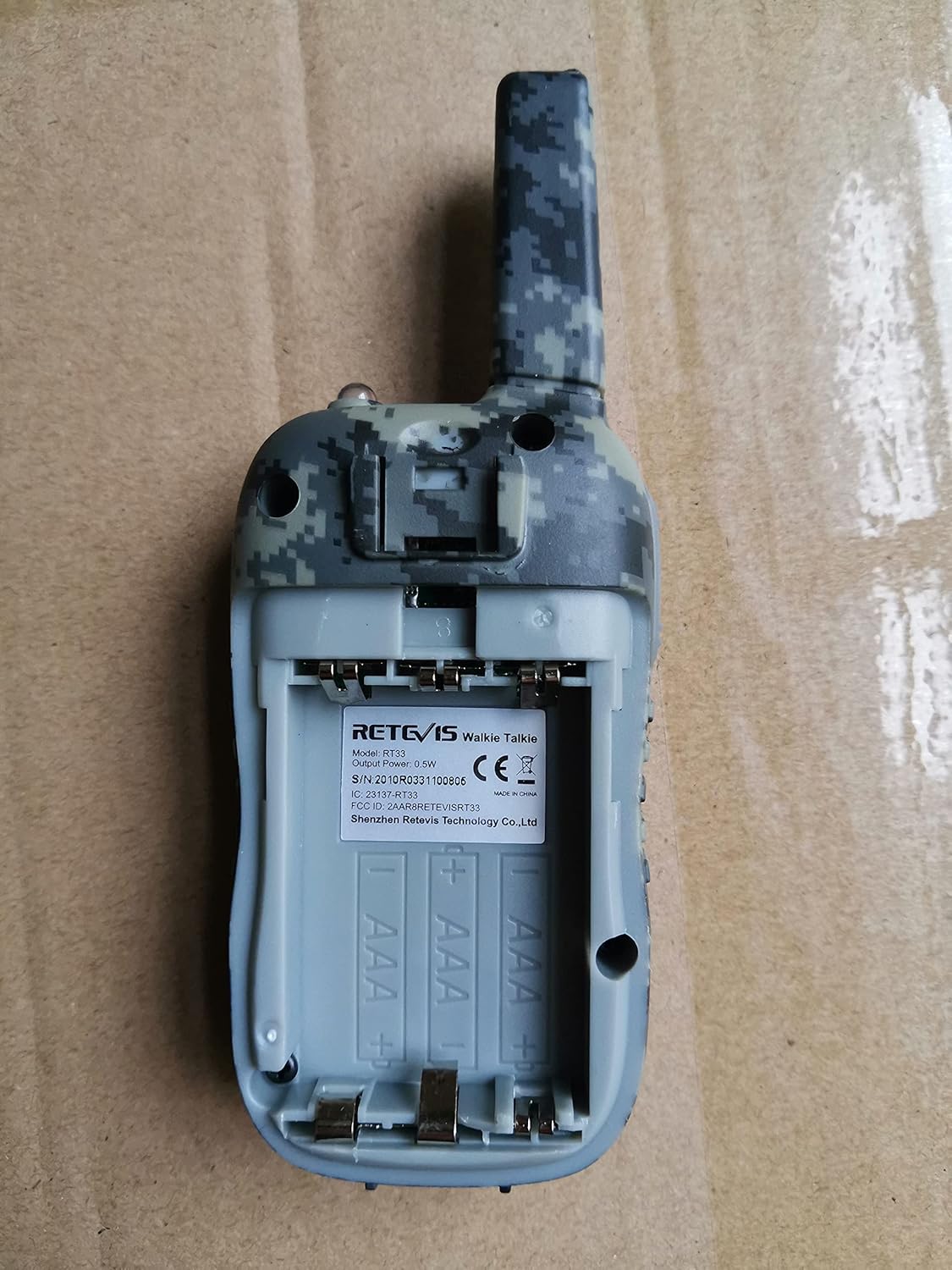
Figure 6: The walkie talkie features a bright LED flashlight for convenience.
7. Onderhoud
- Maak het apparaat schoon met een zachte, damp lap. Gebruik geen agressieve chemicaliën of schurende schoonmaakmiddelen.
- Als u het apparaat gedurende een langere periode niet gebruikt, verwijder dan de batterijen om lekkage te voorkomen.
- Store the walkie talkies in a cool, dry place.
8. Probleemoplossing
| Probleem | Mogelijke oorzaak | Oplossing |
|---|---|---|
| Geen stroom | Batterijen zijn bijna leeg of niet goed geplaatst. | Vervang de batterijen door nieuwe en let daarbij op de juiste polariteit. |
| Cannot communicate with other units | Units are on different channels/sub-channels. | Ensure all units are set to the same main channel and sub-channel. |
| Poor sound quality/short range | Obstructions (buildings, trees), distance, low battery. | Move to an open area, reduce distance, replace batteries. |
| Toetsenbord reageert niet | Toetsenbordvergrendeling is actief. | Long press the Menu/PWR button to unlock the keypad. |
9. Specificaties
- Merk:
- Retevis
- Model:
- RT33
- Aantal items:
- 2
- Aantal kanalen:
- 22
- Frequentiebereik:
- FRS
- Maximaal spreekbereik:
- 1000 Meter (dependent on terrain)
- Type stroombron:
- Op batterijen
- Benodigde batterijen:
- Yes (6 AAA batteries total, 3 per unit)
- Samenstelling van de batterijcel:
- Alkalisch
- Productafmetingen:
- 12.5 x 2.6 x 4.6 cm; 160 g
- Speciale kenmerken:
- Lightweight, Long Range, VOX, Keypad Lock, Flashlight
- Waterbestendigheidsniveau:
- Niet waterbestendig
10. Garantie en ondersteuning
Retevis products are designed for reliability and performance. For warranty information, technical support, or service inquiries, please refer to the contact details provided on the product packaging or the official Retevis webwebsite. Bewaar uw aankoopbewijs voor garantieclaims.
11. Officiële productvideo's
No official seller videos directly demonstrating the Retevis RT33 model were found in the provided data. Please refer to the written instructions and diagrams for guidance.


