Invoering
This manual provides detailed instructions for the setup, operation, and maintenance of your Acer R271 bid 27-inch IPS Full HD (1920 x 1080) Display. Please read this manual thoroughly before using your monitor to ensure proper functionality and to maximize your viewervaring.

Voorkant view of the Acer R271 bid 27-inch IPS Full HD Display.
Instellen
Inhoud van het pakket
Controleer of alle componenten in het pakket aanwezig zijn:
- Acer R271 bid 27-inch Display
- Monitor Stand
- Stroomkabel
- HDMI-kabel (kan per regio verschillen)
- VGA-kabel (kan per regio verschillen)
Monitormontage
To assemble the monitor, carefully attach the stand to the back of the display panel. Ensure it clicks securely into place. Place the monitor on a stable, flat surface.
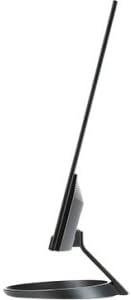
Kant view illustrating the slim design of the Acer R271 bid monitor.
Monitor aansluiten
The Acer R271 bid monitor supports multiple input options. Connect the appropriate cable from your computer or device to the corresponding port on the monitor.
- HDMI: Voor digitale video en audio in hoge resolutie.
- DVI (w/HDCP): Voor digitale videoverbinding.
- VGA: Voor analoge videoaansluiting.
Nadat je de videokabel hebt aangesloten, sluit je de stroomkabel aan op de monitor en vervolgens op een stopcontact.
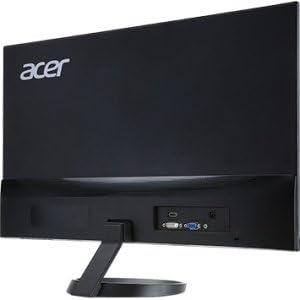
Achterkant view of the Acer R271 bid monitor, highlighting the HDMI, DVI, and VGA input ports.
Inschakelen
Press the power button, usually located on the bottom right side of the monitor, to turn on the display. The monitor will automatically detect the active input source.
Gebruiksaanwijzing
Basisfuncties
Use the buttons located on the bottom bezel of the monitor to navigate the On-Screen Display (OSD) menu. These buttons typically allow you to:
- Power On/Off the monitor.
- Select input source (HDMI, DVI, VGA).
- Adjust volume (if applicable).
- Access the OSD menu for advanced settings.
Weergave-instellingen
The OSD menu provides options to customize your display. Common adjustments include:
- Helderheid: Pas de algehele helderheid van het scherm aan.
- Contrast: Wijzig het verschil tussen lichte en donkere gebieden.
- Kleurinstellingen: Verfijn de kleurtemperatuur, gamma en individuele RGB-niveaus.
- Beeldmodus: Select preset modes for different content types (e.g., Standard, Movie, Game).
Belangrijkste kenmerken
The Acer R271 bid monitor incorporates several features designed to enhance your viewervaring:
- IPS-technologie: Provides clear and bright colors from wide viewing angles (up to 178 degrees).
- ZeroFrame-ontwerp: An edge-to-edge display that minimizes bezels, ideal for multi-monitor setups.
- Oogbeschermingstechnologie: Includes features like Blue Light Filter, Flicker-less, and ComfyView om vermoeide ogen bij langdurig gebruik te verminderen.
Officiële productvideo-showasing the Acer R1 Series monitor's features, including ZeroFrame design, Full HD resolution, IPS technology for wide viewing angles, and Eye Protect technology for user comfort.
Onderhoud en verzorging
De monitor schoonmaken
Om het scherm schoon te maken, veegt u het voorzichtig af met een zachte, pluisvrije doek. Voor hardnekkige vlekken, dampen the cloth with a mild, non-abrasive screen cleaner. Avoid using alcohol-based cleaners or spraying liquid directly onto the screen.
Algemene verzorging
Keep the monitor away from direct sunlight, excessive heat, and moisture. Do not block the ventilation openings. Avoid placing heavy objects on the monitor or its cables.
Probleemoplossing
No Display or "No Signal" Message
- Zorg ervoor dat de stroomkabel goed is aangesloten op zowel de monitor als het stopcontact.
- Verify that the video cable (HDMI, DVI, or VGA) is firmly connected to both the monitor and your computer.
- Check if the correct input source is selected on the monitor using the OSD menu.
- Controleer of uw computer is ingeschakeld en niet in de slaapstand staat.
Slechte beeldkwaliteit
- Pas de helderheid, het contrast en de kleurinstellingen aan via het OSD-menu.
- Zorg ervoor dat de schermresolutie van uw computer is ingesteld op de native resolutie van de monitor (1920 x 1080).
- Controleer of de videokabel of -poorten fysiek beschadigd zijn.
Specificaties
| Functie | Specificatie |
|---|---|
| Schermgrootte | 27 inch |
| Schermresolutie | 1920 x 1080 (volledig HD) |
| Paneeltype | IPS |
| Reactietijd | 4ms |
| Pixelafstand | 0.311 mm |
| Helderheid | 250 nit |
| Signaalingangen | 1 x HDMI, 1 x DVI (w/HDCP), 1 x VGA |
| Beeldverhouding | 16:9 |
| Artikelgewicht | 8.05 pond |
| Productafmetingen (LxBxH) | 24.8 x 18.1 x 9.4 inch |
| Kleur | Zwart |

Detailed dimensions of the Acer R271 bid monitor.
Garantie-informatie
The Acer R271 bid monitor typically comes with a 3-year limited warranty. Please refer to the warranty card included with your product or visit the official Acer website for specific terms and conditions, as warranty details may vary by region and retailer.
Klantenservice
Voor verdere hulp, technische ondersteuning of om de nieuwste stuurprogramma's en software te downloaden, kunt u terecht op de officiële Acer-ondersteuningswebsite. webwebsite:
You may also contact Acer customer service directly for personalized support.


