1. Inleiding
Bedankt voor uw aankoopasing the RHYTHM 8RZ166SR03 Fit Wave Smart Alarm Clock. This device is a radio-controlled alarm clock equipped with a thermometer, hygrometer, and calendar display. Its compact design and user-friendly interface make it ideal for various indoor settings. This manual provides detailed instructions to help you set up, operate, and maintain your new alarm clock.
Belangrijkste kenmerken:
- Atomic Clock Movement: Automatically synchronizes time via radio waves for precise accuracy.
- Temperatuurweergave: Shows ambient temperature from -9.9 to 50 ℃.
- Vochtigheidsweergave: Shows ambient humidity from 20% to 95%.
- Electronic Sound Alarm: Features an alarm with an auto-stop function.
- Snooze-functie: Schakelt tijdelijk het alarm uit.
- Dial Light: Includes an afterglow function for visibility in low light (5 seconds).
- Kalenderweergave: Shows date and day of the week, including Rokuyoku (Japanese traditional calendar).
- 12/24-uurs weergave: Switchable time format.
2. Inhoud van het pakket
Controleer of alle artikelen in het pakket aanwezig zijn:
- RHYTHM 8RZ166SR03 Fit Wave Smart Alarm Clock
- Gebruiksaanwijzing (dit document)
Note: 2 x AA manganese batteries are required and sold separately.
3. Product voorbijview
Voorkant View and Display Elements:

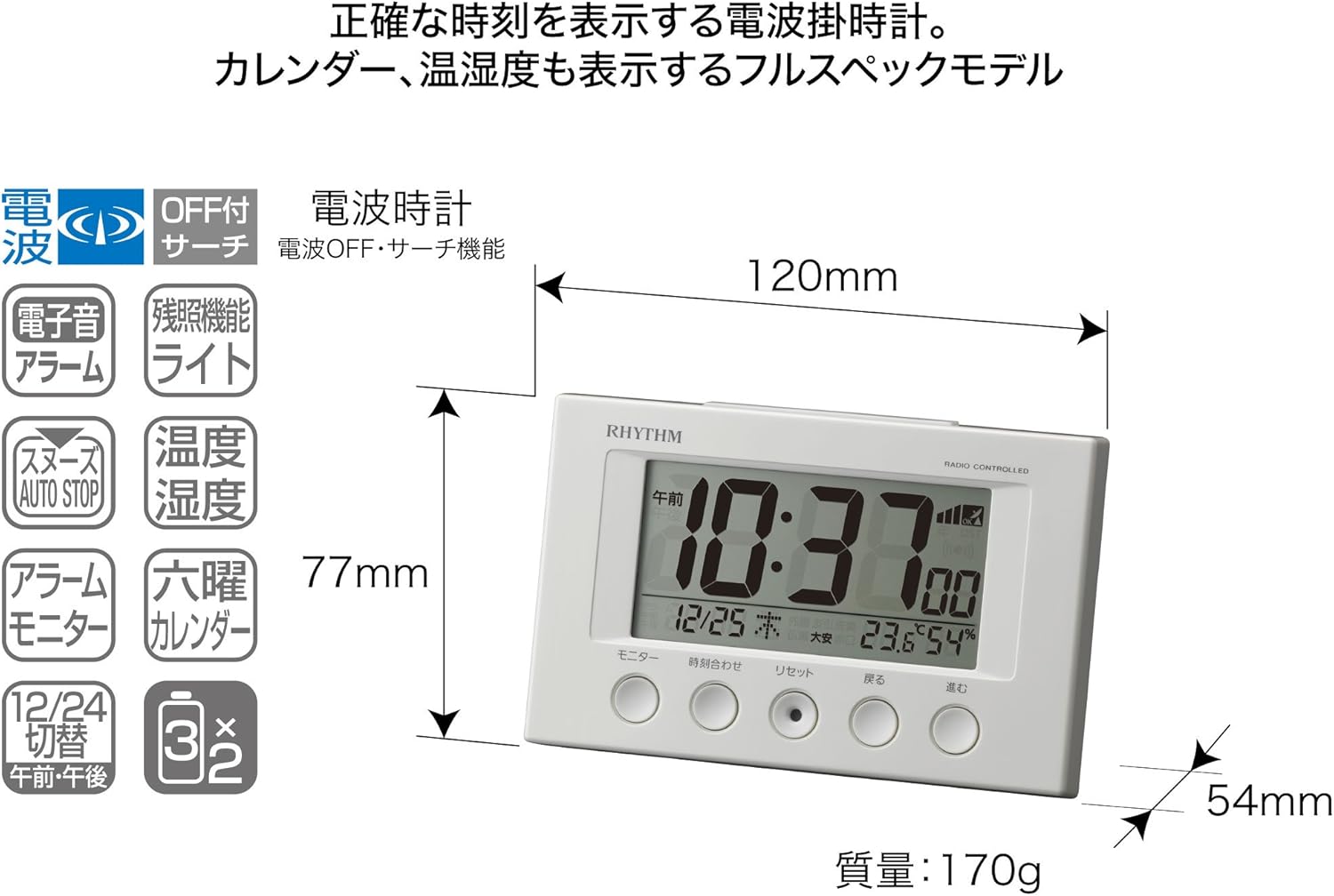
This image displays the front of the RHYTHM 8RZ166SR03 alarm clock. It features a large digital LCD screen at the top, showing time, date, temperature, and humidity. Below the screen are five circular control buttons labeled (from left to right): Monitor, Time Adjustment, Reset, Back, and Forward.

This diagram illustrates the various elements of the LCD display:
- Tijdweergave: Shows the current time in 12-hour (AM/PM) or 24-hour format.
- Radio Wave Reception Indicator: Displays the status of radio wave reception.
- Alarmindicator: An icon appears when the alarm is activated.
- Temperatuurweergave: Toont de huidige kamertemperatuur.
- Vochtigheidsweergave: Shows the current room humidity.
- Kalenderweergave: Shows the current date and day of the week, including Rokuyoku.
Rug View en bedieningselementen:
The back of the clock features the alarm ON/OFF slide switch on the left side and the battery compartment cover in the center. The model number '8RZ166' and 'MADE IN CHINA' are also visible.
Control Buttons Explained:

This image details the function of each button:
- Monitorknop: Used to check the alarm sound.
- Time Adjustment Button: Used for manual time setting and switching between 12/24 hour display.
- Resetknop: Resets the clock and also functions as a forced radio wave reception button.
- Terugknop (←): Used to decrease values during alarm or time settings.
- Forward Button (→): Used to increase values during alarm or time settings.
- Alarm Switch (on back): Slides up for ON, down for OFF.
- Snooze Button (top): Activates the snooze function and the dial light.
4. Instellen
4.1 Batterij installatie
- Verwijder het klepje van het batterijcompartiment aan de achterkant van de klok.
- Insert two (2) AA manganese batteries, ensuring the correct polarity (+/-) as indicated inside the compartment.
- Plaats het batterijklepje terug.
This image shows the open battery compartment with two AA batteries correctly inserted, indicating the positive and negative terminals.
4.2 Initial Power On and Radio Wave Reception
After battery installation, the clock will automatically attempt to receive radio waves to set the correct time. This process may take several minutes. Ensure the clock is placed in an area with good reception, away from electronic devices that may cause interference.

This diagram illustrates how radio-controlled clocks receive standard time signals from two transmission stations (one in Fukushima, 40kHz, and one in Fukuoka/Saga, 60kHz) to automatically correct and display the precise time. The clock will automatically adjust its time based on these signals.
If reception is successful, the time will be set automatically. If not, you may need to manually set the time (refer to Section 5.1).
5. Gebruiksaanwijzing
5.1 Handmatige tijd- en datuminstelling
In cases where radio wave reception is difficult or for specific time zone adjustments:
- Houd de Tijdsaanpassing Houd de knop ingedrukt totdat de tijdweergave begint te knipperen.
- Gebruik de Back (←) En Forward (→) knoppen om de uren aan te passen.
- Druk op de Tijdsaanpassing button again to move to minutes, then adjust using Back (←) En Forward (→).
- Blijf drukken op Tijdsaanpassing om door de instellingen voor jaar, maand en dag te bladeren en elke instelling aan te passen met Back (←) En Forward (→).
- Zodra alle instellingen correct zijn, drukt u op de knop. Tijdsaanpassing Druk nog een laatste keer op de knop om te bevestigen en de instellingsmodus te verlaten.
5.2 Alarminstellingen
- Om de alarmtijd in te stellen, houdt u de knop ingedrukt. Tijdsaanpassing button until the alarm time starts flashing (this may require cycling past the current time settings if already in manual time setting mode).
- Gebruik de Back (←) En Forward (→) knoppen om het gewenste alarmuur en de minuten in te stellen.
- Druk op de Tijdsaanpassing knop om de alarmtijd te bevestigen.
5.3 Alarm activeren/deactiveren
Gebruik de Alarm ON/OFF slide switch located on the back of the clock:
- Schuif de schakelaar UP Om het alarm te activeren. Er verschijnt een alarmpictogram op het display.
- Schuif de schakelaar OMLAAG to deactivate the alarm. The alarm icon will disappear.
5.4 Snooze Function and Dial Light
Wanneer het alarm afgaat, drukt u op de grote Snooze-knop located on the top of the clock. This will:
- Temporarily silence the alarm (snooze duration is preset).
- Activate the dial light for approximately 5 seconds, illuminating the display for easy viewin het donker.
The alarm will sound again after the snooze period. To stop the alarm completely, slide the Alarm AAN/UIT-schakelaar naar UIT.
5.5 Display Modes (12/24 Hour Format)
To switch between 12-hour (with AM/PM indicator) and 24-hour time formats, briefly press the Tijdsaanpassing knop buiten de instelmodus.
5.6 Checking Alarm Sound
Voorafview the alarm sound, press the Monitor button on the front of the clock.
6. Onderhoud
6.1 Reinigen
To clean the clock, wipe it gently with a soft, dry cloth. Do not use abrasive cleaners, solvents, or chemical sprays, as these can damage the casing of weergeven.
6.2 Batterij vervangen
When the display becomes dim or the clock functions erratically, it is time to replace the batteries. Follow the battery installation steps in Section 4.1. It is recommended to replace both batteries at the same time with new ones.
7. Probleemoplossing
| Probleem | Mogelijke oorzaak | Oplossing |
|---|---|---|
| Clock does not display anything or display is dim. | Batterijen zijn leeg of verkeerd geplaatst. | Vervang de batterijen door nieuwe AA-batterijen en let daarbij op de juiste polariteit. |
| Time is incorrect or does not set automatically. | Poor radio wave reception; clock is outside reception area; interference from other electronics. | Move the clock to a different location, away from electronic devices. Try manual time setting (Section 5.1). Press the Reset button to force reception. |
| Het alarm gaat niet af. | Het alarm is niet geactiveerd; het alarmvolume is te laag (indien instelbaar); de alarmtijd is onjuist ingesteld. | Ensure the Alarm ON/OFF switch is in the ON position. Verify the alarm time is set correctly. |
| Time drifts by an hour occasionally. | Daylight Saving Time (DST) adjustment issues, especially if the clock is designed for a specific region's DST rules. | Manually adjust the time if the automatic DST adjustment is not suitable for your region. Some radio-controlled clocks are optimized for specific regional signals. |
| Display is difficult to read from certain angles. | LCD displays have optimal viewhoeken. | Pas de viewing angle or the position of the clock for better clarity. |
8. Specificaties
| Functie | Specificatie |
|---|---|
| Modelnummer | 8RZ166SR03 |
| Merk | RITME |
| Beweging | Atomic clock (Radio-controlled) |
| Framemateriaal | Plastic |
| Weergavetype | Digitale LCD |
| Energiebron | Battery Powered (2 x AA manganese batteries, sold separately) |
| Artikelgewicht | 0.17 kilogram |
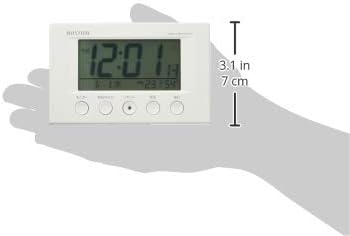
| Productafmetingen | 12W x 7.7H x 5.4D centimetres (approx. 4.7 x 3.0 x 2.1 inches) |
| Temperatuurweergavebereik | -9.9 ℃ tot 50 ℃ |
| Weergavebereik vochtigheid | 20% tot 95% RV |
| Speciale kenmerken | Calendar Display, Humidity Display, Snooze, Temperature Display, Dial Light (afterglow function) |
| Kamertype | Bedroom, General Indoor Use |
9. Garantie en ondersteuning
RHYTHM products are manufactured with high-quality standards. For warranty information, please refer to the documentation provided at the time of purchase or contact your retailer. If you encounter any issues or require technical assistance, please contact the RHYTHM customer support or your local distributor. Keep your purchase receipt as proof of purchase.


