Invoering
Bedankt voor uw aankoopasing the Madison FREESOUND-VR40R Vintage Portable Radio. This device combines a classic retro design with modern audio technology, offering versatile listening options. This manual provides detailed instructions on how to set up, operate, and maintain your radio to ensure optimal performance and longevity.
The FREESOUND-VR40R is a portable, USB-rechargeable radio designed for those who appreciate a vintage aesthetic combined with modern audio technologies. It features an analog dial tuner, Bluetooth, USB, AUX, and FM connectivity, bass enhancement, and a convenient dual metal handle for portability.
Veiligheidsinstructies
Lees deze veiligheidsinstructies zorgvuldig door voordat u het apparaat gebruikt en bewaar ze voor toekomstig gebruik. Onjuist gebruik kan leiden tot elektrische schokken, brand of andere gevaren.
- Stel het apparaat niet bloot aan regen of vocht om brand of elektrische schokken te voorkomen.
- Stel het apparaat niet bloot aan direct zonlicht of extreme temperaturen.
- Open de c nietasing. Er bevinden zich geen onderdelen in het apparaat die door de gebruiker zelf onderhouden kunnen worden. Laat al het onderhoud uitvoeren door gekwalificeerd personeel.
- Use only the specified power adapter/charging cable.
- Houd het apparaat uit de buurt van sterke magnetische velden.
- Reinig het apparaat alleen met een droge, zachte doek. Gebruik geen vloeibare reinigingsmiddelen.
- Zorg voor voldoende ventilatie rondom het apparaat. Blokkeer geen ventilatieopeningen.
Product voorbijview
Familiarize yourself with the components and features of your Madison FREESOUND-VR40R radio.

Figuur 1: Voorzijde View. Shows the analog dial tuner, speaker grille, Madison logo, and control knobs for volume and source selection.
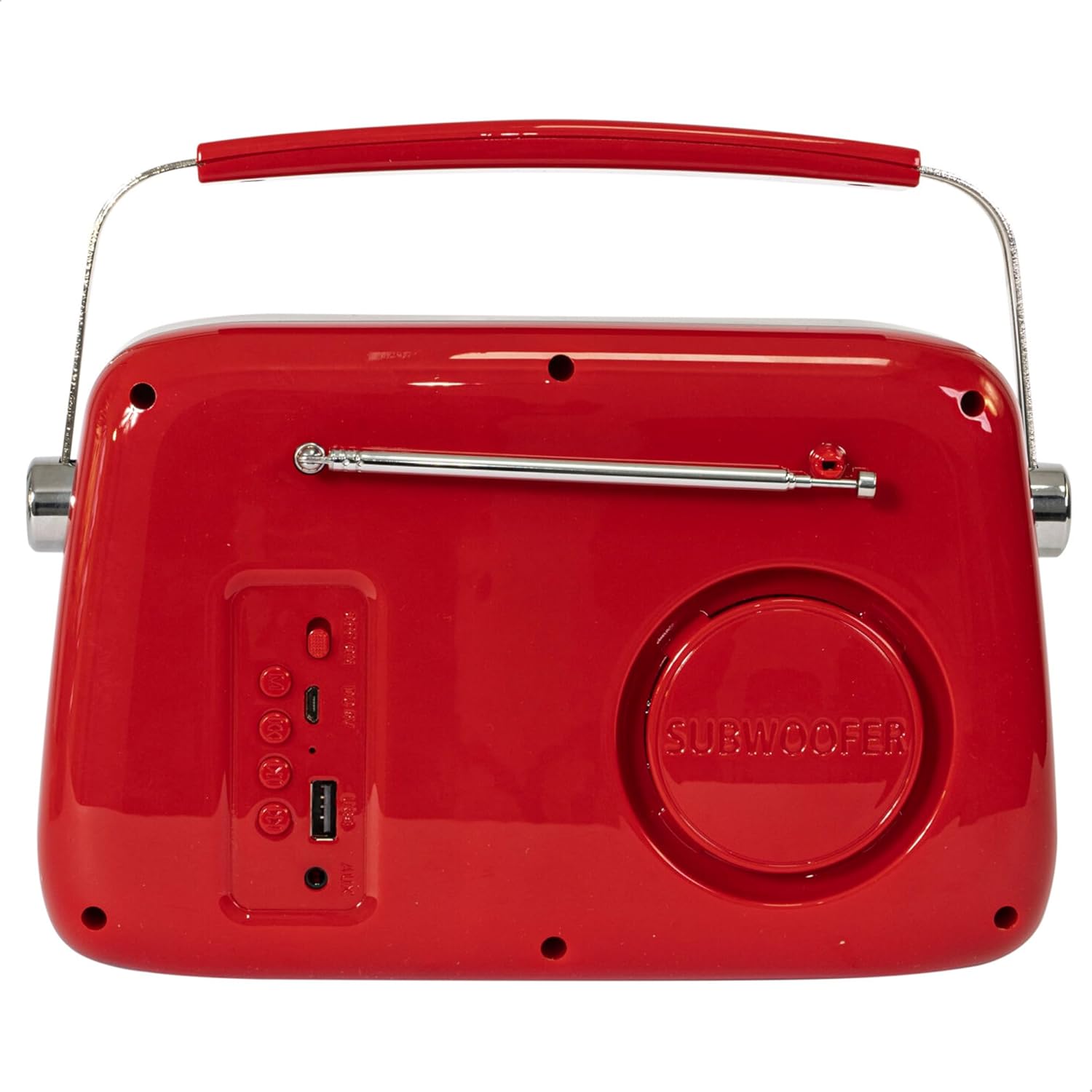
Afbeelding 2: Achter View. Displays the subwoofer, USB port, AUX input, and power/mode buttons.
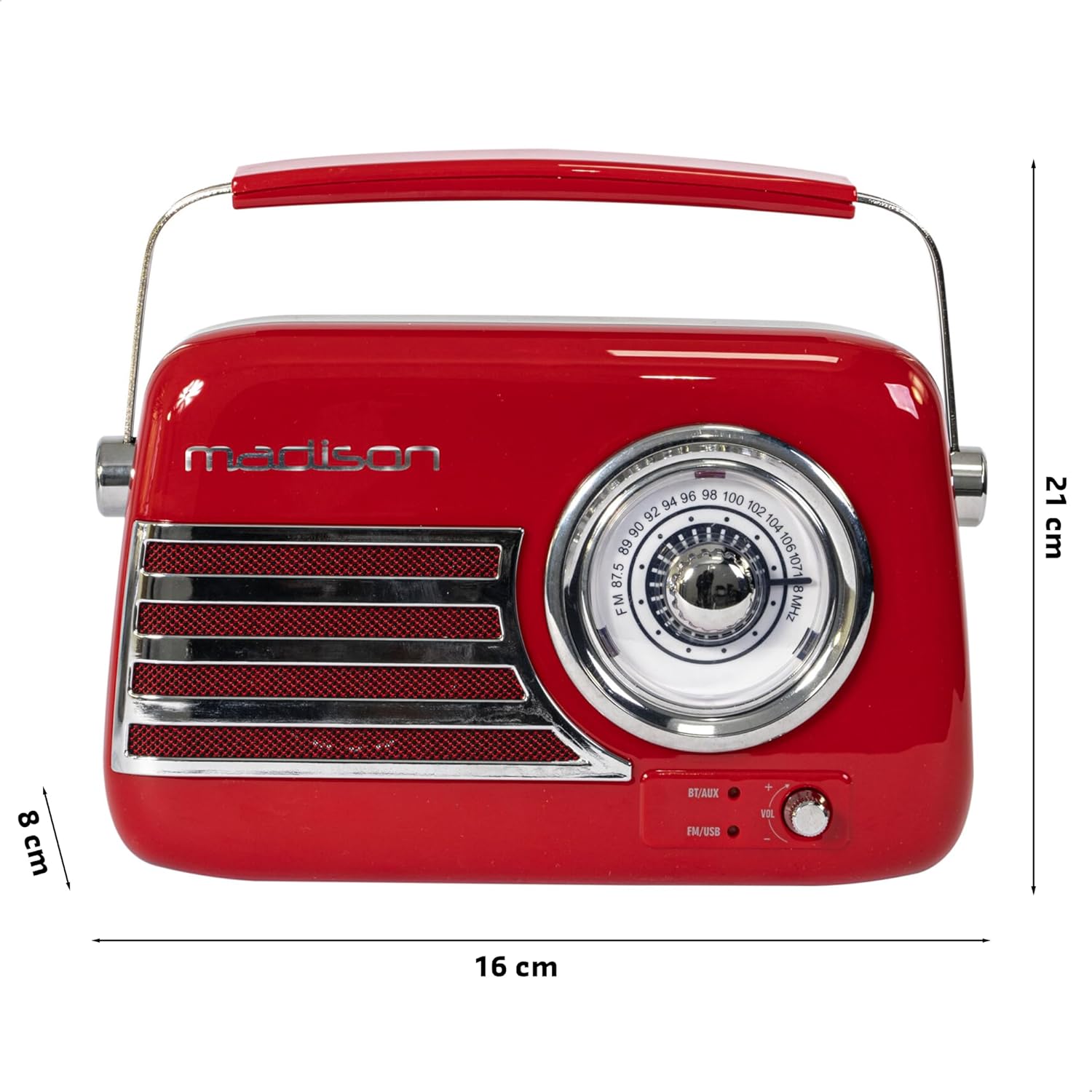
Figuur 3: Productafmetingen. Illustrates the radio's approximate dimensions: 21 cm length, 8 cm width, and 16 cm height.

Afbeelding 4: Achter View with Antenna Extended. Shows the telescopic antenna fully extended for improved FM reception.
Belangrijkste kenmerken:
- Analog Dial Tuner: For classic FM radio tuning.
- Bluetooth-connectiviteit: Stream draadloos audio vanaf je smartphone of tablet.
- USB-weergave: Play music directly from a USB drive.
- AUX-ingang: Sluit externe audioapparaten aan via een 3.5 mm-audiokabel.
- FM-Radio: Enjoy your favorite FM stations with the retractable antenna.
- Basverbetering: Integrated subwoofer for richer bass sound.
- Oplaadbare batterij: Built-in long-lasting battery for portable use.
- Draagbaar ontwerp: Lightweight with a dual metal handle for easy carrying.
Instellen
De batterij opladen:
- Locate the USB charging port on the rear of the radio.
- Connect the provided USB charging cable to the radio's USB port.
- Sluit het andere uiteinde van de USB-kabel aan op een compatibele USB-stroomadapter (niet meegeleverd) of op een USB-poort van een computer.
- Het oplaadlampje gaat branden. Zodra de batterij volledig is opgeladen, kan het lampje van kleur veranderen of uitgaan, afhankelijk van het model.
- Het volledig opladen duurt meestal enkele uren.
Eerste keer inschakelen:
- Ensure the radio is sufficiently charged.
- Press and hold the Power/Mode button (usually located on the rear or front panel) to turn on the radio.
- The front indicator lights will show the currently selected source.
Gebruiksaanwijzing
Volumeregeling:
Draai de Volume knob (VOL) on the front panel to adjust the sound level. Turn clockwise to increase volume, counter-clockwise to decrease.
Een bron selecteren:
Druk op de Bron/modus button (often labeled BT/AUX or FM/USB) repeatedly to cycle through the available input modes: Bluetooth, AUX, FM Radio, and USB.
- Bluetooth-modus:
- Switch the radio to Bluetooth mode. The Bluetooth indicator light will blink, indicating it's ready for pairing.
- Schakel Bluetooth in op uw smartphone of tablet en zoek naar beschikbare apparaten.
- Select "FREESOUND-VR40R" (or similar name) from the list.
- Once paired, the Bluetooth indicator light will become solid, and you can stream audio from your device.
- FM-radiomodus:
- Switch the radio to FM mode.
- Trek de telescopische antenne volledig uit voor optimale ontvangst.
- Draai de Afstemknop on the front panel to manually select your desired FM radio station.
- USB-afspeelmodus:
- Plaats een USB-stick met MP3-audio fileSluit de kabel aan op de USB-poort aan de achterkant van de radio.
- Switch the radio to USB mode. The radio will automatically begin playing the audio files.
- Use the playback controls (if available, usually on the rear panel) to skip tracks or pause/play.
- AUX-ingangsmodus:
- Sluit één uiteinde van een 3.5 mm audiokabel (niet meegeleverd) aan op de AUX-ingang aan de achterkant van de radio.
- Connect the other end of the cable to the headphone jack or audio output of your external device (e.g., MP3 player, CD player).
- Switch the radio to AUX mode. Audio from your external device will now play through the radio.
Onderhoud
Schoonmaak:
Om het uiterlijk en de functionaliteit van uw radio te behouden:
- Veeg de buitenkant af met een zachte, droge, pluisvrije doek.
- Gebruik geen schurende reinigingsmiddelen, was of oplosmiddelen, omdat deze de afwerking kunnen beschadigen.
- Spuit geen vloeistoffen rechtstreeks op de radio.
Opslag:
Als u van plan bent de radio voor langere tijd op te bergen:
- Laad de accu volledig op voordat u deze opbergt.
- Bewaar de radio op een koele, droge plaats, uit de buurt van direct zonlicht en extreme temperaturen.
- For optimal battery health, recharge the battery every 3-6 months, even if not in use.
Probleemoplossing
| Probleem | Mogelijke oorzaak | Oplossing |
|---|---|---|
| Geen stroom / Radio gaat niet aan. | Batterij is leeg. | Laad de radio op met de meegeleverde USB-kabel. |
| Geen geluid. | Het volume is te laag of gedempt. Verkeerde bron geselecteerd. | Increase the volume. Ensure the correct input source (Bluetooth, FM, USB, AUX) is selected. |
| Slechte FM-ontvangst. | Antenne niet uitgeschoven. Zwak signaal. | Schuif de telescopische antenne volledig uit. Probeer de radio anders te positioneren voor een beter signaal. |
| Bluetooth-apparaat kan niet worden gekoppeld. | Radio not in pairing mode. Device too far. Bluetooth disabled on source device. | Ensure radio is in Bluetooth pairing mode (blinking light). Move device closer. Enable Bluetooth on your smartphone/tablet. |
| USB-weergave werkt niet. | USB drive not inserted correctly. Unsupported file formaat. | Zorg ervoor dat de USB-stick volledig is geplaatst. Controleer of het geluid goed werkt. files zijn in MP3-formaat. |
Specificaties
| Modelnummer: | 10-5567MA |
| Productafmetingen (L x B x H): | 21x8x16cm |
| Gewicht: | 635 gram |
| Kleur: | Rood |
| Materiaal: | Plastic |
| Energiebron: | Internal Rechargeable Battery (via USB) |
| Batterijtype: | 1 Lithium-polymeer (meegeleverd) |
| Connectiviteit: | Bluetooth, USB, Auxiliary (AUX) |
| Radiobanden: | FM |
| Speciale kenmerken: | Telescopic antenna, Analog dial tuner, Bass enhancement |
| Meegeleverde componenten: | USB-oplaadkabel |
| Fabrikant: | Lotronic SA |
| Land van herkomst: | China |
Garantie en ondersteuning
For warranty information and customer support, please refer to the warranty card included with your product or visit the official Madison webwebsite. Bewaar uw aankoopbewijs voor eventuele garantieclaims.
For technical assistance or troubleshooting beyond this manual, please contact Madison customer service.
Note: Availability of spare parts is not specified in the product information.


