Invoering
This manual provides detailed instructions for the setup, operation, and maintenance of your Zebronic ZEB-250JP USB Vibration Game Pad. Please read this manual carefully before using the product to ensure proper functionality and longevity.
Producteigenschappen
- Dual vibration and shock function for immersive gaming.
- Ergonomic slip-proof handle design for comfortable grip.
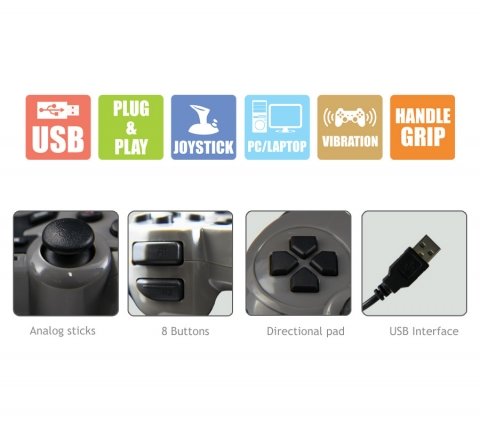
- Equipped with a directional pad, 8 fire buttons, and 2 analog sticks.
- Compatible with Windows XP, Vista, and Windows 7 operating systems.
- Supports both digital and analog modes.
Inhoud van het pakket
- Zebronic ZEB-250JP Game Pad
- Installation CD (for drivers, if required)
Installatie-instructies
- Connect the Game Pad: Locate an available USB port on your computer (Desktop or Laptop). Insert the USB connector of the ZEB-250JP Game Pad into the USB port. The device is designed for plug-and-play functionality.
- Stuurprogramma-installatie: For optimal performance, especially on older operating systems like Windows XP or Vista, it is recommended to install the drivers from the provided installation CD. Insert the CD into your computer's optical drive and follow the on-screen instructions. For Windows 7 and newer, drivers may install automatically.
- Systeemcompatibiliteit: Ensure your computer is running a compatible operating system (Windows XP, Vista, Windows 7).
Gebruiksaanwijzing
Controles voorbijview
- Richtingspad (D-pad): Used for directional movement or menu navigation.
- Analoge sticks: Two analog sticks provide 360-degree movement for finer control in games.
- Fire Buttons (8 buttons): Actieknoppen voor in-game commando's.
- Trillingsfunctie: The game pad features dual vibration motors that provide tactile feedback during gameplay, enhancing immersion. This function is automatically activated by compatible games.
Modusselectie
The game pad supports both digital and analog modes. The mode can typically be switched using a dedicated button on the game pad (often labeled 'Mode' or 'Analog') or is automatically detected by the game. Refer to your game's settings for specific controller configurations.
Onderhoud
- Keep the game pad clean by wiping it with a soft, dry cloth.
- Zorg ervoor dat het apparaat niet wordt blootgesteld aan extreme temperaturen, direct zonlicht of vocht.
- Gebruik geen agressieve chemicaliën of schurende reinigingsmiddelen.
- Store the game pad in a safe place when not in use to prevent damage to the cable or buttons.
Probleemoplossing
- Game Pad Not Detected:
- Ensure the USB cable is securely connected to both the game pad and the computer.
- Try connecting the game pad to a different USB port.
- Start uw computer opnieuw op.
- Verify that the necessary drivers are installed from the provided CD or through Windows Update.
- Trilfunctie werkt niet:
- Controleer of het spel dat je speelt trilfeedback ondersteunt.
- Controleer de spelinstellingen om er zeker van te zijn dat trillen is ingeschakeld.
- Zorg ervoor dat de stuurprogramma's correct zijn geïnstalleerd.
- Buttons or Analog Sticks Unresponsive:
- Test the game pad on another computer or in a different game to isolate the issue.
- Ensure the game pad is in the correct mode (digital/analog) for the game.
- Reinstall the device drivers.
Specificaties
| Merk | ZEBRONICS |
| Model | ZEB-250JP |
| Connectiviteitstechnologie | USB |
| Controller-type | Spelcomputer |
| Compatibele apparaten | Windows (Desktop, Laptop) |
| Ondersteuning voor besturingssysteem | Windows XP, Vista, Windows 7 |
| Speciale kenmerken | Handle Grip, Joystick, Plug and Play, Vibration |
| Productafmetingen | 24.1x18.3x6.4cm |
| Artikelgewicht | 290 gram |
Garantie-informatie
This product is covered by a standard manufacturer's warranty. Please refer to the warranty card included in your package or contact Zebronic's customer support for specific warranty terms and conditions. Keep your purchase receipt as proof of purchase.
Steun
For further assistance, technical support, or service inquiries, please visit the official Zebronics webwebsite of neem contact op met hun klantenservice. Meer informatie en contactgegevens vindt u op de Zebronics Store on Amazon.


