Invoering
The Logitech UE Boom is a 360-degree wireless Bluetooth speaker designed for portable audio. It features a durable, go-anywhere shape and is equipped with a water and stain resistant acoustic skin. This speaker allows for wireless music playback, phone calls, and can be paired with another UE Boom for stereo sound.

Afbeelding: Voorzijde view of the Logitech UE Boom Wireless Bluetooth Speaker in Northern Light color.
Belangrijkste kenmerken
- 360 graden geluid: Biedt meeslepende audio in alle richtingen.
- Draagbaar ontwerp: Versatile, cylindrical shape for easy transport.
- Water- en vlekbestendig: Features a colorful acoustic skin with plasma coating for durability against water and stains.
- Draadloze connectie: Connects via Bluetooth from up to 50 feet away. Easy pairing via NFC for compatible devices.
- Dubbele functie: Wirelessly connect two UE BOOM speakers in stereo using the UE BOOM app for enhanced sound.
- Lange batterijduur: Rechargeable battery provides up to 15 hours of playback.
- Luidspreker: Integrated crystal-clear speakerphone for calls.
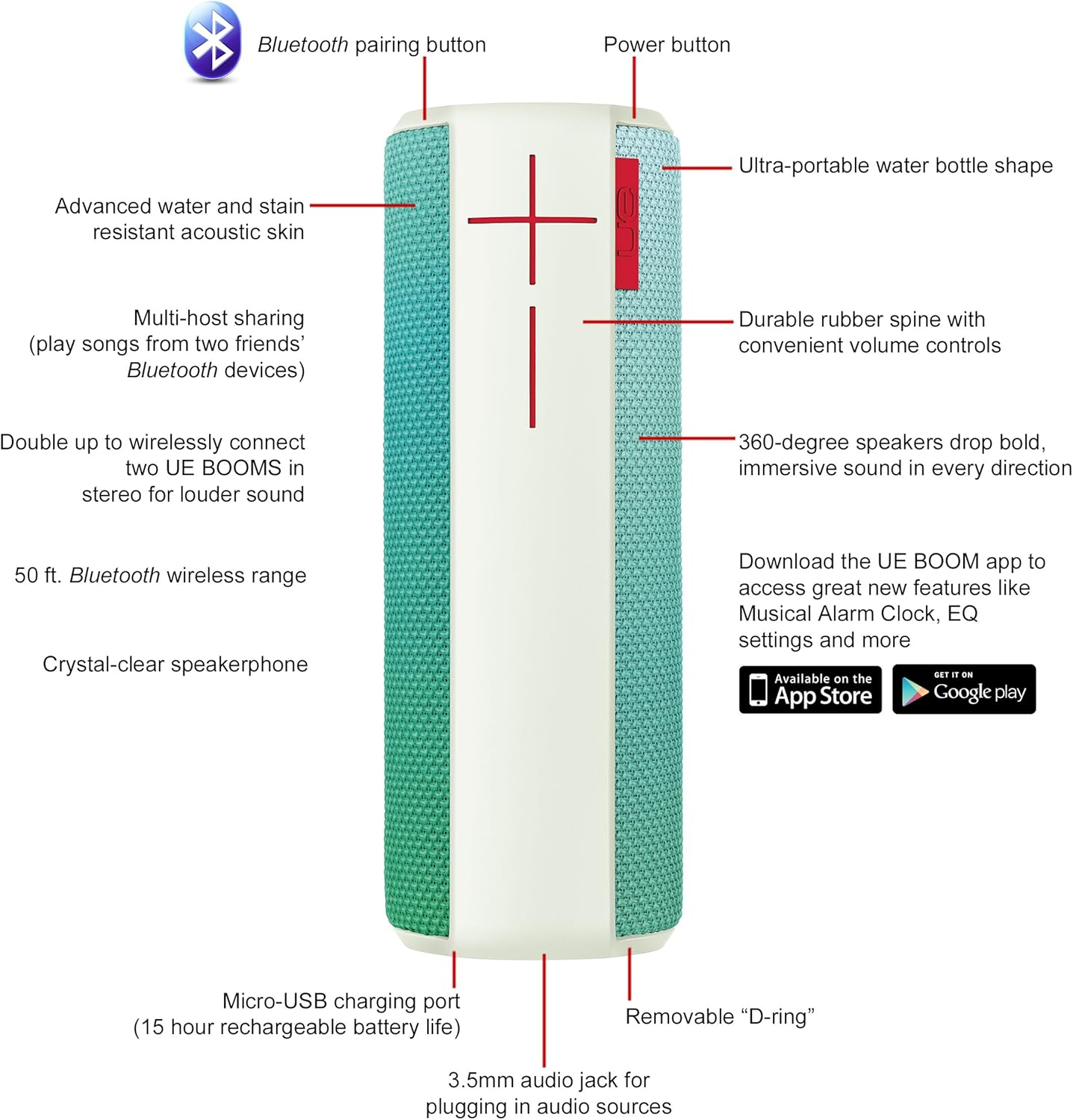
Image: Diagram highlighting key features and controls of the UE Boom speaker, including Bluetooth pairing button, power button, volume controls, micro-USB charging port, and 3.5mm audio jack.
Instellen
De luidspreker opladen
Before initial use, fully charge your UE Boom speaker. Connect the provided micro-USB cable to the charging port located at the bottom of the speaker and plug the other end into a USB power source. The speaker's battery provides approximately 15 hours of playback on a full charge.
Bluetooth-koppeling
- Power on your UE Boom speaker by pressing the power button.
- Press and hold the Bluetooth pairing button (usually indicated by a Bluetooth icon) until you hear an audible tone and the LED indicator flashes rapidly.
- Ga op je mobiele apparaat (smartphone of tablet) naar de Bluetooth-instellingen.
- Select "UE Boom" from the list of available devices to pair.
- Once paired, you will hear a confirmation tone from the speaker.
For NFC-enabled devices, simply tap your device to the NFC area on the speaker for quick pairing.
Gebruiksaanwijzing
Basisbedieningen
- Aan/uit-knop: Located on the top of the speaker to turn it on or off.
- Volumeregeling: Large '+' and '-' buttons on the side of the speaker adjust the volume.
- Bluetooth-knop: Start de Bluetooth-koppelingsmodus.
Using the UE BOOM App
Download the official UE BOOM app from your device's app store (available on App Store and Google Play) to unlock additional features:
- Musical Alarm Clock: Wake up to your favorite music.
- Activering op afstand: Turn your speaker on/off from your device.
- EQ-instellingen: Pas de geluidspro aanfile naar uw voorkeur.
- Verdubbelen: Connect two UE BOOM speakers for a stereo sound experience.
Luidsprekerfunctie
When connected to a smartphone, the UE Boom can be used as a speakerphone. Incoming calls will be routed through the speaker, allowing for hands-free communication.
Onderhoud
The UE Boom speaker features a water and stain resistant acoustic skin. To clean, gently wipe the speaker with a damp cloth. Avoid using harsh chemicals or abrasive cleaners. Ensure all ports are dry before charging or connecting other devices.
Probleemoplossing
- Geen stroom: Ensure the speaker is charged. Connect it to a power source using the micro-USB cable.
- Kan niet koppelen via Bluetooth:
- Zorg ervoor dat de luidspreker in de koppelingsmodus staat (knipperende led).
- Controleer of Bluetooth is ingeschakeld op uw apparaat.
- Plaats uw apparaat dichter bij de luidspreker (binnen 50 meter).
- Probeer het apparaat te ontkoppelen en opnieuw te koppelen.
- Laag volume of vervormd geluid:
- Pas het volume aan op zowel de luidspreker als uw aangesloten apparaat.
- Zorg ervoor dat de luidspreker volledig is opgeladen.
- Check for any obstructions around the speaker.
- App maakt geen verbinding: Ensure the speaker is powered on and connected via Bluetooth to your device. Update the app to the latest version.
Productspecificaties
| Modelnaam | Logitech UE Boom Wireless Bluetooth Speaker |
| Modelnummer | 980-001023 |
| Merk | Logitech |
| Kleur | Northern Light |
| Luidsprekertype | Openlucht |
| Connectiviteitstechnologie | Bluetooth, draadloos |
| Wireless Range | Tot 50 voet (15.24 meter) |
| Energiebron | Werkt op batterijen (1 lithium-ionbatterij meegeleverd) |
| Gemiddelde batterijduur | 15 uur |
| Waterbestendigheidsniveau | Waterdicht |
| Artikelgewicht | 2.2 pond |
| Productafmetingen (LxBxH) | 2.6 x 2.6 x 7.1 inch |
| Materiaal | Plastic |
| UPC | 097855112125 |
Officiële productvideo
Video: Een overview of the Logitech UE Boom speaker's features, including 360-degree sound, water resistance, wireless connectivity, and the ability to pair two speakers for louder sound. This video demonstrates the speaker's durability and portability in various environments.
Garantie en ondersteuning
The Logitech UE Boom Wireless Bluetooth Speaker comes with a Limited Warranty. For specific warranty details, please refer to the documentation included with your product or visit the official Logitech webplaats.
For technical support or customer service, you may contact Logitech at: 646-454-3200.


