Invoering
The TC Electronic T2 Reverb effects pedal provides a diverse range of reverb effects for guitar and other instruments. This manual details the pedal's features, setup procedures, operational guidelines, maintenance tips, troubleshooting steps, and technical specifications to ensure optimal performance.
Product voorbijview
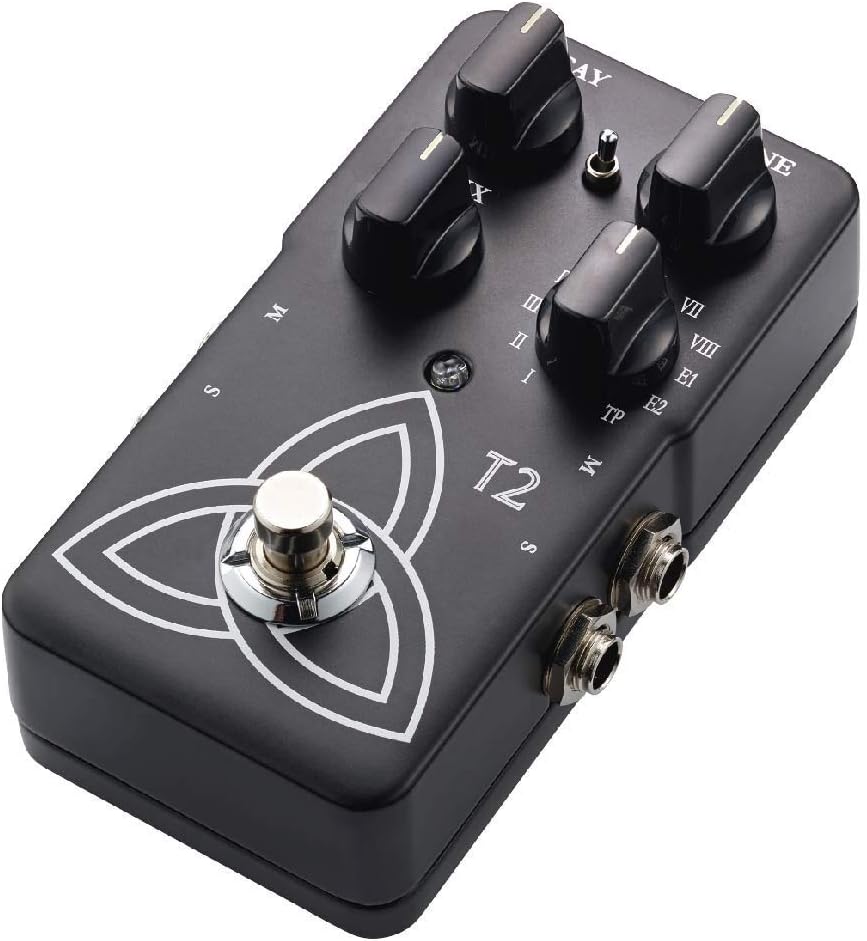
The T2 Reverb pedal features intuitive controls for shaping your sound and a robust design for reliable use. Familiarize yourself with the pedal's components:
- DECAY-knop: Regelt de lengte van de nagalm.
- TONE-knop: Adjusts the brightness or darkness of the reverb.
- MIX-knop: Balances the ratio between the dry (unaffected) signal and the wet (effected) signal.
- Reverb Type Selector: A rotary switch to select from various reverb algorithms (I-VIII, E1, E2, TP).
- Voetschakelaar: Schakelt het effect in of omzeilt het.
- Input/Output-aansluitingen: For connecting your instrument and ampverliezer.
- Stroomverbruik: For connecting a 9V DC power supply.

Instellen
- Stroomaansluiting: Connect a 9V DC power adapter (center negative, not included) to the power input jack. Alternatively, the pedal can be powered by a 9V battery (not included) by opening the battery compartment.
- Instrumentaansluiting: Sluit je instrument (bijvoorbeeld een gitaar) aan op de ingang aan de rechterkant van het pedaal met een standaard 6,3 mm instrumentkabel.
- Amplifier-verbinding: Sluit de uitgangsaansluiting aan de linkerkant van het pedaal aan op uw ampDe ingang van de versterker wordt aangesloten met een standaard 1/4-inch instrumentkabel.
- Stereo Operation (Optional): For stereo output, connect the second output jack to a second ampversterker of stereo-ingangsapparaat.
Zorg ervoor dat alle verbindingen veilig zijn voordat u uw apparaat inschakelt amplifier and pedal.
Gebruiksaanwijzing
Basisbediening
- Inschakelen: Once connected, press the footswitch to engage the effect. The LED indicator will illuminate. Press again to bypass the effect.
- Het type nagalm selecteren: Rotate the Reverb Type Selector knob to choose from the available reverb algorithms (I through VIII, E1, E2). Each setting offers a distinct reverb character.
- Adjusting Reverb Parameters:
- Gebruik de VERVAL knob to control the duration of the reverb.
- Gebruik de TOON knob to adjust the frequency content of the reverb, making it brighter or darker.
- Gebruik de MENGEN knob to blend the dry signal with the reverb effect. A higher setting increases the effect's prominence.
TonePrint Feature
The "TP" setting on the Reverb Type Selector activates the TonePrint feature. TonePrint allows you to upload custom-tuned reverb sounds created by artists or design your own using the TC Electronic TonePrint app. Connect your pedal to a computer via USB (cable not included) or beam TonePrints wirelessly from your smartphone to the pedal's pickup.
Onderhoud
- Schoonmaak: Gebruik een zachte, droge doek om de buitenkant van het pedaal schoon te maken. Vermijd schurende reinigingsmiddelen of oplosmiddelen.
- Batterij vervangen: If using battery power, replace the 9V battery when the LED indicator dims or the effect performance degrades. To replace, open the battery compartment on the underside of the pedal.
- Opslag: Store the pedal in a dry environment, away from extreme temperatures and direct sunlight, when not in use. Disconnect power and remove the battery if storing for extended periods.
Probleemoplossing
| Probleem | Mogelijke oorzaak | Oplossing |
|---|---|---|
| Geen geluid of zwak signaal | Incorrect cable connections, dead battery, faulty power supply, volume knobs on instrument/amp afgewezen. | Check all cable connections. Replace battery or verify power supply. Ensure instrument and amplifier volumes are set appropriately. |
| Ongewenst geluid of gezoem | Ground loop, faulty cables, interference from other electronics, improper power supply. | Use shielded cables. Try a different power outlet or isolated power supply. Move pedal away from other electronic devices. |
| Effect not engaging (LED off) | Geen stroom, defecte voetschakelaar. | Verify power connection and battery status. If problem persists, contact support. |
| TonePrint not loading | Incorrect app usage, connection issues. | Ensure the TonePrint app is updated and the pedal is correctly connected (USB or beaming). Refer to the TonePrint app's instructions for detailed guidance. |
Specificaties
- Model: T2
- Artikelgewicht: 1 pound (approximately 454 grams)
- Productafmetingen: 4.61 x 2.48 x 2.91 cm (11.7 x 6.3 x 7.4 inch)
- Energiebron: 9V DC (midden negatief) voedingsadapter of 9V batterij
- Deeltage: 9 Volt
- Signaalformaat: Analoog
- Hardware-interface: HP-HSC
Garantie en ondersteuning
TC Electronic products are covered by a limited warranty. For detailed warranty information, product support, or service inquiries, please visit the official TC Electronic webwebsite of neem rechtstreeks contact op met hun klantenservice. Bewaar uw aankoopbewijs voor garantieclaims.
Officieel Webwebsite: www.tcelectronic.com


