1. Inleiding en voorbijview
This manual provides comprehensive instructions for the setup, operation, maintenance, and troubleshooting of your InFocus IN3124 Projector. Designed for clarity and ease of use, this guide will help you maximize your projector's performance and longevity.
The InFocus IN3124 is a high-performance projector featuring XGA (1024 x 868) native resolution, 4800 lumens of brightness, and a 3000:1 contrast ratio, making it suitable for various presentation environments. Its portable design allows for flexible placement and usage.
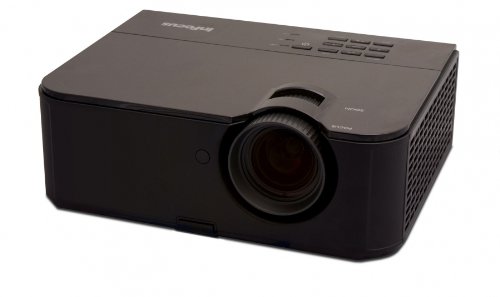
Figuur 1: Voorzijde view of the InFocus IN3124 Projector, highlighting the main lens and the top-mounted control panel.
2. Instellen
2.1 Uitpakken
Carefully remove the projector and all accessories from the packaging. Verify that all components listed in the packing list are present. Retain the original packaging for future transport or storage.
2.2 Plaatsing
Position the projector on a stable, level surface. Ensure adequate ventilation around the unit to prevent overheating. Maintain a clear path between the projector lens and the projection screen or surface. The optimal projection distance will vary based on the desired screen size.
2.3 Stroom aansluiten
- Sluit het netsnoer aan op de stroomingang van de projector.
- Steek het andere uiteinde van het netsnoer in een geaard stopcontact.
2.4 Invoerbronnen aansluiten
The IN3124 projector supports various input sources. Connect your video source (e.g., computer, DVD player) to the appropriate input port on the projector. Common ports include VGA and HDMI (if available on your specific model).
- VGA: Use a VGA cable to connect to a computer's video output.
- HDMI: Use an HDMI cable for digital video and audio (check projector for HDMI port availability).
3. Gebruiksaanwijzing
3.1 In-/uitschakelen
- Inschakelen: Press the power button on the projector's control panel or the remote control. The power indicator light will illuminate.
- Uitschakelen: Press the power button twice. The projector will enter a cooling cycle before shutting down completely. Do not unplug the projector during the cooling cycle.
3.2 Scherpstellen en zoomen aanpassen
Rotate the focus ring on the projector lens until the image appears sharp and clear. Use the zoom ring (if present) to adjust the image size to fit your screen.
3.3 Invoerbronnen selecteren
Press the "Source" or "Input" button on the projector's control panel or remote control to cycle through available input sources (e.g., VGA, HDMI). Select the input corresponding to your connected device.
3.4 Menu Navigation and Keystone Correction
Use the menu buttons on the projector or remote to access the On-Screen Display (OSD). Navigate through the menu options to adjust settings such as brightness, contrast, color, and keystone correction. Keystone correction helps to square the image if the projector is not perfectly perpendicular to the screen.
4. Onderhoud
4.1 De lens reinigen
Veeg de projectorlens voorzichtig af met een zachte, pluisvrije doek die speciaal is ontworpen voor optische oppervlakken. Gebruik geen schurende reinigingsmiddelen en oefen geen overmatige kracht uit, aangezien dit krassen op de lens kan veroorzaken.
4.2 Luchtfilters reinigen
Regularly check and clean the projector's air filters to ensure proper airflow and prevent overheating. Refer to the projector's specific filter access instructions. Use a soft brush or vacuum cleaner to remove dust accumulation.
4.3 literamp Vervanging
De projector lamp heeft een beperkte levensduur. Wanneer de lamp life indicator appears or the image becomes dim, the lamp may need replacement. Consult the full service manual or manufacturer's website for detailed lamp replacement procedures and compatible lamp models. Always allow the projector to cool down completely before attempting lamp vervanging.
4.4 Opslag
Wanneer u de projector langere tijd niet gebruikt, bewaar hem dan op een koele, droge plaats, uit de buurt van direct zonlicht en extreme temperaturen. Gebruik de originele verpakking of een beschermhoes om stof en schade te voorkomen.
5. Probleemoplossing
This section addresses common issues you might encounter with your InFocus IN3124 Projector. For more complex problems, contact customer support.
- Geen afbeelding weergegeven:
- Zorg ervoor dat de projector is ingeschakeld en dat de stroomindicator continu brandt.
- Verify that the input source cable (VGA, HDMI) is securely connected to both the projector and the source device.
- Selecteer de juiste invoerbron met de knop "Bron".
- Check if the source device is outputting a signal.
- Dim or Faded Image:
- Adjust brightness and contrast settings in the OSD menu.
- Zorg ervoor dat de lamp is not nearing the end of its lifespan.
- Clean the projector lens and air filters.
- Check the projection mode (e.g., Eco mode might reduce brightness).
- De afbeelding is wazig:
- Pas de focusring op de projectorlens aan.
- Zorg ervoor dat het projectieoppervlak vlak is en dat de projector stabiel staat.
- Check the resolution settings of your source device to match the projector's native resolution.
- Afstandsbediening werkt niet:
- Vervang de batterijen in de afstandsbediening.
- Zorg ervoor dat er geen obstakels zijn tussen de afstandsbediening en de infraroodontvanger van de projector.
- Richt de afstandsbediening rechtstreeks op de projector.
6. Specificaties
The following table outlines the key technical specifications for the InFocus IN3124 Projector:
| Functie | Specificatie |
|---|---|
| Modelnummer | IN3124 |
| Schermresolutie (native) | XGA (1024 x 868) |
| Helderheid | 4800 lumen |
| Contrastverhouding | 3000:1 |
| Weergavetype | LCD, LCoS |
| Artikelgewicht | 8.16 pond (3.7 kg) |
| Productafmetingen (L x B x H) | 12.83 x 10.43 x 4.8 cm (32.59 x 26.49 x 12.19 inch) |
| Speciale functie | Draagbaar |
7. Garantie en ondersteuning
For detailed warranty information, please refer to the warranty card included with your product packaging or visit the official InFocus website. De garantie dekt doorgaans productiefouten gedurende een bepaalde periode vanaf de aankoopdatum.
If you encounter issues that cannot be resolved using the troubleshooting guide, or require technical assistance, please contact InFocus customer support. Contact details can usually be found on the manufacturer's website of in uw productdocumentatie.


