Invoering
This user manual provides comprehensive instructions for the installation, operation, and maintenance of your RCA RTS736W 30-Inch Streaming Soundbar. Please read this manual thoroughly before using the product to ensure proper functionality and to prevent damage.
The RCA RTS736W is designed to enhance your home audio experience with its 3.0 channel sound and integrated Wi-Fi for streaming online content.
Belangrijkste kenmerken
- Wi-Fi Built-In for streaming video content to a TV.
- 3.0 Channel Left/Center/Right audio configuration.
- HDMI 1080p Output for high-definition connectivity.
- Includes 1 Rear Analog Audio-in Jack and 1 Side Line-in Jack for various audio sources.
- Flexible placement options: includes table or wall mounting brackets.
Inhoud van het pakket
Controleer of alle artikelen in het pakket aanwezig zijn:
- RCA RTS736W 30-Inch Streaming Soundbar
- Afstandsbediening
- Stroomadapter
- Table or Wall Mounting Brackets
- Gebruikershandleiding (dit document)
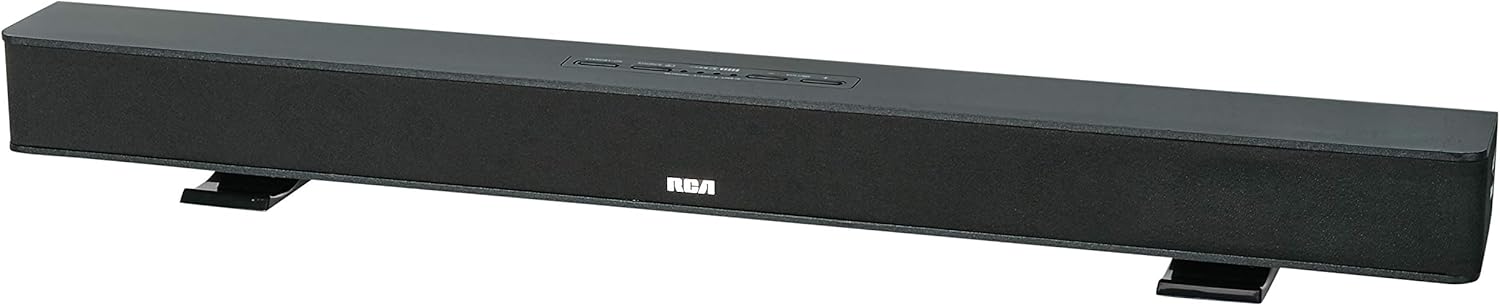
Image: The RCA RTS736W 30-Inch Streaming Soundbar, shown with its sleek black design and integrated controls.
Instellen
1. Plaatsingsopties
The soundbar offers flexible placement:
- Tafelblad plaatsing: Place the soundbar on a flat, stable surface in front of your television. Ensure there is adequate ventilation around the unit.
- Wandmontage: Use the included wall mounting brackets to secure the soundbar to a wall. Refer to the separate wall mounting template (if provided) for detailed instructions. Ensure the wall can support the weight of the soundbar.

Image: The RCA RTS736W soundbar positioned on a TV stand, demonstrating a typical home theater setup with various streaming service icons displayed on the television screen.
2. Aansluiten op stroom
- Connect the power adapter to the DC IN 13.5V port on the back of the soundbar.
- Steek het andere uiteinde van de voedingsadapter in een stopcontact.
3. Audio-aansluitingen
Choose one of the following methods to connect the soundbar to your audio source:
- HDMI-uitgang: Connect an HDMI cable from the HDMI OUT port on the soundbar to an HDMI input on your television. This connection supports 1080p video output from the soundbar's streaming functions.
- Analog Audio-in (AUX 1 / AUX 2): Use RCA audio cables to connect your TV or other audio devices to the AUX 1 or AUX 2 input jacks on the back of the soundbar. Match the red and white connectors.
- Side Line-in Jack: For portable devices like smartphones or tablets, connect a 3.5mm audio cable from your device's headphone jack to the Line-in jack located on the side of the soundbar.

Afbeelding: Een close-up view of the rear panel of the RCA RTS736W soundbar, highlighting the AUX 1, AUX 2, DC IN 13.5V, HDMI OUT, and VIDEO OUT ports for various connections.
4. Netwerkverbinding (Wi-Fi)
To utilize the streaming features, connect the soundbar to your home Wi-Fi network. This process is typically guided by on-screen prompts when the soundbar is first powered on and connected to a TV via HDMI.
- Ensure your TV is connected to the soundbar via HDMI and powered on.
- Follow the on-screen instructions to select your Wi-Fi network and enter the password.
Gebruiksaanwijzing
1. Aan/uit
Druk op de Stroom knop op de soundbar of de afstandsbediening om het apparaat in of uit te schakelen.
2. Ingangsselectie
Druk op de Invoer button on the remote control or the soundbar to cycle through available audio sources: HDMI, AUX 1, AUX 2, Line-in, and Wi-Fi streaming.
3. Volumeregeling
Gebruik de Volume + En Hoeveelheid - buttons on the remote control or the soundbar to adjust the audio level.
Druk op de Stom knop om het geluid tijdelijk te dempen.
4. Streaminginhoud
Once connected to Wi-Fi and your TV via HDMI, you can access various streaming applications. Navigate using the directional buttons and OK knop op de afstandsbediening.
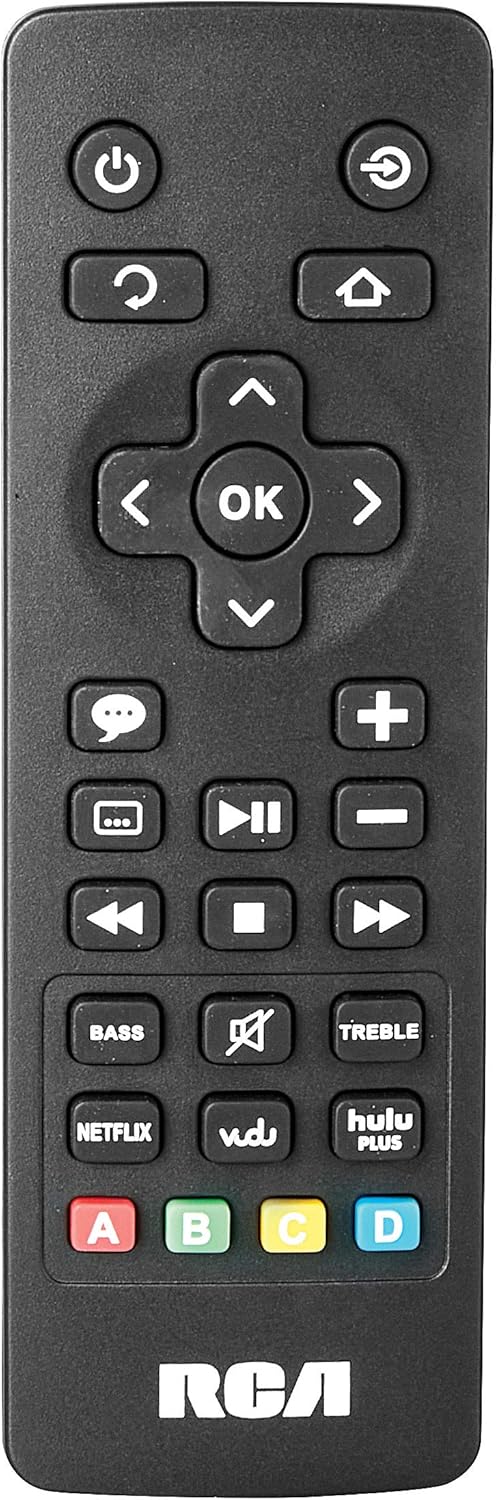
Image: The remote control for the RCA RTS736W soundbar, featuring dedicated buttons for power, volume, input selection, navigation, and direct access to streaming services like Netflix, Vudu, and Hulu Plus.
Dedicated buttons for services like Netflix, Vudu, and Hulu Plus may be available on the remote for direct access.
5. Audio-aanpassingen
Gebruik de BASS En HOOG buttons on the remote control to fine-tune the audio output to your preference.
Onderhoud
- Schoonmaak: Disconnect the soundbar from the power outlet before cleaning. Use a soft, dry cloth to wipe the exterior surfaces. Do not use liquid cleaners or abrasive materials.
- Ventilatie: Ensure that the ventilation openings on the soundbar are not blocked. Proper airflow prevents overheating.
- Opslag: Als u de soundbar voor langere tijd opbergt, koppel hem dan los van de stroom en bewaar hem op een koele, droge plaats, uit de buurt van direct zonlicht en extreme temperaturen.
Probleemoplossing
Geen stroom
- Check if the power adapter is securely connected to the soundbar and a working wall outlet.
- Controleer of het stopcontact werkt door het te testen met een ander apparaat.
Geen geluid
- Controleer of de juiste ingangsbron is geselecteerd op de soundbar.
- Check all audio cable connections between the soundbar and your audio source (TV, etc.).
- Ensure the volume on both the soundbar and the connected audio source is turned up and not muted.
- If using HDMI, confirm that your TV's audio output settings are configured to send audio to the soundbar.
Streaming Issues (Buffering, Freezing)
- Check your Wi-Fi network connection. Ensure the signal strength is adequate.
- Restart your home router and modem.
- Restart the soundbar by unplugging it from the power outlet for a few minutes, then plugging it back in.
- Ensure your internet service is active and performing correctly.
Afstandsbediening werkt niet
- Vervang de batterijen in de afstandsbediening.
- Zorg ervoor dat er geen obstakels zijn tussen de afstandsbediening en de sensor van de soundbar.
- Richt de afstandsbediening rechtstreeks op de soundbar.
Specificaties
| Modelnummer | RTS736W |
| Luidsprekertype | Geluidsbalk |
| Kanalen | 3.0 (Left/Center/Right) |
| Connectiviteit | HDMI, RCA, wifi |
| Draadloze technologie | Wi-Fi |
| HDMI-uitgang | 1080p |
| Audio-ingangen | 2x Analog Audio-in (RCA), 1x Side Line-in (3.5mm) |
| Luidsprekergrootte | 30 inch |
| Maximaal uitgangsvermogen | 150 Watt |
| Impedantie | 8 Ohm |
| Energiebron | Elektrische kabel |
| Productafmetingen (L x B x H) | 33.5 x 6.5 x 5.5 inch |
| Artikelgewicht | 5.55 pond |
| Fabrikant | Alco Electronics Ltd. |
Garantie-informatie
Specific warranty details for the RCA RTS736W Soundbar are typically provided with the product packaging or can be found on the official RCA webwebsite. Bewaar uw aankoopbewijs voor garantieclaims.
For warranty service, contact RCA customer support with your model number and purchase date.
Klantenservice
For further assistance, technical support, or service inquiries, please refer to the contact information provided in your product's original documentation or visit the official RCA support webplaats.
Online bronnen: Bezoek de RCA-winkel op Amazon.
Gerelateerde documenten - RTS736W
 |
Veiligheidsmaatregelen en handleiding voor RCA Ultra HD Smart TV Uitgebreide veiligheidsmaatregelen, belangrijke instructies, een lijst met accessoires en een handleiding voor het aan de slag gaan met RCA Ultra HD Smart TV's, inclusief informatie over de afstandsbediening en de batterij. |
 |
Gebruiksaanwijzing voor de RCA RNSMU5836 58-inch 4K UHD Smart TV Uitgebreide handleiding voor de RCA RNSMU5836 58-inch 4K UHD Smart TV. Behandelt installatie, aansluitingen, smartfuncties, menu-opties en probleemoplossing voor een optimale gebruikerservaring. |
 |
Gebruikershandleiding en installatiegids voor de RCA SBT17015B soundbar Uitgebreide gebruikershandleiding voor de RCA SBT17015B soundbar, met details over installatie, aansluitingen, Bluetooth-koppeling, audio-instellingen, veiligheidsvoorschriften en garantie-informatie. |
 |
RCA RPJ135 standaard HD-projector met Roku streamingstick - Gebruikershandleiding Gebruiksaanwijzing voor de RCA RPJ135 Standard HD-projector, inclusief informatie over installatie, bediening, probleemoplossing en garantie voor de projector en de geïntegreerde Roku Streaming Stick. |
 |
Gebruikershandleiding voor de RCA RS32H2-EU 32-inch LED HD LCD-tv Uitgebreide gebruikershandleiding voor de RCA RS32H2-EU 32-inch LED HD LCD-tv, met veiligheidsinstructies, installatie, bediening, specificaties en probleemoplossing. |
 |
RCA RENO Gebruikershandleiding Uitgebreide gebruikershandleiding voor de RCA RENO-smartphone, met informatie over de installatie, functies, communicatie, hulpmiddelen, veiligheid en onderhoud voor Android 10 (Go-editie). |