1. Inleiding
The J-Tech Digital JTD-EX-120M HDMI Extender is designed to transmit High-Definition Multimedia Interface (HDMI) signals over a single Cat5e/6/7 cable. This system converts the HDMI signal to standard TCP/IP for transmission, allowing for extension up to 120 meters (394 feet) while maintaining full HD 1080p resolution. It also includes Infrared (IR) extension functionality for remote control of source devices.
This manual provides detailed instructions for the installation, operation, and troubleshooting of your J-Tech Digital HDMI Extender.
2. Veiligheidsinformatie
- Stel dit apparaat niet bloot aan water, vocht of overmatige vochtigheid.
- Plaats het apparaat niet op een onstabiele ondergrond.
- Use only the provided power adapters. Using unauthorized power adapters may damage the device and void the warranty.
- Zorg voor goede ventilatie rondom het apparaat om oververhitting te voorkomen.
- Probeer het apparaat niet zelf te openen of te repareren. Laat alle onderhoudswerkzaamheden over aan gekwalificeerd personeel.
- Houd het apparaat uit de buurt van direct zonlicht, warmtebronnen en sterke magnetische velden.
3. Inhoud van het pakket
Controleer of alle artikelen in uw pakket aanwezig zijn:
- 1x HDMI Extender Transmitter (JTD-EX-120M)
- 1x HDMI Extender Receiver (JTD-EX-120M)
- 2x DC 5V/1A voedingsadapters
- 1x IR ontvanger kabel
- 1x IR-zenderkabel
- 1x Gebruiksaanwijzing

Image: Contents of the J-Tech Digital HDMI Extender package, including the transmitter, receiver, power adapters, IR cables, and user manual.
4. Product voorbijview
The JTD-EX-120M system consists of a Transmitter unit and a Receiver unit. Both units feature an Ethernet port for Cat5e/6/7 cable connection, HDMI ports, power ports, and IR ports.
4.1 Zendereenheid

Afbeelding: Gedetailleerd view of the J-Tech Digital HDMI Extender Transmitter unit, showing the Ethernet Port, Power Port, IR TX Port, Reset Button, Status Indicator, Power Indicator, and HDMI Input.
- Ethernet-poort: Connects to the Receiver unit via Cat5e/6/7 cable.
- Power Port (DC/5V): Wordt aangesloten op de meegeleverde 5V-voedingsadapter.
- IR TX Port: Connects to the IR Transmitter cable to send IR signals to the source device.
- Resetknop: Used to reset the unit.
- HDMI-ingang: Connects to the HDMI source device (e.g., Blu-ray player, cable box).
- Statusindicator: Indicates the operational status of the unit.
- Stroomindicator: Indicates if the unit is receiving power.
4.2 Ontvangereenheid

Afbeelding: Gedetailleerd view of the J-Tech Digital HDMI Extender Receiver unit, showing the Ethernet Port, Power Port, IR RX Port, Reset Button, Status Indicator, Power Indicator, and HDMI Output.
- Ethernet-poort: Connects to the Transmitter unit via Cat5e/6/7 cable.
- Power Port (DC/5V): Wordt aangesloten op de meegeleverde 5V-voedingsadapter.
- IR RX Port: Wordt aangesloten op de IR-ontvangerkabel om IR-signalen van een afstandsbediening te ontvangen.
- Resetknop: Used to reset the unit.
- HDMI-uitgang: Connects to the HDMI display device (e.g., TV, projector).
- Statusindicator: Indicates the operational status of the unit.
- Stroomindicator: Indicates if the unit is receiving power.
5. Installatie en installatie
Follow these steps to set up your J-Tech Digital HDMI Extender:
- Kabels voorbereiden: Ensure you have a high-quality Cat5e, Cat6, or Cat7 Ethernet cable of the appropriate length (up to 120m/394ft). Also, have your HDMI cables ready.
- Sluit de HDMI-bron aan op de zender: Connect an HDMI cable from your source device (e.g., DVD player, game console, PC) to the HDMI-ingang poort op de zendereenheid.
- Sluit het HDMI-scherm aan op de ontvanger: Connect an HDMI cable from your display device (e.g., HDTV, projector) to the HDMI-uitgang poort op de ontvangereenheid.
- Ethernetkabel aansluiten: Connect one end of the Cat5e/6/7 cable to the Ethernet-poort on the Transmitter unit and the other end to the Ethernet-poort on the Receiver unit.
- IR-kabels aansluiten (optioneel):
- Sluit de IR TX Cable naar de IR TX Port on the Transmitter unit. Position the IR emitter head near the IR sensor of your source device.
- Sluit de IR RX Cable naar de IR RX Port on the Receiver unit. Position the IR receiver head in a location where it can receive signals from your remote control.
- Vermogen toepassen: Connect the two included 5V power adapters to the Power Ports (DC/5V) on both the Transmitter and Receiver units, then plug them into power outlets. The Power Indicator LEDs on both units should illuminate.
- Controleer de verbinding: Once all connections are made and power is supplied, turn on your HDMI source and display devices. The Status Indicator LEDs on both units should show a stable connection, and the video should appear on your display.
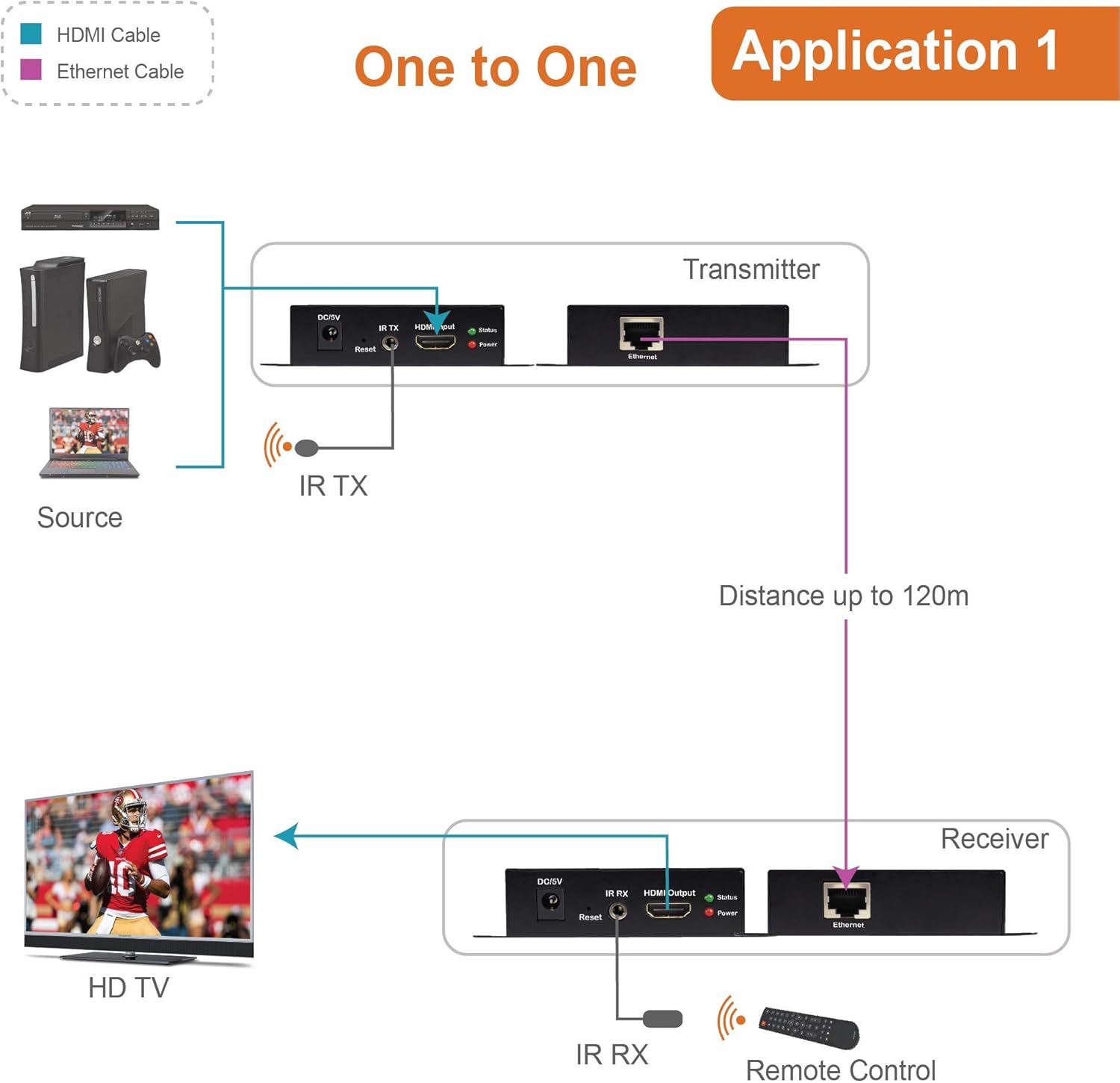
Image: Diagram illustrating a typical one-to-one setup for the J-Tech Digital HDMI Extender, showing a source device connected to the Transmitter, a Cat cable connecting Transmitter and Receiver, and the Receiver connected to an HD TV. IR cables are also shown for remote control functionality.
5.1 Multi-Receiver Application (via Ethernet Switch)
This extender supports a one-to-many configuration using an Ethernet switch. To achieve this, connect the HDMI Transmitter to an Ethernet switch, and then connect multiple HDMI Receivers to the same Ethernet switch. Each Receiver will then connect to its respective display.

Image: Diagram showing the J-Tech Digital HDMI Extender in a multi-receiver setup. A laptop (source) connects to the Transmitter, which then connects to an Ethernet switch. Multiple Receiver units are connected to the switch, each feeding a separate display, extending the signal up to 400ft.
6. Gebruiksaanwijzing
Once the setup is complete, the extender operates automatically. Ensure all devices are powered on in the correct sequence (source, then extender units, then display) for optimal performance.
6.1 IR Control Functionality
The IR extension feature allows you to control your HDMI source device from the location of your display. Point your remote control at the IR Receiver head connected to the Receiver unit. The signal will be transmitted through the Cat cable to the IR Emitter head connected to the Transmitter unit, which then relays the command to your source device.

Image: Diagram illustrating the IR extender control feature. A remote control sends a signal to the IR RX connected to the Receiver unit. This signal is then transmitted via the Cat cable to the IR TX connected to the Transmitter unit, which controls the source device.
7. Onderhoud
- Clean the unit with a soft, dry cloth. Do not use liquid or aerosol cleaners.
- Keep the unit free from dust and debris to ensure proper ventilation.
- Controleer regelmatig of de kabelverbindingen goed vastzitten.
8. Probleemoplossing
If you encounter issues with your HDMI Extender, refer to the following common problems and solutions:
| Probleem | Mogelijke oorzaak | Oplossing |
|---|---|---|
| No video or audio on display. | Loose cable connections, power issue, incorrect input selection on display. | Check all HDMI and Ethernet cable connections. Ensure both Transmitter and Receiver units are powered on. Verify the display is set to the correct HDMI input. Try restarting all devices. |
| Poor video quality (flickering, distortion). | Low quality or damaged Cat cable, excessive cable length, interference. | Use a high-quality Cat6 or Cat7 cable. Ensure cable length does not exceed 120m (394ft). Avoid running Cat cable near strong electrical interference sources. |
| De infrarood afstandsbediening werkt niet. | IR emitter/receiver misaligned, IR cables not connected properly. | Ensure the IR emitter is directly over or very close to the IR sensor of the source device. Confirm the IR receiver is positioned to receive signals from your remote. Check that both IR cables are securely plugged into their respective ports. |
| Power indicator not lit. | De voedingsadapter is niet aangesloten, het stopcontact is defect. | Ensure the power adapter is securely connected to the unit and a working power outlet. Try a different power outlet. |
9. Specificaties
| Functie | Detail |
|---|---|
| Modelnummer | JTD-EX-120M |
| HDMI-versie | Supports 1080p, 3D, HDCP |
| Audio-ondersteuning | Dolby TrueHD, DTS Master Audio |
| Transmissie afstand | Up to 120m (394ft) over single Cat5e/6/7 cable |
| Video Color Support | 36bit (CAT7); 24bit (CAT6) |
| Beeldcompressie | M-JPEG technique (no image quality loss) |
| IR-extensie | Ja |
| Stroomvoorziening | DC 5V/1A (x2) |
| Productafmetingen | 4 x 3 x 1 inch (per stuk) |
| Artikelgewicht | 1 pound (total) |
10. Garantie en ondersteuning
J-Tech Digital products are designed for reliability and performance. For warranty information and technical support, please refer to the official J-Tech Digital website or contact their customer service directly. Contact information is typically provided in the product packaging or on the manufacturer's webplaats.
Fabrikant: J-Tech Digital INC
Webwebsite: www.jtechdigital.com


