1. Inleiding
This instruction manual provides essential information for the safe and efficient use of your THOMSON CE-26 Cassette/SD/USB Audio System. Please read this manual thoroughly before operating the device and retain it for future reference. The CE-26 allows you to play audio from cassettes, USB drives, and SD/MMC cards, as well as record audio directly from cassettes or external sources to MP3 format on USB or SD/MMC media.
2. Product voorbijview
Familiarize yourself with the components and controls of your CE-26 audio system.

Afbeelding 2.1: Voorpaneel View. This image displays the front of the THOMSON CE-26 unit, showing the cassette deck, control buttons, display screen, USB port, SD/MMC card slot, and volume knob.
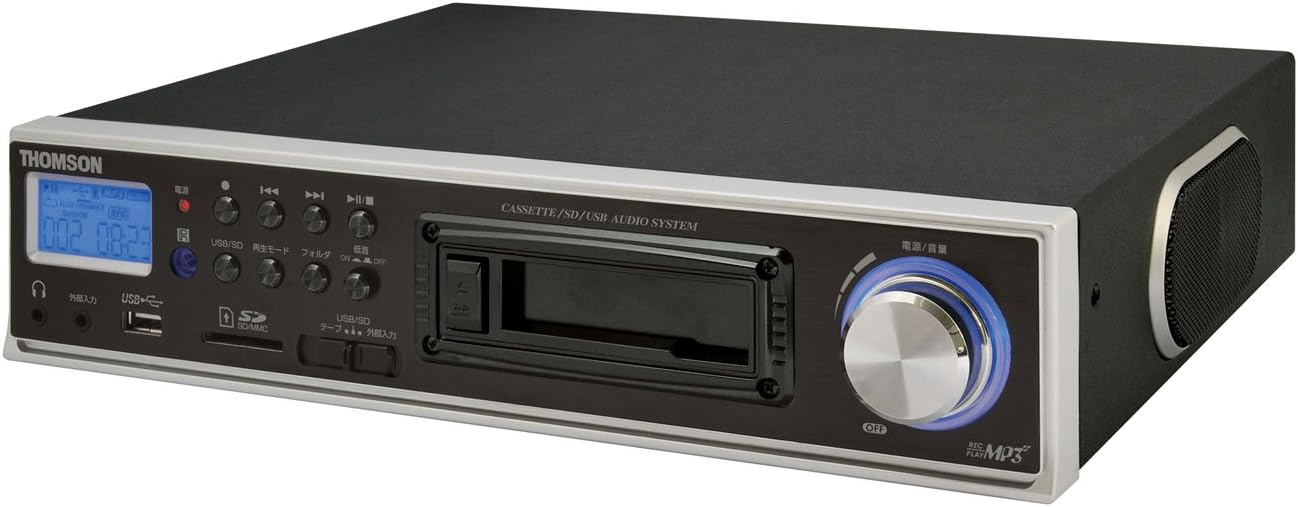
Figuur 2.2: Schuin View. This image shows the THOMSON CE-26 from an angled perspective, highlighting the integrated side speaker and the overall compact design.

Figuur 2.3: Afstandsbediening. This image displays the included remote control for the THOMSON CE-26, featuring buttons for search, display, record, playback mode, program, folder navigation, and USB/SD selection.

Figuur 2.4: Feature Overview Diagram. This diagram illustrates the key functionalities of the THOMSON CE-26, including direct recording from cassette to USB/SD, MP3/WMA playback, USB/SD memory copying, AUX input, built-in speaker, and remote control.
Bedieningselementen op het voorpaneel:
- Aan/uit-knop: Hiermee schakelt u het apparaat in of uit.
- Beeldscherm: Shows track information, mode, and time.
- Cassettedeck: For inserting and playing audio cassettes.
- USB-poort: Connect USB flash drives for playback or recording.
- SD/MMC-kaartsleuf: Insert SD or MMC cards for playback or recording.
- Afspeelbediening: Afspelen, pauzeren, stoppen, vooruitspoelen, terugspoelen, nummer overslaan.
- Opnameknop: Start de opname.
- Modusknop: Switches between Cassette, USB, SD, and AUX input modes.
- Volumeknop: Past het audio-uitvoerniveau aan.
- Koptelefoon aansluiting: Voor privéluisteren.
- AUX-ingang: Sluit externe audioapparaten aan.
3. Instellen
- Stroomaansluiting: Connect the AC power cord to the unit's power input and then to a standard wall outlet.
- Eerste keer inschakelen: Press the Power button to turn on the unit. The display will illuminate.
- Media invoegen:
- cassette: Open the cassette door and insert an audio cassette with the open edge facing upwards. Close the door securely.
- USB-poort: Insert a USB flash drive into the USB port. Ensure it is formatted to FAT32.
- SD/MMC-kaart: Insert an SD or MMC card into the card slot until it clicks into place. Ensure it is formatted to FAT32.
- External Audio Device (Optional): To use the AUX input, connect an external audio source (e.g., smartphone, CD player) to the AUX IN jack using a 3.5mm audio cable.
4. Gebruiksaanwijzing
4.1. Cassette Playback
- Plaats een cassettebandje.
- Press the "Mode" button until "Cassette" mode is selected (or the cassette deck automatically starts playing).
- Druk op de afspeelknop (►) op het apparaat of de afstandsbediening.
- Pas het volume aan met de volumeknop.
- Use Fast Forward (►►) or Rewind (◄◄) knoppen om door de band te navigeren.
- Press Stop (■) om het afspelen te beëindigen.
4.2. USB/SD-weergave
- Insert a USB drive or SD/MMC card containing MP3 or WMA audio files.
- Press the "Mode" button to select "USB" or "SD" mode. The unit will automatically scan and begin playing the first track.
- Gebruik de afspeel/pauze-functie (►/∥), Stop (■), Next Track (► ►|), and Previous Track (|◄◄) knoppen om de weergave te bedienen.
- The "Folder" buttons on the remote can be used to navigate between folders on the USB/SD media.
4.3. Recording Audio to MP3 (Cassette to USB/SD)
This feature allows you to convert your cassette tapes into digital MP3 files.
- Insert a blank or desired USB drive/SD card into the respective slot.
- Insert the cassette tape you wish to record.
- Press the "Mode" button to select "Cassette" mode.
- Start playing the cassette tape.
- Press the "Record" button on the unit or remote. The recording indicator will light up, and the unit will begin converting the cassette audio to MP3 format on the selected USB/SD media.
- To stop recording, press the "Stop" button. The recorded MP3 file will be saved on your USB drive or SD card.
- Opmerking: There might be a slight delay between pressing record and the actual start of recording. It is recommended to start recording slightly before the desired audio begins to avoid cutting off the start of a track.
4.4. Recording Audio to MP3 (AUX Input to USB/SD)
Record audio from an external device connected via the AUX input.
- Connect your external audio device to the AUX IN jack.
- Insert a blank or desired USB drive/SD card.
- Press the "Mode" button to select "AUX" mode.
- Start het afspelen op uw externe audioapparaat.
- Press the "Record" button on the unit or remote. The recording indicator will light up, and the unit will begin converting the AUX audio to MP3 format on the selected USB/SD media.
- To stop recording, press the "Stop" button.
4.5. Kopiëren Files Between USB and SD/MMC
The CE-26 allows direct copying of MP3/WMA files between a USB drive and an SD/MMC card.
- Ensure both a USB drive and an SD/MMC card are inserted into their respective slots.
- Select either "USB" or "SD" mode using the "Mode" button, depending on which source you want to copy van.
- Navigeer naar de file or folder you wish to copy.
- Press and hold the "Copy" button (often labeled "USB/SD Copy" or similar) on the unit or remote. Follow any on-screen prompts to confirm the copy operation.
- The display will indicate when the copying process is complete.
5. Onderhoud
- Schoonmaak: Gebruik een zachte, droge doek om de buitenkant van het apparaat schoon te maken. Gebruik geen vloeibare reinigingsmiddelen of schurende materialen.
- Onderhoud van de cassettedeck: Periodically clean the cassette head and pinch rollers with a specialized cassette head cleaner to ensure optimal audio quality and prevent tape damage.
- Opslag: When not in use for extended periods, disconnect the power cord and store the unit in a cool, dry place away from direct sunlight and extreme temperatures.
6. Probleemoplossing
| Probleem | Mogelijke oorzaak | Oplossing |
|---|---|---|
| Geen stroom | Stroomkabel niet aangesloten. Stopcontact niet actief. | Zorg ervoor dat het netsnoer goed is aangesloten. Controleer of het stopcontact werkt. |
| Geen geluid tijdens afspelen | Volume te laag. Verkeerde modus geselecteerd. Koptelefoon aangesloten. | Increase volume. Select the correct input mode (Cassette, USB, SD, AUX). Disconnect headphones if using speakers. |
| Cassette tape not playing or recording correctly | Tape tangled or damaged; Cassette heads dirty; Incorrect tape direction. | Check tape condition. Clean cassette heads and pinch rollers. Ensure tape is inserted correctly. |
| Recording stops prematurely or has gaps | USB drive/SD card full; Media format issue; Intermittent power. | Ensure sufficient storage space. Use FAT32 formatted media. Check power connection stability. |
| Poor audio quality from USB/SD | Corrupt files; Low bitrate MP3/WMA files. | Probeer verschillende audio-opnamen. fileS. Ervoor zorgen files zijn niet beschadigd. |
| Afstandsbediening werkt niet | Batteries depleted; Obstruction between remote and unit; Incorrect angle. | Vervang de batterijen van de afstandsbediening. Zorg voor een vrije zichtlijn naar de infraroodontvanger van het apparaat. |
7. Specificaties
| Functie | Detail |
|---|---|
| Merk | THOMSON |
| Modelnummer | CE-26 |
| Ondersteunde media | Cassette Tape, USB Memory, SD/MMC Card |
| Ondersteunde audioformaten | MP3, WMA (playback); MP3 (recording) |
| Opnamefunctie | Direct digital recording from Cassette to MP3, AUX to MP3 |
| Connectiviteit | USB Port, SD/MMC Card Slot, AUX Input (3.5mm), Headphone Output (3.5mm) |
| Ingebouwde luidspreker | Ja |
| Afstandsbediening | Inbegrepen |
| Afmetingen (ongeveer) | 35.4x33.2x12cm |
| Gewicht (ongeveer) | 3.02 kg |
8. Garantie en ondersteuning
For warranty information and technical support, please refer to the warranty card included with your product or contact THOMSON customer service directly. Keep your purchase receipt as proof of purchase.
For further assistance, please visit the official THOMSON webwebsite of neem contact op met hun erkende servicecentra.


