1. Inleiding
The Swann ADW300 Digital Wireless Security Camera Kit provides a reliable and interference-free solution for monitoring your home or business. Utilizing Advanced Digital Wireless (ADW) technology, this system ensures clear video and sound transmission without interference from common household devices like microwave ovens, cordless phones, or Wi-Fi routers. Designed for both indoor and outdoor use, the camera offers enhanced security and privacy with its encrypted digital signal.
2. Inhoud van het pakket
Controleer of alle componenten in uw pakket aanwezig zijn:
- Digitale draadloze camera
- Digitale ontvanger
- 2-antennes
- AV-kabel
- Montageschroeven
- 2 stroomadapters
- Gebruiksaanwijzing
3. Instellen
The ADW300 system is designed for simple 'plug & play' installation, typically completed in under 10 minutes.
3.1 Plaatsing en montage van de camera
The camera features a robust metal casing and an easy-mount bracket, making it suitable for both indoor and outdoor environments. Choose a location that provides the desired viewing angle and is within the wireless transmission range (up to 165 feet / 50 meters indoors, or up to 328 feet / 100 meters in direct line of sight outdoors, depending on local conditions). Use the provided mounting screws to secure the camera.
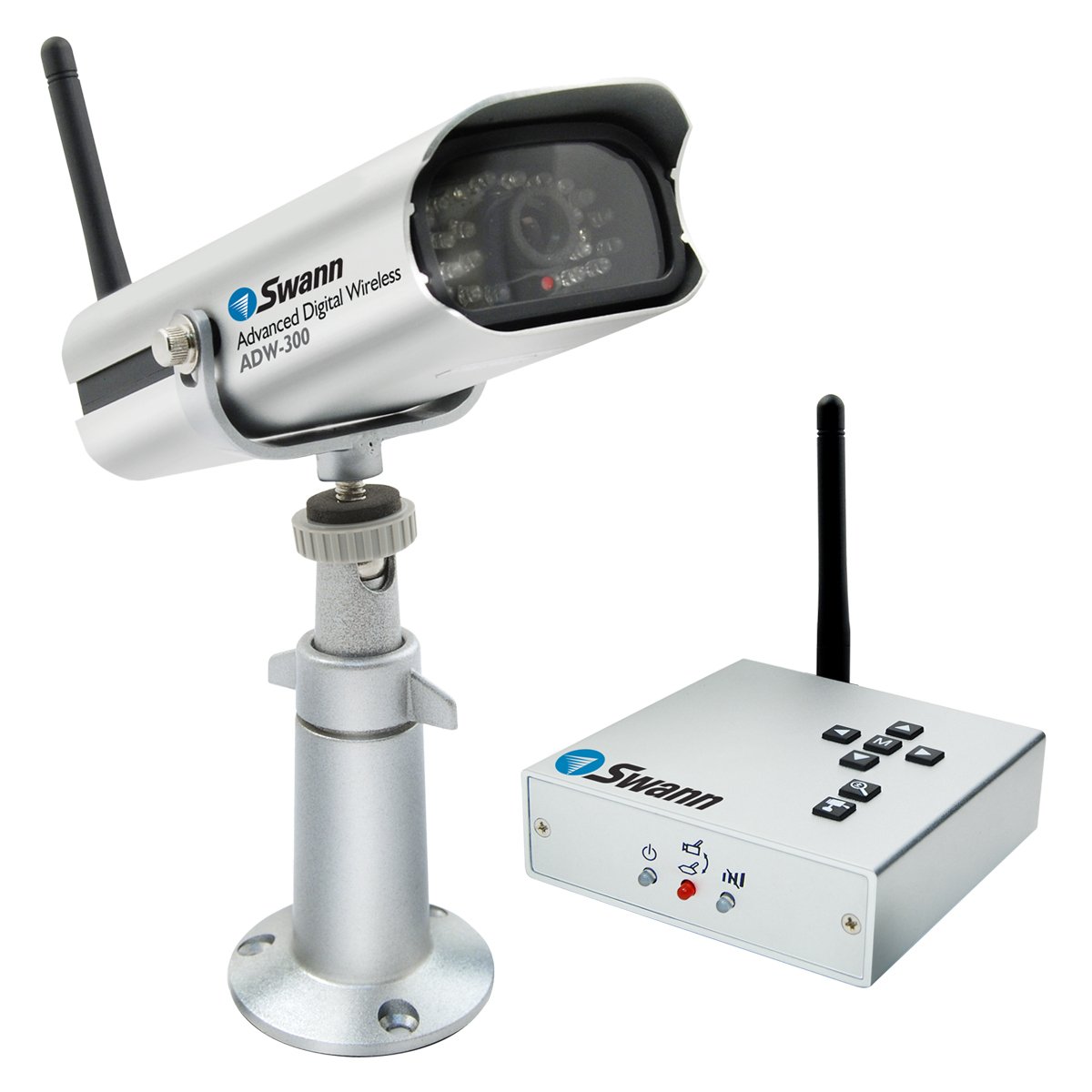
Image: The Swann ADW300 Digital Wireless Security Camera and its receiver, illustrating the compact design of both units. The camera is shown with its mounting bracket, suitable for various installations.
3.2 De ontvanger aansluiten
- Connect the receiver to a power source using one of the provided power adapters.
- Attach an antenna to the receiver.
- Connect the receiver to your desired audio/video input device (e.g., TV, monitor, DVR) using the supplied AV cable.
3.3 Camera Power and Pairing
- Connect the camera to a power source using the second power adapter.
- Attach an antenna to the camera.
- The camera and receiver are pre-set to the same channel for easy installation. They will automatically 'pair' to establish a secure, point-to-point encrypted signal.
- If manual channel adjustment is needed, refer to the receiver's on-screen menu.
4. Gebruiksaanwijzing
Once set up, the ADW300 provides clear video and audio surveillance.
4.1 ViewLivefeed bekijken
Switch your connected TV or monitor to the appropriate AV input channel to view de live-feed van de camera.
4.2 Advanced Camera Functions
The receiver features buttons that allow control over the camera's functions:
- Zoom: Digitally magnify the image.
- Pannen/kantelen: Stel de camera in view (digitally, within the magnified area).
- Menu (M)-knop: Access the on-screen display to adjust settings such as volume levels for the camera's built-in microphone.
4.3 Nachtzicht
The camera automatically switches to infra-red night vision in low-light conditions, providing clear images up to 26 feet (8 meters).
4.4 Multiple Camera Views
The receiver supports up to 4 cameras. If additional ADW-300/X cameras are purchased, you can switch between camera views using the receiver's channel selection feature.
5. Onderhoud
To ensure optimal performance and longevity of your Swann ADW300 camera, follow these maintenance guidelines:
- Schoonmaak: Maak de cameralens en behuizing regelmatig schoon met een zachte doek.amp lap. Vermijd schurende reinigingsmiddelen.
- Milieubescherming: The camera features an all-weather housing (IP66 rated) designed to withstand various outdoor conditions. However, ensure it is securely mounted to prevent damage from strong winds or impacts.
- Voeding: Use only the provided power adapters. Ensure connections are secure and free from moisture.
6. Probleemoplossing
If you encounter issues with your ADW300 system, consider the following:
6.1 No Video/Poor Signal
- Stroomcontrole: Ensure both the camera and receiver are properly powered and their power adapters are securely connected.
- Antenne controleren: Verify that antennas are securely attached to both the camera and receiver.
- Bereik: Confirm the camera is within the effective wireless transmission range of the receiver. Obstructions like thick walls can reduce range.
- Interferentie: While the ADW300 is designed for zero interference, extreme electromagnetic environments can still affect performance. Try repositioning the camera or receiver.
- Kanaal komt niet overeen: If the camera and receiver are not paired, manually change the channel in the receiver's menu and follow on-screen prompts to re-establish connection.
6.2 Problemen met nachtzicht
- Obstakels: Ensure there are no objects directly in front of the camera lens that could reflect the infrared light back, causing glare or poor night vision clarity.
- Stroom: Insufficient power can affect IR LED performance. Verify the power adapter is functioning correctly.
7. Specificaties
- Modelnummer: SW233-ADW
- Connectiviteitstechnologie: Wireless (Digital 2.4 GHz)
- Draadloos bereik: Up to 165 ft (50m) indoors, 328 ft (100m) line of sight outdoors
- Nachtzicht Bereik: 26 voet (8 meter)
- Energiebron: Elektrische kabel
- Materiaal: Metaal
- Afmetingen (L x B x H): 10.71 x 4.17 x 8.5 inch
- Artikelgewicht: 2.35 pond
- Internationale beschermingsclassificatie: IP66 (All-Weather Housing)
- Video-opnameformaat: MJPEG
- Fotosensortechnologie: CMOS
- Speciale kenmerken: Motion Sensor, Night Vision, Pan/Tilt/Zoom (digital)
- Meegeleverde componenten: Digital wireless camera, Digital receiver
8. Garantie en ondersteuning
Swann provides lifetime support for its products. For technical assistance, warranty claims, or further inquiries, please refer to the contact information provided in your product packaging or visit the official Swann support webplaats.


