Invoering
This manual provides comprehensive instructions for the setup, operation, maintenance, and troubleshooting of your RCA RS2650 Bookshelf Stereo System with 5-Disc CD Changer. Please read this manual thoroughly before using the system to ensure proper operation and to maximize your listening experience. Keep this manual for future reference.
Veiligheidsinformatie
Neem bij het gebruik van dit product altijd de basisveiligheidsmaatregelen in acht om het risico op brand, elektrische schokken en letsel te verminderen. Dit omvat, maar is niet beperkt tot:
- Stel dit apparaat niet bloot aan regen of vocht.
- Blokkeer geen ventilatieopeningen.
- Niet in de buurt van warmtebronnen installeren.
- Zorg ervoor dat er niet op het netsnoer wordt gelopen en dat het niet bekneld raakt.
- Gebruik uitsluitend de door de fabrikant gespecificeerde hulpstukken/accessoires.
- Laat alle onderhoudswerkzaamheden over aan gekwalificeerd onderhoudspersoneel.
Inhoud van het pakket
Controleer of alle artikelen in het pakket aanwezig zijn:
- RCA RS2650 Bookshelf Stereo System Main Unit
- Twee (2) stereoluidsprekers
- Afstandsbediening (met batterijen)
- AM-ringantenne
- FM-draadantenne
- Gebruikershandleiding (dit document)
Instellen
1. Uitpakken en plaatsen
Carefully remove all components from the packaging. Place the main unit on a stable, flat surface. Position the speakers on either side of the main unit, ensuring they are at an equal distance for optimal stereo sound. Allow adequate ventilation around the unit.
2. De luidsprekers aansluiten
Connect the speaker wires from the main unit to the corresponding terminals on the back of each speaker. Ensure that the positive (+) and negative (-) terminals are matched correctly for each speaker to maintain proper audio phasing.
3. Antennes aansluiten
- FM-antenne: Connect the supplied FM wire antenna to the FM antenna terminal on the rear of the main unit. Extend the wire for best reception.
- AM-antenne: Assemble the AM loop antenna and connect it to the AM antenna terminals on the rear of the main unit. Rotate the antenna for optimal AM reception.
4. Stroomaansluiting
Plug the AC power cord into a standard wall outlet. The system is now ready for operation.
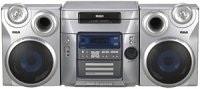
Figuur 1: Voorkant view of the RCA RS2650 Bookshelf Stereo System, showing the main unit with its 5-disc CD changer tray and control panel, flanked by two stereo speakers. This image illustrates the typical setup configuration.
Gebruiksaanwijzing
1. Aan/uit
Druk op de STROOM Gebruik de knop op het voorpaneel of de afstandsbediening om het systeem in of uit te schakelen.
2. Bediening van de CD-speler
The system features a 5-disc CD changer compatible with CD, CD-R, CD-RW, MP3, and WMA formats.
- Druk op de OPENEN/SLUITEN knop om de CD-lade te openen.
- Place up to five discs onto the disc trays, label side up.
- Pers OPENEN/SLUITEN nogmaals om de lade te sluiten.
- Druk op de CD knop om de CD-functie te selecteren.
- Pers AFSPELEN/PAUZE om het afspelen te starten.
- Gebruik de OVERSLAAN buttons to navigate between tracks or discs.
- Programmeren: Druk in de stopmodus op PROGRAMMA to create a custom playback sequence.
- Afspelen in willekeurige volgorde: Pers WILLEKEURIG to play tracks in a random order.
- Herhaal afspelen: Pers HERHALEN to repeat the current track, current disc, or all discs.
3. Bediening van de AM/FM-tuner
The digital AM/FM tuner allows you to listen to your favorite radio stations.
- Druk op de TUNER/BAND Met deze knop kunt u de AM- of FM-band selecteren.
- Druk op de AFSTEM +/- knoppen om handmatig op een station af te stemmen.
- Houd ingedrukt AFSTEM +/- voor automatisch zoeken naar zenders.
- Vooraf ingestelde zenders: The system supports 32 AM/FM presets. To store a station, tune to the desired frequency, then press PROGRAMMA followed by a preset number button. To recall a preset, press the corresponding preset number.
4. Equalizer and Bass Boost
Customize your audio experience with the built-in equalizer and bass boost system.
- Druk op de EQ button repeatedly to cycle through 5 preset equalization settings: Rock, Pop, Jazz, Classic, and Flat.
- Druk op de BAS BOOST button to enhance low-frequency sounds. Press again to deactivate.
5. Front A/V Inputs
The front A/V inputs allow you to connect external audio/video devices, such as game consoles or MP3 players, to the stereo system. Connect the audio output of your device to the corresponding input jacks on the front panel. Select the Hulp input source to listen to the connected device.
Onderhoud
Het apparaat schoonmaken
Veeg de buitenkant van het apparaat af met een zachte, droge doek. Voor hardnekkige vlekken kunt u een doek gebruiken die lichtjes is afgeveegd.ampened with water. Do not use abrasive cleaners, waxes, or solvents as they may damage the finish. Ensure the unit is unplugged before cleaning.
CD-verzorging
Handle CDs by their edges. Keep them clean and free of scratches. Store discs in their cases when not in use. If a disc is dirty, wipe it gently with a soft, lint-free cloth from the center outwards.
Probleemoplossing
If you experience problems with your stereo system, refer to the following table for possible solutions.
| Probleem | Mogelijke oorzaak | Oplossing |
|---|---|---|
| Geen stroom | Netsnoer is niet goed aangesloten. | Check power cord connection to the wall outlet and the unit. |
| Geen geluid | Volume is too low or muted. Speakers not connected properly. | Increase volume. Check speaker wire connections. Ensure correct input source is selected. |
| CD speelt niet af | Disc is dirty, scratched, or inserted incorrectly. Incorrect format. | Clean the disc. Insert disc label side up. Ensure disc format is compatible (CD, CD-R, CD-RW, MP3, WMA). |
| Slechte radio-ontvangst | Antenna not properly positioned or connected. Interference. | Adjust the position of the AM/FM antennas. Move unit away from other electronic devices. |
Specificaties
- Modelnummer: RS2650
- Merk: RCA
- Vermogen: 100 Watt (Totaal)
- CD-wisselaar: 5-Disc Carousel
- Ondersteunde schijfformaten: CD, CD-R, CD-RW, MP3, WMA
- Stemapparaat: Digital AM/FM with 32 Presets
- Equalizer: 5 Preset Modes (Rock, Pop, Jazz, Classic, Flat) + Bass Boost
- Ingangen: Front A/V (for MP3 players, game consoles)
- Luidsprekertype: Stereo
- Energiebron: AC Cable Electric
- Productafmetingen (L x B x H): 63.5x45.72x38.1cm
- Productgewicht: 12.29 kg
Garantie-informatie
This RCA RS2650 Bookshelf Stereo System comes with a 1 jaar beperkte garantie from the date of purchase. This warranty covers manufacturing defects in materials and workmanship under normal use. It does not cover damage caused by misuse, accident, unauthorized modification, or external causes. Please retain your proof of purchase for warranty claims.
Klantenservice
For further assistance, technical support, or warranty service, please contact RCA customer support. Refer to the contact information provided with your product packaging or visit the official RCA website voor de meest actuele ondersteuningsgegevens.


