Invoering
This manual provides instructions for the setup, operation, maintenance, and troubleshooting of your Microsoft Wireless Optical Mouse Blue, Model K80-00004. Please read this manual thoroughly before using your device.
Wat zit er in de doos?
Controleer of alle artikelen in het pakket aanwezig zijn:
- Microsoft Wireless Optical Mouse
- Draadloze ontvanger
- 2 AA-batterijen (vooraf geïnstalleerd of apart meegeleverd)
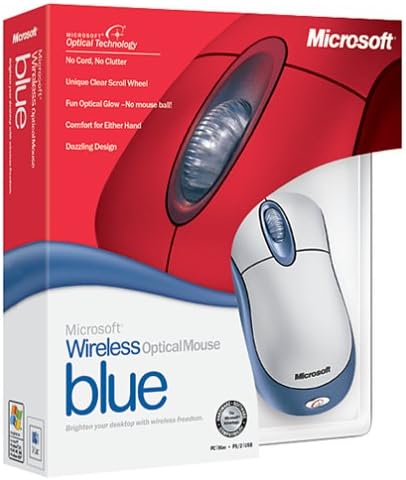
Image: Retail packaging of the Microsoft Wireless Optical Mouse Blue, showing the mouse and receiver.
Instellen
1. Installeer batterijen
- Zoek het batterijcompartiment aan de onderkant van de muis.
- Open het batterijklepje.
- Plaats de twee AA-batterijen en let daarbij op de juiste polariteit (+/-).
- Sluit het batterijklepje.

Afbeelding: Voorzijde view of the Microsoft Wireless Optical Mouse Blue, showing the top buttons and scroll wheel. The battery compartment is on the underside.
2. Connect the Wireless Receiver
- Sluit de draadloze USB-ontvanger aan op een beschikbare USB-poort van uw computer.
- Allow your operating system to detect and install the necessary drivers. This process is usually automatic.
- For optimal performance, ensure the receiver is placed at least 12 inches away from other wireless devices or large metal objects.
3. Optional Software Installation (IntelliPoint)
- While not required for basic functionality, installing Microsoft IntelliPoint software provides advanced customization options for your mouse buttons and scroll wheel.
- Refer to the Microsoft support website for the latest IntelliPoint software compatible with your operating system.
4. Set Orientation (Calibration)
- After initial setup, it is recommended to perform an "Orientation Set" or calibration if available through the IntelliPoint software or your operating system's mouse settings. This helps optimize tracking performance.
Gebruiksaanwijzing
The Microsoft Wireless Optical Mouse Blue is designed for comfortable and precise navigation.
Basisfuncties
- Links klikken: Primaire knop voor het selecteren van items, openen fileen interactie met software.
- Klik met de rechtermuisknop: Secundaire knop voor toegang tot contextmenu's en extra opties.
- Muis wieltje: Draai het wieltje omhoog of omlaag om door documenten te scrollen. web pages. The scroll wheel may also function as a clickable button for additional commands, depending on software configuration.
Draadloze bediening
- The mouse operates wirelessly up to 6 feet (approximately 1.8 meters) from its receiver.
- Optical technology scans the desktop surface for precise cursor movement without the need for a mouse pad on most surfaces.
- The mouse is designed for comfortable use with either the right or left hand.

Afbeelding: Schuin view of the Microsoft Wireless Optical Mouse Blue, highlighting its ergonomic shape and blue/silver design.
Onderhoud
Batterij vervangen
- The mouse requires two AA batteries.
- When battery power is low, your computer may display a notification (if IntelliPoint software is installed) or mouse performance may degrade.
- Replace batteries as described in the "Install Batteries" section under Setup.
- Always use fresh, high-quality batteries for optimal performance.
Schoonmaak
- To clean the mouse, gently wipe the surface with a soft, damp lap.
- Gebruik geen agressieve chemicaliën of schuurmiddelen, omdat deze de afwerking kunnen beschadigen.
- Zorg ervoor dat er geen vloeistof in de interne componenten van de muis terechtkomt.
Travel Considerations
- The Microsoft Wireless Optical Mouse is a transmitting device. When traveling by air, it is recommended to remove the batteries from the mouse before boarding to comply with airline regulations regarding electronic devices.
Probleemoplossing
Mouse Not Responding or Lagging
- Controleer de batterijen: Zorg ervoor dat de batterijen correct zijn geplaatst en voldoende zijn opgeladen. Vervang ze indien nodig.
- Check Receiver Connection: Ensure the wireless receiver is securely plugged into a functioning USB port. Try a different USB port.
- Nabijheid: Ensure the mouse is within 6 feet of the receiver. Reduce obstacles between the mouse and receiver.
- Interferentie: Other wireless devices (e.g., Wi-Fi routers, cordless phones) can cause interference. Move the receiver away from such devices.
- Oppervlak: Ensure the mouse is used on a suitable surface. Highly reflective or transparent surfaces may affect optical tracking.
- Opnieuw synchroniseren: Some wireless mice have a re-sync button on both the mouse and receiver. Consult the full product manual or Microsoft support for specific re-sync procedures for this model if issues persist.
Clicking Issues
- If clicks are not registering or require multiple presses, check for physical obstructions or debris around the buttons.
- Zorg ervoor dat de muis is ingeschakeld en aangesloten.
Softwarecompatibiliteit
- The IntelliPoint software may have specific operating system requirements. For example, older versions may not be compatible with newer operating systems like Windows Vista or later.
- Always download the latest software from the official Microsoft support webde website voor uw specifieke besturingssysteem.
Specificaties
| Functie | Detail |
|---|---|
| Modelnummer | K80-00004 |
| Merk | Microsoft |
| Connectiviteitstechnologie | Draadloze |
| Bewegingsdetectie | Optisch |
| Kleur | Blue / Silver |
| Batterijen | 2 AA-batterijen (meegeleverd) |
| Artikelgewicht | 13.6 ounces (ongeveer 385.5 gram) |
| Productafmetingen | 9.3 x 8.9 x 2.1 inch (ongeveer 23.6 x 22.6 x 5.3 cm) |
| Eerste beschikbare datum | 1 augustus 2002 |
Garantie-informatie
According to the legal disclaimer, this product is sold without a warranty. Please refer to your point of purchase for any return or exchange policies.
Steun
For further assistance, driver downloads, or updated information regarding your Microsoft Wireless Optical Mouse Blue, please visit the official Microsoft support webplaats.
You can typically find support resources by searching for "Microsoft support" and your product model number (K80-00004).


