Invoering
This manual provides instructions for the setup, operation, and maintenance of your Logitech Wingman Force Joystick, model 963155-0403. This device is designed to enhance your PC gaming experience with force feedback technology and programmable controls.
Inhoud van het pakket
Controleer of uw pakket de volgende items bevat:
- Logitech Wingman Force Joystick
- Stroomadapter
- USB Cable (integrated or separate)
- Software CD (if applicable, for WingMan Software)
- Gebruikershandleiding (dit document)
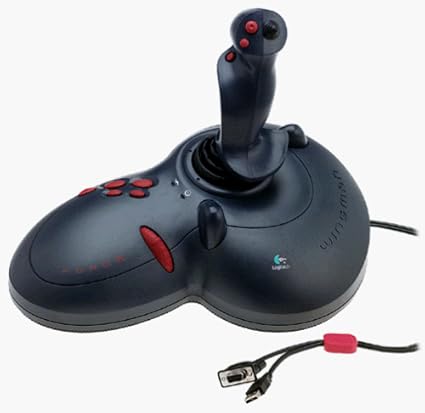
Figure 1: The Logitech Wingman Force Joystick packaging, showing the joystick and its features.
Instellen
- Sluit stroom aan: Plug the power adapter into the joystick and then into a standard electrical outlet.
- Verbinden met PC: Connect the joystick's USB cable to an available USB port on your computer. The joystick also supports serial interfaces.
- Installeer de software: Insert the WingMan Software CD (if provided) into your computer's CD-ROM drive and follow the on-screen instructions to install the drivers and WingMan Software. If no CD is provided, drivers may be automatically installed by your operating system or available for download from the Logitech support webplaats.
- Systeemvereisten: Ensure your computer runs a compatible Windows operating system.
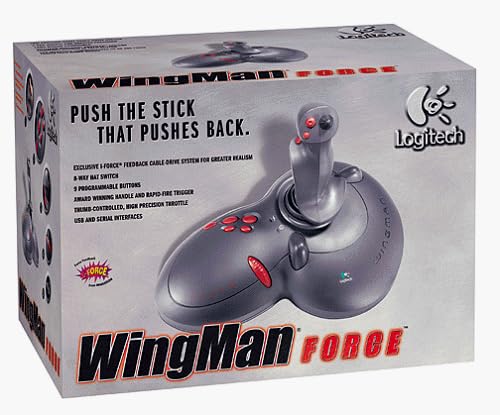
Figure 2: The Logitech Wingman Force Joystick, illustrating its ergonomic design and button layout.
Gebruiksaanwijzing
Controles voorbijview
- Joystick Handle: Provides precise control for in-game movement.
- 9 programmeerbare knoppen: Customize these buttons using the WingMan Software for various in-game actions.
- 8-Way Hat Switch: Located on top of the joystick, this switch allows for quick camera views or directional commands.
- Thumb-Controlled Throttle: Adjust speed or thrust with the integrated throttle control.
Force Feedback Technology
The Wingman Force Joystick utilizes Logitech's exclusive I-Force force feedback technology with a cable-drive system. This system provides realistic tactile feedback, such as vibrations from impacts, recoil from weapons, and resistance during maneuvers, enhancing immersion in compatible games.
Using WingMan Software
The WingMan Software allows you to:
- Program the 9 buttons for specific game functions.
- Meerdere pro's aanmaken en opslaanfiles voor verschillende spellen.
- Adjust force feedback intensity settings.
- Calibrate the joystick for optimal performance.
Refer to the WingMan Software's help documentation for detailed instructions on customization and profile beheer.
Onderhoud
To ensure the longevity and optimal performance of your joystick:
- Schoonmaak: Use a soft, dry cloth to wipe the surface of the joystick. Avoid using abrasive cleaners or solvents.
- Opslag: Store the joystick in a clean, dry environment away from extreme temperatures and direct sunlight.
- Kabelonderhoud: Avoid bending or crimping the cables excessively.
Probleemoplossing
- Problem: Joystick not recognized by computer.
- Oplossing:
- Zorg ervoor dat de USB-kabel goed is aangesloten op zowel de joystick als de computer.
- Probeer verbinding te maken met een andere USB-poort.
- Verify that the power adapter is properly connected and the joystick is receiving power.
- Reinstall the WingMan Software drivers.
- Problem: Inconsistent or absent force feedback.
- Oplossing:
- Check the force feedback settings within the WingMan Software and ensure they are set to an appropriate level.
- Zorg ervoor dat het spel dat je speelt force feedback ondersteunt en dat deze functie is ingeschakeld in de spelinstellingen.
- Restart your computer and the game.
- Controleer of alle verbindingen veilig zijn.
- Problem: Buttons or controls are unresponsive.
- Oplossing:
- Calibrate the joystick using the WingMan Software.
- Ensure the joystick drivers are up to date.
- Test the joystick in a different game or application to determine if the issue is game-specific.
Specificaties
| Functie | Detail |
|---|---|
| Modelnummer | 963155-0403 |
| Merk | Logitech |
| Controller-type | Bedieningshendel |
| Connectiviteitstechnologie | USB, Serieel |
| Compatibele apparaten | Windows-pc's |
| Productafmetingen | 13.5 x 9.63 x 9.25 inch |
| Artikelgewicht | 4.14 pond |
| Force-feedback | I-Force feedback cable-drive system |
| Knoppen | 9 programmeerbare knoppen |
| Hoedschakelaar | 8-weg hat-schakelaar |
| Gashendel | Thumb-controlled, high precision throttle |
Garantie en ondersteuning
For warranty information and technical support, please refer to the documentation included with your product or visit the official Logitech support webOp de website vind je doorgaans stuurprogramma's, veelgestelde vragen en contactgegevens voor de klantenservice.
Logitech-ondersteuning Webwebsite: www.logitech.com/support