
Q37H4-AM2
Generic Q37H4-AM2 Motherboard User Manual
Model: Q37H4-AM2 for M6660G T850 Desktop Systems
1. Inleiding
This manual provides detailed instructions for the installation, operation, and maintenance of the Generic Q37H4-AM2 Motherboard. Please read this manual thoroughly before proceeding with installation or use to ensure proper functionality and to prevent damage to the product or other components. Keep this manual for future reference.
2. Product voorbijview
The Generic Q37H4-AM2 Motherboard is designed for optimal performance and compatibility with various computing needs. It features a robust design for longevity and reliability, suitable for M6660G T850 desktop systems.

Figuur 2.1: Top-down view of the Q37H4-AM2 motherboard, highlighting the CPU socket, RAM slots, and various expansion slots and connectors. This image provides a general layout of the board's components.
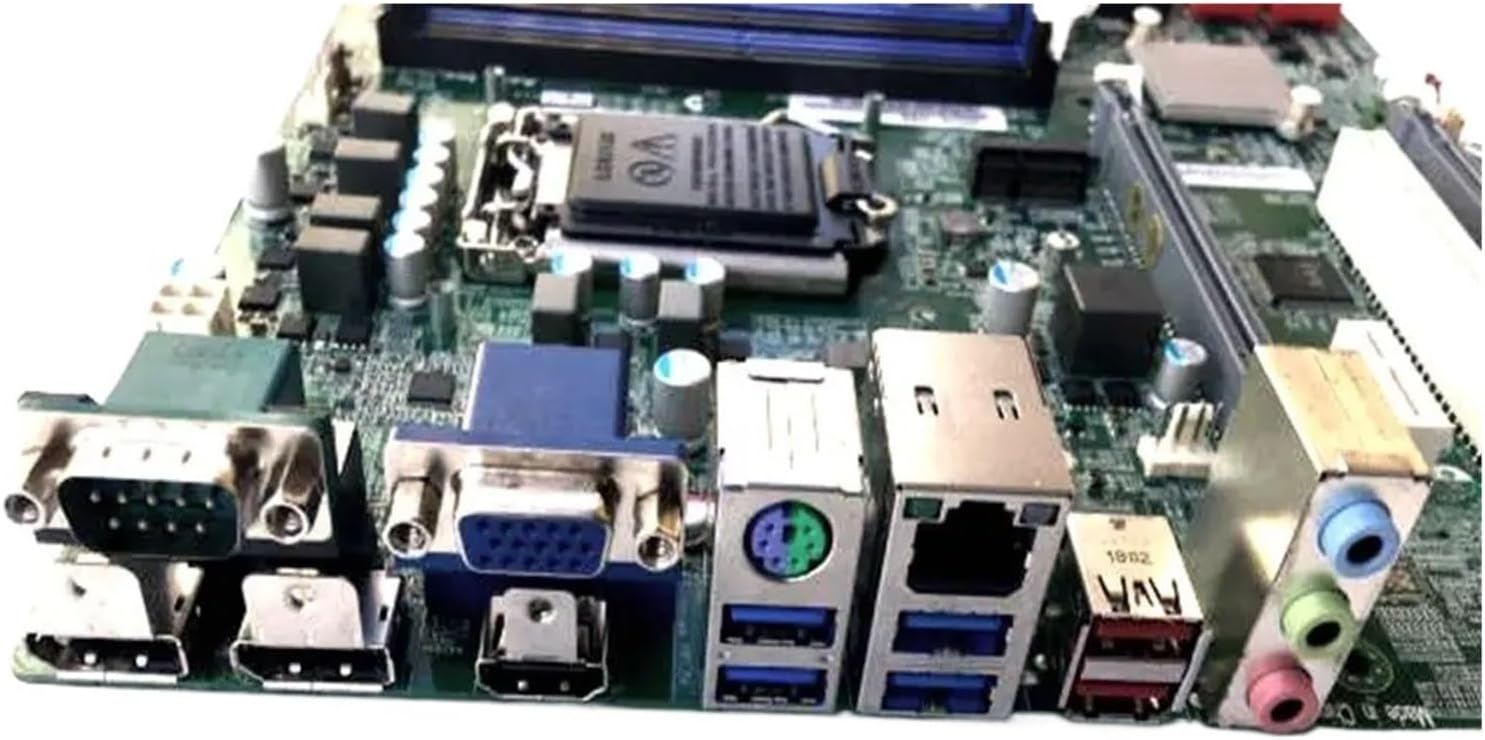
Figure 2.2: Rear I/O panel of the Q37H4-AM2 motherboard, displaying ports such as USB, VGA, HDMI, Ethernet, and audio jacks. This view is crucial for connecting external peripherals.

Figuur 2.3: Close-up view of the Q37H4-AM2 motherboard, showing the model number label (Q37H4-AM2) and additional expansion slots. This image helps in identifying the specific model and available expansion options.
3. Installatie en installatie
Voordat u met de installatie begint, moet u ervoor zorgen dat uw werkruimte schoon, goed verlicht en vrij van statische elektriciteit is. Het wordt aanbevolen om een antistatische polsband te dragen.
3.1. Inhoud van het pakket
Controleer of alle componenten in het pakket aanwezig zijn:
- Generic Q37H4-AM2 Motherboard
- I / O Shield
- SATA-kabels (aantal kan variëren)
- Gebruikershandleiding (dit document)
- Stuurprogramma-cd/usb (indien meegeleverd)
3.2. De CPU installeren
- Locate the CPU socket (LGA1151) on the motherboard.
- Til de laadhendel voorzichtig op en open het klepje van de CPU-socket.
- Lijn de CPU uit met de socket en zorg ervoor dat de gouden driehoek op de CPU overeenkomt met de driehoek op de socket.
- Plaats de CPU voorzichtig in de socket, zonder deze te forceren.
- Sluit de afdekking van het stopcontact en druk de laadhendel naar beneden totdat deze vastklikt.
- Breng thermische pasta aan op het oppervlak van de CPU en installeer de CPU-koeler.
3.3. RAM installeren
- Locate the DDR RAM slots on the motherboard.
- Open de klemmen aan beide uiteinden van het RAM-slot.
- Align the notch on the RAM module with the notch in the slot.
- Plaats de RAM-module stevig in de sleuf totdat de klemmen vastklikken.
- Repeat for additional RAM modules, following dual-channel configuration guidelines if applicable.
3.4. Randapparatuur aansluiten
- Voeding: Sluit de 24-pins ATX-voedingsconnector en de 8-pins (of 4-pins) CPU-voedingsconnector van uw voeding aan op het moederbord.
- Opslagapparaten: Connect SATA data cables from your storage drives (HDD/SSD) to the SATA ports on the motherboard. Connect power cables from the power supply to the drives.
- Connectoren op het voorpaneel: Connect the power button, reset button, HDD LED, power LED, and front USB/audio headers to the corresponding pins on the motherboard. Refer to the motherboard diagram for exact pin locations.
- Uitbreidingskaarten: Insert graphics cards or other expansion cards into the appropriate PCIe slots.
4. Gebruiksaanwijzing
4.1. Eerste keer opstarten
- After all components are installed and connected, ensure all cables are secure.
- Sluit uw monitor, toetsenbord en muis aan.
- Plug in the power cord to the power supply and turn on the power switch.
- Druk op de aan/uit-knop op de behuizing van uw computer.
- The system should boot and display the BIOS/UEFI screen.
4.2. BIOS/UEFI-configuratie
To enter the BIOS/UEFI setup, press the designated key (usually VERDELEN or F2) during the initial boot sequence. Here you can configure boot order, system time, and other hardware settings.
4.3. Installatie van het besturingssysteem
Insert your operating system installation media (USB drive or DVD) and configure the boot order in BIOS/UEFI to boot from it. Follow the on-screen instructions to install your preferred operating system.
4.4. Stuurprogramma-installatie
After installing the operating system, install the necessary drivers for the motherboard chipset, audio, network, and any other integrated components. These drivers are typically provided on a CD/USB or can be downloaded from the manufacturer's webplaats.
5. Onderhoud
Regelmatig onderhoud draagt bij aan de lange levensduur en stabiele werking van uw moederbord en systeem.
- Stofverwijdering: Reinig het moederbord en andere componenten periodiek met perslucht om stof te verwijderen. Zorg ervoor dat het systeem is uitgeschakeld en de stekker uit het stopcontact is gehaald voordat u gaat reinigen.
- BIOS/UEFI-updates: Controleer die van de fabrikant website for BIOS/UEFI updates. Updates can improve stability, compatibility, and performance. Follow update instructions carefully to avoid system damage.
- Stuurprogramma-updates: Zorg ervoor dat uw drivers up-to-date zijn om optimale prestaties en compatibiliteit met nieuwe software en hardware te garanderen.
- Kabelbeheer: Zorg ervoor dat de interne kabels netjes zijn aangelegd, zodat de luchtstroom verbetert en storingen worden voorkomen.
6. Probleemoplossing
In dit gedeelte vindt u oplossingen voor veelvoorkomende problemen die u kunt tegenkomen.
6.1. Geen stroom / Geen weergave
- Check all power connections: 24-pin ATX, 8-pin CPU, and power supply cable.
- Zorg ervoor dat de aan/uit-schakelaar in de stand "AAN" staat.
- Verify that the monitor is connected and powered on.
- Reseat RAM modules and expansion cards.
- Try booting with minimal components (CPU, one RAM stick, graphics card if no integrated graphics).
6.2. Systeeminstabiliteit / Crashes
- Controleer de temperaturen van de CPU en GPU. Oververhitting kan instabiliteit veroorzaken.
- Zorg ervoor dat alle drivers correct zijn geïnstalleerd en up-to-date zijn.
- Voer geheugendiagnostische hulpprogramma's uit om te controleren of het RAM-geheugen defect is.
- Controleer het wattage van de voeding.tage is voldoende voor alle componenten.
- Controleer op losse verbindingen of onderdelen die niet goed vastzitten.
6.3. Randapparatuur niet gedetecteerd
- Zorg ervoor dat het randapparaat correct is aangesloten op de juiste poort.
- Controleer in het apparaatbeheer van uw besturingssysteem of er problemen zijn met stuurprogramma's.
- Probeer het randapparaat op een andere poort aan te sluiten.
- Verify that the peripheral is powered on (if applicable).
7. Specificaties
| Functie | Specificatie |
|---|---|
| Merk | Algemeen |
| Model | Q37H4-AM2 |
| CPU-socket | LGA1151 |
| Compatibele apparaten | Desktop-pc's |
| RAM-geheugentechnologie | DDR |
| Chipsettype | Q370 |
| Geheugenkloksnelheid | 1 GHz |
| Maximale grootte van RAM-geheugen | 1GB |
| Beschikbare geheugenslots | 2 |
Note: Some specifications provided in the source data appear to be generic placeholders and may not accurately reflect the specific model. Users should consult the official manufacturer's documentation for precise details. For example, 1 GHz memory speed and 1 GB maximum RAM are typically placeholder values for modern motherboards. The image shows 2 memory slots.
8. Garantie en ondersteuning
For warranty information, please refer to the documentation provided with your purchase or contact the seller directly. Technical support may be available through the seller or the original equipment manufacturer (OEM) if this is a replacement part for a specific system.
Verkoper: Er HHh Store
ASIN: B0GG437SW4
Ask a question about this manual
Ask about setup, troubleshooting, compatibility, parts, safety, or missing instructions. Manuals+ will review the question and use this page’s manual context to help answer it.