
1. Inleiding
This manual provides essential information for setting up, operating, and maintaining your NiPoGi P2-3300U Mini PC. Please read it thoroughly before using the device to ensure optimal performance and longevity.
Een overview videoshowasing the compact design, AMD Ryzen 3300U processor, memory and storage expansion, multiple display output, various ports, efficient cooling, and diverse usage scenarios of the NiPoGi P2-3300U Mini PC.
Belangrijkste kenmerken:
- Verwerker: AMD Ryzen 3 3300U (up to 3.5GHz, 4 Cores/4 Threads)
- Besturingssysteem: Windows 11 Pro
- Geheugen: 16GB DDR4 (uitbreidbaar tot 32GB)
- Opslag: 512GB M.2 2280 SSD (expandable up to 4TB)
- Grafisch: Integrated Graphics with 4K@60Hz support
- Weergave-uitvoer: Supports up to 3 screens simultaneously (HDMI 2.0, DisplayPort 1.4, USB 3.2 Gen1 Type-C)
- Connectiviteit: USB 3.2 x6, USB 3.2 Gen1 Type-C x1, 1000Mbps Wired LAN, Wi-Fi 5GHz, Bluetooth 4.2
- Koeling: Efficient and silent cooling fan system
- Beveiliging: TPM 2.0 chip for enhanced data protection
- Ontwerp: Ultra-compact and lightweight (approx. 128.2×128.2×44mm), VESA mount compatible

Diagram showing the compact size and key features like 4K output, Windows 11 Pro, 512GB SSD, 16GB DDR4, LAN, Bluetooth 4.2, and WiFi 5.
2. Inhoud van het pakket
Controleer voordat u met de installatie begint of alle onderstaande items in uw pakket zijn inbegrepen:
- NiPoGi P2-3300U Mini PC
- Stroomadapter
- HDMI-kabel
- VESA Mount
- Schroeven voor VESA-montage
- Gebruiksaanwijzing

Image showing the package contents, including the mini PC, power adapter, HDMI cable, VESA mount, and user manual.
3. Installatiehandleiding
3.1 Randapparatuur aansluiten
Identify the various ports on your Mini PC to connect your display, keyboard, mouse, and other devices.

Gedetailleerd view of the mini PC's ports, including USB, HDMI, DP, LAN, and Type-C.
- Stroom: Sluit de voedingsadapter aan op de DC-poort van de mini-pc en vervolgens op een stopcontact.
- Weergave: Connect your monitor(s) using the HDMI 2.0, DisplayPort 1.4, or USB 3.2 Gen1 Type-C ports. The Mini PC supports up to three displays simultaneously.
- Toetsenbord muis: Sluit uw USB-toetsenbord en -muis aan op een van de beschikbare USB 3.2-poorten.
- Netwerk: For a wired connection, connect an Ethernet cable to the RJ45 LAN port. For wireless, the device supports Wi-Fi 5GHz.
- Geluid: Sluit een hoofdtelefoon of luidsprekers aan op de 3.5 mm audioaansluiting.
3.2 VESA-montage-installatie
The Mini PC can be mounted on the back of a VESA-compatible monitor to save desk space.
- Bevestig de VESA-montagebeugel aan de achterkant van uw monitor met behulp van de meegeleverde schroeven.
- Schuif de mini-pc op de beugel totdat deze stevig vastklikt.

Mini PC mounted on the back of a monitor using a VESA mount.
3.3 Eerste opstart en installatie van Windows 11 Pro
After connecting all necessary peripherals and power, press the power button to turn on the Mini PC. Follow the on-screen instructions to complete the initial setup of Windows 11 Pro.
4. Gebruiksaanwijzing
4.1 Basisbediening
The NiPoGi P2-3300U Mini PC is designed for smooth performance across various daily tasks:
- Web Bladeren: Enjoy fast and stable internet access with Wi-Fi 5GHz or wired LAN.
- Document Creation: Efficiently work on office applications for documents, spreadsheets, and presentations.
- Onlinevergaderingen: Participate in video conferences with reliable connectivity.
- Video afspelen: Stream 4K content smoothly.

Various usage scenarios: video conferencing, light gaming, data analysis, and movie watching.
4.2 Multitasking and Multi-Display
The AMD Ryzen 3 3300U processor ensures efficient multitasking, allowing you to run multiple applications simultaneously without significant slowdowns.

Multiple application windows open on a screen, illustrating the mini PC's multitasking capabilities.
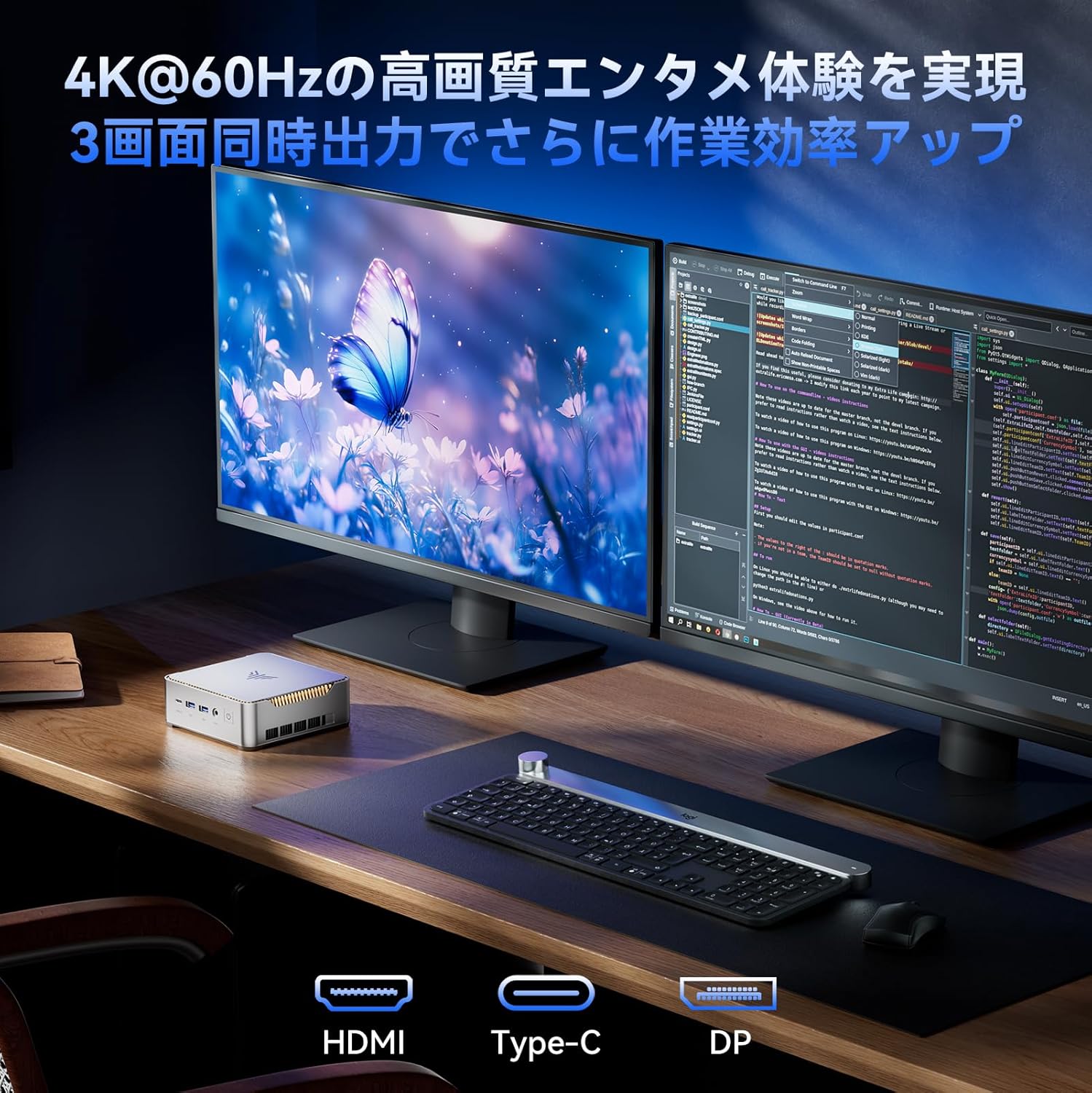
With support for up to three 4K@60Hz displays, you can expand your workspace for enhanced productivity.

Mini PC connected to multiple monitors, demonstrating multi-display capability.
4.3 Geavanceerde BIOS-instellingen
The unlocked BIOS provides access to advanced settings, including:
- Automatisch opstarten: Configure the system to automatically power on when connected to power.
- RTC Wake: Schedule the PC to wake up at a specific time.
- Wake-on-LAN: Power on the PC remotely over a network connection.
5. Onderhoud en upgrades
5.1 Efficiënt koelsysteem
The Mini PC features an efficient and silent cooling fan system to prevent overheating and maintain stable performance even during extended use. The design ensures heat is effectively dissipated from the interior.
Intern view of the mini PC highlighting the cooling fan and heat dissipation system.

Image depicting a user working on the mini PC at night while a child sleeps, emphasizing silent operation.
5.2 Opslag- en geheugenuitbreiding
The Mini PC comes with 16GB DDR4 RAM and a 512GB M.2 2280 SSD. Both can be upgraded:
- Geheugen: Expandable up to 32GB DDR4 SO-DIMM.
- Opslag: The M.2 2280 SSD can be replaced with a larger capacity drive, up to 4TB.
For detailed instructions on how to access and upgrade these components, please refer to the technical support section or contact customer service.

Diagram illustrating the internal memory (DDR4) and storage (M.2 2280 SSD) expansion capabilities.
6. Probleemoplossing
If you encounter any issues with your NiPoGi P2-3300U Mini PC, please try the following general troubleshooting steps:
- Geen stroom: Zorg ervoor dat de stroomadapter goed is aangesloten op zowel de mini-pc als een werkend stopcontact. Probeer indien nodig een ander stopcontact.
- Geen scherm: Verify that the monitor is powered on and the display cable (HDMI, DP, or Type-C) is firmly connected to both the Mini PC and the monitor. Try a different cable or port.
- Randapparatuur niet gedetecteerd: Zorg ervoor dat USB-apparaten correct zijn aangesloten op de juiste poorten. Probeer ze op verschillende USB-poorten aan te sluiten.
- Trage prestaties: Close unnecessary applications. Check for available Windows updates. Ensure the cooling vents are not obstructed.
- Netwerkproblemen: For wired connections, check the Ethernet cable and router. For Wi-Fi, ensure you are connected to the correct network and the signal is strong.
Als het probleem aanhoudt, raadpleeg dan het gedeelte Garantie en ondersteuning voor verdere hulp.
7. Specificaties
| Functie | Detail |
|---|---|
| Merk | NiPoGi |
| Modelnummer | P2-3300U-16+512-NEW |
| Productafmetingen | 128.2x128.2x44mm |
| Artikelgewicht | 1.11 kilogram |
| CPU-merk | AMD |
| CPU-type | Ryzen 3 3300U |
| CPU-snelheid | 2.1 GHz (up to 3.5 GHz Max Turbo) |
| Aantal processoren | 4 |
| RAM Memory Type | DDR4 SDRAM |
| Geïnstalleerde RAM-grootte | 16GB |
| Maximaal ondersteund geheugen | 32GB |
| Grootte van de harde schijf | 512GB |
| Type harde schijf | SSD (M.2 2280) |
| Harde schijfinterface | eSATA (Note: M.2 is NVMe/SATA, eSATA is an external interface, likely a translation error in source data) |
| Grafische versneller | Geïntegreerde grafische kaart |
| Beschrijving grafische kaart | Geïntegreerd |
| VRAM-type | DDR4 SDRAM |
| Grafische kaartinterface | Geïntegreerd |
| Oplossing | 3840x2160 (4K) |
| USB 3.0-poorten | 6 |
| HDMI-poorten | 1 |
| Optisch schijftype | Geen |
| Besturingssysteem | Windows 11 Pro |
| Connectiviteit | Wi-Fi 5, Bluetooth 4.2, 1000 Mbps LAN |
| Speciale kenmerken | VESA Support, TPM 2.0 |
8. Garantie en ondersteuning
Your NiPoGi P2-3300U Mini PC comes with an 18 maanden garantie from the date of purchase. This warranty covers manufacturing defects and malfunctions under normal use. In the event of a defect or malfunction, NiPoGi offers free replacement or return services.
For technical support, warranty claims, or any questions regarding your product, please contact NiPoGi customer service through the official channels provided at the time of purchase or on the NiPoGi website. Houd uw productmodel en aankoopgegevens bij de hand wanneer u contact opneemt met de klantenservice.