
Invoering
This manual provides detailed instructions for the setup, operation, and maintenance of your Tivoli Audio PAL BT (Gen 3) Portable Bluetooth FM Radio. Please read this manual thoroughly before using your device to ensure proper function and longevity.

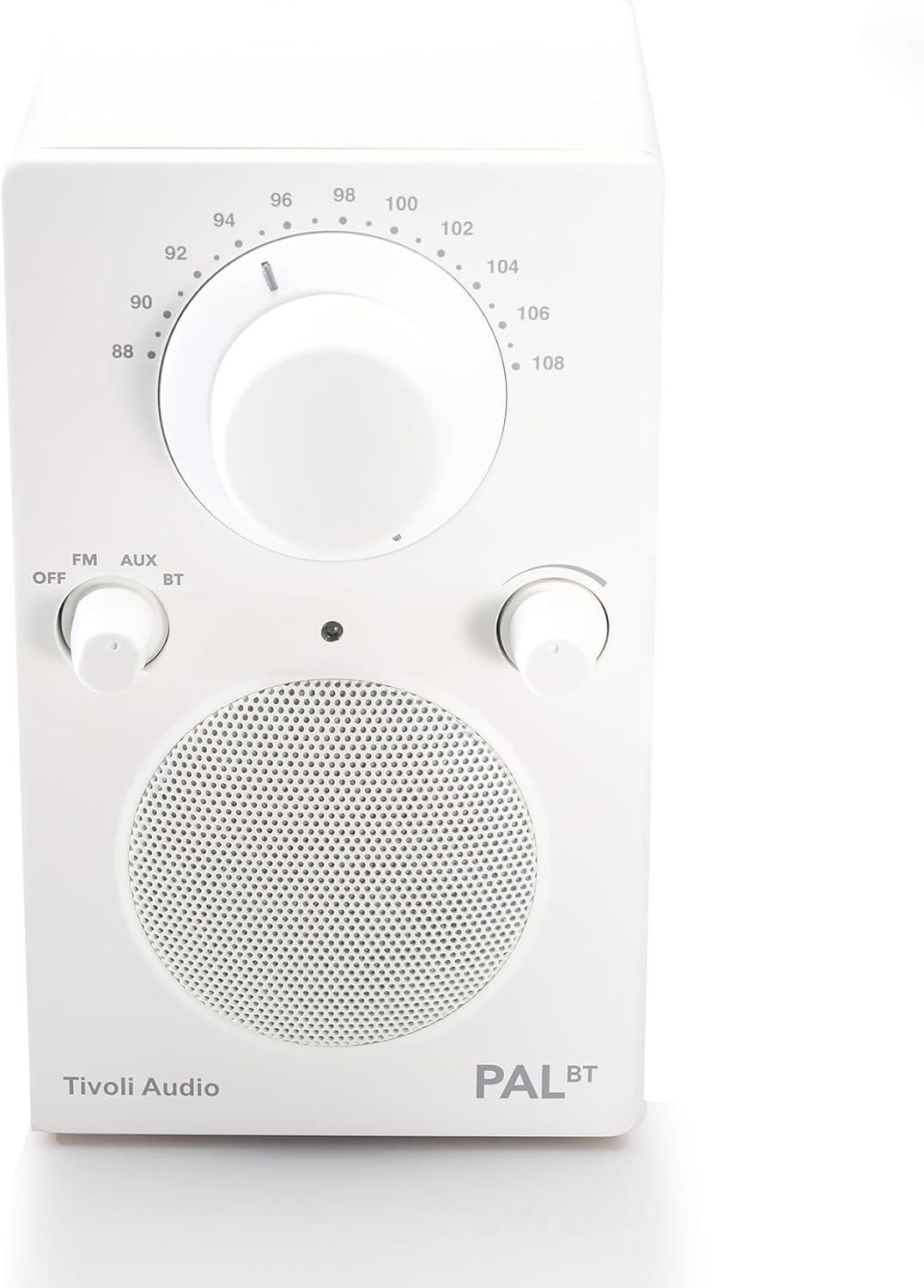
Image: The Tivoli Audio PAL BT (Gen 3) radio, showcasing dankzij het compacte ontwerp en de bedieningselementen aan de voorkant.
Inhoud van het pakket
Controleer of alle artikelen in uw pakket aanwezig zijn:
- Tivoli Audio PAL BT (Gen 3) Portable Bluetooth FM Radio
- USB-C-oplaadkabel
- Gebruikershandleiding (dit document)
Instellen
1. De batterij opladen
The PAL BT (Gen 3) features a built-in rechargeable battery. Before first use, fully charge the device.
- Locate the USB-C charging port on the back or side of the unit.
- Connect the provided USB-C cable to the radio and to a compatible USB power adapter (not included) or a powered USB port.
- The charging indicator light will illuminate. Allow several hours for a full charge. A full charge provides over 14 hours of playback.
Afbeelding: Zijkant view of the Tivoli Audio PAL BT (Gen 3), illustrating its portable design and potential location for the USB-C charging port.
2. In-/uitschakelen
Use the multi-function knob on the front of the unit to control power and source selection.
- To power on, rotate the knob from "OFF" to "FM", "AUX", or "BT".
- To power off, rotate the knob to "OFF".
Gebruiksaanwijzing
1. Controles voorbijview
The PAL BT (Gen 3) features three main control knobs:
- Source/Power Knob: Selects between OFF, FM, AUX, and Bluetooth (BT) modes.
- Afstemknop: Hiermee wordt de FM-radiofrequentie aangepast.
- Volumeknop: Regelt het audio-uitgangsniveau.

Afbeelding: Voorzijde view of the PAL BT (Gen 3) highlighting the control knobs and FM frequency dial.
2. FM-radiobediening
- Rotate the Source/Power knob to "FM".
- Trek de telescopische antenne uit voor optimale ontvangst.
- Rotate the Tuning knob to select your desired FM station.
- Adjust the Volume knob to your preferred listening level.
3. Bluetooth (BT) Pairing
The PAL BT (Gen 3) uses Bluetooth 5.0 for wireless audio streaming.
- Rotate the Source/Power knob to "BT". The Bluetooth indicator light will begin to flash, indicating it is in pairing mode.
- On your Bluetooth-enabled device (e.g., smartphone, tablet), go to its Bluetooth settings and enable Bluetooth.
- Zoeken naar available devices. You should see "Tivoli PAL BT" or similar in the list.
- Select "Tivoli PAL BT" to connect. Once paired, the Bluetooth indicator light on the radio will glow solid.
- You can now stream audio from your device to the PAL BT (Gen 3).
4. Hulpingang
Connect external audio sources using the auxiliary input.
- Rotate the Source/Power knob to "AUX".
- Connect a 3.5mm audio cable (not included) from your external audio device's headphone jack or line-out to the AUX input port on the PAL BT (Gen 3).
- Speel audio af vanaf uw externe apparaat.
- Adjust the Volume knob on the PAL BT (Gen 3) and your external device for optimal sound.
5. Koptelefoonuitgang
For private listening, connect headphones to the dedicated output.
- Plug a standard 3.5mm headphone jack into the headphone output port.
- The internal speaker will mute automatically.
- Adjust the Volume knob for comfortable listening.
Onderhoud
Schoonmaak
To maintain the appearance of your PAL BT (Gen 3):
- Haal altijd de stekker uit het stopcontact voordat u het apparaat schoonmaakt.
- Gebruik een zachte, droge doek om de oppervlakken af te vegen.
- Vermijd het gebruik van schurende reinigingsmiddelen, oplosmiddelen of sterke schoonmaakmiddelen, aangezien deze de afwerking kunnen beschadigen.
Batterijverzorging
Om de levensduur van de batterij te maximaliseren:
- Zorg ervoor dat de batterij niet te vaak volledig ontladen wordt.
- Als u het apparaat voor een langere periode opbergt, laadt u het elke paar maanden op tot ongeveer 50%.
- Stel het apparaat niet bloot aan extreme temperaturen.
Weerbestendigheid
The PAL BT (Gen 3) is designed with a weather-resistant housing, making it suitable for outdoor use. However, it is not waterproof. Avoid submerging the unit in water or exposing it to heavy rain for prolonged periods.
Probleemoplossing
| Probleem | Mogelijke oorzaak | Oplossing |
|---|---|---|
| Geen stroom | Battery discharged; Unit not turned on. | Charge the battery using the USB-C cable; Rotate the Source/Power knob to an active source (FM, AUX, BT). |
| Geen geluid | Volume te laag. Verkeerde bron geselecteerd. Koptelefoon aangesloten. | Verhoog het volume; selecteer de juiste bron; koppel de hoofdtelefoon los. |
| Slechte FM-ontvangst | Antenne niet uitgeschoven. Zwak signaal. | Schuif de telescopische antenne volledig uit; verplaats de radio voor een beter signaal. |
| Bluetooth koppelt niet | Radio not in pairing mode; Device too far; Previously paired device connected. | Ensure radio is in BT mode and indicator is flashing; Move device closer; Disconnect from other devices or forget "Tivoli PAL BT" on your device and re-pair. |
Specificaties
- Modelnummer: PALBT3-3059-NA
- Connectiviteit: Bluetooth 5.0, FM Tuner, Auxiliary Input
- Energiebron: Werkt op batterijen (opladen via USB-C)
- Levensduur batterij: Over 14 hours (playback)
- Afmetingen (L x B x H): 3.6" x 4.5" x 6"
- Speciale kenmerken: Portable, Weather-Resistant Housing
- Meegeleverde componenten: Handleiding van de eigenaar
Garantie-informatie
The Tivoli Audio PAL BT (Gen 3) comes with a 2 jaar garantie from the date of purchase. This warranty covers manufacturing defects and workmanship under normal use. Please retain your proof of purchase for warranty claims. For full warranty terms and conditions, please visit the official Tivoli Audio webwebsite of neem contact op met de klantenservice.
Klantenservice
If you encounter any issues not covered in this manual or require further assistance, please contact Tivoli Audio customer support:
- Webwebsite: www.tivoliaudio.com/support
- E-mailadres: Refer to the Tivoli Audio webwebsite voor contactgegevens.
- Telefoon: Refer to the Tivoli Audio webwebsite voor contactgegevens.
When contacting support, please have your product model number (PAL BT (Gen 3)) and purchase information ready.