
1. Inleiding
This manual provides detailed instructions for the installation, operation, and maintenance of your AINAVI 11.5-inch Car Radio Stereo. This advanced system is designed to upgrade your vehicle's infotainment experience with Android 13.0, wireless CarPlay, Android Auto, GPS navigation, and various multimedia features. Please read this manual thoroughly before installation and use to ensure proper functionality and safety.
2. Product voorbijview
The AINAVI 11.5-inch Car Radio Stereo is a high-performance multimedia system compatible with specific Jeep Wrangler JK, Dodge Grand Caravan, and Dodge Ram models. It features an 11.5-inch QLED touchscreen with 1280x800 resolution, running on Android 13.0 with 4GB RAM and 64GB ROM for smooth operation. Key features include:
- 11.5-inch QLED Touchscreen: G+G full lamination technology with 178° full-viewhoek.
- Android 13.0 besturingssysteem: Latest operating system for enhanced performance.
- Draadloze/bekabelde CarPlay en Android Auto: Seamless smartphone integration.
- GPS navigatie: Ondersteunt online en offline kaarten.
- 5G WiFi & Bluetooth 5.4: Fast internet connectivity and stable device pairing.
- AM/FM/RDS-radio: Access to various radio stations.
- Stuurwielbediening: Behoudt de originele bedieningselementen van het voertuig.

Image: The 11.5-inch HD IPS Touch Screen, showcasing its vibrant display and full lamination technology for clarity and responsiveness.
3. Inhoud van het pakket
Controleer of alle hieronder vermelde artikelen in uw pakket zitten. Als er artikelen ontbreken of beschadigd zijn, neem dan contact op met de klantenservice.
- 11.5-inch Car Head Unit for Jeep Wrangler JK
- Plastic frame
- AHD 1080P Achterzijde View Camera + Extension Power Cable
- Microfoon
- GPS-antenne
- USB 4Pin Cable
- USB 6Pin Cable
- Gebruikershandleiding (dit document)
- Stroomkabel
- Power Harness with CAN BUS (for some models)
- Blue Frame Removal Tool
- RCA-kabel
- Omkeerbedieningskabel
Note: The specific cables included may vary slightly depending on the vehicle model.
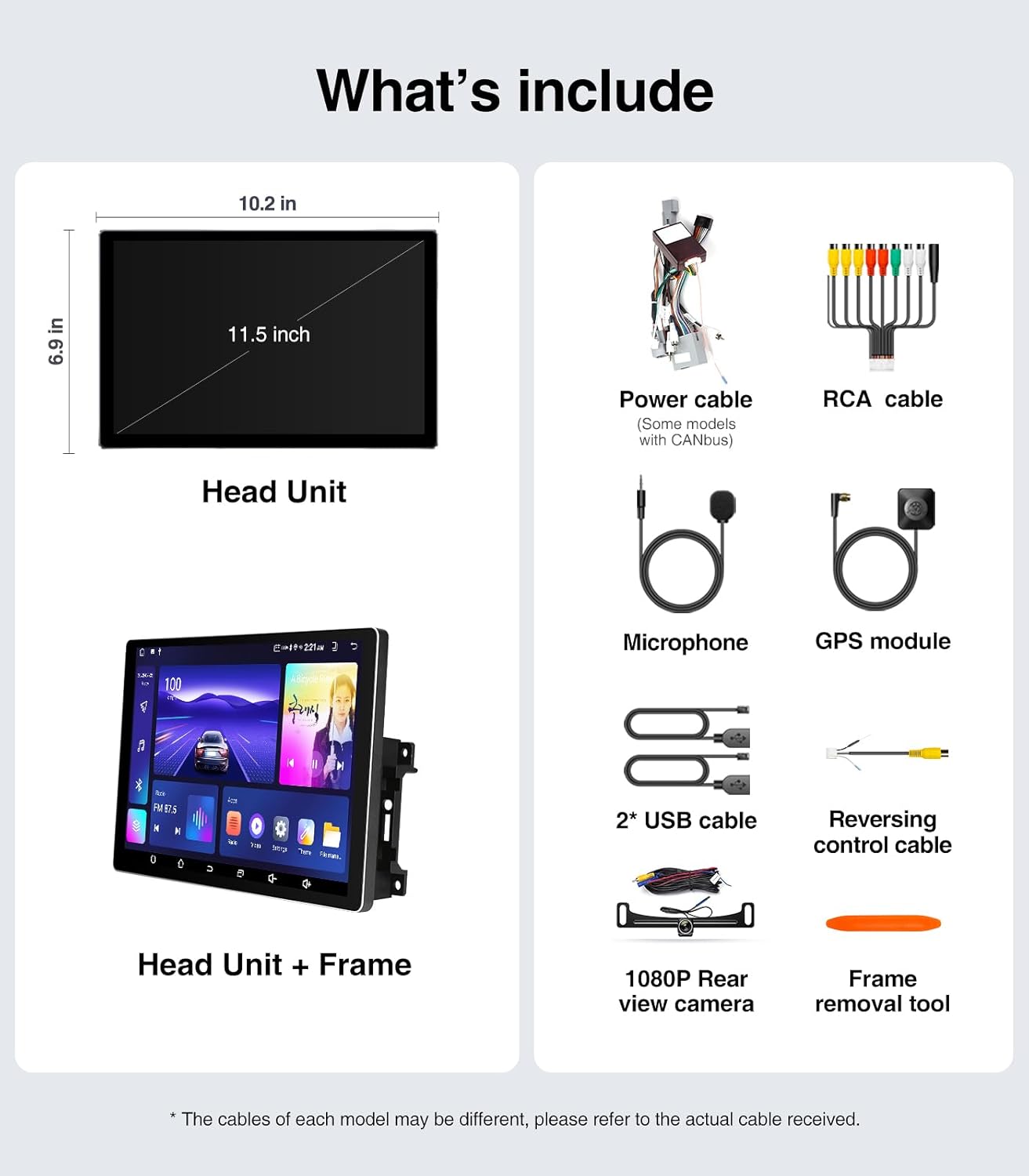
Image: A visual representation of all components included in the package, such as the head unit, frame, various cables, camera, microphone, and tools.
4. Installatiehandleiding (installatie)
The AINAVI Car Radio Stereo is designed for a plug-and-play installation for compatible vehicles. However, professional installation is recommended if you are unfamiliar with car audio system wiring.
4.1 Controle vóór installatie
- Ensure your vehicle is compatible with the head unit (Jeep Wrangler JK 2007-2018, Dodge Grand Caravan 2011-2020, Dodge Ram 2009-2012, etc.).
- Gather all necessary tools, including the provided frame removal tool.
- Disconnect the vehicle's battery before starting the installation to prevent electrical shorts.
4.2 Installatiestappen
- Carefully remove the original car radio and dashboard trim using the frame removal tool. Refer to your vehicle's service manual for specific trim removal instructions.
- Connect the provided power harness and CAN BUS (if applicable) to the vehicle's wiring. Ensure all connections are secure.
- Connect the GPS antenna, USB cables, microphone, and rear view camera cables to the corresponding ports on the new head unit.
- Mount the new 11.5-inch head unit into the dashboard opening. Ensure it fits securely within the plastic frame.
- Sluit de accu van het voertuig weer aan.
- Turn on the vehicle's ignition and test the head unit's basic functions (power, audio, touch screen).
- Reinstall the dashboard trim panels.

Image: A comparison showing the vehicle's dashboard before and after the installation of the AINAVI 11.5-inch car radio stereo, highlighting the significant visual upgrade.

Image: Illustrates the plug-and-play nature of the installation, showing a user connecting wiring harnesses, along with icons indicating support for Steering Wheel Control and AMP.
5. Gebruiksaanwijzing
5.1 Basisbediening
- Aan/uit: The unit powers on with the vehicle's ignition. Press and hold the power button (if available) for manual power control.
- Aanraakscherm: Navigate the Android interface by tapping, swiping, and pinching gestures.
- Volumeregeling: Adjust volume using the on-screen controls or your vehicle's steering wheel buttons.
5.2 Draadloze/bekabelde CarPlay en Android Auto
Connect your iPhone or Android smartphone for seamless integration of navigation, communication, and entertainment apps.
- Zorg ervoor dat Bluetooth is ingeschakeld op zowel uw smartphone als de autoradio.
- Open de CarPlay- of Android Auto-app op het infotainmentsysteem.
- For wireless connection, pair your phone via Bluetooth. For wired, connect your phone using a USB cable to the designated USB port.
- Volg de instructies op het scherm om de verbinding te voltooien.
Once connected, you can use voice commands (e.g., "Hey Siri" or "Hey Google") for hands-free operation.

Image: A visual of the head unit displaying the Wireless CarPlay and Android Auto interface, with a smartphone icon indicating connectivity and various app logos.
5.3 GPS-navigatie
Het apparaat ondersteunt zowel online als offline navigatie.
- Online kaarten: Connect the head unit to a WiFi hotspot (e.g., from your phone) to access real-time traffic information and updated maps.
- Offline kaarten: Download maps for your region to the unit's internal storage. This allows navigation without an internet connection.
- Use the pre-installed navigation app or download your preferred app from the Google Play Store.
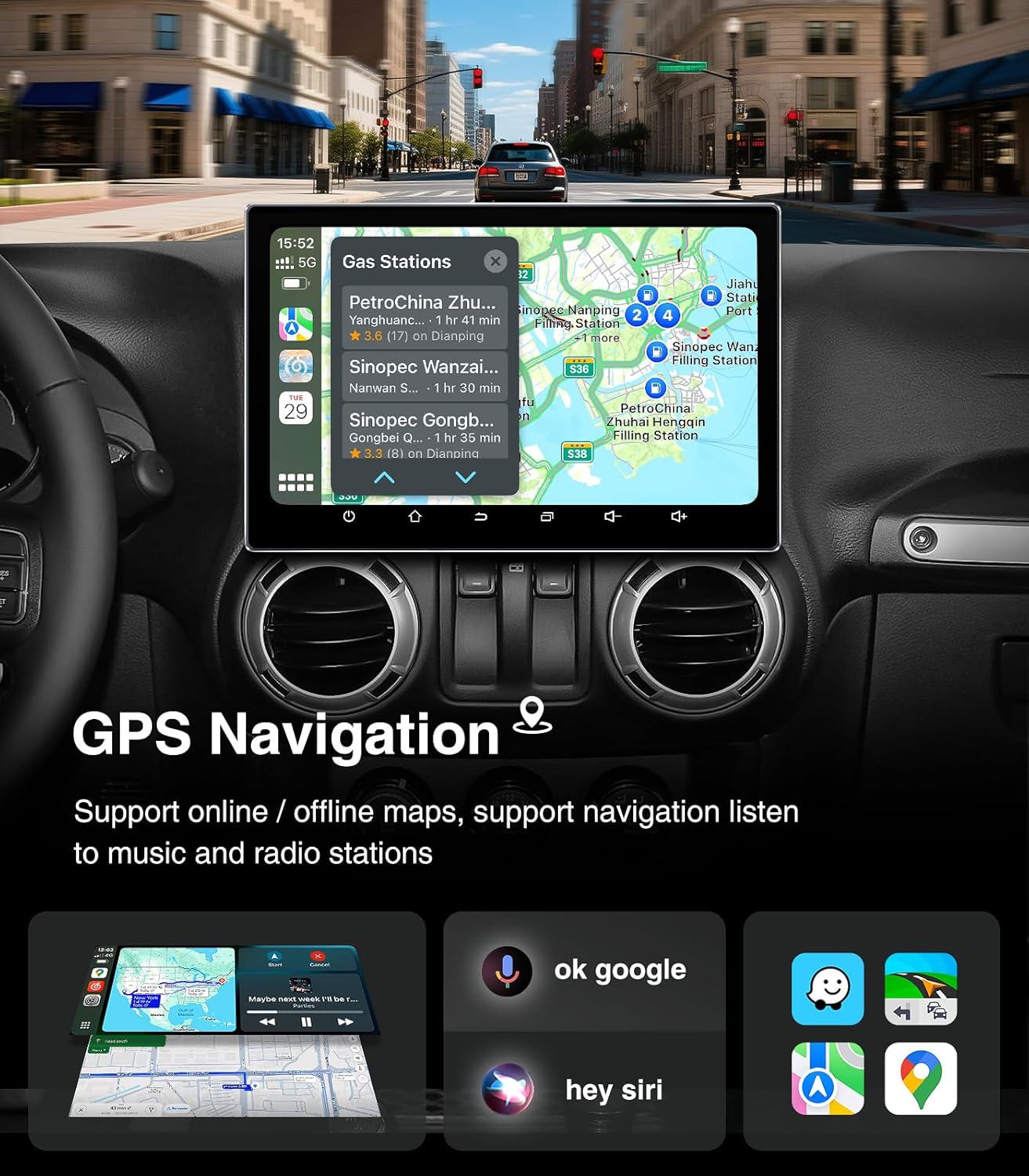
Image: The head unit displaying a GPS navigation map with points of interest and traffic information, alongside icons for voice commands like "ok google" and "hey siri".
5.4 AM/FM/RDS Radio
Access your favorite radio stations with the built-in tuner.
- Open the "Radio" application on the head unit.
- Scan for available stations or manually tune to a specific frequency.
- Sla je favoriete zenders op als voorkeurszenders voor snelle toegang.
- The RDS (Radio Data System) feature displays station information where available.

Image: The head unit displaying the AM/FM/RDS radio interface, showing frequency tuning and preset options, with a scenic road background.
5.5 5G WiFi Hotspot & Bluetooth Connection
Enhance your connectivity with fast WiFi and stable Bluetooth.
- WiFi: Connect to a mobile hotspot or home WiFi network to browse the internet, download apps, and stream content. Supports dual-band 2.4GHz & 5GHz.
- Bluetooth 5.4: Pair your smartphone for hands-free calls, Bluetooth music streaming, and phonebook synchronization.

Image: The head unit displaying a phone dialer interface, indicating Bluetooth connectivity with a smartphone, and icons for various supported apps like Google Play, Chrome, YouTube, Instagram, and Netflix.
6. Onderhoud
To ensure the longevity and optimal performance of your AINAVI Car Radio Stereo, follow these maintenance guidelines:
- Schermreiniging: Gebruik een zachte, pluisvrije doek om het touchscreen voorzichtig schoon te vegen. Voor hardnekkige vlekken, lichtjes dampReinig de doek met water of een schermreiniger. Vermijd agressieve chemicaliën of schurende materialen.
- Software-updates: Periodically check for system updates through the unit's settings menu. Keeping the software updated ensures optimal performance, security, and access to new features.
- Temperatuurregeling: Avoid exposing the unit to extreme temperatures for extended periods. While designed for automotive environments, prolonged exposure to direct sunlight or freezing conditions can affect performance.
- Kabelverbindingen: Zorg ervoor dat alle kabels goed aangesloten blijven. Losse verbindingen kunnen leiden tot intermitterende problemen.
7. Probleemoplossing
Als u problemen ondervindt met uw autoradio, raadpleeg dan de volgende veelvoorkomende problemen en oplossingen:
| Probleem | Mogelijke oorzaak | Oplossing |
|---|---|---|
| Apparaat gaat niet aan | Losse stroomverbinding, doorgebrande zekering, probleem met de accu van het voertuig. | Controleer de stroomkabels en de zekering. Zorg ervoor dat de accu van het voertuig opgeladen is. |
| Geen geluid | Volume te laag, dempen ingeschakeld, probleem met luidsprekerbedrading, onjuiste audiobron. | Verhoog het volume, controleer de dempingsstatus, controleer de luidsprekeraansluitingen en selecteer de juiste audiobron. |
| Touchscreen reageert niet | Software glitch, screen calibration issue. | Start het apparaat opnieuw op. Als het probleem aanhoudt, voer dan een fabrieksreset uit (gegevens gaan hierbij verloren). |
| CarPlay/Android Auto maakt geen verbinding | Bluetooth/USB issue, phone settings, app not updated. | Ensure Bluetooth is on and paired. Try a different USB cable. Update phone OS and apps. |
| GPS-signaal verloren of onnauwkeurig | Obstructie van de GPS-antenne, slechte satellietontvangst. | Zorg ervoor dat de GPS-antenne vrij is view van de hemel. Controleer de antenneaansluiting. |
If these solutions do not resolve the issue, please contact AINAVI customer support.
8. Specificaties
| Functie | Detail |
|---|---|
| Merk | AINAVI |
| Besturingssysteem | Androïde 13.0 |
| Geheugenopslagcapaciteit | 64 GB (ROM) |
| RAM | 4GB |
| Schermgrootte | 11.5 inch |
| Weergavetype | QLED, G+G Full Lamination |
| Oplossing | 1280x800 |
| Connectiviteitstechnologie | Bluetooth 5.4, USB, Wi-Fi (2.4Ghz & 5Ghz), Wireless CarPlay, Wired Android Auto |
| Speciale kenmerken | AM/FM/RDS radio, 5G WiFi, CarPlay+Android Auto+Mirror Link+AirPlay, Split Screen Function, Touch Screen |
| Compatibele apparaten | Smartphone, iPhone |
| Montagetype | Dashboardbevestiging |
| Audio-uitvoermodus | Stereo |
| Type voertuigonderhoud | Auto |
9. Garantie en ondersteuning
AINAVI provides technical support for this product. If you have any questions regarding installation, operation, or troubleshooting that are not covered in this manual, please do not hesitate to contact us via Amazon email. We are committed to providing prompt assistance.
Please retain your proof of purchase for warranty claims. Specific warranty terms and conditions may apply and are available upon request or through the product's purchase platform.