
Invoering
This manual provides essential information for the safe and effective operation of your Radioddity FS-T8 FRS Two-Way Radio. Please read this manual thoroughly before using the device and retain it for future reference. The Radioddity FS-T8 is a Family Radio Service (FRS) device designed for clear, long-range communication, suitable for various outdoor activities and family use.
Inhoud van het pakket
Upon unpacking, please ensure all items listed below are present and in good condition. If any items are missing or damaged, please contact Radioddity customer support.
- 4 x Radioddity FS-T8 Two-Way Radios
- 4 oplaadbare batterijen (2000 mAh)
- 4 x USB-C-oplaadkabels
- 4 x Belt Clips
- 4 x Lanyards
- 4 x Compasses
- 4 x Badges
- Sticker Sheets
- Gebruiksaanwijzing
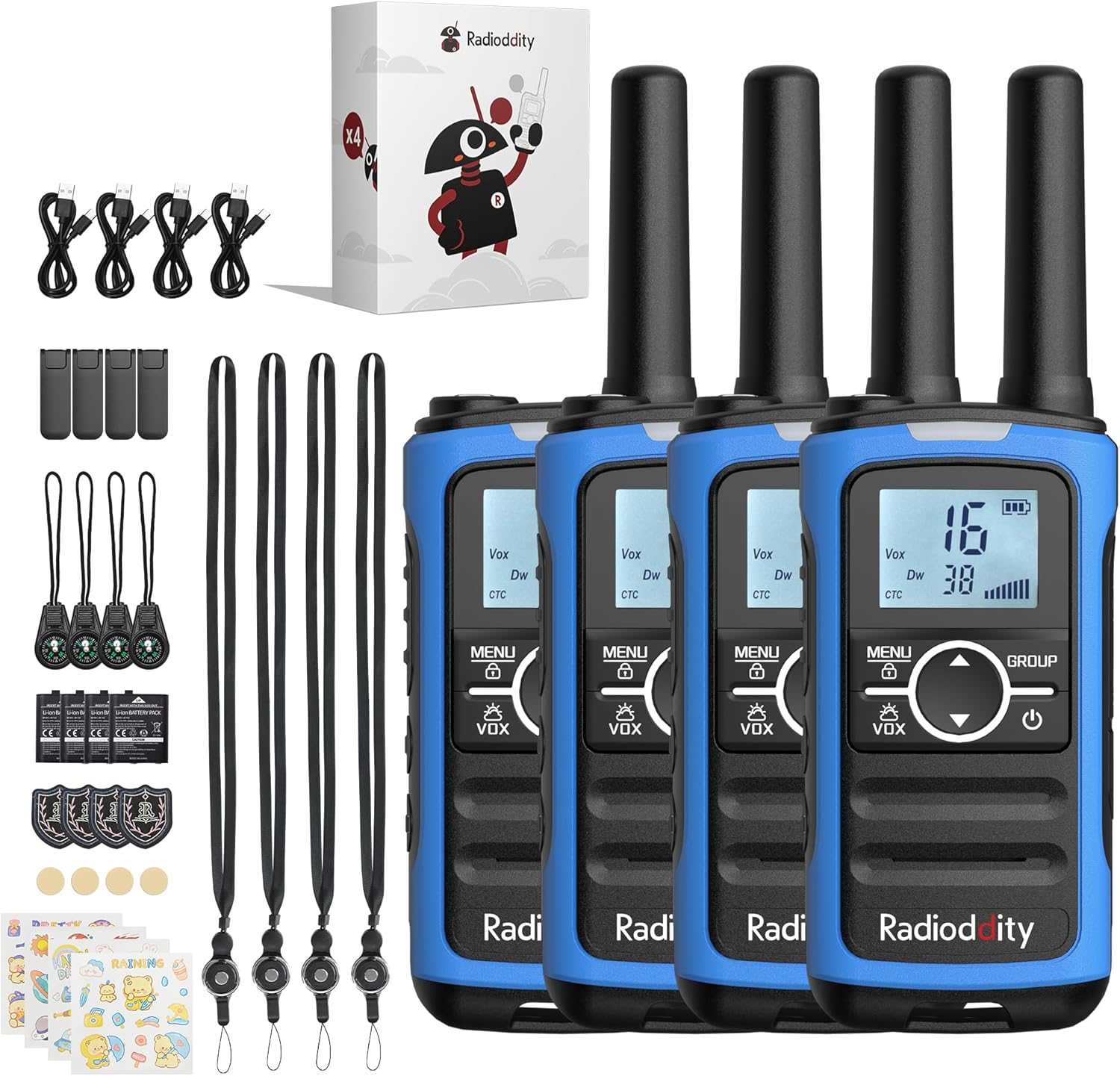
Image: A complete set of Radioddity FS-T8 walkie talkies and their accessories, laid out on a surface.
Product voorbijview
The Radioddity FS-T8 features a compact design with an easy-to-read backlit digital display. It includes essential functions for reliable communication and safety.

Image: A close-up of the Radioddity FS-T8 walkie talkie, highlighting its digital display and main control buttons.
Instellen
Batterij installeren en opladen
The FS-T8 radios come with 2000mAh rechargeable batteries. They are also compatible with 3xAA batteries (not included) for backup power.
- To install the rechargeable battery, remove the battery compartment cover on the back of the radio.
- Insert the 2000mAh rechargeable battery pack, ensuring correct polarity.
- Plaats het batterijklepje terug.
- To charge, connect the USB-C charging cable to the radio's USB-C port and a compatible 5V USB power adapter (not included). A full charge takes approximately 2 hours and provides up to 48 hours of continuous talk time.
- For AA battery use, open the compartment and insert 3xAA batteries, observing polarity.

Image: An illustration showing the USB-C charging port on the Radioddity FS-T8 and the option for both rechargeable and AA batteries.
Accessoires bevestigen
Each radio includes a belt clip and a lanyard for convenient carrying. The lanyard can be attached to either the top or bottom loop on the radio.
- Riem clip: Slide the belt clip into the slot on the back of the radio until it clicks into place.
- Sleutelkoord: Thread the lanyard loop through the desired attachment point (top or bottom) on the radio and secure it.
- Kompas: The included compass can be attached to the lanyard. Avoid attaching the compass directly to the radio's magnetic areas, as this may affect its accuracy.
Gebruiksaanwijzing
Aan/uit
Om de radio in of uit te schakelen, houdt u de knop ingedrukt. Stroom button (usually marked with a power symbol) until the display lights up or turns off.
Kanaalselectie
The FS-T8 features 22 FRS channels. To select a channel:
- Druk op de MENU Druk één keer op de knop. Het kanaalnummer zal knipperen.
- Gebruik de Up or Omlaag Gebruik de pijlknoppen om het gewenste kanaal te selecteren.
- Druk op de MENU button again to confirm your selection, or wait a few seconds for it to auto-confirm.
Groepsgesprekfunctie
The One-Key Group Call feature allows instant communication with all other FS-T8 radios within range, regardless of their current channel setting. This is ideal for ensuring everyone hears important messages.
- To initiate a group call, press and hold the GROEP knop.
- Spreek duidelijk in de microfoon.
- Laat de GROEP knop om te luisteren.

Image: A visual representation of the group call feature, demonstrating its ease of use in an outdoor family setting.
VOX (spraakgestuurde transmissie)
De VOX-functie maakt handsfree communicatie mogelijk. Wanneer deze is geactiveerd, zendt de radio automatisch uit zodra uw stem wordt gedetecteerd.
- To activate/deactivate VOX, press the MENU Druk meerdere keren op de knop totdat het VOX-pictogram knippert.
- Gebruik de Up or Omlaag arrow buttons to select a VOX sensitivity level (1-3, with 3 being most sensitive) or 'OFF'.
- Pers MENU bevestigen.
Keypad Lock
Om te voorkomen dat instellingen per ongeluk worden gewijzigd, kunt u het toetsenbord vergrendelen.
- Om het toetsenbord te vergrendelen, houdt u de . ingedrukt MENU Houd de knop ingedrukt totdat het vergrendelingspictogram op het scherm verschijnt.
- Om te ontgrendelen, houdt u de knop ingedrukt MENU Druk nogmaals op de knop totdat het slotpictogram verdwijnt.
NOAA-weerkanalen
Stay informed about hazardous weather conditions with the integrated NOAA weather channels.
- Om toegang te krijgen tot de NOAA-weerkanalen, drukt u op de knop. MENU button until the NOAA icon appears.
- Gebruik de Up or Omlaag arrow buttons to scan through the 11 available NOAA channels. The radio will automatically select the strongest signal.
- Pers MENU to exit NOAA mode.

Image: The Radioddity FS-T8 showing its NOAA weather channel feature, providing critical weather alerts.
Flashlight and SOS Alert
The FS-T8 includes a built-in flashlight and an SOS alert function for emergencies.
- To turn on/off the flashlight, press the dedicated Zaklamp knop aan de zijkant van de radio.
- To activate the SOS alert, press and hold the Sos button (often combined with the flashlight button or a separate dedicated button). The flashlight will flash in an SOS pattern, and an audible alert may sound.
Bereikprestaties
The effective communication range varies based on terrain and obstructions:
- Up to 3 miles in open areas with minimal obstructions.
- Approximately 1 mile in semi-obstructed zones (e.g., light foliage, scattered buildings).
- Up to 547 yards in heavily obstructed urban environments.

Image: A graphic illustrating the varying communication ranges of the FS-T8 in different types of terrain.
Onderhoud
Schoonmaak
To maintain your radio's performance and appearance:
- Veeg de radio af met een zachte, damp lap.
- Gebruik geen agressieve chemicaliën of schurende reinigingsmiddelen.
- Zorg ervoor dat alle poorten droog zijn voordat u gaat opladen.
Batterijverzorging
- Laad de batterijen volledig op voor het eerste gebruik.
- Avoid overcharging or completely draining the rechargeable batteries.
- Als u AA-batterijen gebruikt, verwijder deze dan als u de radio langere tijd niet gebruikt om lekkage te voorkomen.
Probleemoplossing
| Probleem | Mogelijke oorzaak | Oplossing |
|---|---|---|
| Geen stroom | Batterij bijna leeg of niet goed geplaatst. | Charge the rechargeable battery or replace AA batteries. Ensure batteries are installed with correct polarity. |
| Kan niet communiceren met andere radio's | Verschillende kanalen of privacycodes. Buiten bereik. | Ensure all radios are on the same channel and privacy code. Use the Group Call function. Move closer to other radios. |
| Slechte audiokwaliteit | Zwak signaal. Obstakels. | Move to an area with fewer obstructions. Check battery level. |
| Toetsenbord reageert niet | Toetsenbord is vergrendeld. | Ontgrendel het toetsenbord door de MENU-knop ingedrukt te houden. |
Specificaties
| Functie | Detail |
|---|---|
| Merk | Radioditeit |
| Modelnummer | FS-T8 (QYWRFTB01) |
| Frequentiebereik | FRS |
| Aantal kanalen | 22 |
| Spreekbereik Maximaal | 3 Miles (unobstructed) |
| Batterijtype | 2000mAh Rechargeable (included), 3xAA (not included) |
| Gemiddelde levensduur van de batterij | Tot 48 uur |
| Opladen | USB-C (5V only) |
| Speciale kenmerken | Integrated Flashlight, NOAA Weather Channels, One-Key Group Call, SOS Alarm, VOX (Voice Operated Transmission), Keypad Lock, 131 Privacy Codes |
| Waterbestendigheidsniveau | Niet waterbestendig |
| Productafmetingen | 1.18"D x 1.9"B x 5.9"H |
| Artikelgewicht | 0.3 pond |
| FCC-ID | 2AN62-T8 |
Garantie
The Radioddity FS-T8 FRS Two-Way Radio comes with a 19-month warranty from the date of purchase. This warranty covers manufacturing defects and malfunctions under normal use. Please retain your proof of purchase for warranty claims. For detailed warranty terms and conditions, please visit the official Radioddity webwebsite of neem contact op met de klantenservice.
Steun
For further assistance, technical support, or to inquire about replacement parts, please contact Radioddity customer service through the following channels:
- Online: Visit the official Radioddity website voor veelgestelde vragen, ondersteuningsartikelen en contactformulieren.
- E-mailadres: Raadpleeg de verpakking van uw product of de officiële website voor het e-mailadres van de klantenservice.
Please have your model number (FS-T8) and purchase information ready when contacting support.