
SMALLRIG 5546
SMALLRIG Mobile Video Cage 5546 for iPhone 17 Pro Max User Manual
Model: 5546 | Merk: SMALLRIG
1. Inleiding en voorbijview
The SMALLRIG Mobile Video Cage 5546 is designed for the iPhone 17 Pro Max, providing a versatile platform for professional video recording, live streaming, and short film production. Its all-metal construction offers comprehensive protection, absorbing shock and safeguarding against scratches.
- One-touch Quick Lock Design: Features a quick lock mechanism for secure phone mounting and dismounting, preventing accidental release. Includes a classic quick-release interface for efficient connection.
- Multiple Installation Points: Equipped with multiple 1/4"-20 anti-twist threaded holes and cold shoe mounts for attaching handles, tripods, microphones, and lighting accessories. Side-mounted strap holes accommodate professional wrist and shoulder straps under 2mm in diameter for easy carrying.
- Unrestricted Phone Use: The hollow design ensures full access to all buttons, ports, radar, ultra-wide-angle lens, and wireless charging capabilities without interference.
- Lens Backplate System: Comes standard with a T-mount backplate and a 17mm threaded lens backplate for external lens mounting. The T-mount backplate is interchangeable with a 67mm magnetic filter adapter (ID: 5548, sold separately) for enhanced optical output.
2. Wat zit er in de doos?
- Phone Cage for iPhone 17 Pro Max × 1
- Zachte TPU-bumper voor iPhone 17 Pro Max × 1
- T-Mount lensachterplaat × 1
- 17mm Threaded Lens Backplate × 1
- Gebruiksaanwijzing × 1
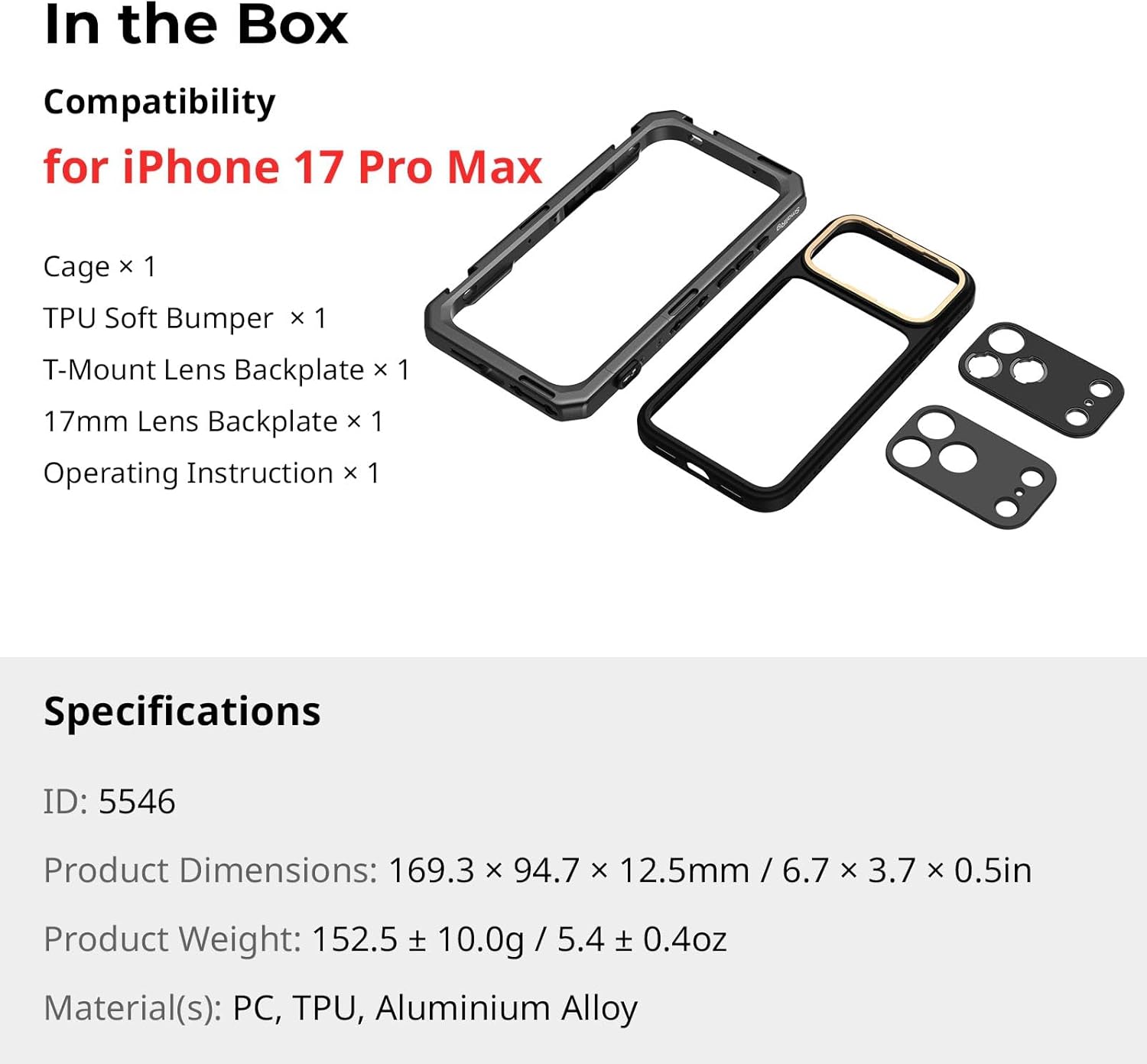
Figure 2.1: Included components of the SMALLRIG Mobile Video Cage 5546.
3. Installatie-instructies
3.1 Je iPhone 17 Pro Max installeren
- Ensure the quick lock mechanism on the cage is in the 'open' position.
- Carefully slide your iPhone 17 Pro Max into the TPU soft bumper.
- Insert the phone (with bumper) into the cage, aligning the camera module and ports.
- Engage the quick lock mechanism to secure the phone firmly within the cage.

Figure 3.1: Phone insertion and quick lock mechanism.
3.2 Attaching Lens Backplates
The cage supports interchangeable lens backplates. The kit includes a T-mount and a 17mm threaded backplate.
- To remove the current backplate, gently slide it off the camera module area.
- Align the desired backplate (T-mount or 17mm threaded) with the camera module.
- Slide the new backplate into place until it clicks securely.
- Attach compatible external lenses or filters to the installed backplate.
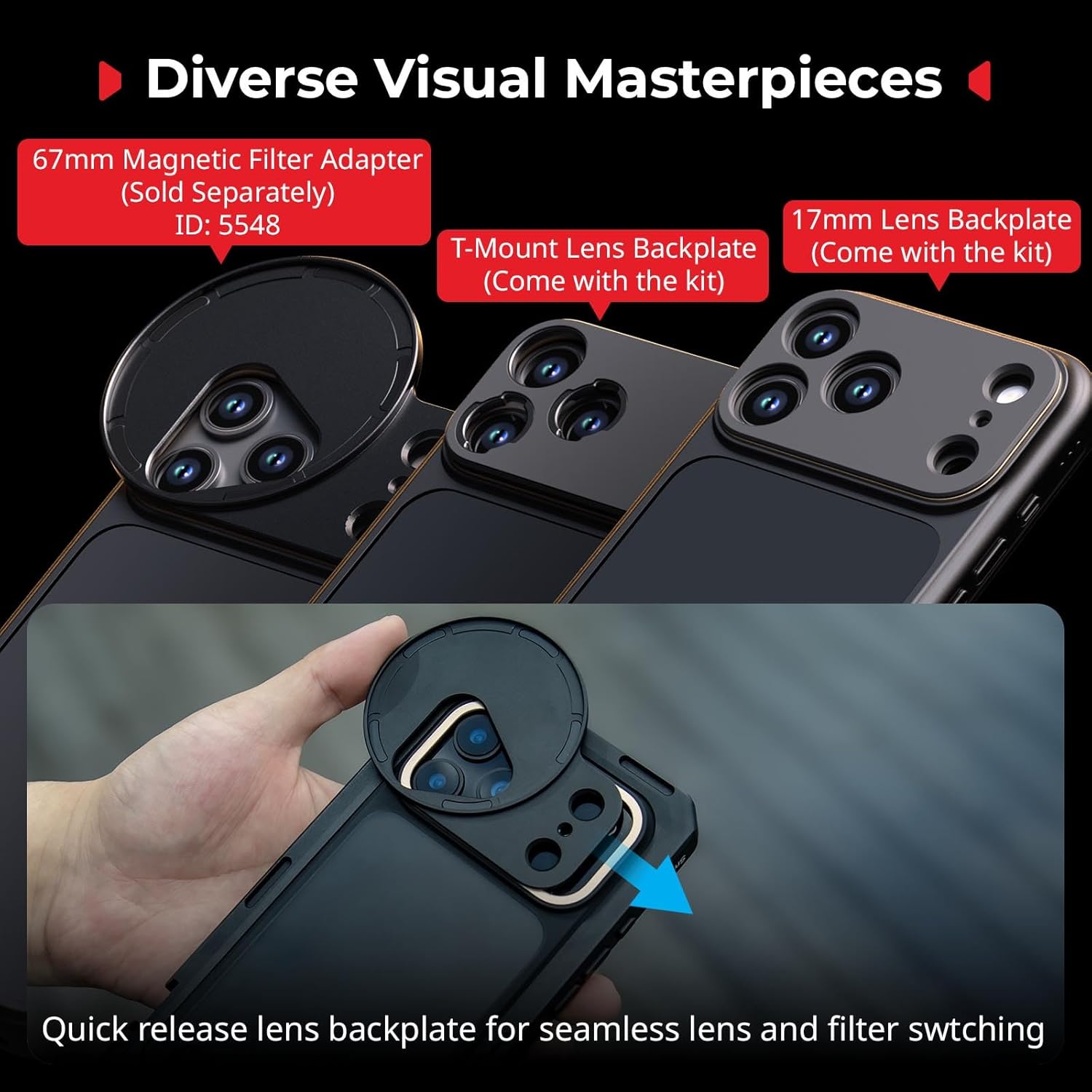
Figure 3.2: Interchangeable lens backplates for diverse optical accessories.
3.3 Accessoires bevestigen
Utilize the 1/4"-20 anti-twist threaded holes and cold shoe mounts to attach various accessories:
- Handgrepen: Attach side handles for improved grip and stability during handheld shooting.
- Statieven: Mount the cage onto a tripod for stable, stationary shots.
- Microphones & Lights: Use cold shoe mounts to add external microphones or LED lights for enhanced audio and illumination.
Video 3.1: Official SmallRig video demonstrating the phone cage for iPhone 17 Pro/Max, including accessory attachment and usage scenarios.
4. Gebruiksaanwijzing
The SMALLRIG Mobile Video Cage enhances your iPhone 17 Pro Max for various content creation needs. Once your phone and desired accessories are securely attached, you can begin shooting.
- Handheld Shooting: Use attached handles for stable, ergonomic grip during dynamic shots.
- Tripod-Mounted Shooting: For static shots or interviews, mount the cage onto a tripod using the 1/4"-20 threaded holes.
- External Lenses/Filters: Experiment with different T-mount or 17mm threaded lenses and filters to achieve various cinematic effects.
- Power & Audio: Connect external power banks or audio recording devices via the available mounting points without obstructing phone functionality.

Afbeelding 4.1: Examples of cinematic and everyday shooting configurations.
Video 4.1: Official SmallRig video showcasing the phone video rig for iPhone 17 Pro/Max in various operational scenarios.
5. Onderhoud
To ensure the longevity and optimal performance of your SMALLRIG Mobile Video Cage, follow these maintenance guidelines:
- Schoonmaak: Wipe the metal cage and TPU bumper with a soft, dry cloth. For stubborn dirt, use a slightly damp Maak de doek schoon met een mild zeepmiddel en droog hem daarna grondig af. Vermijd agressieve chemicaliën of schurende materialen.
- Opslag: Store the cage and its components in a clean, dry environment away from direct sunlight and extreme temperatures.
- Inspectie: Periodically check all screws and connection points for tightness. Ensure the quick lock mechanism operates smoothly.
6. Probleemoplossing
If you encounter any issues with your Mobile Video Cage, refer to the following common problems and solutions:
- Telefoon zit niet stevig vast: Ensure the quick lock mechanism is fully open before inserting the phone. Verify that the correct iPhone 17 Pro Max model is being used with the cage.
- Accessories not attaching firmly: Check that threaded holes are clean and free of debris. Ensure screws are tightened appropriately without over-tightening.
- Lens backplate loose: Confirm the backplate is correctly aligned and fully slid into place until it clicks.
- Buttons obstructed: The cage is designed for full access. If buttons are obstructed, re-seat the phone to ensure proper alignment within the TPU bumper and cage.
Voor verdere hulp kunt u contact opnemen met de klantenservice van SMALLRIG.
7. Specificaties
| Functie | Detail |
|---|---|
| Modelnaam | 5546 |
| Compatibele apparaten | iPhone 17 Pro Max |
| Kleur | Zwart |
| Productafmetingen | 6.67"D x 3.73"B x 0.49"H |
| Artikelgewicht | 152.5 gram |
| Materiaal | PC, TPU, Aluminium Alloy |
| Fabrikant onderdeelnummer | 12652-AC |
| Ingebouwde media | 17mm Threaded Lens Backplate × 1, Operating Instruction × 1, Phone Cage × 1, T-Mount Lens Backplate × 1, TPU Soft Bumper × 1 |
8. Garantie-informatie
The SMALLRIG Mobile Video Cage 5546 comes with a 2 jaar garantie vanaf de aankoopdatum. Deze garantie dekt fabricagefouten en garandeert dat het product bij normaal gebruik vrij is van materiaal- en fabricagefouten.
For warranty claims or further details, please retain your proof of purchase and contact SMALLRIG customer support.
9. Ondersteuning
For technical support, product inquiries, or assistance with your SMALLRIG Mobile Video Cage 5546, please visit the official SMALLRIG website of neem contact op met de klantenservice.
Online resources, FAQs, and contact information can typically be found on the manufacturer's support page.
Ask a question about this manual
Ask about setup, troubleshooting, compatibility, parts, safety, or missing instructions. Manuals+ will review the question and use this page’s manual context to help answer it.