
1. Inleiding
This manual provides essential instructions for the installation, operation, and maintenance of your Generic P11 Dual 4K 6MP Outdoor Security Camera. This advanced security camera features dual 4K lenses and a 6MP sensor, delivering clear images for effective surveillance. It includes an integrated police siren for intruder deterrence and offers real-time monitoring via WiFi, accessible through a smartphone application. With infrared LED illumination and night vision capabilities, it ensures 24-hour vigilance. The camera detects suspicious movements and sends instant alerts to your mobile device. Designed for outdoor use, it boasts weather-resistant construction and two antennas for a stable connection. The system also supports two-way audio and high-definition recording. Please read this manual thoroughly before use to ensure proper functionality and safety.
2. Inhoud van het pakket
Controleer of alle artikelen in het pakket aanwezig zijn:
- Generic P11 Dual 4K 6MP Outdoor Security Camera
- Stroomadapter
- Montageschroeven en pluggen
- Gebruikershandleiding (dit document)
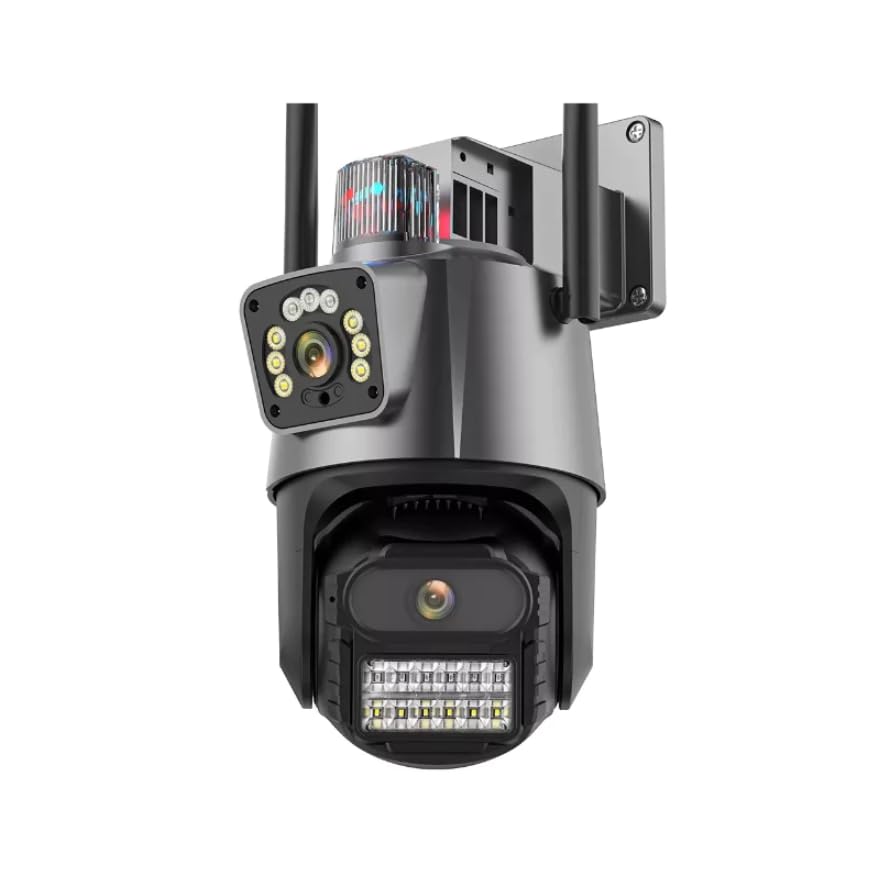
Image: The Generic P11 Dual 4K 6MP Outdoor Security Camera, showing its dual lens design and external antennas.
3. Installatiehandleiding
3.1. Eerste voorbereiding
- Pak de camera uit: Haal alle onderdelen voorzichtig uit de verpakking.
- Stroomaansluiting: Connect the provided power adapter to the camera and plug it into a power outlet. The camera will initiate its startup sequence.
- Download de app: Zoeken naar the recommended security camera application (refer to packaging or quick start guide for app name) on your smartphone's app store (iOS or Android) and install it.
- Maak een account aan: Open de app en volg de instructies op het scherm om een nieuw gebruikersaccount aan te maken.
3.2. Wi-Fi-verbinding en -koppeling
- Apparaat toevoegen: Selecteer in de app de optie om een nieuw apparaat toe te voegen.
- Selecteer cameratype: Choose the appropriate camera model or type from the list.
- Netwerk configuratie: Follow the app's instructions to connect the camera to your 2.4GHz Wi-Fi network. Ensure your smartphone is connected to the same Wi-Fi network during this process.
- Koppelen: The app will guide you through the pairing process, which may involve scanning a QR code on the camera or listening for an audio prompt.
- Geef uw camera een naam: Assign a name to your camera for easy identification (e.g., "Front Door," "Backyard").
3.3. Fysieke installatie
- Kies een locatie: Kies een buitenlocatie met een duidelijke view of the area you wish to monitor, within range of your Wi-Fi signal and a power source. The camera is IP66 rated for outdoor use.
- Montage: Use the provided mounting screws and wall plugs to securely attach the camera to a wall or suitable surface. Ensure the camera is mounted at an optimal height for surveillance.
- Hoek aanpassen: Stel de camera in viewing angle using the app to cover the desired area. The camera offers a 355-degree viewhoek.
4. Gebruiksaanwijzing
4.1. Realtimebewaking
Open the security camera app on your smartphone. Select your camera from the device list to view the live feed. You can pan and tilt the camera remotely within the app to adjust the viewgebied.
4.2. Bewegingsdetectie en waarschuwingen
The camera features an advanced motion detection system. When motion is detected, the camera will send instant notifications to your smartphone. You can customize motion detection sensitivity and alert schedules within the app settings.
4.3. Nachtzicht
The camera automatically switches to night vision mode in low-light conditions, utilizing powerful infrared LEDs to provide clear images up to 15 meters. This ensures continuous surveillance day and night.
4.4. Tweerichtingsaudio
Use the two-way audio feature in the app to communicate with individuals near the camera. Press the microphone icon to speak and listen through the camera's built-in speaker and microphone.
4.5. Registratie en opslag
The camera supports local storage via an SD card (up to 128GB, 32GB installed). Recordings can also be stored on cloud services, if subscribed. Access recorded footage through the app's playback function.
4.6. Police Siren
Activate the built-in police siren through the app to deter intruders. This feature emits a high-power sound designed to draw attention and scare off unwanted visitors.
5. Belangrijkste kenmerken
- Dubbel camerasysteem: Equipped with two high-resolution 4K and 6MP lenses for detailed day and night monitoring.
- Integrated WiFi Connectivity: Allows real-time remote monitoring via a smartphone application.
- Powerful Alert System: Features a built-in police siren with high-power sound for effective intruder deterrence.
- Geavanceerd nachtzicht: Powerful infrared LEDs ensure clear images even in low-light conditions, with a range of 15 meters.
- Smart Motion Detection: An advanced system that provides instant mobile notifications upon detecting movement.
- Tweerichtingsaudio: Enables communication through the camera via the mobile app.
- Weerbestendig ontwerp: IP66 international protection rating ensures durability for outdoor installation.
6. Onderhoud
- Schoonmaak: Regularly clean the camera lenses with a soft, dry cloth to ensure optimal image clarity. Do not use harsh chemicals.
- Firmware-updates: Check the app periodically for firmware updates. Keeping the camera's firmware updated ensures optimal performance and security.
- Verbindingscontrole: Periodically verify the power and Wi-Fi connections to ensure stable operation.
- SD-kaartbeheer: If using an SD card, ensure it is functioning correctly and consider formatting it periodically to maintain recording efficiency.
7. Probleemoplossing
| Probleem | Mogelijke oorzaak | Oplossing |
|---|---|---|
| Camera gaat niet aan | No power supply; faulty adapter | Check power connection; try a different outlet; ensure adapter is working. |
| Kan geen verbinding maken met wifi | Incorrect Wi-Fi password; camera too far from router; 5GHz network selected | Controleer het Wi-Fi-wachtwoord, plaats de camera dichter bij de router en zorg ervoor dat u verbinding maakt met een 2.4GHz-netwerk. |
| Slechte beeldkwaliteit | Dirty lens; insufficient lighting; network bandwidth issues | Clean the lens; ensure adequate lighting for non-night vision mode; check Wi-Fi signal strength. |
| Bewegingsdetectie werkt niet | Settings incorrect; sensitivity too low; object too far | Adjust motion detection settings in the app; increase sensitivity; ensure objects are within detection range. |
| Geen audio of slechte audiokwaliteit | Microphone/speaker blocked; app volume low; network issues | Ensure microphone/speaker are clear; check app volume settings; verify stable network connection. |
8. Specificaties
| Functie | Detail |
|---|---|
| Modelnaam | P11 |
| Merk | Algemeen |
| Connectiviteitstechnologie | Draadloos (Wi-Fi) |
| Speciale kenmerken | Night Vision, Motion Detection, Two-Way Audio, Police Siren |
| Binnen-/buitengebruik | Buitenruimte |
| Compatibele apparaten | Smartphone |
| Controletype | Mobiele app |
| Montagetype | Muurbevestiging |
| Kleur | Wit en zwart |
| Materiaal | ABS-kunststof |
| Waterbestendigheidsniveau | Waterbestendig (IP66) |
| Alert Type | Motion Detection with App Notification |
| Definitieve resolutie | 6 MP (Dual 4K Lenses) |
| Resolutie van de fotosensor | 3 MP |
| Resolutie video-opname | 2048x1536 |
| Framesnelheid | 30 beelden per seconde |
| Viewhoek: | 355 graden |
| Optische zoom | 4x |
| Zoomtype | Digital and Optical |
| Artikelafmetingen | 15 x 12 x 15 centimeter |
| Artikelgewicht | 450 gram |
| Energiebron | Elektrische energie |
| Stroomverbruik | 5 watt |
| Videocodering | H.264 |
| Video-opname-indeling | MP4 |
| Nachtzichtbereik | 15 meter |
| Aantal IR-LED's | 8 |
| Installed Flash Memory Size | 32GB |
| Flash-geheugentype | SD-kaart |
| Maximum Supported Flash Memory Size | 128GB |
9. Garantie en ondersteuning
9.1. Garantie-informatie
This product is typically covered by a manufacturer's warranty against defects in materials and workmanship. Specific warranty terms, duration, and conditions may vary by region and retailer. Please refer to the warranty card included with your purchase or contact your point of sale for detailed information. Extended warranty options may also be available from your retailer.
9.2. Klantenservice
For technical assistance, troubleshooting not covered in this manual, or warranty claims, please contact the seller or manufacturer's customer support. Have your product model number (P11) and purchase details ready when contacting support.


