
Invoering
Welcome to the user manual for your SWOFY D08 Android 13 MP3 Player. This device is designed to provide a versatile and high-quality portable audio and video experience. Featuring an Android 13 operating system, Bluetooth 5.0, dual-band Wi-Fi, and a 4-inch touchscreen, the D08 allows you to enjoy music, videos, and various applications with ease. Please read this manual carefully to ensure proper setup, operation, and maintenance of your device.
Inhoud van het pakket
Controleer voordat u begint of alle artikelen in uw pakket aanwezig zijn:
- SWOFY D08 MP3 Player (160GB)
- USB Type-C kabel
- Bedrade oordopjes
- Gebruiksaanwijzing
Apparaat voorbijview
Familiarize yourself with the physical components of your SWOFY D08 MP3 Player.

Afbeelding: Voor- en zijkant view of the SWOFY D08 MP3 Player, showcasing its 4-inch touchscreen and physical buttons.
- 4-inch HD-touchscreen: Hoofdinterface voor interactie.
- Aan/uit-knop: Aan de zijkant bevindt zich de knop waarmee u het apparaat kunt in- en uitschakelen en de slaapstand kunt activeren of uitschakelen.
- Volumeknoppen: Pas het audio-uitvoerniveau aan.
- USB-C-poort: Voor opladen en gegevensoverdracht.
- 3.5 mm koptelefoonaansluiting: Voor bekabelde audio-uitvoer.
- MicroSD-kaartsleuf: Voor uitbreidbare opslag.
- Ingebouwde luidspreker: Voor audioweergave zonder hoofdtelefoon.
Instellen
1. Het apparaat opladen
Before first use, fully charge your SWOFY D08 MP3 Player. Connect the provided USB Type-C cable to the device's USB-C port and the other end to a USB power adapter (not included) or a computer's USB port. The battery indicator on the screen will show charging status.

Image: The SWOFY D08 MP3 Player displaying a 100% battery charge icon, indicating a full charge. The image also highlights the 2000mAh battery capacity and estimated usage times: 60 hours standby, 20 hours music, 6 hours video, and 3-4 hours charging time.
- Een volledige lading duurt meestal 3-4 uur.
- The 2000mAh battery provides up to 35 hours of continuous music playback or 10 hours of 1080p video viewind.
2. In-/uitschakelen
- Inschakelen: Houd de aan/uit-knop aan de zijkant van het apparaat ingedrukt totdat het scherm oplicht.
- Uitschakelen: Houd de aan/uit-knop ingedrukt en selecteer vervolgens 'Uitschakelen' uit de opties op het scherm.
- Slapen/Wakker worden: Druk kort op de aan/uit-knop om het apparaat in de slaapstand te zetten of te activeren.
3. Eerste installatie en Wi-Fi-verbinding
Upon first power-on, follow the on-screen prompts to complete the initial setup, including language selection and Wi-Fi connection.
- Tik vanuit het startscherm op het pictogram 'Instellingen'.
- Select "Network & internet".
- Schakel wifi in.
- Selecteer het gewenste Wi-Fi-netwerk uit de lijst.
- Voer het netwerkwachtwoord in als daarom wordt gevraagd en tik vervolgens op 'Verbinden'.

Image: The SWOFY D08 MP3 Player's home screen, displaying a grid of application icons including Spotify, Pandora, Audible, FM Radio, Play Store, and Chrome, illustrating the Android 13 OS interface.
4. Opslag uitbreiden met een MicroSD-kaart
The device comes with 32GB internal storage and a 128GB microSD card. You can expand storage further up to 1TB using an additional microSD card.
- Zoek de microSD-kaartsleuf aan de zijkant van het apparaat.
- Plaats de microSD-kaart voorzichtig in de sleuf totdat u een klik hoort. Zorg ervoor dat de kaart correct is georiënteerd.
- Om de kaart te verwijderen, duwt u deze voorzichtig naar binnen totdat deze losspringt.
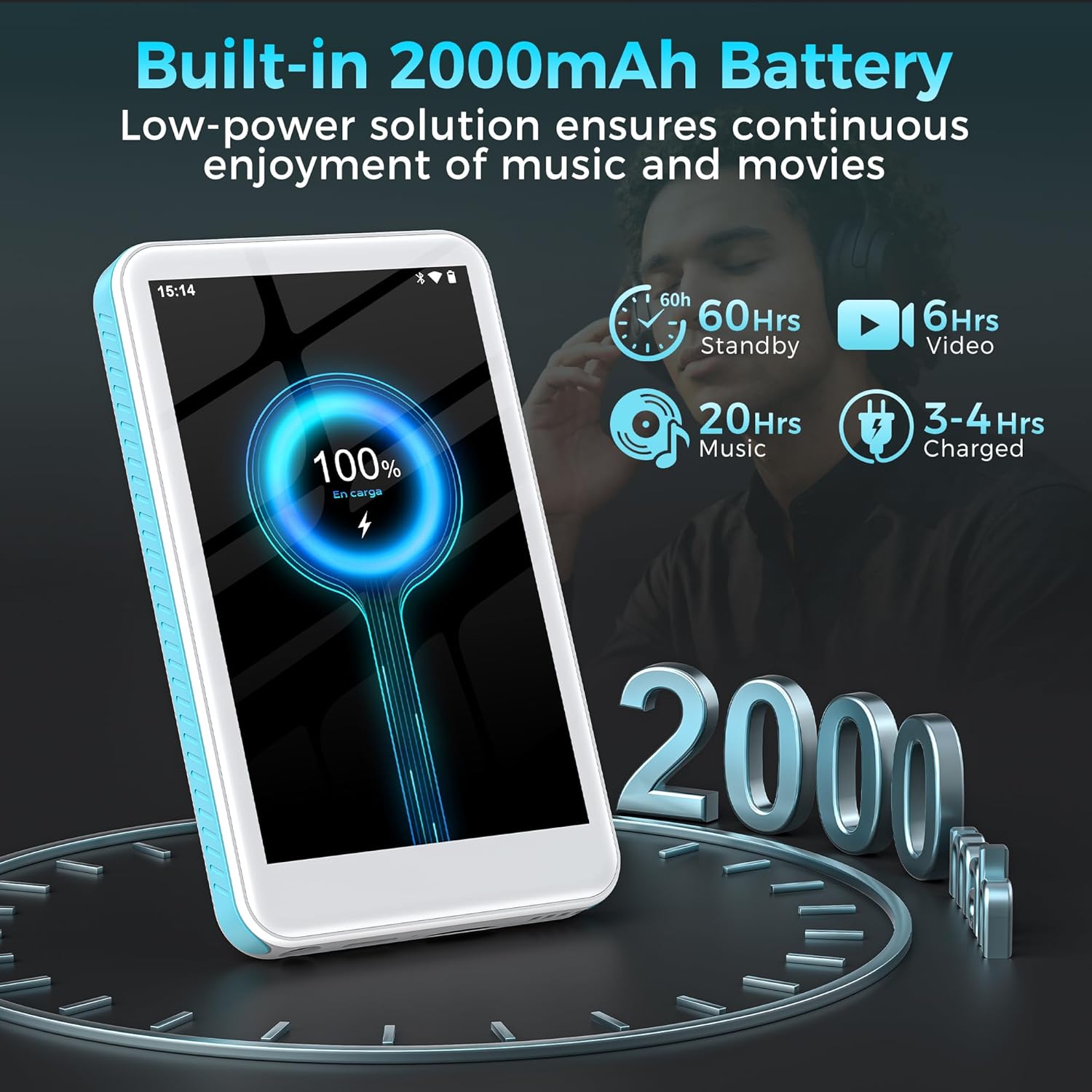
Image: The SWOFY D08 MP3 Player with a 1TB microSD card being inserted into its slot, illustrating the device's expandable storage capability. The image also highlights the 160GB total storage capacity.
Gebruiksaanwijzing
1. Navigeren door de interface
The SWOFY D08 uses an Android 13 operating system with a 4-inch touchscreen. Swipe left/right to navigate between home screens, tap icons to open apps, and swipe down from the top for quick settings and notifications.
2. Muziek afspelen
The device supports various audio formats including MP3, FLAC, WAV, AAC, APE, DSD, M4A, and OGG. Use the pre-installed music player app or download your preferred streaming apps from the Play Store.
- Muziek toevoegen: Connect the player to your computer using the USB-C cable. The player will appear as a removable storage device. Drag and drop your music files into the "Music" folder.
- Muziek afspelen: Open the music player app. You can browse music by artist, album, genre, or create custom playlists.
- Equalizer: Access the built-in equalizer within the music app settings to customize bass and treble levels.

Image: The SWOFY D08 MP3 Player displaying a music playback screen with album art, song title "Crazy Dream", and playback controls. This illustrates the user interface for audio playback.
3. Video afspelen
The D08 supports 1080p HD video playback and is compatible with formats such as RM, AVI, RMVB, FLV, MP4, DAT, MKV, MPG, MOV, and TS. Use the pre-installed video player app.
- Adding Videos: Connect the player to your computer and transfer video files to the "Videos" folder.
- Playing Videos: Open the video player app and select your desired video.

Image: The SWOFY D08 MP3 Player displaying a video playback screen with a high-definition image from a movie, highlighting its 1080p HD video capabilities and 4.0-inch IPS screen.
4. Bluetooth-connectiviteit
Connect your D08 to Bluetooth headphones, speakers, or car stereos using Bluetooth 5.0 for wireless audio.
- Ensure Bluetooth is enabled on your D08 (Settings > Connected devices > Bluetooth).
- Zet uw Bluetooth-accessoire in de koppelingsmodus.
- On the D08, tap "Pair new device" and select your accessory from the list.
- Bevestig de koppeling indien gevraagd.

Image: The SWOFY D08 MP3 Player displaying a music playback screen with icons indicating Bluetooth connectivity to headphones, a portable speaker, and a car audio system, demonstrating its versatile wireless pairing capabilities.
5. Andere functies
- FM-Radio: Access the FM Radio app to listen to local radio stations.
- Dictafoon: Use the built-in voice recorder for memos or lectures.
- E-boeklezer: Read e-books using compatible apps.
- Speel Store: Download and install additional applications like Spotify, Pandora, Audible, and more.
Onderhoud
1. Uw apparaat schoonmaken
- Use a soft, lint-free cloth to clean the screen and body of the player.
- Avoid using abrasive cleaners, alcohol, or solvents, as these can damage the finish.
- Houd de poorten vrij van stof en vuil.
2. Batterijverzorging
- Om de levensduur van de batterij te verlengen, moet u voorkomen dat het apparaat wordt blootgesteld aan extreme temperaturen (warm of koud).
- Do not allow the battery to fully discharge frequently. Charge it when the battery level is low.
- Als u het apparaat voor langere tijd opbergt, laad het dan voor het opbergen op tot ongeveer 50%.
3. Software-updates
Periodically check for software updates to ensure optimal performance and access to new features. Go to Settings > System > System update.
Probleemoplossing
Het apparaat gaat niet aan.
- Ensure the device is sufficiently charged. Connect it to a power source and wait a few minutes before attempting to power on.
- Houd de aan/uit-knop minimaal 10 tot 15 seconden ingedrukt om een geforceerde herstart uit te voeren.
Cannot Connect to Wi-Fi or Bluetooth
- Ensure Wi-Fi/Bluetooth is enabled in Settings.
- Start het apparaat en uw router/Bluetooth-accessoire opnieuw op.
- For Wi-Fi, verify the password. For Bluetooth, ensure the accessory is in pairing mode and within range.
- Vergeet het netwerk/apparaat en probeer opnieuw verbinding te maken.
Audio/Video Playback Issues
- Controleer de file format compatibility (refer to Specifications section).
- Zorg ervoor dat het volume niet gedempt of te laag staat.
- Probeer eens een andere file to determine if the issue is with a specific file.
- If using headphones, ensure they are properly connected or paired.
Het apparaat is traag of reageert niet.
- Sluit onnodige achtergrondtoepassingen.
- Wis de cache voor veelgebruikte apps (Instellingen > Apps > [Appnaam] > Opslag en cache > Cache wissen).
- Start het apparaat opnieuw op.
- Als de problemen aanhouden, kunt u overwegen een fabrieksreset uit te voeren (Let op: hiermee worden alle gegevens gewist. Maak een back-up van belangrijke files eerste. Settings > System > Reset options > Erase all data (factory reset)).
Specificaties
| Modelnaam | D08 |
| Besturingssysteem | Androïde 13 |
| Verwerker | 8-core 2.0 GHz |
| RAM | 3GB |
| Interne opslag | 32GB (with included 128GB microSD card for 160GB total) |
| Uitbreidbare opslag | Tot 1 TB via MicroSD-kaart |
| Batterij | 2000 mAh lithium-polymeer |
| Weergave | 4-inch HD Touchscreen, 480*800P Resolution, IPS |
| Connectiviteit | Bluetooth 5.0, Dual-Band Wi-Fi, USB-C |
| Audioformaten | MP3, FLAC, WAV, AAC, APE, DSD, M4A, OGG |
| Videoformaten | RM, AVI, RMVB, FLV, MP4, DAT, MKV, MPG, MOV, TS |
| Speciale kenmerken | Built-In Speaker, Equalizer, FM Radio, Voice Recorder, E-book Reader, Play Store support |
| Afmetingen | 5.83 x 5.83 x 0.75 inch |
| Gewicht | 7.4 ons |
Garantie en ondersteuning
Your SWOFY D08 MP3 Player comes with a standard manufacturer's warranty. Please refer to the warranty card included in your package for specific terms and conditions. For technical support, troubleshooting assistance, or warranty claims, please contact SWOFY customer service through the retailer where you purchased the product or visit the official SWOFY webplaats.
Voor aanvullende informatie en veelgestelde vragen kunt u terecht op de volgende website: SWOFY Store on Amazon.
Belangrijke veiligheidsinformatie
- U mag het apparaat niet zelf demonteren, repareren of wijzigen.
- Zorg ervoor dat het apparaat niet wordt blootgesteld aan water, vocht of extreme temperaturen.
- Gebruik uitsluitend goedgekeurde opladers en accessoires.
- Verwijder het apparaat en de batterij op verantwoorde wijze volgens de plaatselijke voorschriften.